
If your Google Pixel 10 Pro XL is locked to a specific carrier and you want to switch providers or use a local SIM while traveling, you’ll need to get it unlocked. The process is straightforward, but it varies depending on where you bought the phone and who your carrier is. Here’s exactly how to do it for the Pixel 10 Pro XL running Android 16.
Check If Your Phone Is Already Unlocked
Before you do anything else, take a quick look in settings. Go to Settings > About phone > SIM status. If you see “Network lock” or “SIM lock” listed as “Disabled,” you’re already good to go. If it says “Enabled,” you’ll need an unlock code.
Another way to check is to insert a SIM card from another carrier. If the phone prompts you for an unlock code, it’s locked. If it works without one, you’re set.
Get Your IMEI Number
You need your IMEI to request an unlock code. Dial *#06# on the phone’s keypad and the number will pop up on screen. Write it down or take a screenshot. The IMEI is unique to your Pixel 10 Pro XL, so double-check you have the right one.
Contact Your Carrier for a Free Unlock Code
Your first stop should always be the carrier that sold you the Pixel. Federal regulations (and most carrier policies in the US) require them to unlock your phone once you meet their conditions. Here’s what you’ll typically need:
- The device must be paid off in full (no outstanding balance or installment plan).
- Your account must be in good standing, with no past-due bills.
- The phone has to have been active on their network for a set period (usually 60 days for prepaid plans).
- The Pixel can’t be reported as lost or stolen.
Once you meet those, call customer service or start a live chat. Ask for a “SIM network unlock PIN” or “network unlock code.” You’ll need to provide the IMEI and verify your account. Most carriers will send the code by email or text within a few business days, though some push it through in under an hour.
Carrier-Specific Notes for the Pixel 10 Pro XL
AT&T You can request the unlock online through their device unlock portal. They usually send an 8-digit code by email. If you bought the Pixel direct from Google, AT&T won’t lock it only carrier-purchased ones are locked.
T-Mobile T-Mobile has a policy where phones purchased from them are locked for 40 days on postpaid or 12 months on prepaid. After that, they’ll provide the code. You can request it through the T-Mobile app or by calling support.
Verizon Verizon phones sold after 2019 are unlocked out of the box for 60 days. After that period, the lock is automatically removed. If you bought a second-hand Verizon Pixel, it might already be unlocked. If not, contact Verizon with the IMEI.
Enter the Unlock Code on Your Pixel
Once you have the code, here’s what to do:
- 1.Turn off the Pixel 10 Pro XL completely.
- 2.Remove the current SIM card and insert a SIM from a different carrier.
- 3.Turn the phone back on. It should show a screen asking for the SIM network unlock PIN.
- 4.Type the code carefully. You usually get 10 attempts before the phone locks permanently, so take your time.
- 5.If successful, the screen will confirm the unlock. You’ll see a message like “Network unlock successful.”
If the phone doesn’t prompt you for the code, try restarting once more with the new SIM inside. Sometimes the prompt takes a second to show up.
When the Carrier Won’t Provide a Code
Sometimes the carrier can’t or won’t unlock the device, for example, if you bought it second-hand and the original owner hasn’t paid it off, or if you’re outside the US and your carrier doesn’t support unlocking. In those cases, a third-party unlocking service is your backup.
Look for a service with good reviews and a money-back guarantee. You’ll provide the IMEI, carrier, and model (Pixel 10 Pro XL). Prices usually range from $10 to $30. The code arrives by email within 24 hours. Just be cautious: avoid any service that claims “instant” or “free” unlocks, as those are almost always scams.
Troubleshooting Common Unlock Issues
“SIM Network PIN Blocked” error If you enter the wrong code too many times, the phone will lock you out. You’ll need a “Master Control Key” (also called a PUK code) from your carrier. Contact the carrier who provided the original unlock code and ask them for this key. Once entered, the phone unlocks and you can try the correct unlock code again.
“Network Unlock Unsuccessful” message This can happen if the code is incorrect or if the phone was already unlocked by someone else. Double-check that you’re using the right IMEI and that the code matches the carrier. If it still fails, contact the code provider (carrier or service) for a replacement.
Code doesn’t prompt at startup Sometimes the Pixel won’t ask for the code if the new SIM is from a carrier that uses the same network (for example, a T-Mobile SIM on a AT&T-locked phone won’t work because the network isn’t their own). Try inserting a SIM from a completely different network (e.g., a prepaid SIM from a different operator).
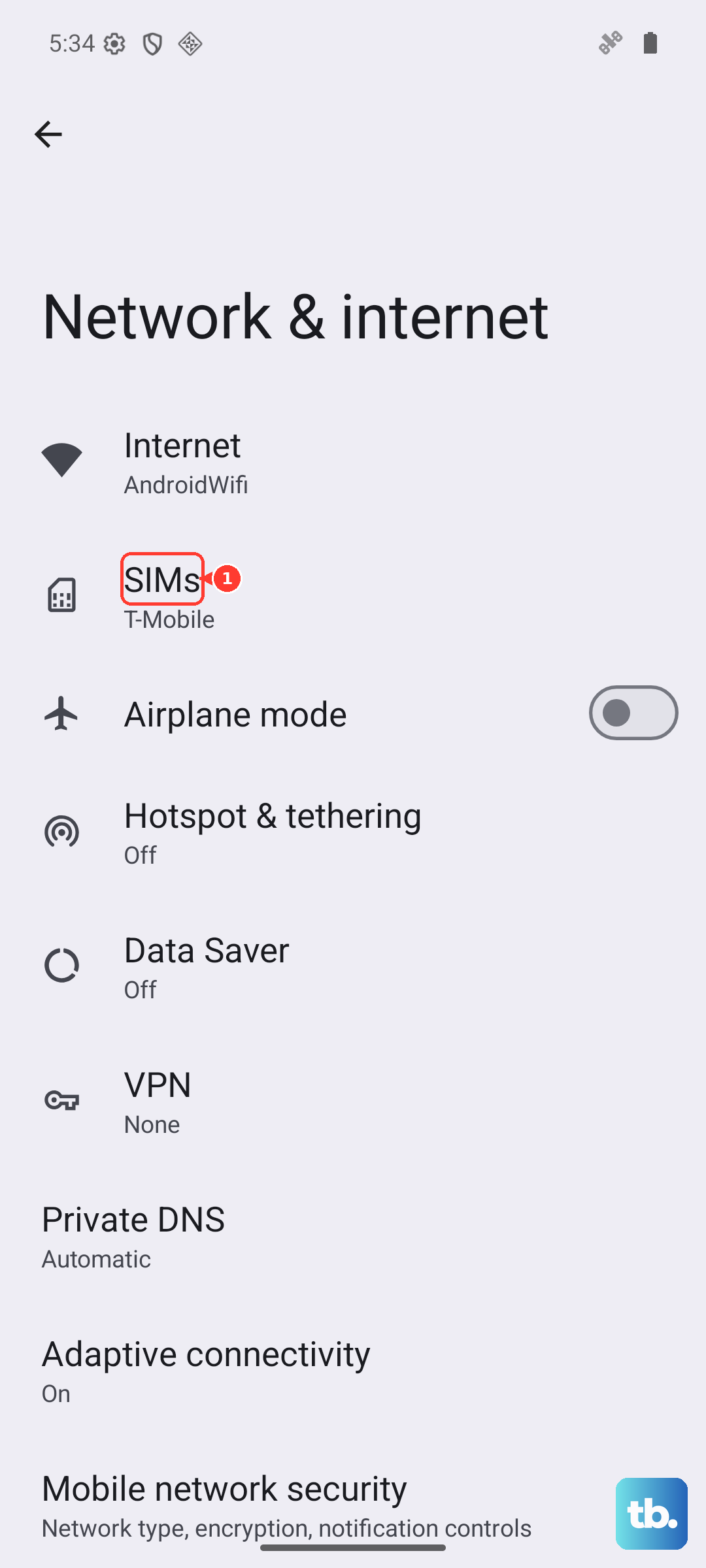
Phone is still locked after entering the code Restart the phone, then go to Settings > Network & internet > SIMs and toggle the SIM on and off. If that doesn’t work, try a factory reset, but only after backing up your data. A reset can sometimes finalize the unlock.
A Few Extra Tips for the Pixel 10 Pro XL
If you bought the Pixel directly from Google’s online store, it’s unlocked by default. You don’t need an unlock code at all. The same goes for most carrier-unlocked versions sold on Amazon or Best Buy. Only carrier-financed units are locked.
Also, keep in mind that the Pixel 10 Pro XL uses a physical SIM and an eSIM. The unlock applies to both, once the device is unlocked, you can use any physical SIM or eSIM from any compatible carrier.
One more thing: if you’re traveling internationally, unlocking your Pixel lets you use cheap local SIMs or eSIM plans. That can save a lot compared to roaming fees.