
If your iPhone 17 Pro Max is tied to one carrier, you can unlock it to use any network you want.
Contact Your Original Carrier First
This is almost always the easiest and cheapest way to get your iPhone 17 Pro Max unlocked. If you bought it on a contract or installment plan, your carrier is obligated to provide the unlock code once you've met their requirements. For the iPhone 17 Pro Max, this process is handled digitally by Apple's servers once your carrier approves it.
You'll need to call their customer support or use their online unlock portal. Have your device's IMEI number ready, which you can find by going to Settings > General > About and scrolling down. They'll verify your account is in good standing and that the phone is fully paid off.
Check Your Unlock Status in Settings
Before you do anything else, it's worth a quick check. With your current SIM card inserted, go to Settings > General > About on your iPhone 17 Pro Max.
Scroll down and look for "Carrier Lock." If it says "No SIM restrictions," your phone is already unlocked. If it says "SIM Locked" or mentions a specific carrier, then you'll need to proceed with an unlock request.
Use the Carrier Unlock Portal Online
Most major carriers have moved their unlock requests entirely online, which is often faster than calling. For AT&T, T-Mobile, or Verizon, just search "[Your Carrier] device unlock" in your browser.
You'll be asked to log into your account, enter your iPhone 17 Pro Max's IMEI number, and submit the request. Approval can be instant or take a few business days. You'll receive a confirmation email when it's processed.
Insert a New SIM Card to Trigger the Unlock
Once your carrier confirms the unlock is approved, the final step happens on the phone itself. You need to insert a SIM card from a different carrier. This doesn't have to be an active plan; even an old, deactivated SIM will work.
Power your iPhone 17 Pro Max off, swap the SIMs, and turn it back on. If the unlock was successful, it will connect to the new network or show "Service" without any prompts. You usually don't enter a code manually on modern iPhones; the unlock happens over the air.
Perform a Network Settings Reset
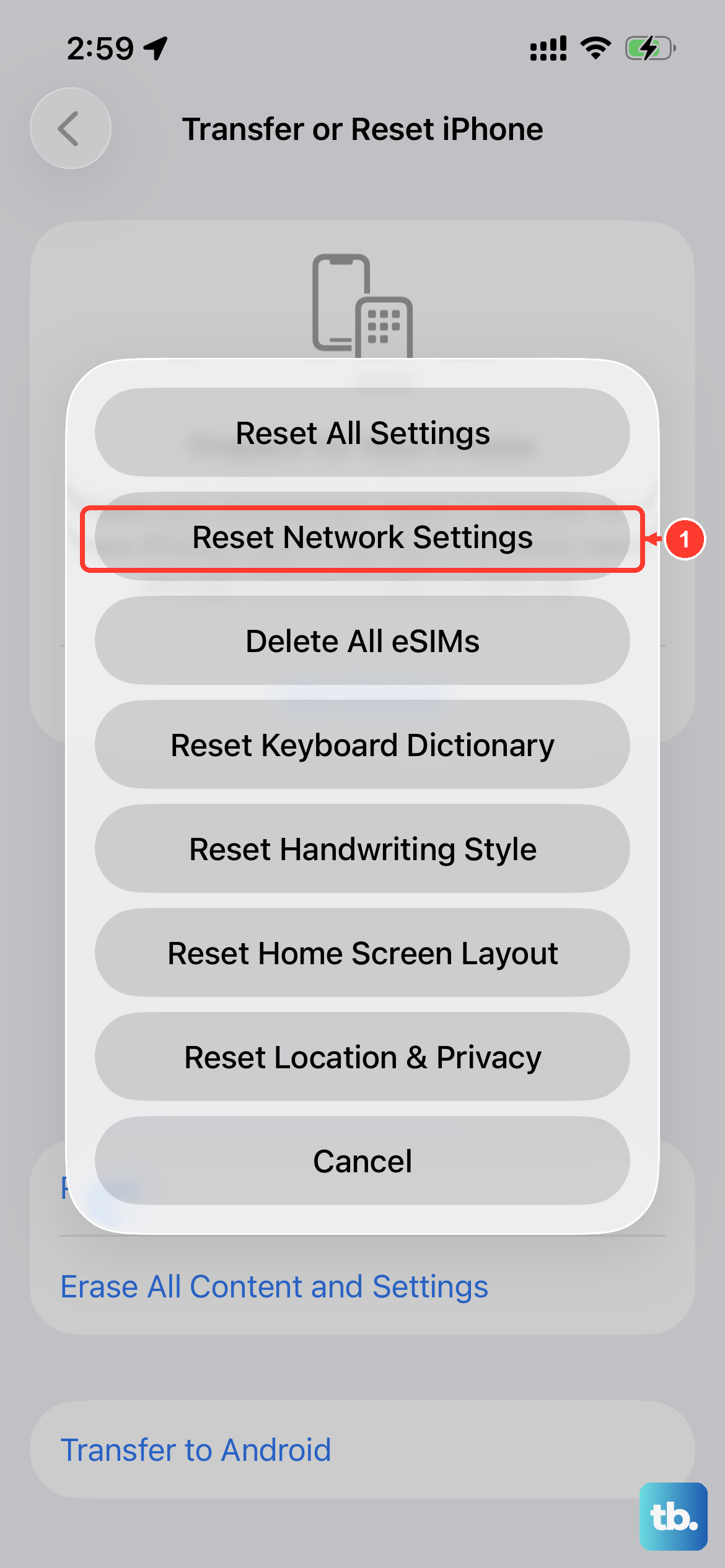
If you've been told your iPhone 17 Pro Max is unlocked but it's still not recognizing a new SIM card, a settings reset can help. This clears out any old carrier profiles or cached network data.
Go to Settings > General > Transfer or Reset iPhone > Reset. Then, tap Reset Network Settings. You'll need to re-enter any saved Wi-Fi passwords, but it won't affect your personal data. After the phone restarts, try the new SIM card again.
Restore Your iPhone Using a Computer
In some cases, especially if the unlock was processed recently, a full restore via Finder or iTunes can finalize the process. This ensures the phone gets the very latest carrier bundle from Apple.
Connect your iPhone 17 Pro Max to a Mac or PC with a USB-C cable. Put the phone into Recovery Mode by pressing and quickly releasing the Volume Up button, then the Volume Down button, then holding the Side button until you see the recovery mode screen. Choose "Restore" when prompted. This will install a fresh copy of iOS 26.
Consider a Reputable Third-Party Service
If your original carrier refuses to unlock the phone, perhaps because it's still under contract from a previous owner, a third-party unlocking service is an option. I'd only recommend this as a last resort. Look for services with strong reviews that specifically mention the iPhone 17 Pro Max.
You'll provide them with your IMEI number, and they submit the unlock request to Apple's database through their channels. Be wary of any service promising "instant" unlocks for a few dollars; legitimate unlocks for newer models like this often take a day or two and cost more.
Verify the Unlock Before Selling or Traveling
Once you think the process is complete, double-check. The best way is to borrow a friend's SIM card from a different network and pop it into your iPhone 17 Pro Max. If it connects to their carrier's network and allows you to make a test call, you're all set.
This is crucial if you plan to sell the phone or use it abroad. An officially unlocked iPhone 17 Pro Max has a higher resale value and will work with local prepaid SIM cards almost anywhere in the world, giving you much cheaper data rates when traveling.











