
To delete a Facebook Page, switch into the Page, open Settings & privacy > Settings, choose Access and control, select Delete Page, tap or click Continue and follow the remaining steps. You need full control of the Page. Once you send the request, Facebook deactivates the Page at once and permanently deletes it after 14 days, and until then you can cancel by reactivating it from your personal profile.
It works the same way for a business Page. Two things trip people up. Delete Page lives in the Page's own settings, not in Meta Account (still called Accounts Center on some accounts), so you only see it while you are switched into the Page. And the window is 14 days, not the 30 days often quoted, which is the window for deleting a personal Facebook account.
If you only want the Page out of sight for a while, deactivate or unpublish it instead, from the same Access and control screen. If you meant a group rather than a Page, groups have their own settings, and if you only want out of one, our guide shows how to leave a Facebook group.
The short version
- Delete: switch into the Page, then Settings & privacy > Settings > Access and control > Delete Page > Continue, then follow the remaining steps.
- Who can: only someone with full control of the Page.
- Timing: the Page is hidden as soon as you send the request and deleted for good after 14 days.
- Undo: reactivate it from your personal profile before day 14.
- Your account: deleting your own Facebook account also deletes Pages you manage individually that aren't connected to a business portfolio.
Delete, hide or restore a Page at a glance
Every route below starts with the Page you want to change, except the undo, which starts from your personal profile. The paths and timings follow Meta's Help Center.
| What you want | Where | What happens |
|---|---|---|
| Delete the Page for good | Page > Settings > Access and control > Delete Page | Hidden once you send the request, permanently deleted after 14 days |
| Hide it for a while | Page > Settings > Access and control > Deactivate Page | Hidden from the public, including followers, no edits until you reactivate it |
| Hide it but keep working on it | Page > Settings > Access and control > Unpublish Page | Hidden from the public, you can still edit |
| Undo a deletion | Your profile > Settings > Reactivate a Page (computer) or Pages > Reactivate Your Pages (app) | The Page comes back if 14 days have not passed |
| Keep a copy | Page > Settings > Download your information | A file to download, the link lasts 4 days |
| Take it out of Business Suite | Business Suite > Settings > Pages (under Accounts) > the Page > Remove | Leaves the business portfolio, the Page stays on Facebook (needs full control of the portfolio) |
Save a copy of the Page first
If you might want the Page's posts and photos later, download a copy before you delete it. Meta says anyone with full control can do this, and its steps are for a computer. Switch into the Page, click the Page's photo, open Settings & privacy > Settings and click Download your information in the left column. Choose the format, the quality of photos and videos and a date range, then click Request a download.
Facebook notifies you when the file is ready. Click Download Page and enter your password, and don't wait long, because Meta says the link to your file expires after 4 days. Wait until you have the file before you request the deletion.
Delete a Facebook Page in the Facebook app
Meta gives the same steps for the iPhone and Android apps. First, switch into the Page. Meta says to tap Menu at the top left of Facebook or your profile picture, tap Options and select the Page. On iPad, Meta puts Menu at the bottom right instead.
The Facebook app on our iPhone 17 Pro with iOS 26.6 also had a quicker way in. In Meta Account, under Your account > Pages you manage, tapping an active Page switched the app straight into that Page.
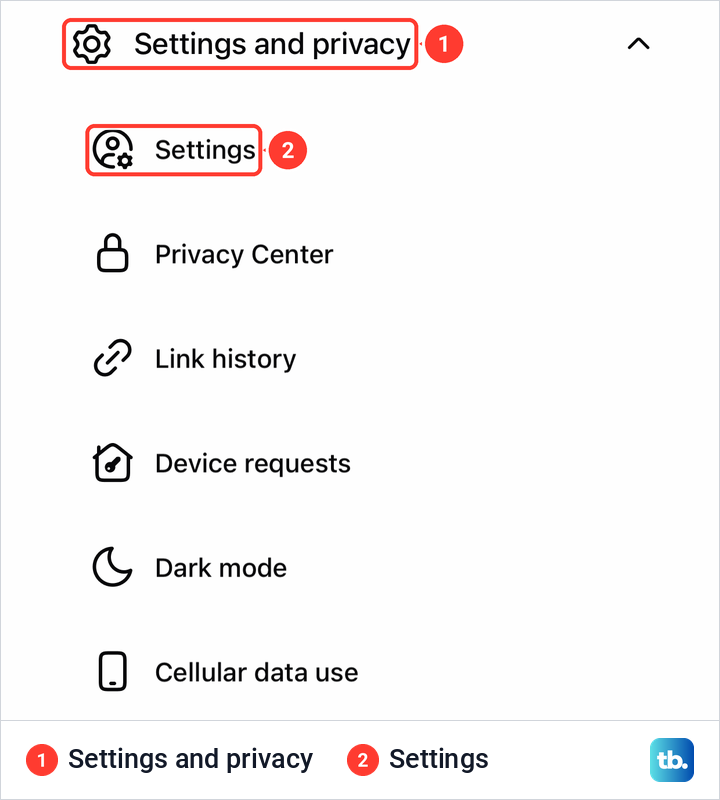
Once you are the Page, open the menu again. On our iPhone the Page's menu opened from the three-line button at the top left, and Settings and privacy expanded to show Settings first, followed by Privacy Center, Link history, Device requests, Dark mode and Cellular data use. Tap Settings.
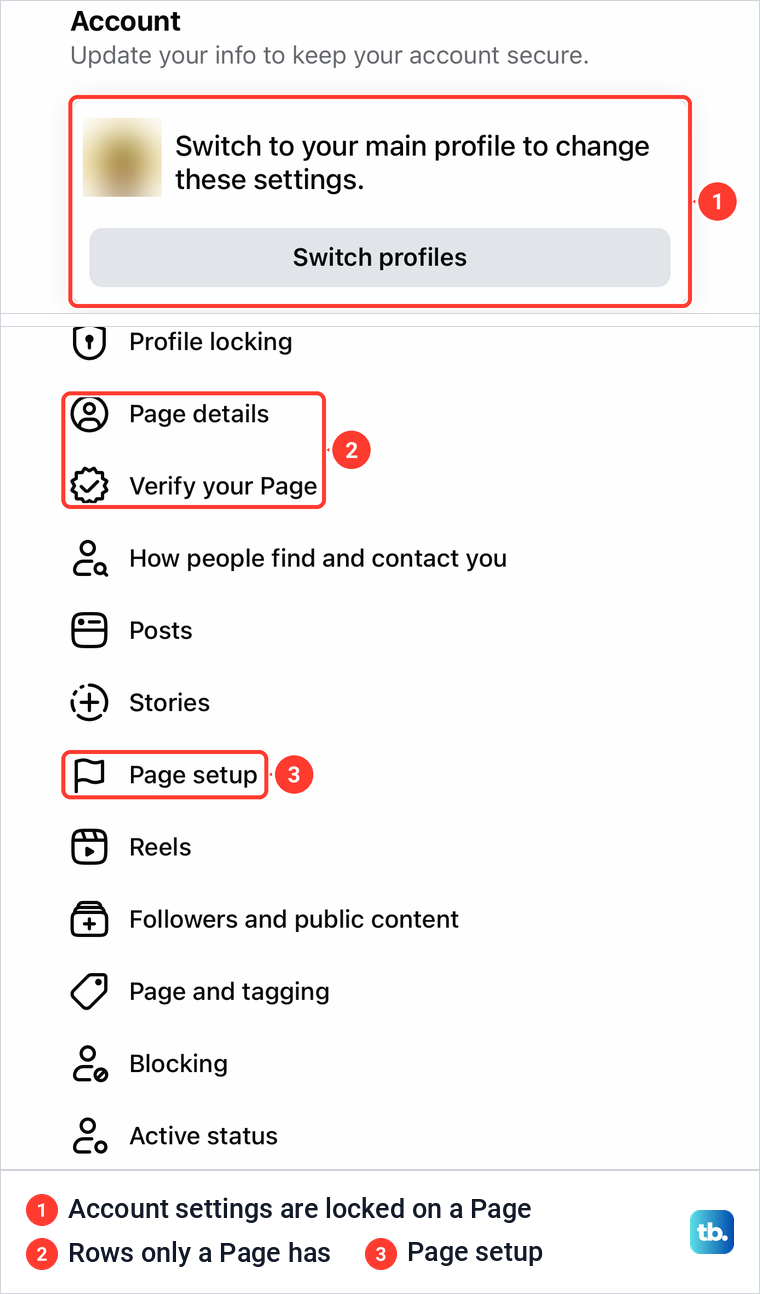
Two things on the next screen tell you that you are in the Page's settings and not your own. On our iPhone the Account box at the top read "Switch to your main profile to change these settings." with a Switch profiles button. Further down, the list held rows only a Page has, such as Page details, Verify your Page and Page setup.
Then tap Access and control. Meta's iPhone steps for unpublishing a Page place it under Your information, further down the list. If Access and control isn't in your app's Page settings, open facebook.com in your phone's browser and follow the computer steps below, which Meta gives for phone browsers and Facebook Lite too.
Select Delete Page, tap Continue and follow the remaining steps. Meta says you may be asked to re-enter your password, and that the Page is deactivated as soon as you request the deletion.
If Facebook asks for a password you have forgotten, sort that out first. Our guide covers what to do when the Facebook password reset is not working, and the Page stays as it is until you come back to finish.
Delete a Facebook Page on a computer
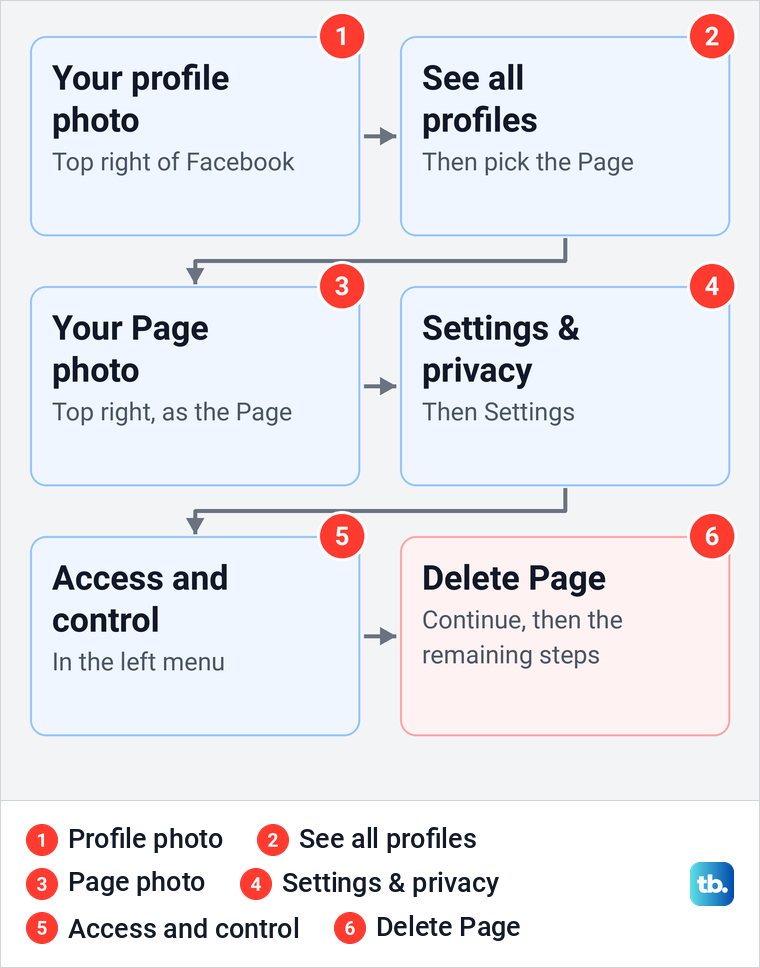
On facebook.com, Meta's route starts from your profile photo in the top right. Click it, click See all profiles and select the Page you want to delete. Then click the Page's photo in the top right, click Settings & privacy and then Settings.
In the left menu, click Access and control. Select Delete Page, click Continue and follow the remaining steps, entering your password if Facebook asks for it.
Meta's article on unpublishing describes a second way into the same screen. Click your Page profile picture, click the Page, click Settings under Manage Page, then Access and control under Your information on the left. Both routes end on the Access and control screen, so use whichever your Page shows.
Who can delete a Facebook Page
Only someone with Facebook access with full control can delete a Page. Meta lists deleting the Page under full control only. Partial control covers things like content, messages, comments, ads and insights, and people with task access or Community Manager access can't switch into the Page on Facebook at all.
Pages in a business portfolio name the levels differently: partial access (business tools only), partial access (business tools and Facebook), and full control. There too, only full control includes the ability to delete the Facebook Page. Meta also says every Page must keep at least one person with full control to stay active.
Full control and partial access came with Meta's new Pages experience, which every Page now uses. Where an older guide says admin, read full control.
To check your own access, switch into the Page and open Settings & privacy > Settings > Page setup > Page access. On our iPhone, Page access listed everyone under People with Facebook access next to their permissions, and one entry read Content, Messages and calls, Community Activity, Ads, Insights, Permissions, Page Deletion.
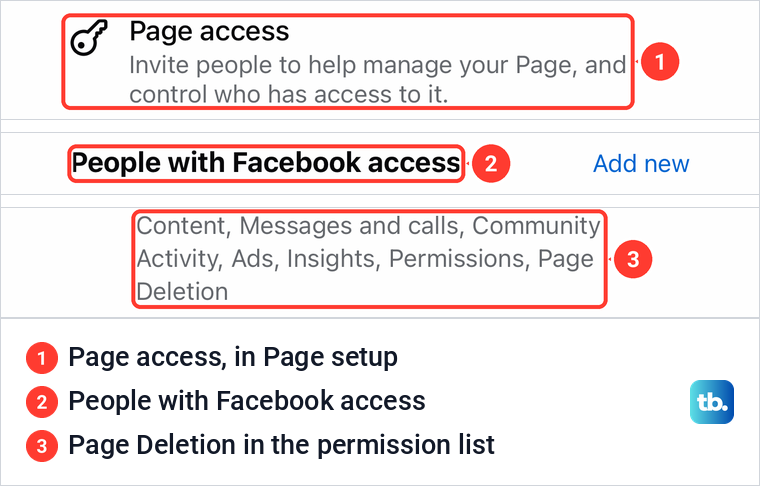
If you don't have full control, ask someone who does. Meta's steps for them are Page setup > Page access > Add New next to People with Facebook access, then pick you, select full control and click Give Access, and confirm with their password. You then get an email invitation to accept.
What happens after you delete a Page
Meta says that when you ask it to delete a Page, it deactivates the Page immediately but does not delete it permanently until 14 days have passed. Deactivated means hidden from the public, including the people who follow it, and you can't edit it in that time. Reactivating it within those 14 days is the only way Meta gives to cancel.
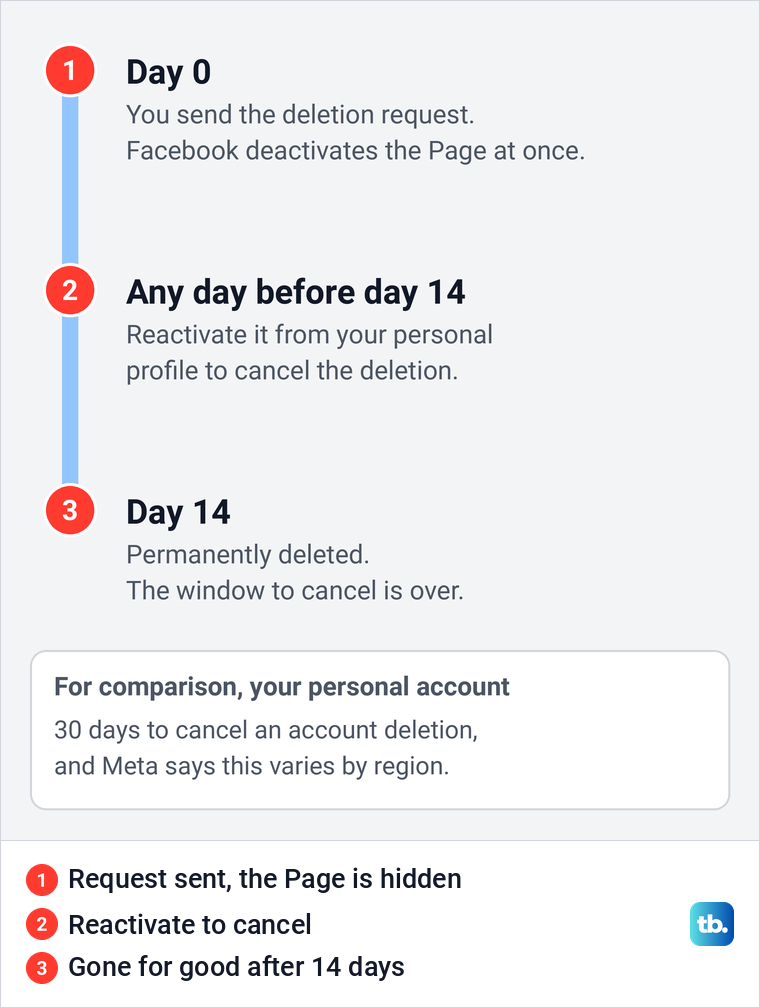
The 30 days you may have read about elsewhere is a different clock. It is the window for cancelling the deletion of your personal Facebook account, and Meta notes that the number of days varies by region. An additional profile is also deleted after 30 days, but a Page gets 14.
How to cancel a Page deletion
You cancel a deletion by reactivating the Page, and Meta says that only works from a personal Facebook profile, not from the Page's business settings. So switch back to your main profile first. On a computer, click your profile photo, then Settings & privacy > Settings, and under Your activity click Reactivate a Page, which also opens at facebook.com/settings/reactivation. Find the Page and click Reactivate.
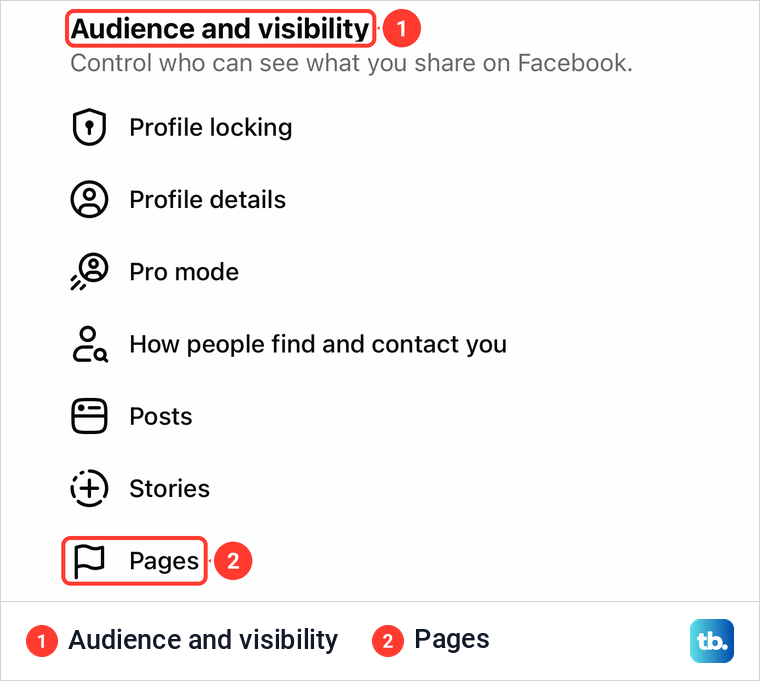
In the app, Meta's route is Menu > Settings & privacy > Settings > Pages, then View next to Reactivate Your Pages, and Reactivate next to the Page. On our iPhone, Pages sat in the main profile's Settings & privacy under Audience and visibility, between Stories and Reels.
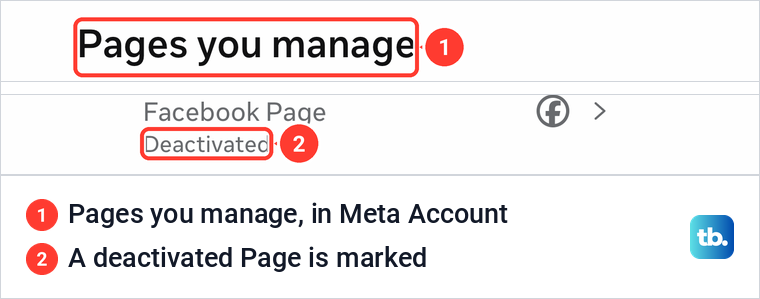
Meta Account can't do this part for you. Its list of Pages you manage marked deactivated Pages as Deactivated on our iPhone. Tapping one opened a note telling us to reactivate it from Facebook settings on desktop or in the Facebook app, with a Go to Facebook settings button.
Deactivate or unpublish instead
Deleting is not the only way to take a Page down, and Meta offers two softer options on the same Access and control screen. Deactivating hides the Page from the public, including its followers, and you can't edit it until you reactivate it. You need full control to deactivate, and the Page waits until you bring it back.
Unpublishing hides the Page from anyone who doesn't have Facebook access to it, but you can keep editing, and your edits show once you publish again. Meta says an unpublished Page can't interact with other profiles or Pages, new ad campaigns can't start and running ones are paused. Only people with Facebook access to the Page can unpublish or publish it.
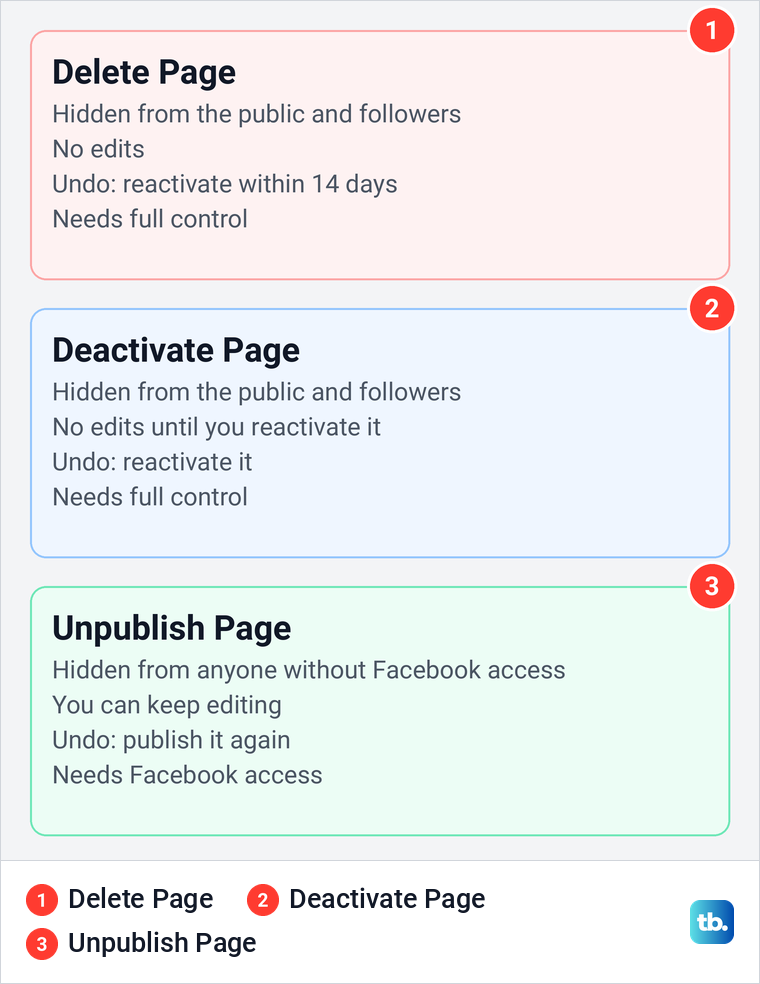
Neither option deletes anything, and Meta says deactivating a parent Page also deactivates its child Pages, such as store location Pages. A child Page can't come back until the parent does. If only a few things on the Page are the problem, remove a Facebook post or two and keep the Page.
Deleting your account can take your Pages with it
Deleting a Page leaves your personal profile in place, since Meta says your main profile can only be deleted if you delete your Facebook account. It works the other way round, though. When we opened the profile deletion screens in the Facebook app on our iPhone, Facebook warned that "Deleting your profile will also delete any Pages you manage individually that aren't connected to a business portfolio." The next part of the screen listed the Pages it would delete.
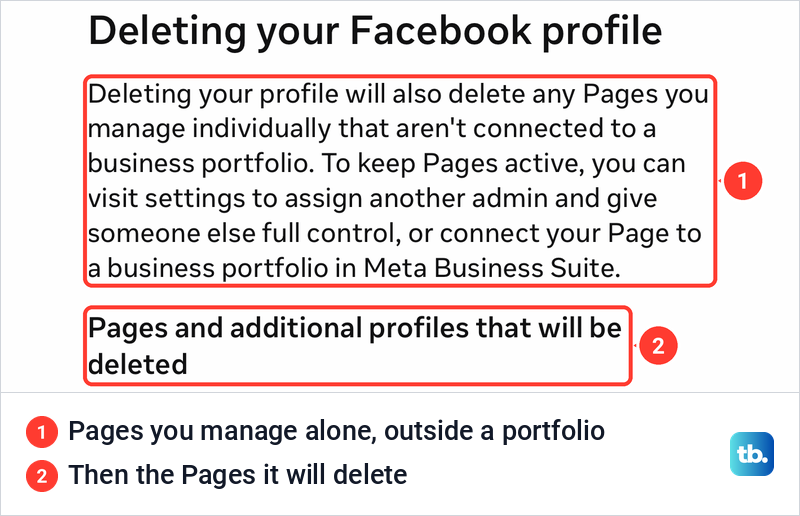
The same screen names the two ways to keep a Page. Give someone else full control of it, or connect it to a business portfolio in Meta Business Suite, before you delete your personal Facebook account. Meta's own article says the same, that Pages only you control will also be deleted.
Full control is a lot to hand over, because Meta says it lets a person remove anyone from the Page, including you, or delete it. Before you give it to anyone, ask them to set up two-factor authentication on their Facebook account.
A break works the same way. If you deactivate your Facebook account, Pages you manage individually that aren't connected to a business portfolio go dark with it, and our iPhone showed that warning, with the list of Pages, on the deactivation screens too. Meta says you must reactivate the account by logging back in before you can reactivate those Pages.
If the account was deleted by mistake, you can recover a deleted Facebook account within 30 days, a number Meta says varies by region. Then reactivate your Pages.
Business Pages and Meta Business Suite
A business Page is deleted the same way, on Facebook, by someone with full control. Removing it from a business portfolio in Meta Business Suite is a different thing, and Meta says plainly that if you want to delete the Facebook Page, you must delete it on Facebook.
Meta's removal steps need full control of the business portfolio, and the Page must first be disconnected from other business assets such as an Instagram or WhatsApp account. Then open Settings in Business Suite, click Pages below Accounts, click the Page and click Remove. Review the information and click Remove Page from business portfolio.
Deleting a whole business portfolio doesn't delete its Pages either. Meta says they can move to another portfolio or back to the personal profile of the Page owner, and that the business stays pending deletion for 24 hours before it can't be reopened. A Page removed from your portfolio can also be added by another organization to theirs.
Why you can't see Delete Page
First, check whether you are still on your personal profile. Your account settings live in Meta Account (still called Accounts Center on some accounts). On our iPhone, the main profile's Settings & privacy opened with Meta Account under Your account. It covers password, security and personal details, and it even lists the Pages you manage, but Delete Page is not there.
Next, check your access. Meta says that if you don't see the option to delete your Page, make sure you have Facebook access with full control. Page setup > Page access, shown above, is where your access is listed.
Last, ignore older guides that tell you to open Settings, then General, and scroll to Remove Page. Meta has moved every Page to the new Pages experience, its current steps don't go that way, and the option now sits in Access and control.
If you lost access to the Page
If the Page is fine but you are locked out of your Facebook account, get back into the account first, because only a profile with full control can delete the Page. If a login code never arrives because two-factor authentication is not working, you can't get into the account that manages the Page either, so fix that first.
If your Facebook account was hacked and someone removed you from the Page, Meta's best route is its Page recovery form. Meta says you can only submit it while you are logged in and have recently lost access, and it aims to reply within a day. If you can't log in at all, Meta points you to facebook.com/hacked on a device you have used with Facebook before.
When the last person with full control is gone, for example a former employee or contractor, or someone who has died, Meta offers a Page admin dispute. It asks for ID, a signed attestation letter and a document that shows ownership, plus a death certificate if the person has died. Go to Business Support Home, start a chat and select Page Admin Dispute as the issue.
For other problems, our guide on how to contact Facebook customer support covers the other ways to reach Meta. Don't rely on removing yourself from a Page you want gone. Meta says a Page with nobody holding full control is automatically deactivated and scheduled for deletion, but it gives no timescale, so deleting the Page yourself is the predictable route.
How we tested this guide
We tested this in the Facebook app on an iPhone 17 Pro with iOS 26.6, going through a Page's Settings & privacy and Page access screens.
Frequently Asked Questions
Does deleting a Facebook Page delete my personal account?
No. Meta says your main profile can only be deleted if you delete your Facebook account. It works the other way round, because deleting your account deletes Pages that only you control and that aren't connected to a business portfolio.
How long does it take to delete a Facebook Page?
Facebook deactivates the Page as soon as you send the deletion request, so the public can no longer see it. Meta permanently deletes it after 14 days.
Can I recover a deleted Facebook Page?
Yes, within 14 days. Reactivate it from your personal profile, under Reactivate a Page on a computer or Reactivate Your Pages in the app.
Why can't I see the Delete Page option?
Switch into the Page first, because Delete Page is in the Page's own settings. Then check that you have full control under Page setup > Page access.
Can I delete a business Page from Meta Business Suite?
No. Business Suite only removes the Page from your business portfolio, and Meta says you must delete the Page itself on Facebook.
How do I delete a Page I can no longer get into?
Get back into the account that manages it, or ask someone with full control to add you again. If it was taken from you, use Meta's Page recovery form, or a Page admin dispute if the last person with full control left or died.