

To create a SharePoint site, sign in to Microsoft 365 with your work or school account, open SharePoint and select Build in the left bar, then the Site card under Start building. Choose Team site for people working together or Communication site for sharing news with a wider audience, pick a template, name it and select Create site. When the site is ready, select Go to site.
Some SharePoint start pages show a + Create site button instead, and one of Microsoft's help pages starts there and leads to the same two site types. The start page we opened had no such button, which is where many older instructions stop matching the screen. Microsoft says the screens for creating team and communication sites are being updated gradually, so two people can see two different routes.
We made a team site and a communication site from Build in SharePoint in Microsoft Edge, and two more group sites from classic Outlook and from OneDrive. Three things surprised us: a reused site name got no warning of its own, the group email address and the site address were checked separately, and OneDrive reported an error for a site it had in fact created.
The short version
- Start: in SharePoint, select Build and then the Site card under Start building, or + Create site if your start page has it.
- Pick the type: Team site for a group that works on files together, Communication site for news that many people read.
- Name it: wait for the green tick under the site address, and under the group email address too on a team site, and keep symbols other than underscores, dashes, single quotes and periods out of the address.
- Before Create site: on a team site, choose Private or Public, and on either type check the language, which cannot be changed later.
- Site card grey or missing: ask your Microsoft 365 administrator to check the site creation settings.
Choose a team site or a communication site
Decide this first, because the two types are built differently. Microsoft's advice is to use a team site when you want to collaborate with your team or on a specific project, and a communication site to broadcast information to a broad audience. A team site made from Build, as below, also creates a Microsoft 365 Group with its own email address, while a communication site does not.
| What you need | Create this | Where to start | What you get |
|---|---|---|---|
| Files and work shared by a team or project | Team site | SharePoint > Build > Site | A private or public site, a Microsoft 365 Group and a group email address |
| News and information for many readers | Communication site | SharePoint > Build > Site | A site with links across the top and no Microsoft 365 Group |
| Group email and a group calendar, with a site behind them | Microsoft 365 Group | Classic Outlook > New Email arrow > Group | A group in Outlook and a connected team site |
| A new shared place for files, started from OneDrive | Shared library | OneDrive > Libraries > Create shared library | A group-connected site with a Documents library |
The picker spells out the difference too. The communication site option said it is not connected to Microsoft 365 Groups or Teams, and its setup form had no group email address and no privacy setting at all. If your team already works in Teams, its files may already have a home, and our guide on how to use Microsoft Teams shows where to find them before you add another workspace.
Open SharePoint and find the Site card
Sign in to Microsoft 365 with your work or school account, select the app launcher (the grid of dots at the top left) and choose SharePoint. The SharePoint tile was in the launcher's main list for us. Microsoft says to try More apps or search for SharePoint if the tile is missing, and that if it is still not there, your subscription may not include SharePoint.
SharePoint opened on a start page called Discover, with a one-time Explore SharePoint box describing Discover, Publish, Build and OneDrive. There was no + Create site button anywhere on that page. Select Build in the bar on the left, and the Build page opens with Start building at the top and a Site card first in the row, beside List, Document library and Agent.
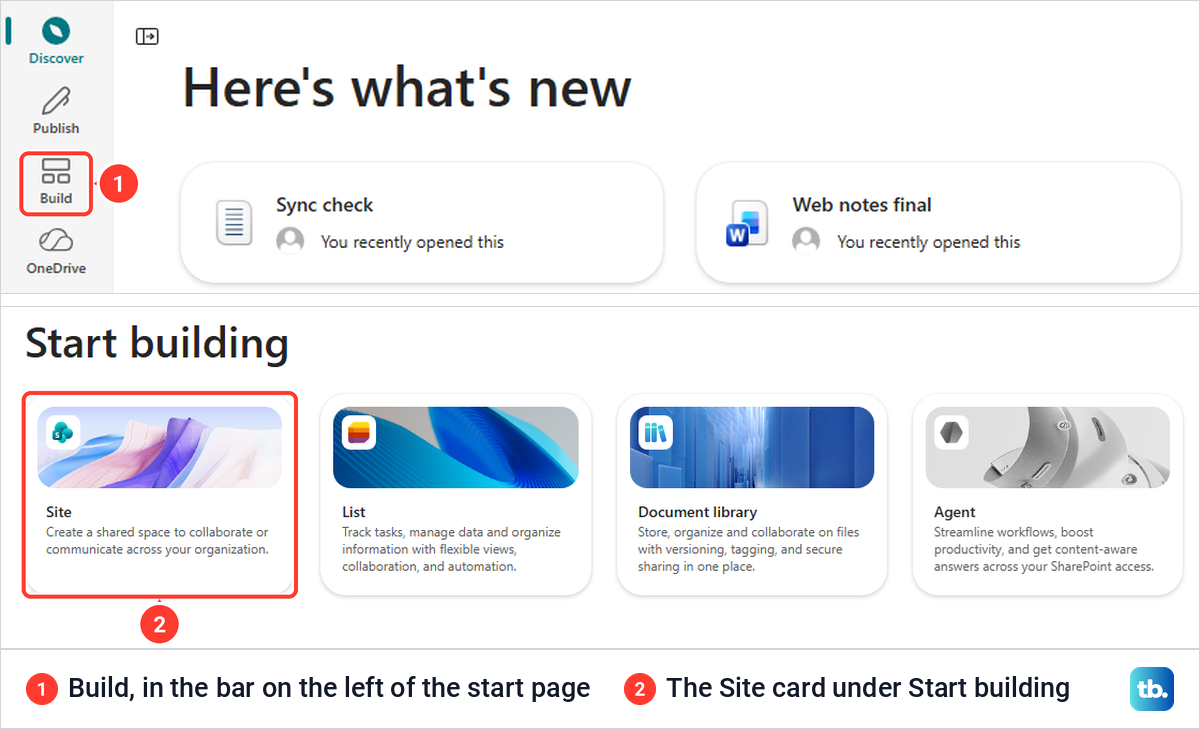
Select the Site card to begin. If your work account will not get as far as SharePoint, start with our Microsoft 365 sign-in fixes before you look for missing site controls. A Site card that looks greyed out is a different problem, covered under When you cannot create a site below.
Pick the site type and a template
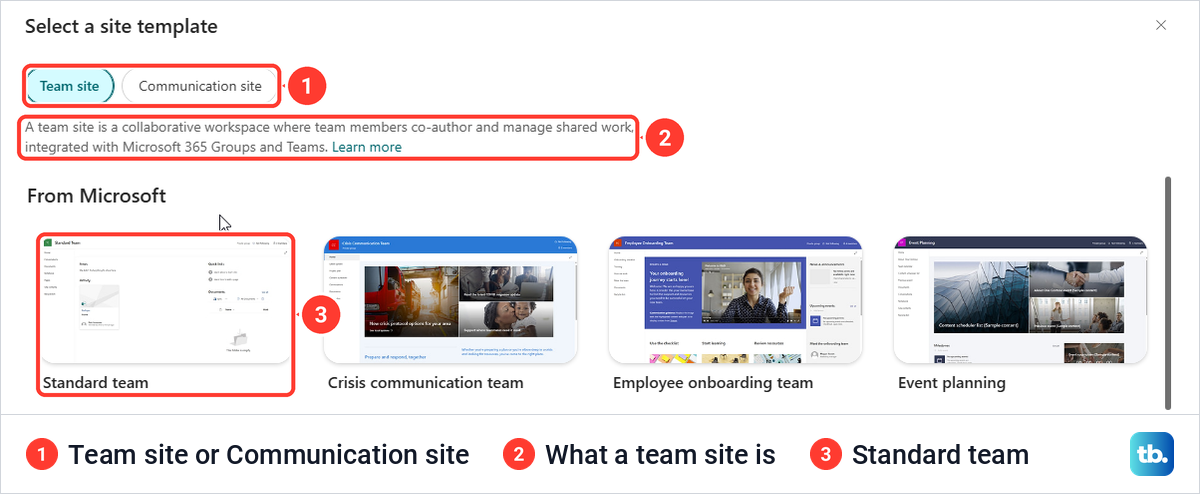
The Site card opened a box called Select a site template, with Team site and Communication site buttons at the top. Team site was selected when it opened, and the line under it described a collaborative workspace integrated with Microsoft 365 Groups and Teams.
Below that, From Microsoft listed ten team templates, including Standard team, Crisis communication team, Employee onboarding team, Project management and Training course. None was marked as the default. Microsoft's own advice is to pick Standard team for a general team site, and that is the one we used.
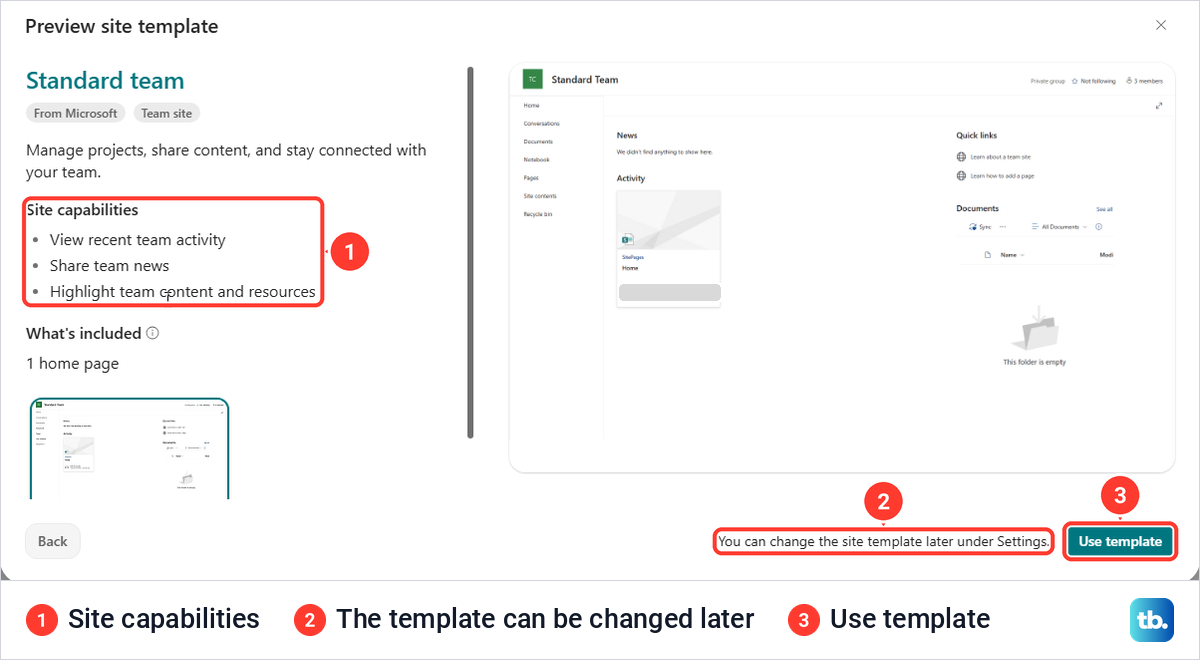
Selecting a template opens Preview site template rather than the form. For Standard team it listed three Site capabilities, "View recent team activity", "Share team news" and "Highlight team content and resources", and under What's included, "1 home page". Select Use template when it fits, or Back to look at another one.
The line beside the button read "You can change the site template later under Settings", so the template is less final than the site type. The finished sites also had Apply a site template in their Settings menu.
Name the site and check its address
The next box, Set up your site, asks for a Site name, an optional Site description, a Group email address and a Site address. The address has a fixed first part, your organization's SharePoint address followed by /sites/, and only the part after it can be edited.
As soon as we typed the name, SharePoint filled in the group email address and the end of the site address with the same words, minus the spaces. A green tick then appeared under each of the three fields, with "The site name is available", "The group alias is available" and "The site address is available". Edit the alias or the address here if your organization has naming rules for them.
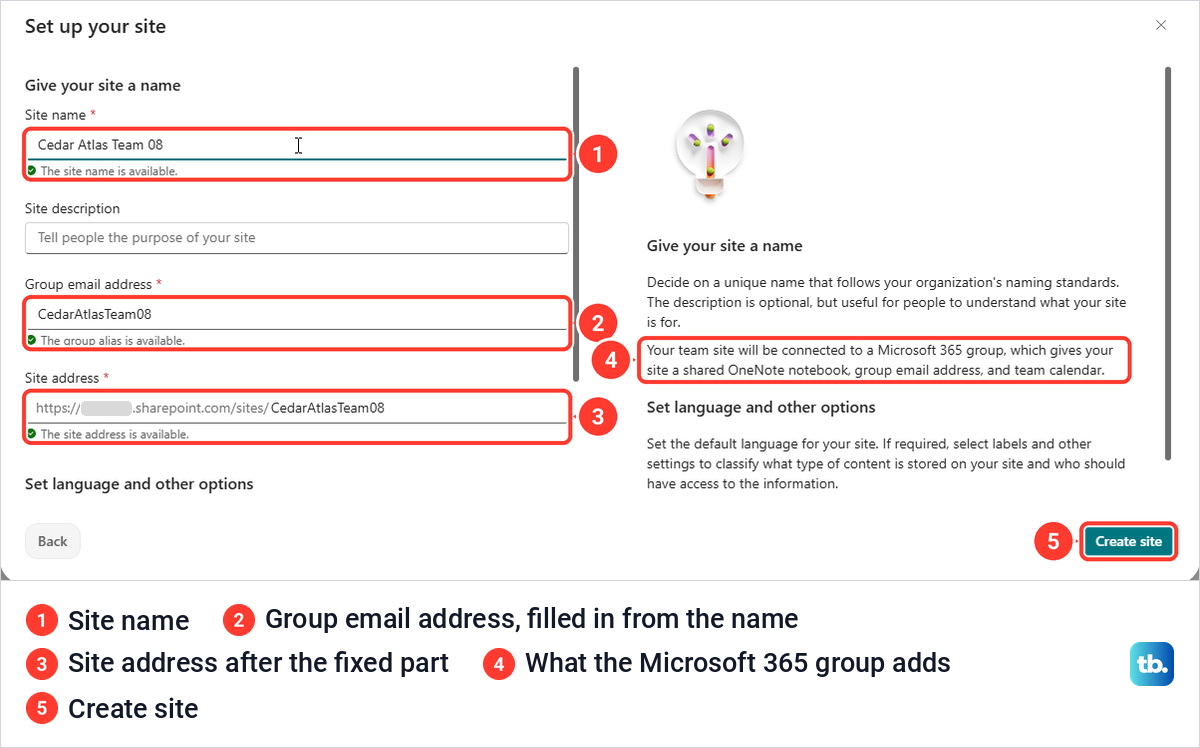
The help text beside the form explains what the group adds. It said a team site is connected to a Microsoft 365 group, which gives the site a shared OneNote notebook, a group email address and a team calendar. The finished site had a Notebook link in its navigation, and our guide to using OneNote for notes and organization covers working in a notebook like that one.
Fix a site address SharePoint will not accept
The address only takes a few symbols. When we put an @ in it, the field turned red with "The site address can't contain symbols other than underscores, dashes, single quotes, and periods (_, -, ', .), and can't start or end with a period." Create site greyed out until we removed the @, and then the green tick came back.
Reusing a name is the other trap. When we started a second team site with the same name, the name box showed no warning at all. The group email address said "Another group with the same alias already exists", the site address said "The site address is available with modification" and offered the same address with a 2 on the end, and Create site stayed grey.
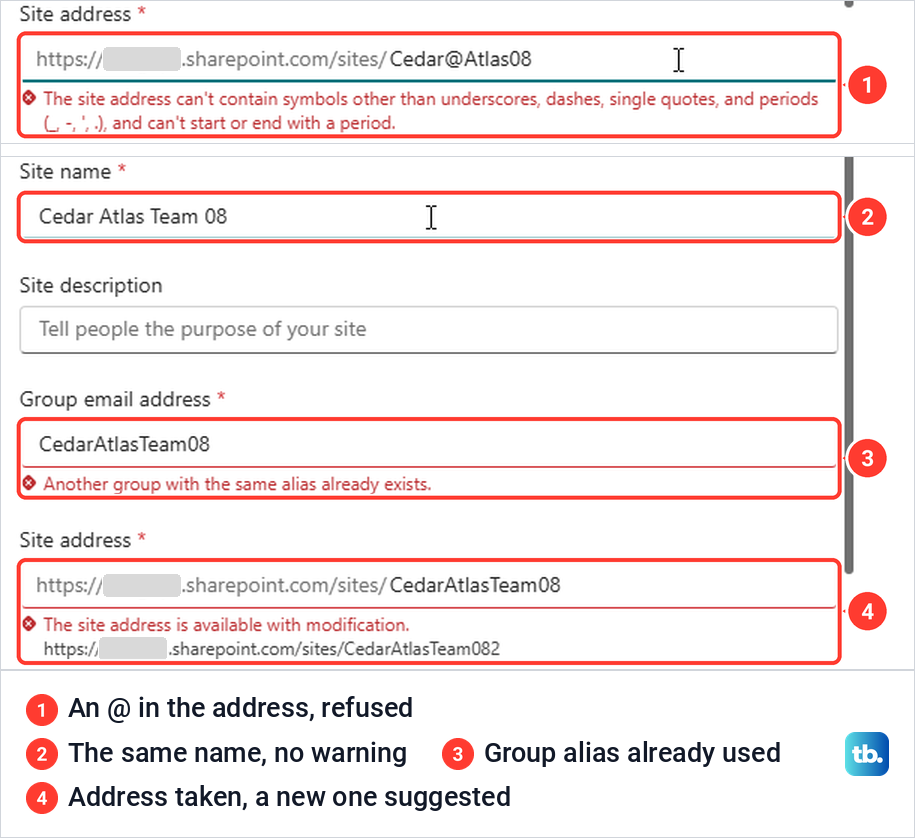
So change the group email address to one nobody uses, and type an unused address into Site address, such as the one SharePoint suggested under it. Closing the box with the X brought up "Exit creation", which warned that the site would not be created if we left.
Set privacy and language before you create it
Scroll down the form to Set language and other options. Privacy settings had "Private - only members can access this site" selected, and the other choice was "Public - anyone in the organization can access this site".
Public here means open to everyone in your organization, not to the whole internet, which is how Microsoft words it too. Private is the better start for project files, because only the people you add get in. The finished team site showed Privacy settings again under Settings > Site information.
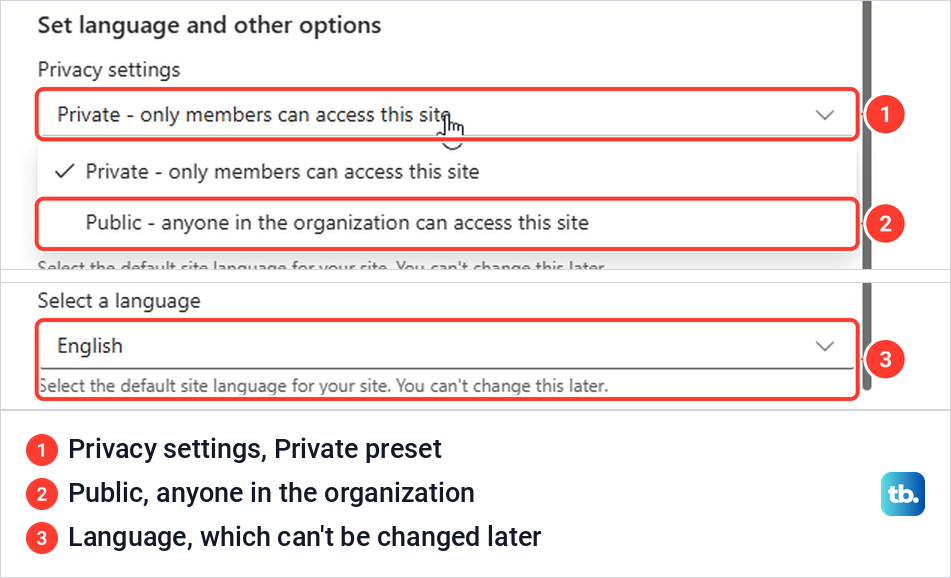
Select a language comes last, set to English for us, with the note "You can't change this later". Microsoft confirms that the default language cannot be changed once the site exists, although you can add alternate supported languages. The form had no sensitivity label or site classification box, while Microsoft's instructions include both and say the classification appears only if your administrator has enabled it.
Add members and open the team site
Select Create site. A "Creating site" message ran for about ten seconds, then the box changed to "Your site is ready", with a line that read "While you're waiting, add owners and members".
Type a name or email address and pick the person from the suggestions. The person was added straight away as a Member, with the role shown in a small menu beside the name, and there was no separate Add or Finish button. You do not need to add yourself, because Microsoft says the person who creates the site is automatically one of its owners.
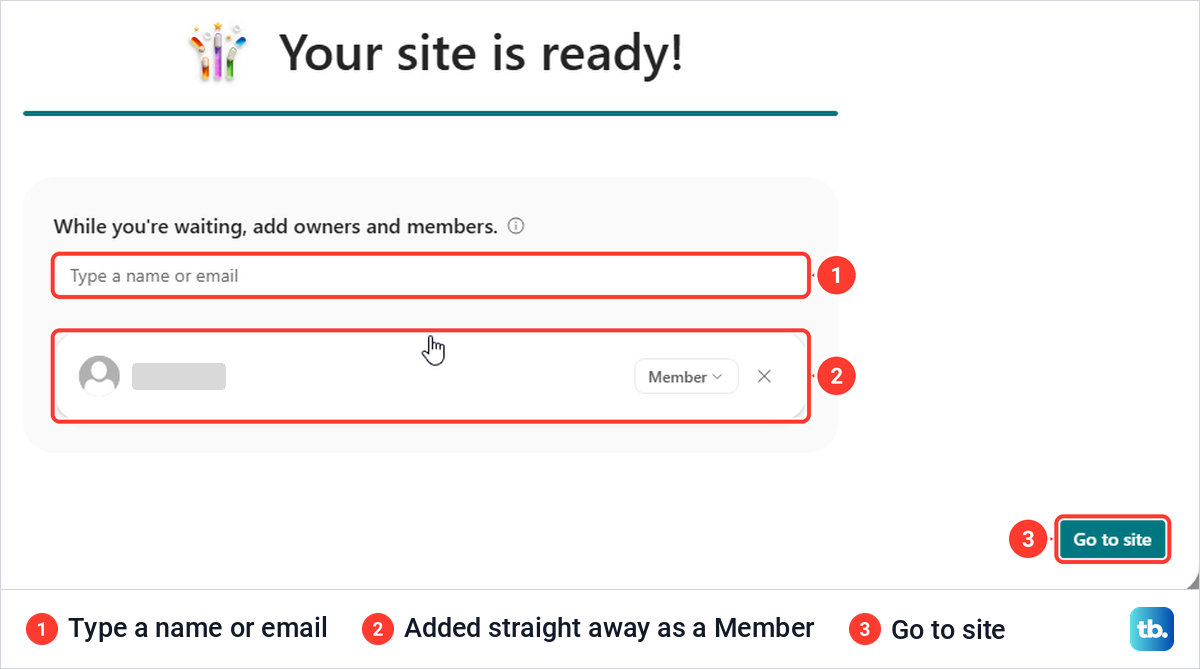
Select Go to site. Microsoft's + Create site steps end with Finish, but Go to site was the only button for us. The new site opened with a "Start designing your site" box offering templates, and Maybe later closed it.
Behind it, the header showed the site name, Private group, Added to favorites and 2 members, with Home, Conversations, Documents, Notebook, Pages, Site contents and Recycle bin down the left. The home page already had News, Quick links and an empty Documents area. Selecting the member count opens Group membership, where you can add more people later.
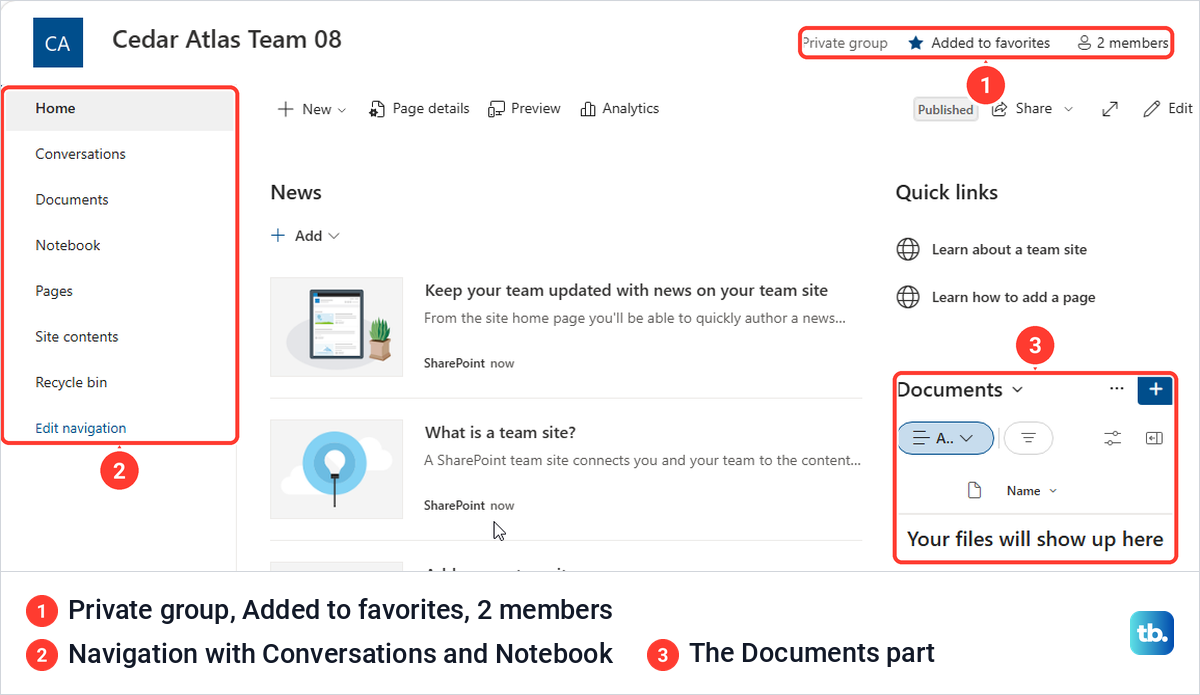
From here the site is ready for files. Our guide to using SharePoint for files and pages covers uploading, sharing and restoring files in its Documents library.
Create a communication site
Select Build in the bar on the far left, which stays on screen on the new site too, then the Site card, and switch to Communication site at the top. The description changed to say most users have read-only access and the site is not connected to Microsoft 365 Groups or Teams.
The templates start with Standard communication, Brand central, Crisis management and Department, and run on to Showcase and Volunteer center. Standard communication is only listed first, not marked as a default. Choose one, look over its preview and select Use template.
The form was shorter than the team one. It had Site name, Site description, Site address and Select a language, with the same "You can't change this later" note, and no group email address, privacy setting or member step. The address checks work the same way, so the green tick under Site address is the one to watch.
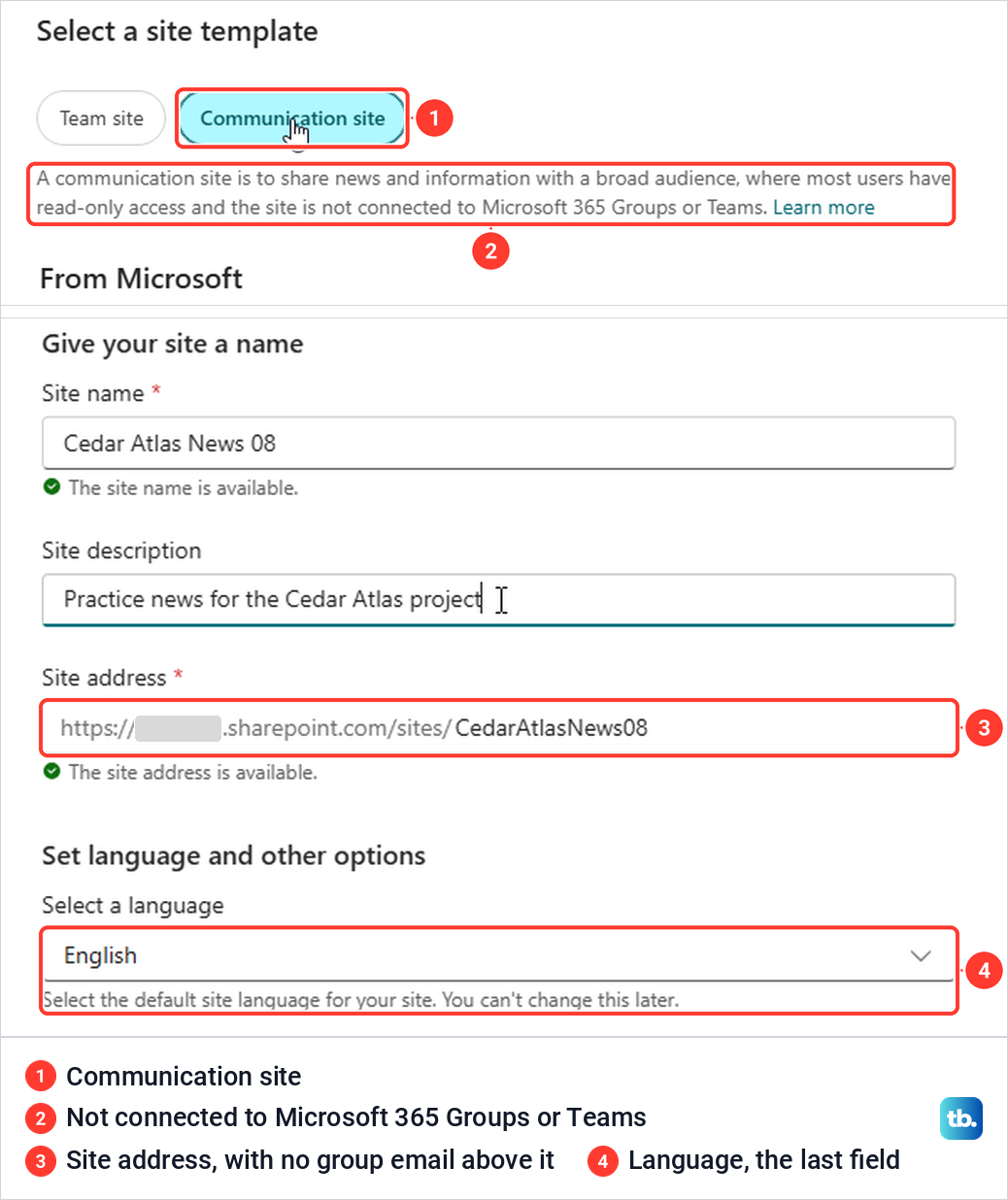
After Create site, the box showed "Applying template" with the note "Keep this tab open while your site is being set up". A few seconds later it read "Your site is ready", with only Go to site and no box for owners and members.
The communication site opened with its links across the top instead of down the left, and a large Hero section of picture tiles on the home page. Where the team site said Private group and 2 members, this one showed Site access.

Tell the two site types apart later
Open Settings (the gear at the top right) and choose Site permissions to check what you made. On the team site the panel led with Add members, and the owner was the site's group, listed as the site name followed by Owners. On the communication site it led with Share site, and the owner was the person who created it.
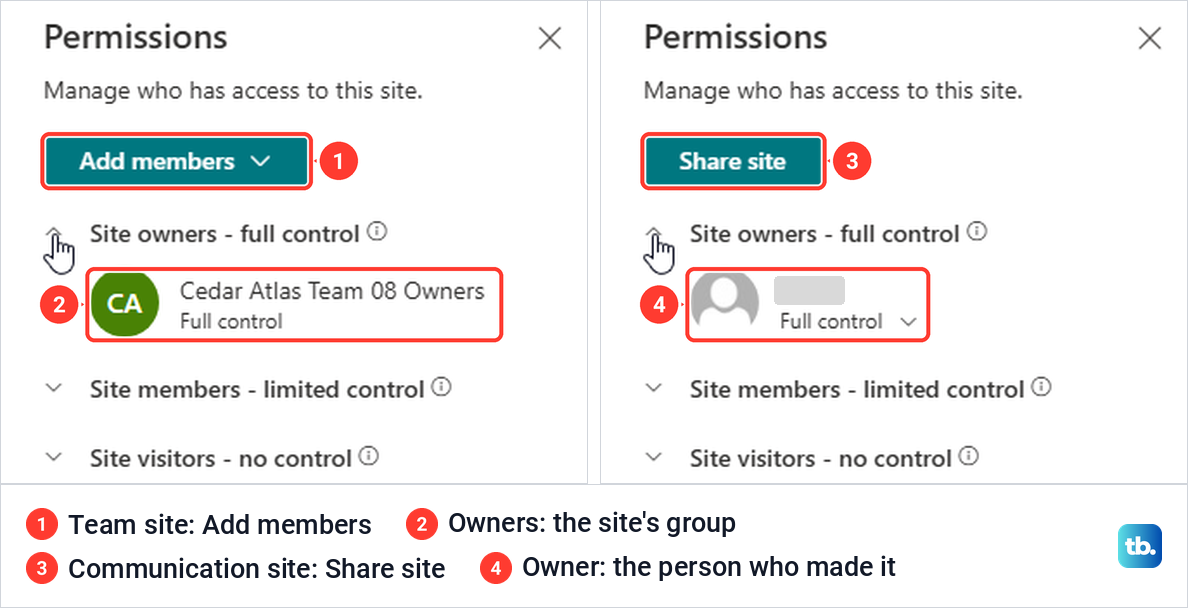
Site information, in the same Settings menu, showed Privacy settings only on the team site. The communication site's Settings menu had one extra entry, Schedule site launch. These details tell you a site's type better than its looks do, because either type can take on a new template later.
Create a team site from an Outlook group
A Microsoft 365 Group made in Outlook comes with a SharePoint team site, so this is a second way to get one. In classic Outlook for Microsoft 365 with the Simplified Ribbon, open Home, select the arrow beside New Email and choose Group. Microsoft's help page describes the same step as Home > New Group, so look for either label.
The menu can move under you. A few minutes after Outlook started, a Storyline Post item appeared second in that menu and pushed Group down one row, so read the label before you click. In the Create Group box, type a Name, check the Email address Outlook suggests, add a Description, leave Privacy on Private and select Create.
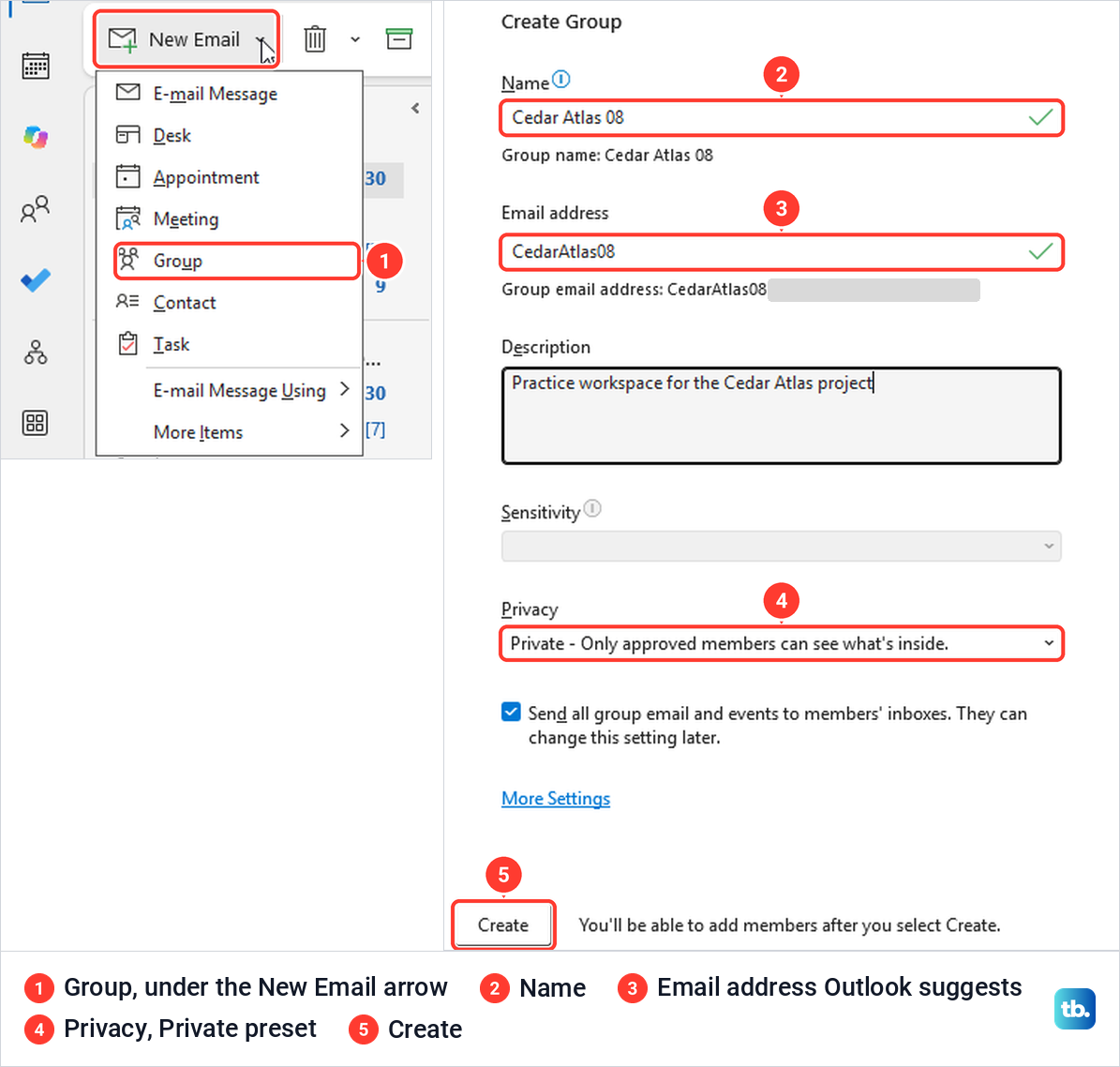
An Add Members box opened next, with only a close button and no Not now. After we added one person, Outlook said "Edit group operation is successful", and the group appeared under Groups in the folder list. Our walkthrough on creating a Microsoft 365 Group in Outlook covers the group side of this in full.
To reach the site, select the group and choose Files on its ribbon, whose tooltip reads "View the group's files in SharePoint". It opened the group's Documents library in the browser, marked Private group with 2 members, and Home in the site's navigation led to a team site with News, Quick links and a Documents area.
Reusing a group name fails in its own way here. The Name box kept its green tick, the Email address got a red cross and "This address isn't available", and Create stayed grey, so change the address rather than the name. A distribution list is a different thing, and creating an Outlook distribution list gives you a list of addresses with no SharePoint site behind it.
Create a site from a OneDrive shared library
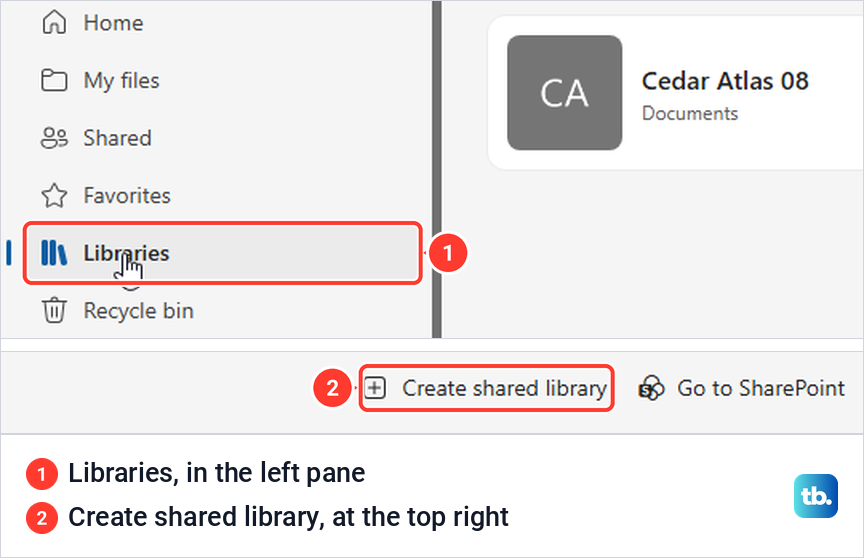
OneDrive can make a site too, built around one shared library. In OneDrive in the browser, select Libraries in the left pane, then Create shared library at the top right. Microsoft's help page calls the section Shared libraries, but the pane we saw said Libraries.
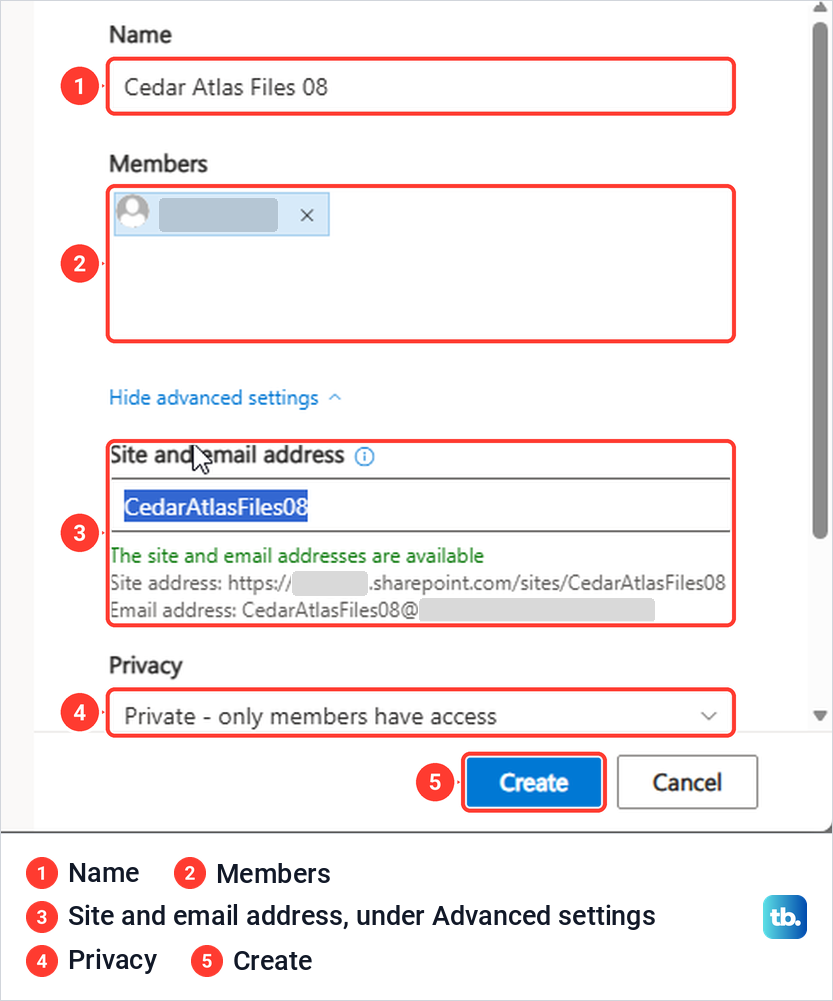
The Create a shared library box asks for a Name and Members. The name got a green tick and "This name is available", and only then did an Advanced settings link appear under Members. It holds the site and email address, Privacy, preset to "Private - only members have access", and Language, again with "You can't change this later".
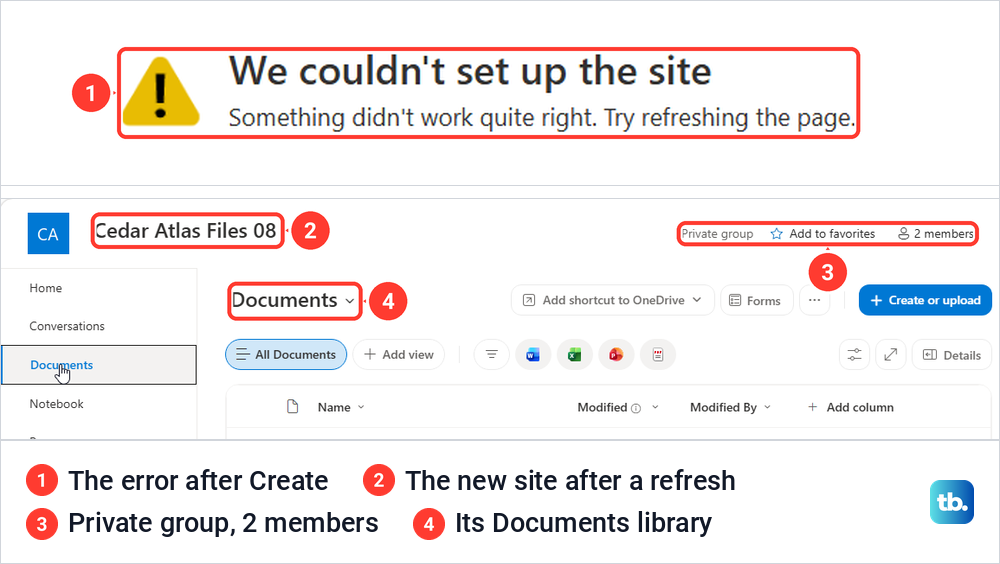
Select Create. Instead of a Go to site button, the page we got said "We couldn't set up the site" and "Something didn't work quite right. Try refreshing the page." We pressed F5 about a minute after Create, and the same tab opened the new site, with 2 members, Conversations, Notebook and a Documents library.
So refresh and look for the site before you try again, because its name and address may already belong to the site you just made. The new library was still missing from OneDrive's Libraries list two and a half minutes later, and Microsoft says it can take up to 48 hours to appear there.
To work on its files from File Explorer, open the new library and select Add shortcut to OneDrive, the button at the top of its Documents page. Microsoft recommends OneDrive shortcuts as the more versatile option when available, and says that on a Windows PC they appear in the OneDrive folder with your organization's name after it. If File Explorer has no such folder yet, start with setting up OneDrive on Windows.
When you cannot create a site
A missing + Create site button does not by itself mean you are blocked, because Build may still offer the Site card, as it did for us. Microsoft says a missing + Create site link can also mean self-service site creation is disabled, so check Build > Site first.
If the Site card is greyed out, Microsoft says self-service site creation may be turned off, and the person who runs SharePoint for your organization can create the site for you. Administrators have two separate settings, one that lets users create sites and one that shows the options to create them in SharePoint and OneDrive. A SharePoint Administrator can also make the site from Active sites in the SharePoint admin center.
Microsoft notes that the site creation setting does not affect Microsoft 365 Groups, so the Outlook route may still give you a team site when the Site card does not. If Outlook has no Group command either, Microsoft says your account may not have a Microsoft 365 subscription or your IT department may not have turned on Microsoft 365 Groups.
Two more of Microsoft's notes explain other dead ends. Site creation is not currently available in the SharePoint mobile app, so use a browser on a computer. If your screens do not match the ones above, you may have another version of SharePoint's site creation screens, and Microsoft says one of them, classic site creation, makes a team site without a Microsoft 365 Group, so ask your administrator which one is turned on.
Subsites are an older route. On the team site we made, the + New menu in Site contents offered List, Page, Document library and App, with no Subsite, and Microsoft recommends hub sites instead of subsites. To add a new site to a hub, Microsoft says to open the hub site first and use its own Create site link, which associates the new site with that hub.
How we tested this guide
We tested this in SharePoint in Microsoft Edge on Windows 11, version 25H2, creating a team site and a communication site from the Build page.
Frequently Asked Questions
Where is Create site in SharePoint?
The start page we used had no + Create site button, so we selected Build in the bar on the left, then the Site card under Start building. If your start page does show + Create site, you can use it, and one of Microsoft's help pages leads from it to the same choice of a team or communication site.
Should I make a team site or a communication site?
A team site suits people who work on the same files, and made from Build it comes with a Microsoft 365 Group and a group email address. A communication site suits a few authors publishing news and information to many readers, most of whom only read.
Does a SharePoint team site create a Microsoft 365 Group?
Yes, when you create it from Build or + Create site, Microsoft says a Microsoft 365 Group is created with it, and the finished site showed Private group and a member count. Microsoft notes one exception: classic site creation, if your administrator has set it, makes a team site without a group. A communication site has no group and no group email address.
Why won't SharePoint accept my site address?
The address can't contain symbols other than underscores, dashes, single quotes and periods, and it can't start or end with a period. If it says the address is "available with modification", another site already uses it. Microsoft says that to reuse that address, the existing site has to be permanently deleted first (or the redirect at that address removed), so otherwise type the suggested address or a different one.
Why is the Site card greyed out in SharePoint?
Microsoft says self-service site creation may be turned off for your organization. Ask the person who runs SharePoint to create the site or to change the setting. Creating a Microsoft 365 Group in Outlook may still work, because that setting does not cover groups.
Can I change a SharePoint site's language later?
No, the default language is fixed once the site is created, and the form says "You can't change this later". Microsoft says you can still add alternate supported languages afterwards.
Can I create a SharePoint site on my phone?
Not in the SharePoint mobile app, where Microsoft says site creation is not currently available. Use SharePoint in a browser on a computer instead.