
The ASUS ROG Ally X is a beast of a handheld, but it hits different when you plug it in and nothing lights up. Maybe the charging LED is dead, maybe it trickle charges, or maybe the built-in gamepad stops responding mid-session. Most of the time, it's a cable or charger issue, but software glitches from Armoury Crate SE and Windows updates are close behind.
Before changing any settings, plug the controller in and open a online controller test in your browser. If buttons and sticks respond there, the pad works and the game or console setup is the problem.
Try a full shutdown first. Hold the power button for 10 seconds until the device completely powers off. Then plug in the official 65W USB-C charger and wait a minute. If the white LED on the side lights up, you were probably dealing with a hung power state. If that didn't work, check the USB-C cable itself. The Ally X needs a USB-C cable that supports Power Delivery. A cheap phone cable will either charge very slowly or not at all.
Check the Charger and Cable First
The official charger is a 65W USB-C PD unit. That specific wattage and protocol matters. If you're using a phone charger or an older laptop charger that doesn't support PD, the Ally X might not negotiate power correctly. I've seen it charge at 15W when the cooler is spinning, only to discharge under load. Grab the original charger and cable, or any 65W+ GaN charger with a certified USB-C PD cable.
Plug it into either of the Ally X's USB-C ports. If the battery icon changes to "Charging" in Windows, you've found the issue. The built-in gamepad is powered by the system battery, so if the handheld charges, the gamepad will work once it has enough power to boot Windows and Armoury Crate SE.
Clean the USB-C Ports
Dust and lint love the ROG Ally X's USB-C ports, especially if you toss it in a bag without the caps. Power the device off completely and grab a wooden toothpick or a plastic spudger. Gently scrape inside the port on both the Ally X and the cable connector. Compressed air helps too, just hold the can upright.
Don't use isopropyl alcohol, it can leave a residue that attracts more dust. After cleaning, plug the charger back in and check for the charging LED. If the gamepad is acting up but the charging port is clean, check if an external controller is connected via Bluetooth or USB, the Ally X might be prioritizing that over the built-in gamepad.
A Stuck Firmware or Windows State
This is probably the most common issue specific to the Ally X. Windows 11's Fast Startup feature can sometimes cause the device to not fully shut down, leaving the charging IC in a weird state. Hold the power button for 10 seconds to force a hardware reset. If the charging light blinks or the device turns on, good. Next, disable Fast Startup: Control Panel > Power Options > Choose what the power buttons do > Change settings that are currently unavailable > Uncheck Turn on fast startup. Then shut down normally.
If the gamepad itself isn't working, open Armoury Crate SE > Settings > Updates > Check for Updates. A gamepad firmware update often fixes spurious disconnections or dead input. In my experience, running Windows Update then immediately updating Armoury Crate SE fixes 90% of weird behavior with the built-in controls.
Rule Out a Thermal or SD Card Issue
The ROG Ally X has a known issue where the MicroSD card slot runs hot enough to degrade cards. While this doesn't usually stop the device from charging, extreme internal heat can cause the charging IC to throttle or shut down for safety. If you've been gaming on Turbo mode in a warm room and the device won't charge, let it cool down for 15-20 minutes. The same applies if you were using the MicroSD card slot heavily.
The microSD slot on the Ally X was relocated away from the heat source compared to the original Ally, but it still runs warm under heavy loads. Switch to Silent or Performance mode via the Command Center (left button) if heat is a recurring concern during charging.
Update Everything (Windows, Armoury Crate, Gamepad Drivers)
Because the Ally X runs standard Windows 11 (24H2 or later is required for the latest fixes), a lot of issues trace back to a Windows Update that broke things, or an update that needs to be installed. Go to Settings > Windows Update > Check for updates. Install every pending update, especially any labeled "System Firmware" or "Realtek Audio" or "AMD Graphics".
Next, open Armoury Crate SE and check the Updates center. ASUS pushes gamepad firmware, BIOS updates, and driver packs through this tool. I'd restart after all updates are applied. If the built-in gamepad is your issue, check Device Manager > Human Interface Devices > ASUS ROG Gamepad. If it has a yellow exclamation mark, right-click and update the driver, then let Windows search automatically.
Check Battery Health
If the device charges but drains faster than a Steam Deck OLED in similar workloads (a known comparison point for the Ally X), the battery might just have some wear. Open a Command Prompt (Admin) and run powercfg /batteryreport. This generates a battery health report saved to C:\Users\YourName\battery-report.html. Open it and check the design capacity vs. full charge capacity.
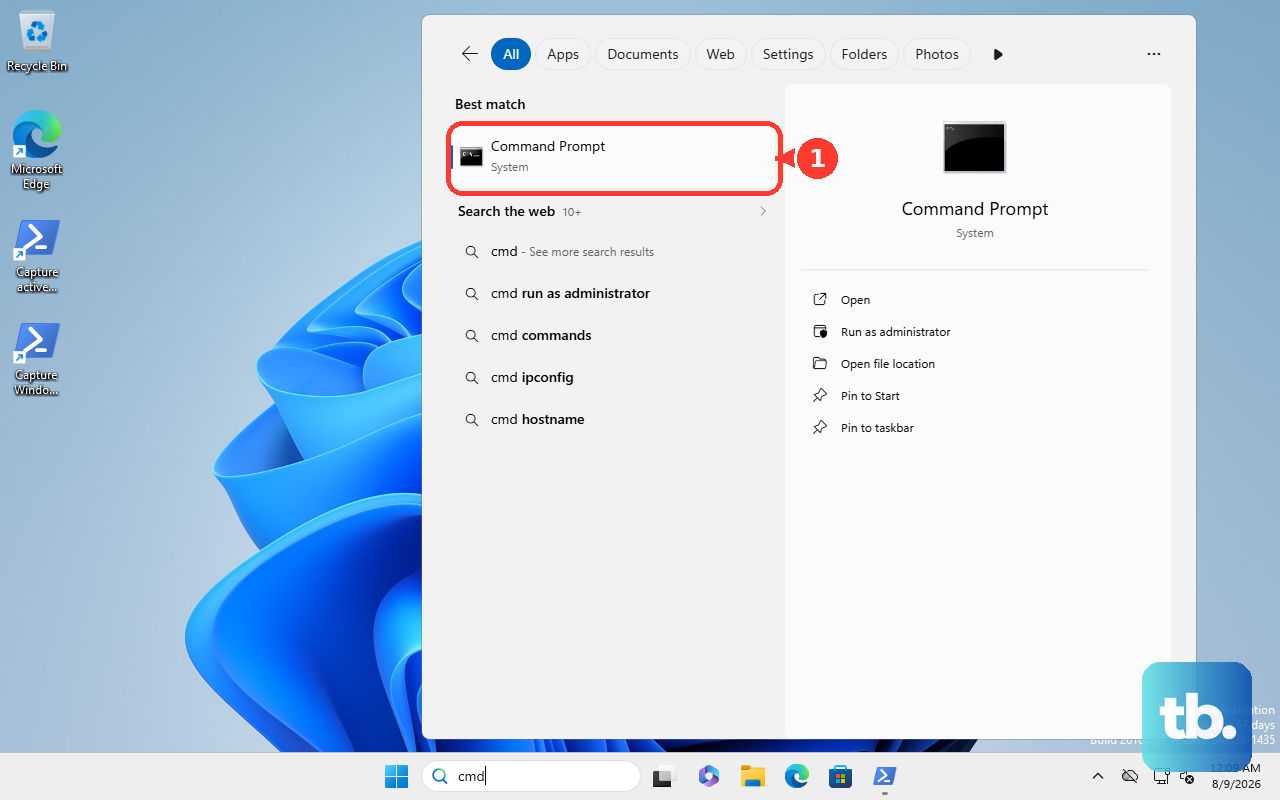
If it's below 80%, that's significant wear. The Ally X has an 80Wh battery, which is massive, but if it's worn out, the only fix is a battery replacement. If the gamepad is unresponsive but the device charges fine, check if the issue is in-game vs. Windows. A game may have locked input to an external controller, or a profile in Armoury Crate SE may have reassigned the gamepad buttons.
Factory Reset as a Last Step
If nothing else works and you're sure the charging port and charger are good, a full reset might clear a deep software conflict. Because the Ally X is a Windows device, the reset is handled through the OS. Go to Settings > System > Recovery > Reset this PC. You can choose "Keep my files" to preserve game installs, but I'd recommend "Remove everything" for a truly clean slate.
After the reset, install the latest Windows updates and Armoury Crate SE 1.5+ (which is recommended for the performance modes and Command Center). Don't confuse this process with anything related to the newer ROG Xbox Ally X (2025), that's a completely different SKU running an Xbox-branded Windows shell with a Ryzen Z2 Extreme, and its fixes won't apply here.