If your Samsung phone asks for a network unlock code or a SIM network unlock PIN when you insert a different carrier's SIM, the device is locked to a specific network. This guide explains exactly what that means, how to get the legitimate code, and how to enter it without risking a permanent lock.
What a Network Lock Actually Is
Samsung does not lock any of its devices to a particular network. The lock is applied by the carrier or retailer that sold you the phone, usually because the device was subsidized or bought on a payment plan.
A network lock is different from a SIM PIN. The network lock ties the phone to one carrier, while a SIM PIN protects the SIM card itself. The unlock code that frees your phone for other carriers is the network unlock code, sometimes shown on screen as the SIM network unlock PIN.
Because the carrier owns the lock, the carrier is the only source for the genuine code. No code is the same across phones, and the default 0000 you may see referenced applies to a basic SIM PIN, not the network unlock.
How to Tell if Your Samsung Is Locked
The fastest test is to power off the phone, swap in a SIM from a different network, and turn it back on. If the phone is locked you will see a prompt asking for a code instead of connecting normally.
Common on screen messages include the following:
- Network lock
- SIM network unlock PIN
- SP lock
- SIM unavailable
- Enter network unlock code
If the phone connects to the new SIM with full signal and no code prompt, it is already unlocked and you do not need to do anything further.
Find Your IMEI First
Your carrier needs your IMEI number to look up the phone and generate the correct unlock code. Every phone has a unique IMEI.
You can pull it up two ways:
- Open the dialer and enter *#06#, which displays the IMEI instantly
- Go to Settings > About phone > Status information and read the IMEI there
Write the number down before you contact your carrier. If your phone has two SIM slots, you may see two IMEI numbers, which is normal.
Request the Code From Your Carrier
Contact the original carrier the phone is locked to and ask for a device unlock. Under wireless industry rules, carriers will unlock an eligible device, or provide the code to do so, within two business days of a valid request. Many carriers unlock eligible phones automatically with no code needed.
Eligibility usually depends on the device being fully paid off and the account being in good standing. Costs vary, since some providers unlock for free while others may charge a fee or, for ineligible devices, decline.
Here is how the three largest US carriers handle it as of 2026:
- T-Mobile: The phone must be active on the network for at least 40 days and paid in full. Eligible devices that support remote unlock are unlocked automatically within two business days. Prepaid devices generally qualify after 365 days, or sooner with enough refill activity.
- AT&T: The device must be more than 60 days old, paid in full with no installment balance, and the account current. Eligible phones often unlock automatically, and you can also submit an unlock request through AT&T's unlock page.
- Verizon: As of January 27, 2026, Verizon retired its old 60-day automatic unlock. Postpaid phones now unlock once paid in full, and prepaid devices unlock after 365 days of paid, active service.
Deployed military personnel who are customers in good standing can request an unlock with deployment papers, regardless of the standard waiting period. You can request a code even after leaving the carrier, as long as the device met the eligibility rules.
Enter the Code the Right Way
Once your carrier gives you the network unlock code, the entry steps are simple. The code is usually eight digits.
- 1.Power off your Samsung phone
- 2.Remove the current SIM card
- 3.Insert the SIM from the new network
- 4.Power the phone back on
- 5.When the SIM network unlock PIN screen appears, type the exact code your carrier provided
- 6.Tap Unlock or OK
After a correct entry, the phone connects to the new network and the prompt does not return. Enter the code carefully, because repeated wrong attempts can hard lock the device.
When the Code Does Not Work
Unsuccessful Message After Entering the Code
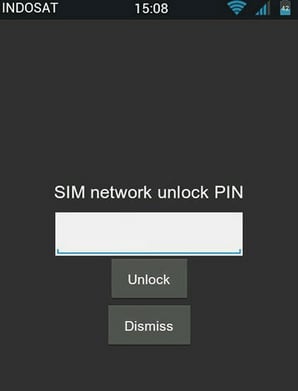
An "Unsuccessful" or "Wrong code" message almost always means the digits were entered incorrectly or the code does not match this IMEI. Stop entering codes and contact your carrier to confirm the exact code tied to your IMEI.
Do not keep guessing. Many Samsung models limit network unlock attempts, and exhausting them can permanently lock the phone so that even the right code no longer works.
Different Lock Messages
Not every prompt is the standard network unlock. If you see "SP lock" or a frozen "SIM unavailable" state, the phone may need a separate code such as an unfreeze code, which only the carrier can supply.
Give the carrier the exact wording on your screen along with your IMEI so they issue the right code for that specific lock type.
Check Your Lock Status Online
If you are unsure whether a phone is locked before buying or switching, your carrier's account portal usually shows the device lock status. This is the most reliable place to confirm it.
Some third party IMEI lookup tools also report lock and blacklist status, but accuracy varies and many charge a fee. Treat their results as a hint, not proof.
The safest path is always to work directly with the original carrier. Paid third party unlock services can be unreliable, may not honor refunds, and cannot legitimately bypass a lock that the carrier itself will not lift.
Frequently Asked Questions
Is the Samsung network unlock code free
It can be. Many carriers unlock eligible phones for free, and some do it automatically once the device is paid off. Others may charge a fee, and ineligible devices may not be unlockable at all.
How long does a carrier take to provide an unlock
Under US wireless rules, carriers respond within two business days of a valid request by unlocking the device, providing the code, or explaining why it does not qualify.
What is the difference between a SIM PIN and a network unlock PIN
A SIM PIN protects the SIM card and is set by you or the carrier on the SIM. A network unlock PIN, or network unlock code, frees the phone to work on other carriers and comes only from the locking carrier.
Can too many wrong attempts permanently lock my Samsung
Yes. Many Samsung models cap network unlock attempts, and using them all can hard lock the phone. Always confirm the exact code with your carrier before entering it.
Can I unlock a Samsung phone that is still on a payment plan
Usually no. Most carriers require the device to be fully paid off and the account in good standing before it becomes eligible for unlocking.
Where do I find my IMEI to request a code
Dial *#06# in the phone app, or go to Settings > About phone > Status information to see the IMEI.
First published October 4, 2025. Last updated June 4, 2026.