
To cancel Spotify Premium, sign in at spotify.com/account, select Cancel subscription under Your Premium, select Continue to cancel on the next two screens, then select Yes, cancel on the last one. On a paid plan, Premium stays until your next billing date, while a free trial you paid nothing for ends the moment you cancel. If Google Play, Apple, or a phone or internet provider bills you, cancel with that company instead.
The first two screens only move you forward, so leaving after either of them changes nothing. Yes, cancel is the final button, and Spotify says to make sure you reach its confirmation message, then look for a date on the account page for switching to Free where the next bill used to be. Your playlists and saved music stay on Spotify Free, and Spotify says a free trial you paid nothing for can't be restarted.
The short version
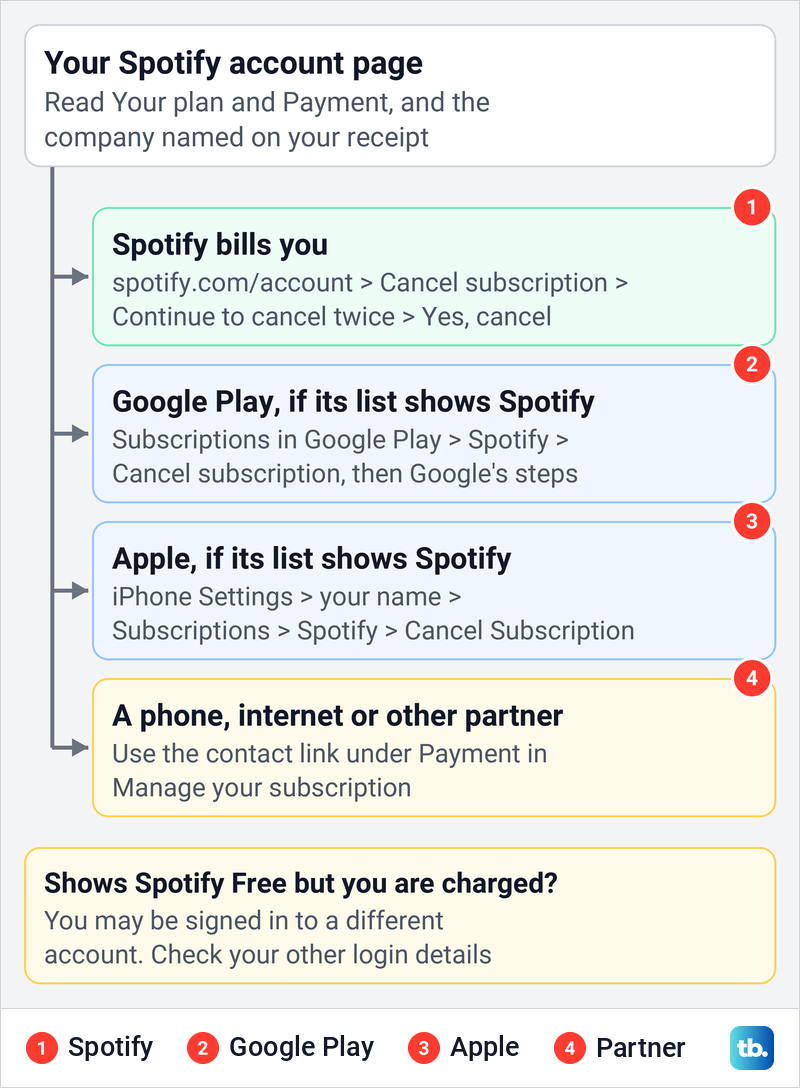
- Check the biller: your Spotify account page shows your plan, and Payment in Manage your subscription names any partner that bills you.
- On the web: spotify.com/account > Cancel subscription > Continue to cancel > Continue to cancel > Yes, cancel.
- The last click: Yes, cancel is the final button, after two Continue to cancel buttons that just move you on.
- When it ends: paid Premium lasts until the next billing date, while a free trial you paid nothing for ends straight away.
- Check it worked: the account page should show a date for switching to Free, not a next bill.
Find out who bills your Spotify plan
Start on Spotify's account page, because it shows who takes your money. Sign in at spotify.com/account with the login you use for Premium. On the account we used, the overview opened with a Your plan card showing Premium and a line reading Your next bill is for, followed by the amount and the date.
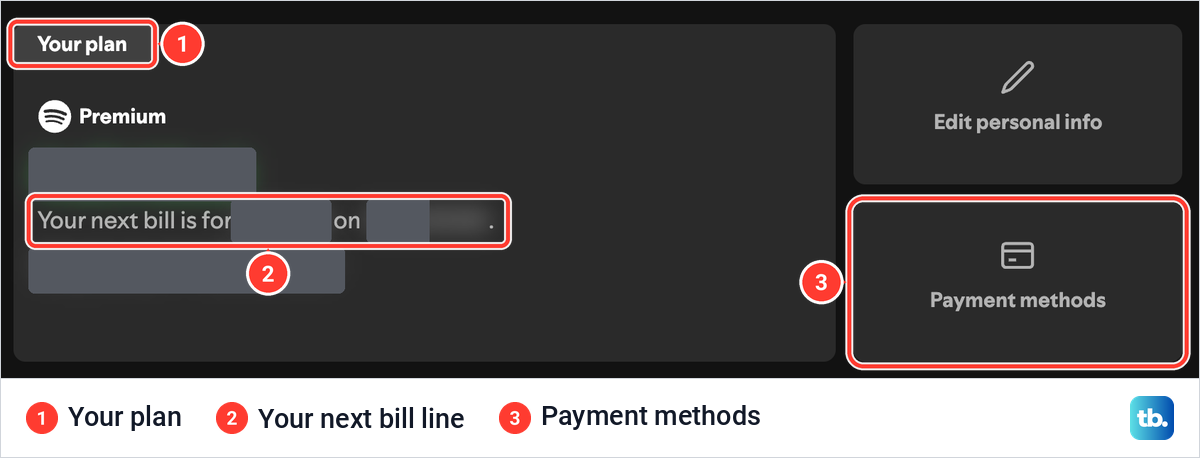
A plan Spotify bills directly, like the one we used, has a Cancel subscription row further down the same page. Spotify's help says a plan run by a partner, such as a phone or internet provider, has no option to change it there, and the partner's contact link appears under Payment in Manage your subscription instead. If the page shows Spotify Free, that login has no Premium plan to cancel.
| What your account or receipt shows | Where to cancel | What to check afterward |
|---|---|---|
| Premium with a Cancel subscription row | spotify.com/account, then Spotify's three screens | A date for switching to Spotify Free |
| Spotify in your Google Play subscriptions | Subscriptions in Google Play, on the Google account that pays | The end date Google Play shows |
| Spotify as an active subscription in your Apple Account's Subscriptions list | Settings > your name > Subscriptions on an iPhone or iPad | No Cancel button, or an expiration message in red |
| A partner's contact link under Payment in Manage your subscription | The partner's own account pages or support | The partner's confirmation, then Spotify's plan status |
| Spotify Free, but a Spotify charge on your statement | Your other Spotify logins, to find the billed account | Which account shows a next bill |
The Apple and Google Play rows apply only when that company's own subscription list shows Spotify. Listening on an iPhone or an Android phone does not make Apple or Google your biller, and Spotify's help says Premium can't be bought in its iPhone and iPad app at all.
If the charge on your statement does not clearly say Spotify, find subscriptions on a bank statement first and read the merchant name. If your Spotify login details were changed without you, or someone else is using your account, first recover a hacked Spotify account and secure it before you cancel anything.
Cancel Spotify Premium on the web
Spotify's help says to cancel a plan it bills on your account page, which opens in a web browser on a computer or a phone. Go to spotify.com/account and sign in. Scroll past Your plan to the Your Premium box, which on our screen held three rows, Available subscriptions, Manage your subscription and Cancel subscription.
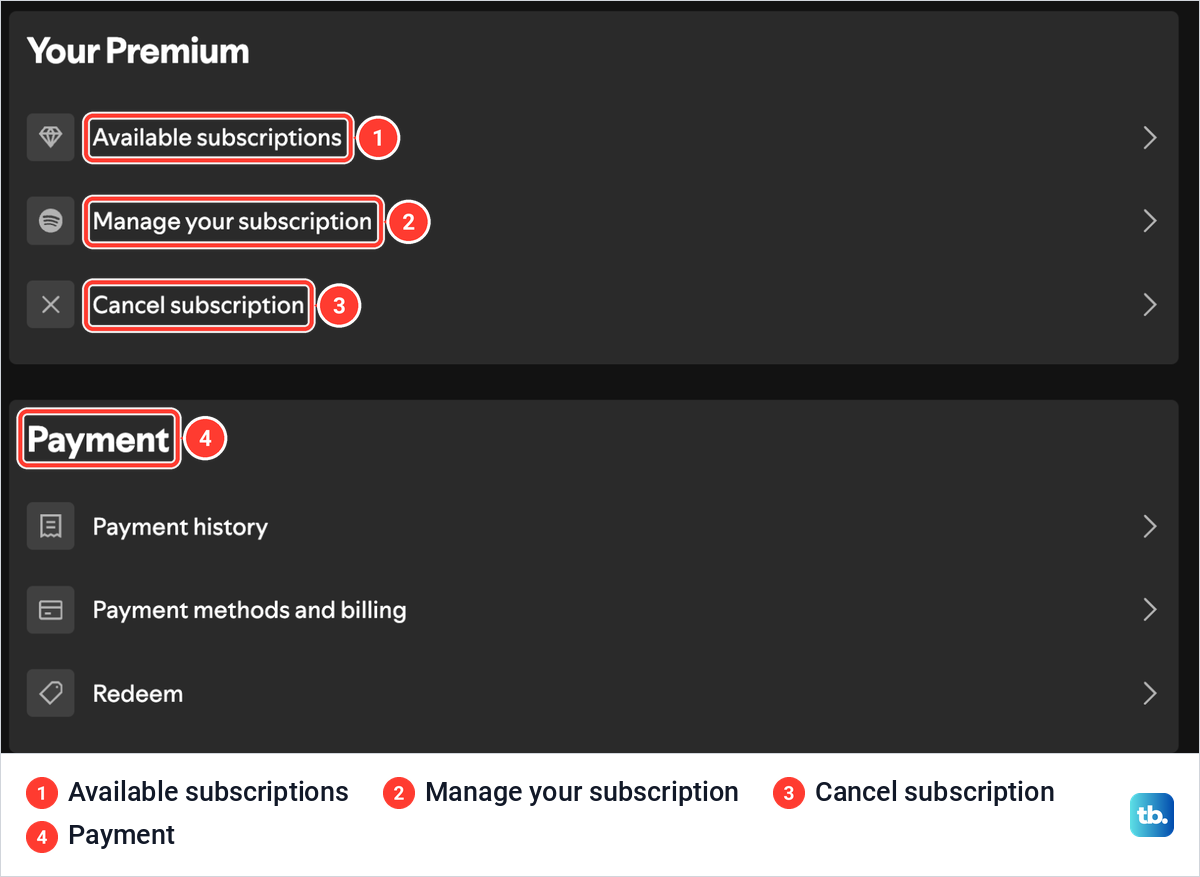
Select Cancel subscription. Spotify's help words this step as Manage your plan and then Cancel subscription, but on the account we used the row was called Manage your subscription, and Cancel subscription sat in the Your Premium box as a row of its own. If your page shows Change plan and no Cancel subscription row, Spotify's plan-change help still gives that route: select Change plan, scroll to Spotify Free and select Cancel Premium, then continue to the confirmation message.
The second way in is Manage your subscription. That page showed the plan card with Cancel anytime, a Learn more about your plan link and a wide Change plan button, then a second Cancel subscription button below it that starts the same flow.
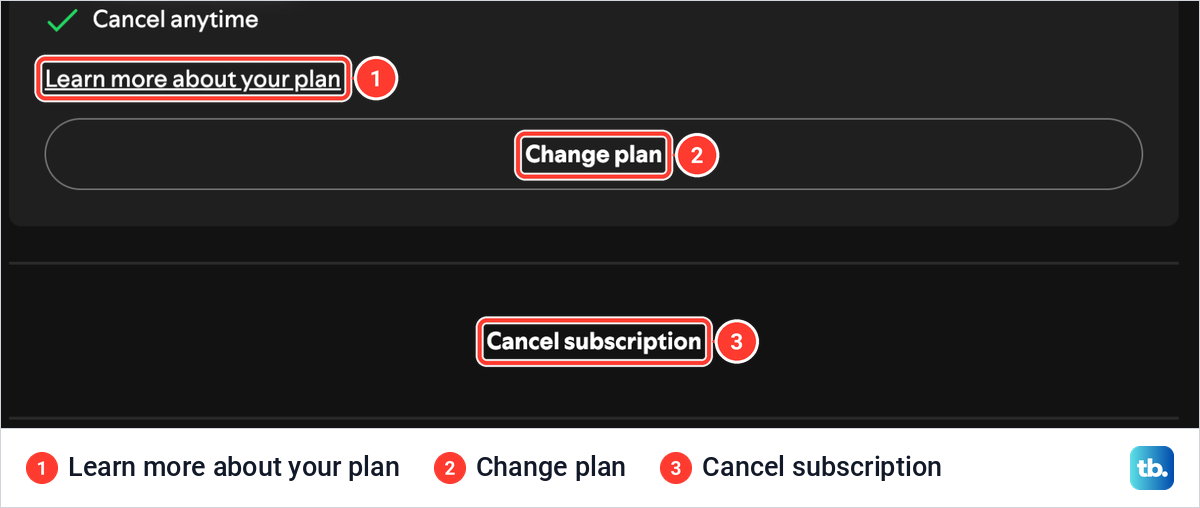
Either Cancel subscription button opens the same three screens. Basic plans are the exception: Spotify's help sends you to Change plan and then Cancel plan near the bottom, and warns that once you cancel Basic you can't subscribe to it again.
Finish Spotify's three cancellation screens
When we selected Cancel subscription, Spotify did not cancel anything. It opened the first of three screens, headed How you listen will change, which says that if you cancel, you'll switch over to the free service on a date it names. Note that date, because it is when Premium ends if you go through with it.
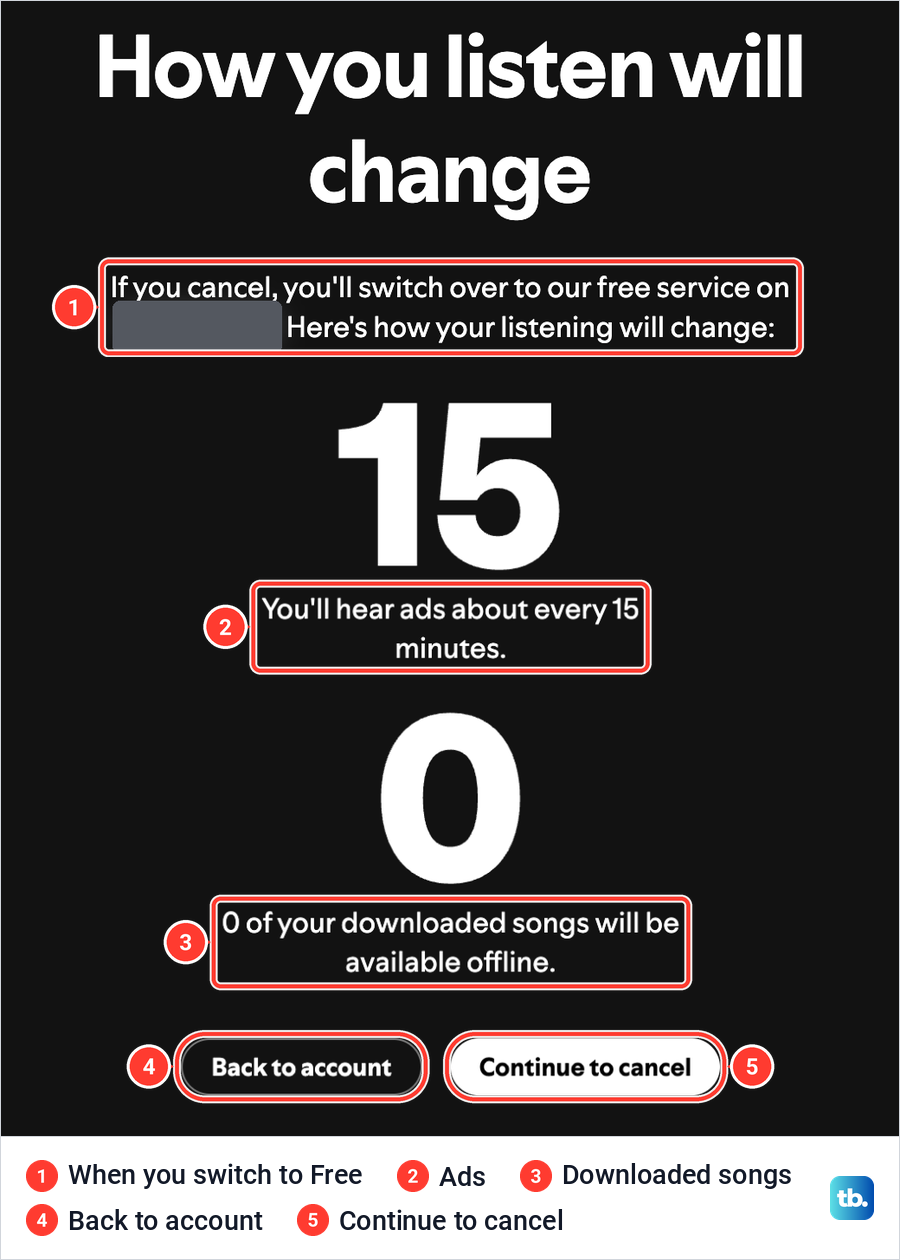
Below that, our screen showed two large figures with the lines You'll hear ads about every 15 minutes and 0 of your downloaded songs will be available offline. Spotify's offline help says the free version can only download podcasts, so downloaded songs stop playing offline on Free. Two buttons sit underneath, Back to account and Continue to cancel.
Continue to cancel took us to the second screen, Find a plan that works for you. It offered other Premium plans, each card with an arrow, including Premium Student under Our other plans. A footnote says the per person saving assumes every account on a shared plan is active, and that the plan holder pays the whole bill.
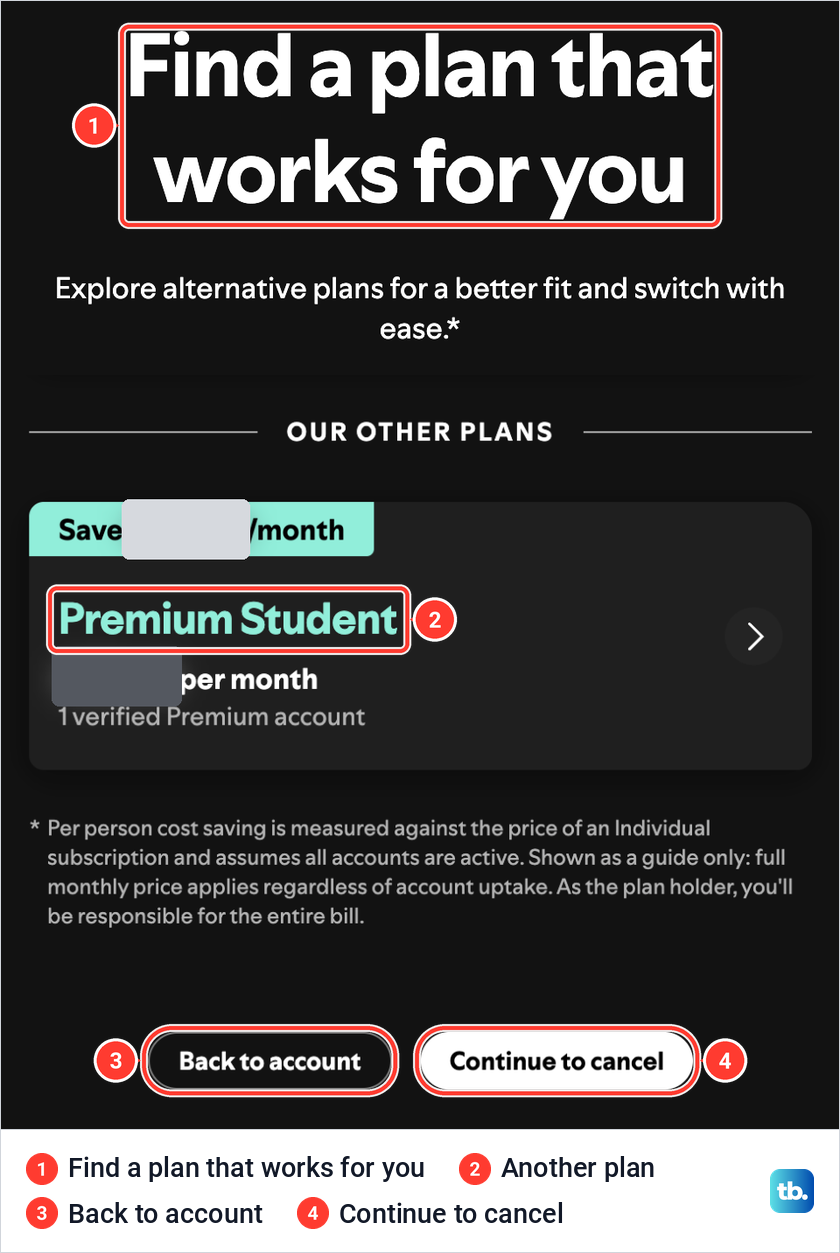
The cards are offers to switch plans, as the line under the heading says, so skip them if you want out. The same two buttons sit at the bottom, Back to account and a second Continue to cancel.
The second Continue to cancel opened the last screen, titled Cancel Premium followed by the plan's name. It repeats that you'll switch over to the free service on a date, losing access to all subscription benefits, and then asks Are you sure you want to cancel your Spotify subscription?
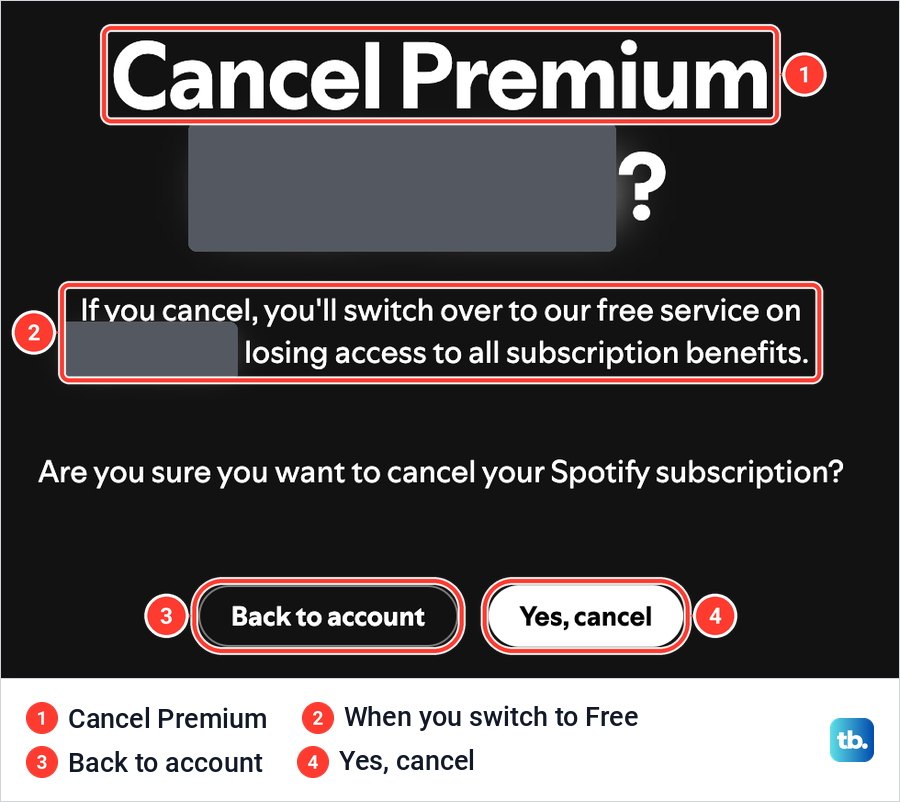
Yes, cancel is the last button in the flow, and this is where we stopped. No reason survey and no password prompt came before this screen for us. When we left without pressing it, the account page still showed the next bill line and the Cancel subscription row, so reaching this screen is not the same as canceling.
Spotify's help describes the end of the flow only as reaching the confirmation message. Follow any further prompts after Yes, cancel and read the confirmation before you close the tab, then check the account page as the section on confirming your cancellation explains. If a Continue to cancel button does nothing, reload spotify.com/account in another browser and start again from Cancel subscription.
Cancel Spotify Premium on a phone
If Spotify bills you, a phone cancels the same way as a computer. Open Safari or Chrome, go to spotify.com/account, sign in and follow the same rows and screens. Spotify's help points to the account page for canceling, not to a button in the app.
Inside the app, Spotify's help shows your billing date under your profile picture, Settings and privacy, Account and Billing, a quick way to see when Premium renews. Deleting the Spotify app from a phone or computer does not cancel Premium, because the plan belongs to your account, not to the app.
Cancel Spotify billed through Google Play
Spotify's help says you can pay for Spotify with Google Play billing, chosen at checkout in the Android app, and that Google then manages your payments. Check that Spotify appears in your Play subscriptions before you start, because otherwise Google Play is not the place to cancel it.
Google's steps on an Android phone are to go to subscriptions in Google Play, select Spotify, tap Cancel subscription and follow the instructions. On a computer, open subscriptions in Google Play, click Manage beside Spotify, click Cancel subscription, pick a reason in the pop-up and click Continue. That Continue is Google's last step, not one of Spotify's screens.
Google says uninstalling an app does not cancel its subscription, and that you can keep using it for the time you've already paid. If Spotify is not in the list, Google's tip is that it may be on a different Google account, so switch accounts and look again.
Cancel Spotify billed by Apple
Apple bills you only if Spotify appears as an active subscription in the Subscriptions list of your Apple Account. If you can't find it, Apple's tip is to search your email for a receipt from Apple or an invoice from Apple, check which Apple Account it names, and look in that account's list.
Apple's steps on an iPhone are Settings, your name, Subscriptions, the subscription, then Cancel Subscription. Apple says that no Cancel button, or an expiration message in red text, means it is already canceled, and that a trial should be canceled at least 24 hours before it ends. For the full Apple side, follow our guide to cancel an App Store subscription on iPhone.
Cancel a plan billed by a carrier or other partner
Some phone and internet providers include Spotify Premium in their plans or put it on their bill. Spotify's help says that partner manages your payments, and that its contact link sits under Payment when you open Manage your subscription on the account page.
Cancel through that link or the partner's own account pages, not through Spotify. Menus differ from one provider to the next, so follow the partner's steps, then check Spotify's account page once the partner confirms. Spotify's help adds that if you want to pay Spotify directly later, you cancel with the partner first and sign up again once the account is on Free.
Know when Premium and a free trial end
Spotify's help says a paid plan keeps Premium until your next billing date, then the account switches to Free. A free trial that cost nothing is different, because canceling it moves the account to Free immediately, and Spotify says a "zero-priced" trial can't be reactivated.
A trial that cost something, such as a first few months at a reduced price, follows Spotify's terms instead. Unless the cancellation screens say otherwise, it runs until the end of the trial period. The terms also say you must cancel before the trial ends if you don't want to be charged the regular price that follows.
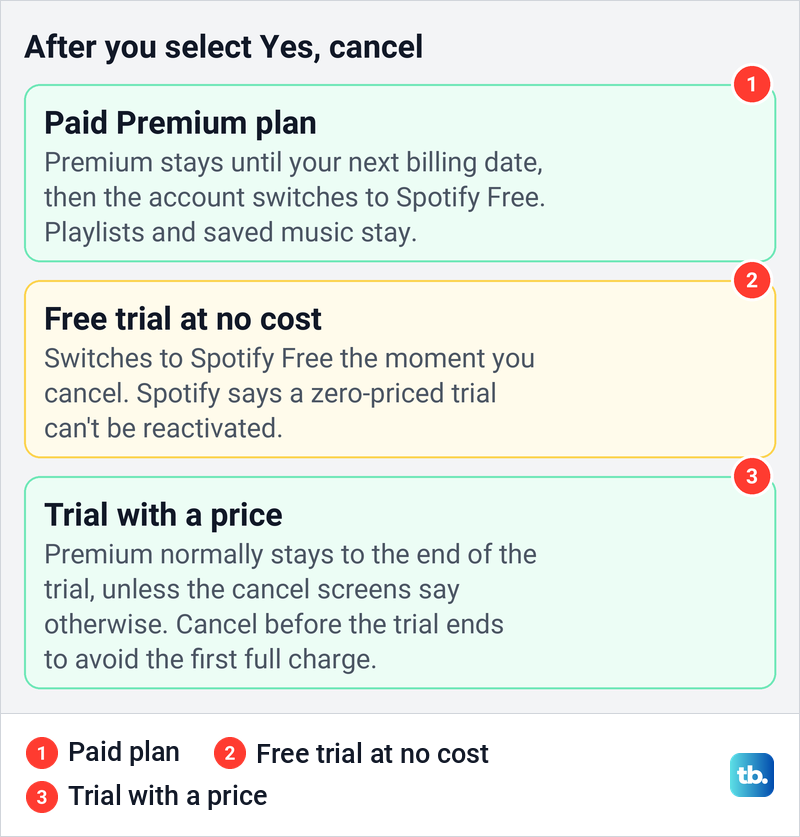
On Free you keep your playlists and saved music, and you can still log in and play with ads. Downloads are the exception, because Spotify's offline help says the free version can only download podcasts. If Premium features vanish before the date the screens gave you, fix Spotify Premium features that stopped working before assuming the cancellation ended them early.
On a Family or Duo plan, only the plan manager can cancel for everyone. Spotify says members lose Premium from the next payment date and managed accounts move to the free plan, while a member who follows the cancel steps only leaves the plan without canceling it.
Change plans instead of canceling
If price is the reason, the second cancel screen already shows other Premium plans, such as Student. The same plans sit under Available subscriptions on the account page, where each card had a Select button and a Learn more link.
Spotify's help puts plan changes under Manage your subscription, then Change plan. An Individual or Student plan updates right away, while a Family or Duo manager moving to a smaller plan picks which members stay on Premium.
Neither the cancel screens nor Available subscriptions offered a pause on the plan we used. Google Play lets some apps offer a pause that starts at the end of the current billing period, so look there only if Google Play bills your Spotify plan.
Check that your cancellation worked
Reopen spotify.com/account after Yes, cancel and read the Your plan card. Spotify's billing help gives the test: a date when your next payment is due means the account is not canceled, while a date when the account will switch to Spotify Free means it worked. On the account we used, which stayed on Premium, the card read Your next bill is for, followed by an amount and a date, the state Spotify calls not canceled.
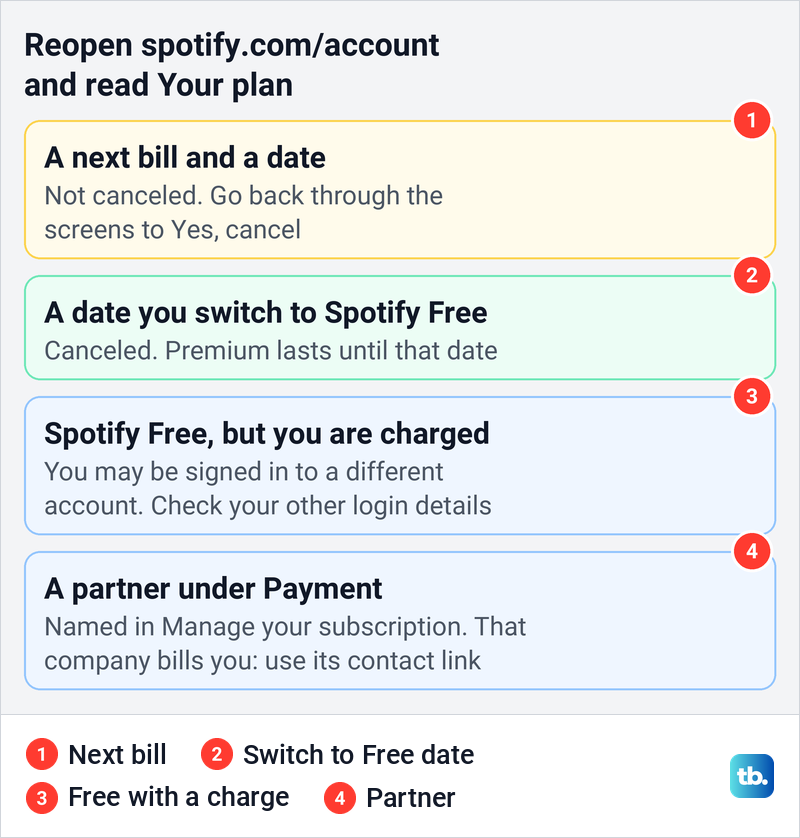
If a payment went through just before you canceled, Spotify says you won't be charged again. Keep any confirmation email Spotify sends, but treat the account page as the proof. If the right account still shows a next payment after you finished every screen, contact Spotify customer service with the date you canceled. For charges from services other than Spotify, you can track down other unwanted subscriptions one by one.
Ask for a refund from the right company
Canceling stops the next charge but does not pay back the current one. Spotify's refund policy says you can cancel any time and keep what you paid for, with Premium running to the end of the billing period, and points to its terms for refund eligibility.
Spotify says it can't refund Premium payments made through a partner, so ask that partner. Apple says some purchases might be eligible for a refund, requested at reportaproblem.apple.com. Google says it doesn't give refunds for most Google Play purchases, though it lists exceptions.
Keep your account and playlists
Canceling Premium and deleting your account are separate controls on the same page. Delete account, near the bottom of the account overview, opened a page headed Are you sure you want to delete your account? It offers a card to Switch to Spotify free beside one to Delete your account and data.
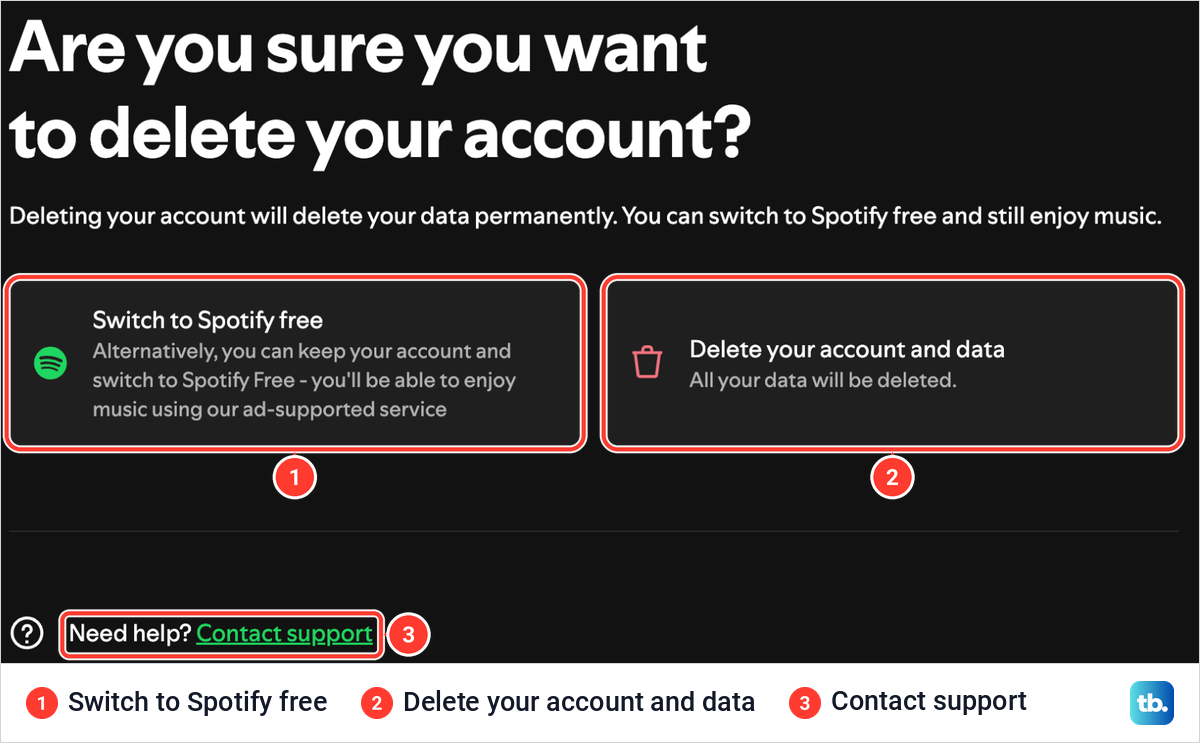
Spotify's help says closing the account deletes your data permanently, takes any purchased audiobooks with it, and emails a link to reactivate the account within 7 days. If you only want to stop paying, cancel Premium and keep the account, and your playlists stay. If privacy is why you are leaving, you can manage your Spotify listening history and privacy without deleting anything.
Canceling Premium does not sign anyone out of your account. If someone else is using your login, Sign out everywhere, in the same list as Delete account, opened a page explaining that its button logs you out of the mobile, tablet, web player and desktop apps.
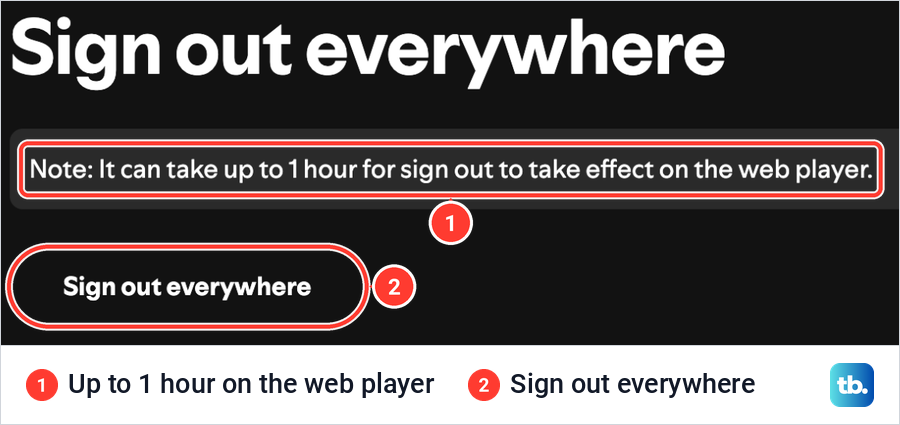
That page notes that partner devices such as speakers, games consoles and TVs are not included, and points to your apps page to remove their access. It also says sign out can take up to 1 hour to reach the web player, so change your Spotify password as well if someone else may know it.
How we tested this guide
We tested this on Spotify's website in Chrome on a Mac, following Cancel subscription through each screen up to the final Yes, cancel button, which we did not press.
Frequently Asked Questions
How do I cancel Spotify Premium when there is no Cancel subscription button?
Check Payment in Manage your subscription for a partner such as a phone or internet provider, which cancels the plan instead. If the page shows Spotify Free, that login has no Premium plan, so try your other login details. On Basic, or a layout without that row, open Change plan and look for Cancel plan or Cancel Premium further down, and if Google Play or Apple bills you, cancel in their subscription list.
Can I cancel Spotify Premium in the app?
Spotify's help sends you to your account page, which you can open in Safari or Chrome on a phone. If Apple or Google Play bills you, cancel in their subscription settings instead.
Will I lose Spotify Premium as soon as I cancel?
Not on a paid plan, which keeps Premium until the next billing date. A free trial you paid nothing for switches to Free immediately and can't be reactivated.
Will canceling Spotify delete my playlists?
No. Spotify says you keep playlists and saved music on Free, and deleting the account is a separate process with its own warning page.
Why does Spotify still show my next payment?
Spotify says a next payment date means the account is not canceled. Go back through Cancel subscription and both Continue to cancel screens, select Yes, cancel and check the page again.
Can a Family or Duo member cancel the whole plan?
No. A member who follows the cancel steps only leaves the plan, and the plan manager is the one who cancels it for everyone.
Can I pause Spotify instead of canceling?
The plan we used offered other plans but no pause, either on the cancel screens or under Available subscriptions. If Google Play bills you, check there, since Google lets some apps offer a pause.