Spotify problems can get frustrating fast when you need account, billing, refund, or content help and keep finding old phone numbers. Spotify routes regular listener support through its Support site, online messaging, Community pages, and issue-specific forms. Start with the path that matches your issue so you reach the right support channel first.
Start with Spotify Support Ask
Open Spotify Support and use the Ask field on the page. Spotify says Ask is AI-powered, so use it to narrow down a common account, playback, billing, app, or cancellation question.
Type your problem in plain language, such as a payment issue, login problem, cancellation question, or content report. Follow the answer into the matching support page or contact option.
If Ask does not give you the right route, use Spotify's direct message option next because that is the main customer support path for private account help.
Message Spotify customer support online
Use this when your issue should not be handled in public, including account, subscription, or billing questions. Spotify says it does not offer phone support, so the current consumer route is online messaging.
Open Spotify Support's Contact us page and choose Send us a message.
Select Message us.
Sign in if Spotify asks you to.
Start the support conversation and keep the issue specific. Include the account or plan problem you need help with, but keep payment details out of public channels.
Use the Spotify Community for public help
This fixes public troubleshooting questions that do not require private account review.
From Spotify's Contact us page, choose The Spotify Community.
Open Spotify Community.
Use Search all content to look for an existing answer.
Browse a help category such as Accounts, Subscriptions, iOS (iPhone, iPad), Android, Desktop (Windows), Desktop (Mac), or Desktop (Linux).
Create a thread if search and the category pages do not answer your question. Keep it public-safe, because Community help is not private customer service.
Skip old phone numbers and email claims
The most common dead end is an old phone number or a general support email from a third-party customer-service directory.
Spotify says it currently does not offer support by phone. Use Send us a message, then Message us, on Spotify Support.
Spotify's current Contact us page does not list a general [email protected] customer-service address for regular consumer support. Use Message us instead.
For public social support, Spotify's contact page points to @SpotifyCares on X. Do not use X DMs for support, because the current @SpotifyCares profile says DMs are not monitored and points users back to Spotify's support link.
Handle billing subscriptions and partner plan help
Billing issues get easier once you identify who bills you.
If Spotify bills you directly and you only want to stop Premium, go to Manage your plan, select Cancel subscription, and continue through cancellation.
Expect Premium to stay active until the next billing date, then switch to Spotify Free. The exception is a zero-priced free trial: cancel during that trial and the account switches to the free service immediately, and that trial cannot be reactivated.
For Family or Duo, the plan manager can cancel the plan; members need to ask the plan manager.
If your plan is tied to a mobile, internet, or other partner, open Manage your subscription or Manage your plan and check Payment for the partner contact link.
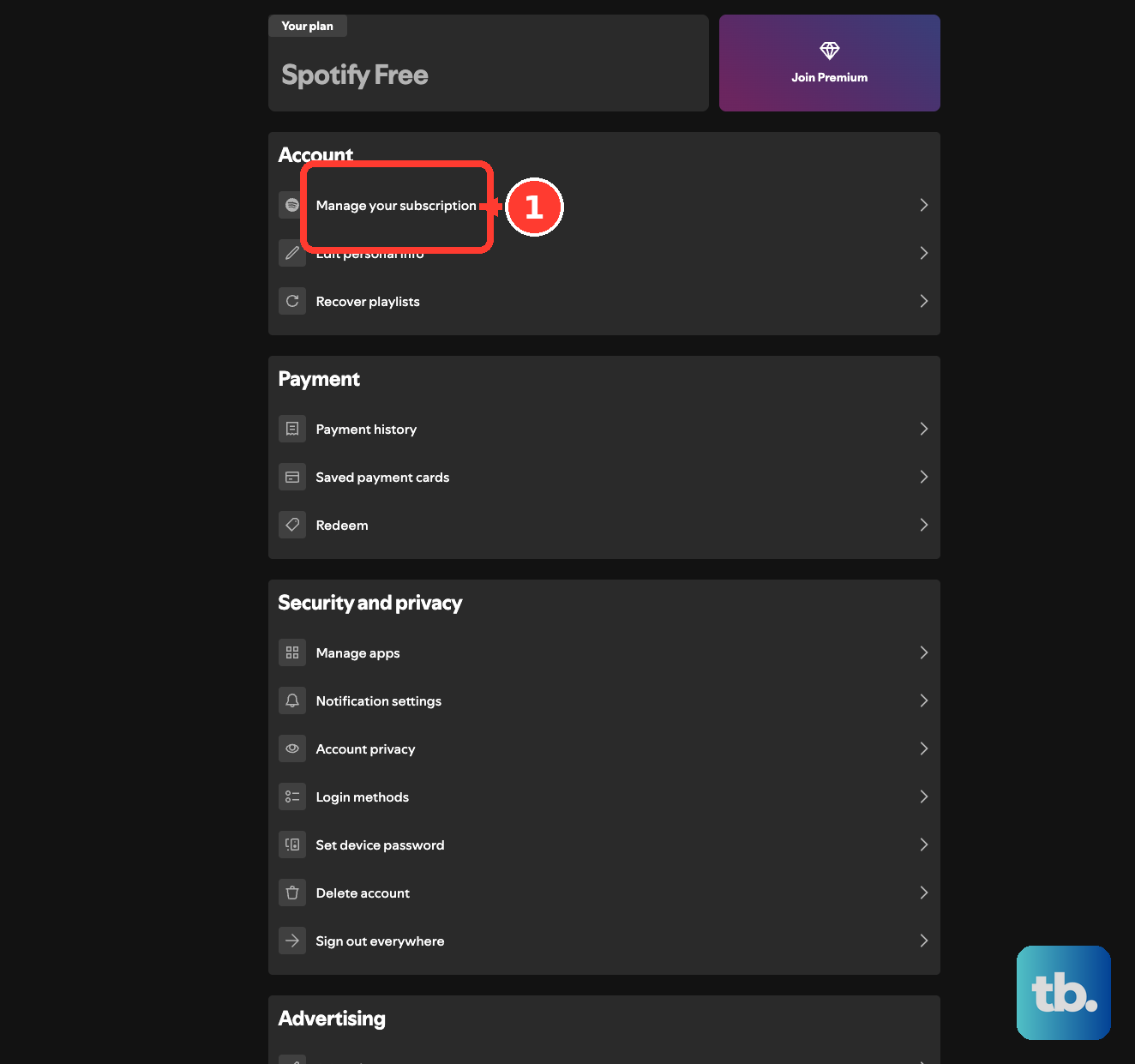
For partner payment problems or partner refund requests, contact that company because partner plans are managed by the partner.
For written cancellation, complete Spotify's cancellation form and send it to Spotify.
Request refunds for audiobooks and partner payments
Use refund steps when money has already moved and you are not only canceling future billing. The right route depends on whether the charge was for an audiobook or a Premium payment handled by a partner.
For an audiobook refund request, open Spotify Support and go to Audiobook refund policy.
Choose contact us.
Spotify reviews audiobook refund requests case by case. Eligibility includes payment within the last 7 days and listening to less than 50% of the audiobook, along with any legal rights you have.
For Premium payments made through a partner, open your Spotify account page.
Go to Your plan.
Use the partner details shown there to request a refund from the partner.
Report content or tagging problems
Go to Spotify's report content form for content that may be illegal or violate intellectual-property rights.
For content that breaks Spotify Platform Rules, such as bullying, harassment, or deceptive content, use Spotify's separate Platform Rules reporting form instead, which the report content page links to.
Choose the relevant reporting option.
Complete the form.
Submit one form for each category of content.
On supported Spotify surfaces, open the options menu ... or right-click the podcast, audiobook, playlist title, or artist name.
Choose Report.
Complete the browser form and select Submit.
For a song, podcast, or audiobook with an incorrect explicit-content tag, go through Spotify Support to Explicit content settings, then Report explicit content, then contact us.
Use the direct support route for tracks or albums when the in-app report option does not cover that content type.
Use privacy and data request routes
Use privacy routes only for account data and privacy-policy questions, not ordinary playback or billing support.
Open Account Privacy and use Download your data to request a copy of your data.
For access, correction, deletion, portability, consent withdrawal, or other privacy requests, contact Spotify through the Support Contact us route.
For Privacy Policy questions or concerns, email [email protected].
You can also write to Spotify USA Inc., 150 Greenwich Street, Floor 62, New York, NY 10007, USA, Attn: Data Protection Officer.
If you use an authorized agent, designate that agent in writing or through power of attorney; Spotify can require proof of authorization and direct identity verification from you.
Suggest a feature through the Ideas board
This handles product requests, not billing or account emergencies.
Go to Spotify Support and choose Suggest a feature.
Open the Ideas board in the Community.
Enter the title of your idea.
Check whether a similar idea already exists.
Vote for an existing idea if it matches what you want.
Submit a new idea at the bottom of the list when no similar idea exists.
Log in with your Spotify details before voting or submitting.
Frequently Asked Questions
Does Spotify have a customer service phone number?
No. Spotify says it currently does not offer phone support. Use Spotify Support > Send us a message > Message us instead.
Can I email Spotify customer service?
Spotify does not list a general [email protected] customer-service address on its current Contact us page. The [email protected] address is for Privacy Policy questions, not regular account or billing troubleshooting.
What should I do if Spotify billing goes through my mobile or internet provider?
Check Payment under Manage your subscription or Manage your plan. If a partner is listed, use the partner contact link because payment issues and refund requests go through that company.
Are @SpotifyCares DMs monitored on X?
No. The current @SpotifyCares profile says DMs are not monitored and points users back to Spotify's support link. Use public posts carefully and avoid private account or payment details.