You’ve paid for Spotify Premium, but the app still shows Free, your downloads won’t play, or a feature has disappeared. Start with the account that holds your subscription, then refresh your login. From there, follow the fixes that match what’s actually failing, whether that’s a payment, the app, or a connected speaker.
Check what plan your account actually has
Before paying again, open your Spotify account website and select Manage your subscription. Check the plan and payment information.
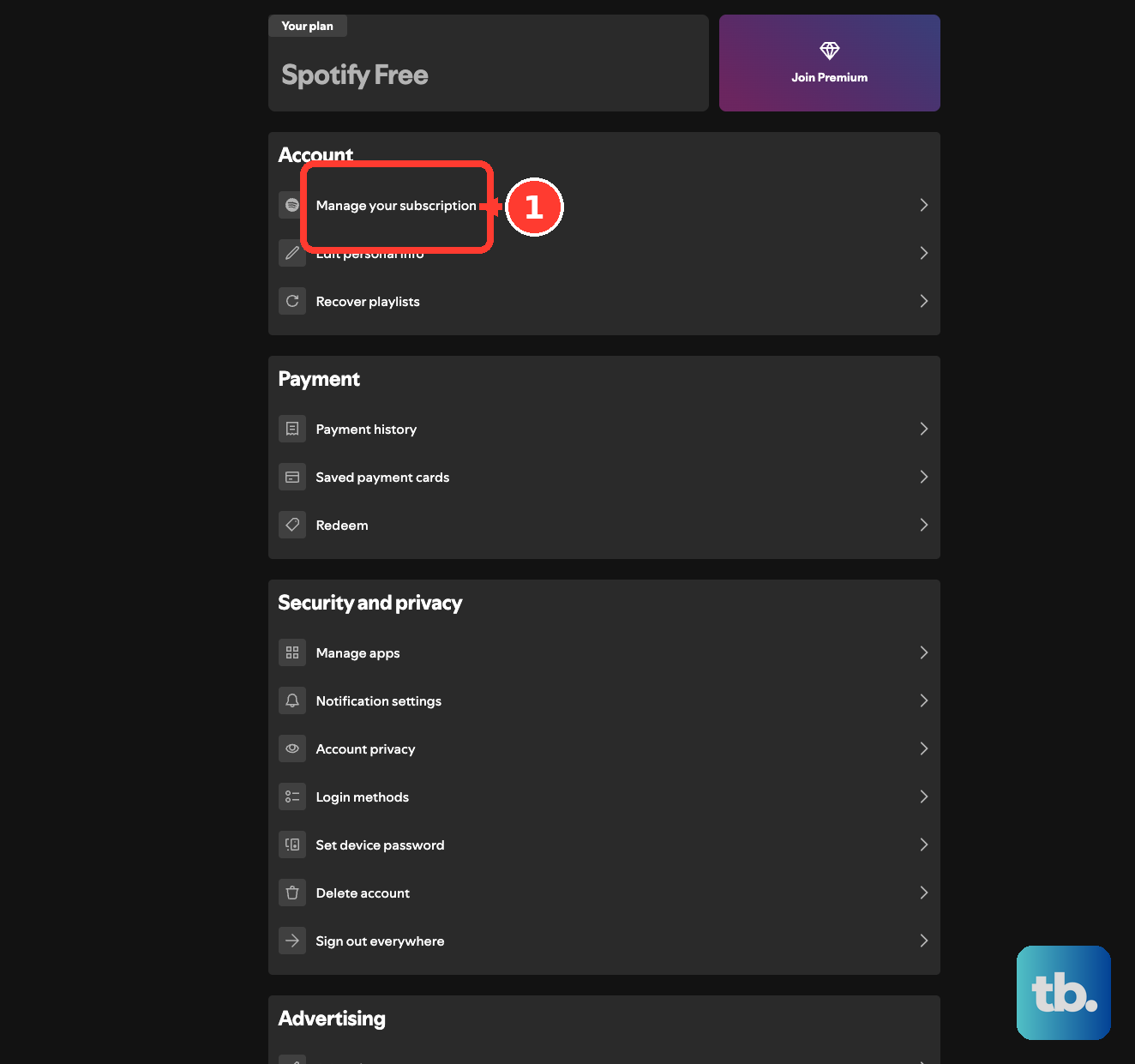
On your phone, check the same details through your profile picture > Settings and privacy > Account > Billing.
If your plan shows Premium but the app still acts like Free, try logging out and back in next. If it shows Free, check for another account or a payment problem before reinstalling Spotify.
Refresh your Premium connection
Spotify recommends logging out and back in to refresh the connection between your account and device.
- 1.On mobile or tablet, tap your profile picture, open Settings and privacy, scroll down, and tap Log out. On desktop or the web player, open your profile menu and select Log out.
- 2.Sign back into the account that holds your Premium subscription.
- 3.Try the Premium feature that was missing.
A different login can mean a different account
Signing into an account other than the one that received your subscription leaves you without that subscription’s Premium benefits.
Open Edit login methods on Spotify’s account website to review your login methods.
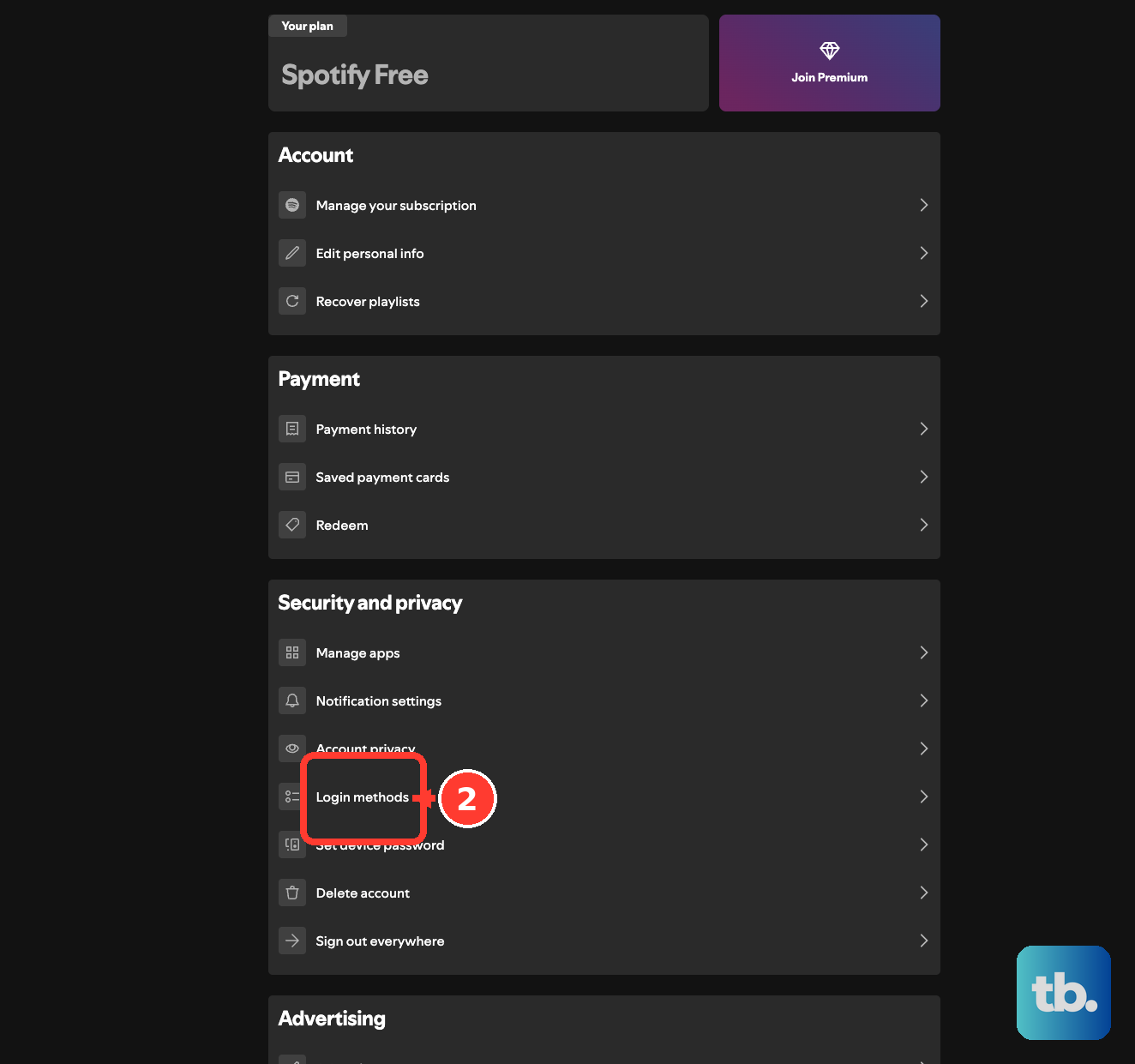
Check whether you subscribed using another email address, phone number, Apple login, or Google login. The login you use matters here.
Sign into the account that received the subscription.
Check its plan under Manage your subscription.
Test playback again using that account.
If you paid but Premium never activated
Use these checks when Spotify shows Free after a purchase or Premium stopped after a renewal problem. A pending bank transaction is not confirmation of a completed payment.
Compare the transaction’s status in your bank account with your Spotify subscription status. A failed authorization eventually expires and the funds return.
Review Spotify’s payment history for a failed payment. Spotify retries failed recurring payments over the following days.
Check that your payment method has sufficient funds.
Check that the card is still valid.
Check that the payment method’s country matches your Spotify account’s country.
In your banking app, permit recurring, online, and international transactions where your bank requires it.
Complete any bank authentication requested for the payment.
Retry the failed payment in a private browser window.
If it still fails, try another payment method.
Contact your payment provider if the payment remains blocked.
To replace payment details for a subscription billed directly by Spotify, open Payment methods on the account website.
Select Add or Change.
Enter your payment details.
Confirm with Add/Change payment method.
For Premium supplied by a phone carrier, internet provider, or another partner, open Manage your subscription > Payment.
Use the provider’s contact link to ask for help with payment or activation. That provider manages the subscription.
Restore your Family or Duo membership
Ask your plan manager for a fresh invitation if your membership is missing.
For Family, have the manager create or copy an invitation through Manage members.
For Duo, have the manager use the invitation option under Manage Members > People on this plan.
Log out of the manager’s account if it is open in your browser.
Open the invitation.
Sign into your own Spotify account.
Confirm your full address to complete the joining process.
If the invitation link fails, try opening it in a private browser window.
Request another invitation if the link still fails.
If Spotify requests Family address reverification, submit the full shared address through its email within seven days.
After missed or failed verification, request to rejoin the same plan if you’re eligible.
Before switching plans, remember that failed or missed Family address verification can restrict joining a different Family or Duo plan for 12 months.
When only one Premium feature fails
If your account shows Premium and other benefits work, go straight to the feature that’s failing. Downloads, audio quality, and playback order each have their own settings and limits.
For downloads that stopped playing, connect Spotify to the internet. You must go online at least once every 30 days to keep downloads available, with a limit of 10,000 tracks per device on up to five download devices.
To download an individual song, put it in a playlist first.
Download missing music again using the download-arrow button on its album or playlist.
To download over mobile data, enable Downloads over cellular through your profile picture > Settings and privacy > Data-saving and offline > Downloads and streaming. Downloads use Wi-Fi by default.
If undownloaded tracks are unavailable on mobile, turn off Offline mode through your profile picture > Settings and privacy > Data-saving and offline.
On Mac, deselect Offline Mode in the Spotify menu.
On Windows, deselect Offline Mode through the three-dot menu > File > Offline Mode.
For low audio quality on mobile, choose your streaming or download quality through your profile picture > Settings and privacy > Media Quality.
On desktop, choose the quality through your profile picture > Settings > Audio Quality. The web player has no quality selector.
If quality keeps dropping, check Auto-adjust on mobile or Auto adjust quality on desktop.
To enable lossless on mobile, select Lossless for streaming or downloads through your profile picture > Settings and privacy > Media quality. Lossless requires mobile app version 9.0.58 or later, desktop version 1.2.67 or later, and compatible equipment. It applies to music, not podcasts, videos, or audiobooks.
For existing downloads, select Update to Lossless when prompted.
If songs play in an unexpected order, tap the shuffle icon until shuffle is off.
To remove Smart Shuffle from the play-mode cycle, disable Include Smart Shuffle in play modes through your profile picture > Settings and privacy > Playback.
Repair Spotify on the affected device
These checks target app and playback problems on an account that already has Premium.
Close Spotify.
Reopen Spotify.
Test the same account on another supported device or the web player. If it works there, focus on the device that fails.
If multiple devices or accounts fail, check @SpotifyStatus or Community Ongoing Issues through Spotify’s troubleshooting page.
Follow the instructions for any matching incident.
If Spotify cannot connect, test another website or app.
Turn Wi-Fi off in your device settings.
Wait 30 seconds.
Turn Wi-Fi back on.
If the connection still fails, test another Wi-Fi network or cellular data.
On Android, update Spotify by finding Spotify in the Google Play Store and tapping UPDATE.
On iPhone or iPad, update through the App Store > account photo > App Updates > Update beside Spotify.
On desktop, update through the profile picture’s update indicator > Update Spotify now.
On mobile, clear the cache through your profile picture > Settings and privacy > Data-saving and offline > Storage > Clear beside Clear cache. Clearing the cache can remove Offline Backup content.
On desktop, clear the cache through your profile picture > Settings > Storage > Clear cache.
Free device storage until approximately 1 GB is available for Spotify.
If the app still fails on iPhone or iPad, uninstall it by holding Spotify’s icon and selecting Remove App > Delete App. Reinstallation removes your downloads.
Reinstall Spotify from the App Store.
On Android, uninstall through Settings > Apps > Spotify > Uninstall.
Reinstall Spotify from Google Play.
On Mac, move Spotify from Finder > Applications to Trash.
Empty Trash.
Reinstall Spotify using its official download page.
On Windows 11, uninstall through Start > Settings > Apps > Installed apps > Spotify > More > Uninstall. Windows 10 uses Apps & features for the Settings route.
Reinstall Spotify from the Microsoft Store or Spotify’s official download page.
Download your offline content again after reinstalling.
Reconnect a speaker or TV using the right account
Follow these steps when Premium works on your phone or computer but playback fails on a connected device.
- 1.For the first connection, put your phone and the speaker or TV on the same Wi-Fi network.
- 2.Play something in Spotify, tap the device icon, and select the intended device.
- 3.If the connection fails, restart Spotify and the receiving device, update both, and reconnect.
- 4.On iPhone or iPad, enable Spotify under Settings > Privacy & Security > Local Network to allow device discovery.
- 5.To reset account sessions, open Sign out everywhere on Spotify’s account website and select Sign out everywhere.
- 6.For speakers, TVs, and consoles, also open the account’s apps page and select Remove Access for the relevant integration. Reconnect using your Premium account.
Get help when your paid account still lacks Premium
If the correct account shows Premium but its benefits remain unavailable, open Spotify’s contact page and select Message us. Explain which features fail, which devices are affected, what plan your account shows, and which fixes you’ve tried.
Spotify does not provide telephone support. Use its messaging option for unresolved account or subscription problems.
If your subscription changed unexpectedly or someone else is controlling playback, reset your Spotify password using a private browser window. Then select Sign out everywhere on your account website.
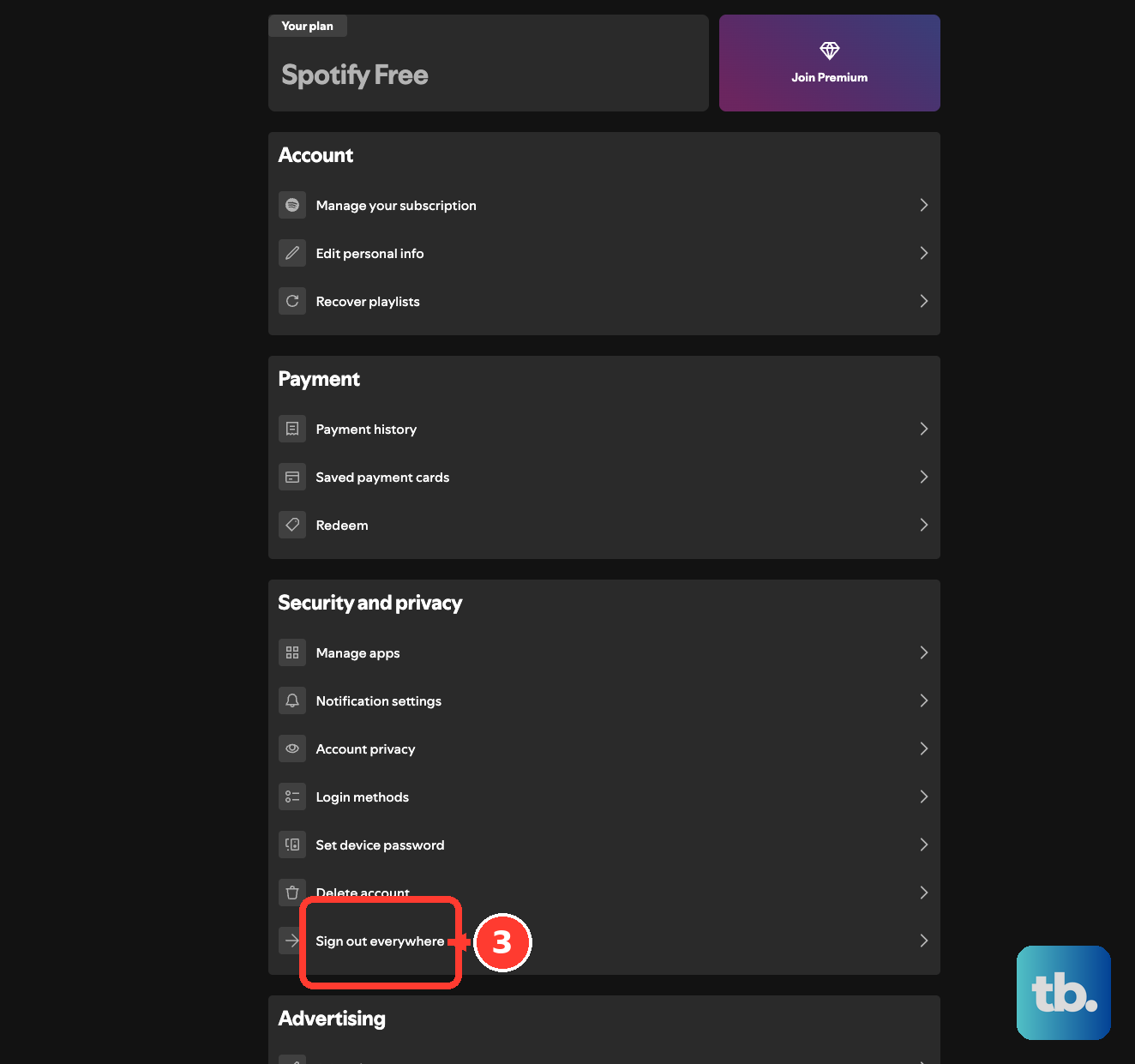
Remove unfamiliar connections through Manage apps > Remove Access. Secure your associated email or login-provider account, then reconnect your devices.
Frequently Asked Questions
Why do I still hear ads with Spotify Premium?
Premium does not remove all podcast advertising, host endorsements, or sponsorships. Hearing an ad inside a podcast does not by itself mean your subscription is broken. There is no Premium setting that removes all of these ads.
Why are audiobooks unavailable even though I have Premium?
Audiobook access depends on your plan, country, and remaining listening allowance. In the US, included hours apply to eligible Individual subscribers and Family or Duo managers, not Student subscribers or every plan member. Open Audiobook Listening Time on your account website to check your allowance and renewal date.
Can two people listen at the same time with one Premium account?
One Spotify account supports one simultaneous playback device. Separate listeners need separate accounts, including their own accounts as members of a Family or Duo plan.
Why is my child's account missing features on Premium Family?
Ask the Family manager to check that the managed account occupies a Family plan slot. Managed accounts created without an available slot can be Free. Even with Premium, managed accounts intentionally lack features such as Jam, Blend, and collaborative playlists.