Your friends are messaging you about playlists you never made, or you opened the app and saw "listening on a device in another country" that isn't yours. Maybe your password suddenly stopped working, your Discover Weekly is full of music in a language you don't speak, or you got an email confirming a change you never requested. Whatever the symptom, it all points to one thing. Someone else is in your Spotify account.
For the reset itself, a browser based strong password generator builds a long random password in one click. It runs entirely on your device, so the new password is never transmitted anywhere.
Take a breath, because the realistic outlook here is good. Most Spotify takeovers are recoverable in a few minutes once you reset the password and force every other session to sign out, and Spotify states that your financial and security details are never compromised in these account takeovers. The steps below are ordered fastest and most common first, then the locked-out recovery flow, then the steps that lock the account down so it does not happen again.
One ground rule before you start. Do everything on a device, browser, and network you have signed in from before. A familiar setup is less likely to trip extra verification, and it keeps you on the genuine Spotify domains instead of a copycat. Confirm you are actually on accounts.spotify.com or spotify.com before you type a password anywhere.
Confirm the Compromise Before You Touch Anything
It is worth a ten-second sanity check so you fix the right problem. Genuine signs of a takeover include login alerts from a location you have never visited, your password no longer working, playlists or follows you did not create, a change to the email on the account, or contacts telling you they received odd messages from your profile.
If you can still get into the account, that is the easy case, and the first two steps below will likely be enough. If your password has already been changed and you are locked out entirely, skip ahead to the locked-out recovery flow further down. Either way, the very next action is the same. Change the password.
Reset Your Password Right Away
Resetting the password is the single most effective move because it invalidates the credentials the attacker is using. Do this in a private or incognito browser window so no stale logged-in session gets in the way.
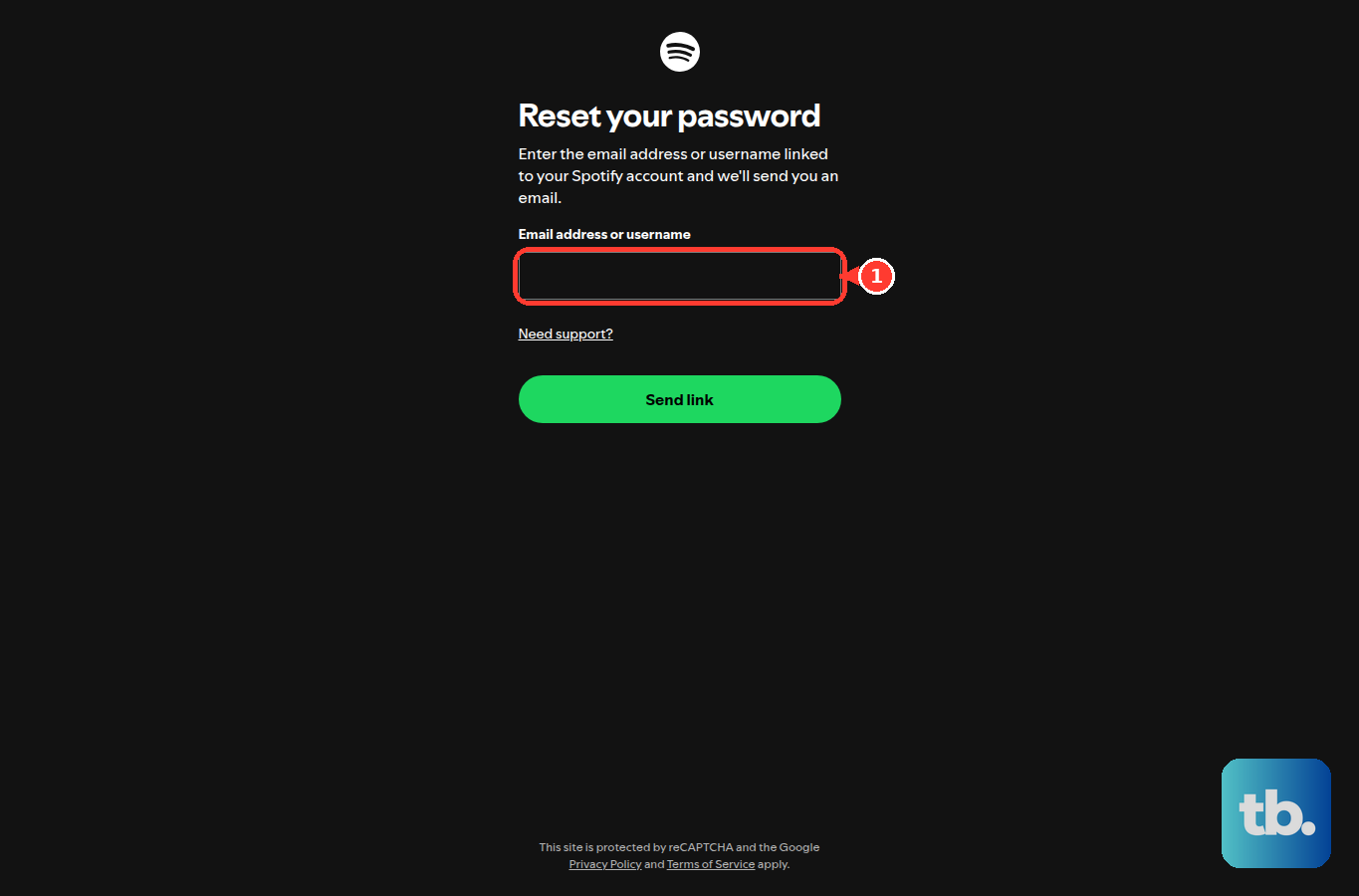
- 1.Open Spotify's password reset page at spotify.com/password-reset, which loads as accounts.spotify.com/password-reset.
- 2.Enter the email address or username linked to your account. You need access to that email address, because the reset link arrives there.
- 3.Open the reset email Spotify sends you and follow the instructions. If the link does not seem to work, open that same emailed link in a private or incognito window.
- 4.Choose a strong new password you have not used anywhere before.
If you have already tried resetting several times in a short period, give it a rest or switch to a different device or browser before trying again. And to be clear, real Spotify support will never ask you to read back a verification code, your password, or any login code. If anyone does, it is a scam, no matter who they claim to be.
Sign Out Everywhere to Kick the Intruder Off
Changing the password is not always instant across active sessions, so the next step force-disconnects everyone. On your Spotify account page, use the Sign Out Everywhere option at spotify.com/account/sign-out-everywhere/, then confirm.
This logs out every active web, app, and desktop session, so whoever got in is pushed out. Spotify's hacked-account guidance notes this can take up to 1 hour to take effect across all sessions and devices, so do not be alarmed if a rogue session lingers briefly. One important limit. Sign Out Everywhere does not cover partner devices such as speakers, game consoles, and TVs, which you handle in the next step.
Review and Revoke Connected Apps and Devices
Attackers often leave a connected app or partner device in place so they can quietly get back in. Clean those out from the Manage apps page at spotify.com/account/apps/.
This page lists everything connected to your account, including the partner devices that Sign Out Everywhere does not reach. Select Remove Access next to anything you do not recognize. The safest move during a takeover is to clear the whole list, since you can always reconnect the apps and devices you actually use afterward.
Check Which Sign-In Methods Are Linked to Your Account
Spotify lets you log in directly or through a third-party account, and an attacker may have attached or abused one of those connections. Review them on the Login methods page at spotify.com/account/login-methods/.
Look at which third-party sign-in methods are connected, such as Facebook, Google, Apple, and Samsung. Select Remove next to anything you do not recognize or no longer want, and use Add to enable a trusted one. Keep at least 1 login method available, otherwise you can lock yourself out. If you sign in to Spotify through Facebook, Google, or Apple, that linked account is now part of your Spotify security, so secure it too, which leads directly to the next step.
Change the Password on Your Email and Linked Accounts
Spotify accounts are most often compromised because of a breach on some other service, not Spotify itself. That means the same leaked password may unlock several of your accounts.
Change the password for any service tied to your Spotify login, and treat these two as the priority. The first is the email address on the account, because it controls password resets. The second is your Facebook, Google, or Apple account if you use it to sign in. Use a strong, unique password for each one, and do not reuse a password you have used elsewhere.
What to Do When You Are Completely Locked Out
If the attacker changed your email or you simply cannot reset the password and get back in, you will need Spotify to step in. Do not create a brand-new account to report the hacked one, because that will not recover the original. And do not pay any third-party account recovery service, as those are unnecessary and frequently scams.
Instead, use Spotify's own Contact us options. You can message Spotify Support through the Contact Spotify Support page at support.spotify.com/contact-spotify-support/, which requires logging in, or get help through Spotify's community help options. Spotify states that it does not offer phone support, so a support agent helps you by messaging. While you are talking to support, remember the rule from earlier. Genuine support never asks you to hand over a password, a verification code, or any login code.
About Two-Step Verification and Backup Codes on Spotify
Many recovery guides tell you to turn on two-factor authentication at this point, so it is worth being precise about what Spotify actually offers. Standard consumer Spotify listener accounts do not have user-facing two-factor or 2-step verification, so there are no 2FA prompts and no backup codes in the recovery flow for a normal account.
Per Spotify Support, 2-step verification is currently available only for Spotify for Artists accounts, and it is required for Spotify Payouts accounts that have earned $1,000 or more in a month. On those accounts it uses an authenticator app or SMS and provides backup codes to save, and those codes let you log in if you lose your phone. For a regular listener account, your security instead rests on the account password, the linked third-party login methods such as Facebook, Google, Apple, and Samsung, and the email address on the account, which is exactly why the steps above focus on all three.
Harden the Account So It Does Not Happen Again
Once you are back in control, a few habits keep you there. Because the original break-in almost certainly started with a reused or weak password, the fixes are mostly about credentials and device hygiene.
- 1.Use a long password with letters, capital letters, numbers, and special characters, and a different password for every service you use.
- 2.Keep your device firmware, operating system, and anti-virus software up to date.
- 3.Always log out after using Spotify on a device that is not your own.
It is reassuring to repeat the one piece of good news through all of this. Even in a full account takeover, Spotify states your financial and security details are never compromised. Fix the password, clear the sessions and connected apps, and the account is yours again.
Frequently Asked Questions
How long does Sign Out Everywhere take to work?
Spotify's hacked-account guidance states that Sign Out Everywhere can take up to 1 hour to take effect across all sessions and devices. If a session you do not recognize is still showing during that window, it does not mean the step failed. Give it time, and make sure you have also changed the password.
Does Sign Out Everywhere disconnect my speakers, TV, and game console?
No. Sign Out Everywhere does not cover partner devices such as speakers, game consoles, and TVs. To remove those, go to the Manage apps page at spotify.com/account/apps/ and select Remove Access on everything connected to your account.
Can I turn on two-factor authentication to protect my Spotify account?
Not on a standard listener account. Per Spotify Support, 2-step verification is currently available only for Spotify for Artists accounts, and it is required for Spotify Payouts accounts that have earned $1,000 or more in a month. A regular account's security rests on a strong password, your linked login methods, and the email address on the account.
What if the hacker changed the email on my account?
If you cannot reset the password or get back in because the email was changed, contact Spotify through the Contact Spotify Support page at support.spotify.com/contact-spotify-support/, or get help through Spotify's community help options. Do not create a new account to report the problem, and never pay a third-party recovery service.
Were my payment or card details stolen?
Spotify states that your financial and security details are never compromised in these account takeovers. Your priority is still to reset the password, sign out everywhere, and remove unrecognized connected apps and login methods.
How do I make sure this does not happen again?
Use a long, unique password with letters, capitals, numbers, and special characters that you do not reuse on any other service, keep your device firmware, operating system, and anti-virus up to date, and always log out after using Spotify on a device that is not your own. Because most Spotify takeovers begin with a breach on another service, also secure the email address and any third-party account linked to your Spotify login.