You open Yahoo Mail and something is off. Maybe the page won't load or freezes mid-scroll, maybe new messages have stopped arriving, or maybe you keep getting bounced at the sign-in screen.
The good news is that most Yahoo Mail problems trace back to a short list of fixable causes: a stale browser cache, an ad blocker, a full mailbox, a wrong setting, or an outdated app. Some live on Yahoo's side, but you can clear most of them yourself in a few minutes.
The fixes below are ordered quickest and most common first. Start at the top and stop as soon as your mail is working again.
Send Yourself a Test Email First
Before changing anything, find out whether the problem is your account or just one device. This single check saves you from troubleshooting the wrong thing.
Sign in to Yahoo Mail from a web browser on a computer, compose a test email to your own address, and send it. Then wait up to 5 minutes for it to arrive.
If it arrives with no error, your account is fine and the problem is specific to a device, app, or browser, so skip ahead to the relevant section. If you get an error message, follow the instructions in that message. If nothing arrives at all, check for any failed-delivery messages and read the mailbox and incoming-mail sections below.
Whitelist Yahoo Mail in Your Ad Blocker
This is an easy one to overlook. Yahoo says ad blockers can hurt email performance and functionality, so a blocker can be the reason buttons, menus, or whole pages misbehave.
Open your ad-blocking software and unblock ads on the Yahoo Mail website (add it to the allow list), then reload the page. If Mail starts working, the blocker was the culprit.
Update Your Browser and Clear the Cache
When the website, buttons, or menus don't work or load slowly, make sure you are on the latest version of a supported browser. Update your browser first, then clear its cache and cookies, since a corrupted cache can cause pages to freeze, fail to load, or trigger cookie-related sign-in errors.
Google Chrome: click More (the three-dot icon) at the top right, then Delete browsing data. Choose a time range such as Last hour or All time, check Cookies and other site data and Cached images and files, then click Delete data. If you are signed in to Chrome, this also clears the data from your synced Google Account.
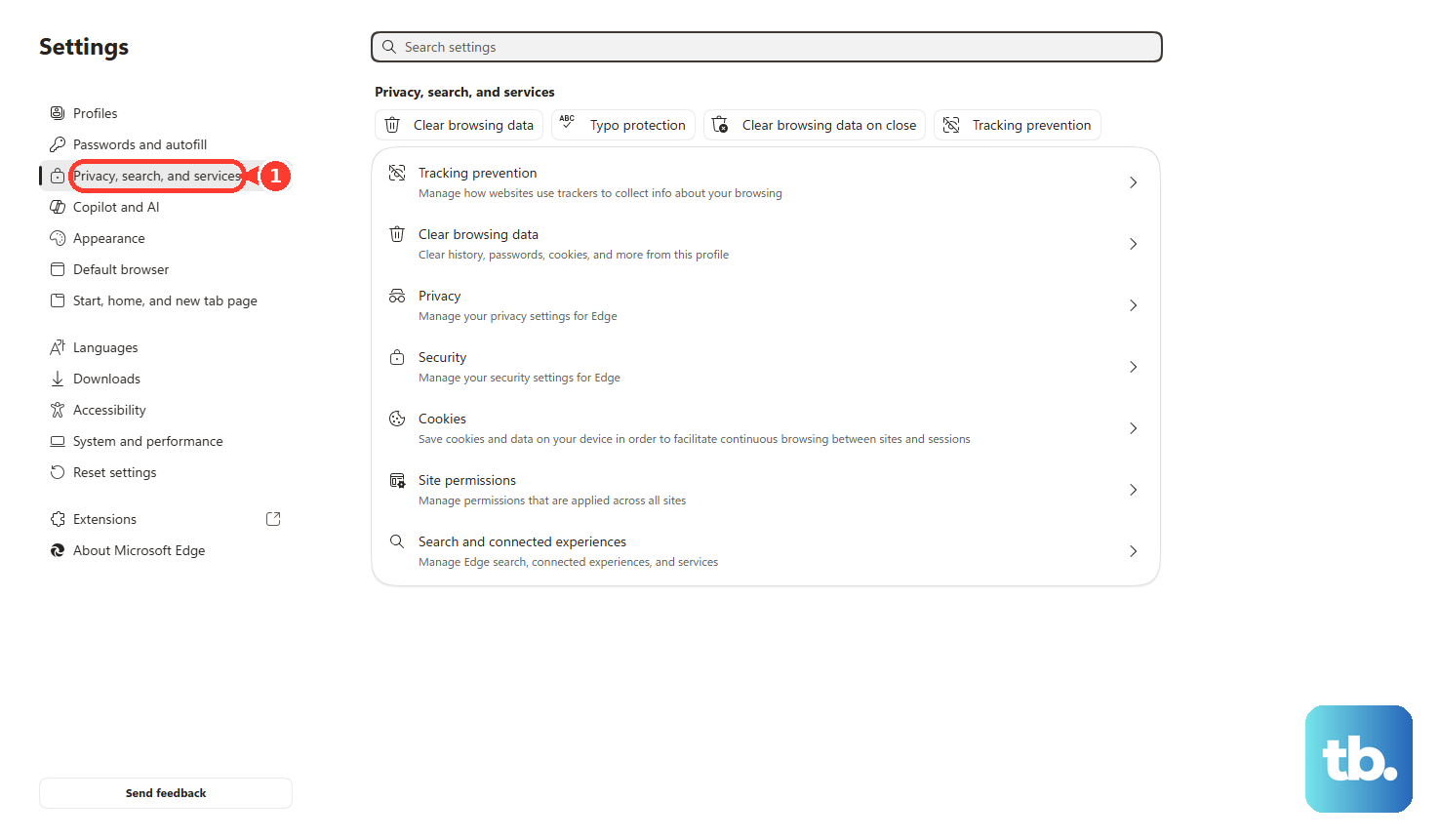
Microsoft Edge: select Settings and more (the three-dot icon) > Settings > Privacy, search, and services. Next to "Clear browsing data now," select Choose what to clear, pick a time range, check Cookies and other site data and Cached images and files, then select Clear now. If sync is on, Edge clears this across all your synced devices. To clear only this device, turn off sync first under Settings > Profiles > Sync.
Mozilla Firefox: click the menu button, select Settings, then open the Privacy & Security panel. In the Cookies and Site Data section, click Clear Data, choose Everything as the time range, make sure the cached files and the cookies and site data options are checked, then click Clear.
After clearing, quit and reopen the browser, then load Yahoo Mail again.
Fix Sign-In and Password Errors
An "Invalid ID or Password" message means the Yahoo ID and password combination doesn't match Yahoo's records. Work through these in order:
- 1.Check that Caps Lock and Num Lock are off, since they change what you actually type.
- 2.If your browser autofills your password, update its saved password (especially after a password change).
- 3.At sign-in, click Not you? and carefully re-enter your Yahoo ID and password.
- 4.Clear your browser's cookies, then quit and restart the browser.
- 5.Try a different supported browser. If you can sign in there, the problem is your usual browser, not your account.
After too many failed attempts, Yahoo may lock the account temporarily. It unlocks automatically after 12 hours. To get in sooner, or if someone changed your password without permission, use the Sign-in Helper with your recovery phone number or email address, then review your account settings and undo any changes you didn't make.
An account can also keep locking if Yahoo detects a risk to your password, if your IP address is hidden or keeps changing, or if sign-in attempts come from different places in a short time. Secure the account, update your recovery information, and consider turning on free 2-Step Verification, which asks for a code in addition to your password.
Free Up Space When the Mailbox Is Full
Yahoo Mail includes 20 GB of free storage per account in the US (some regions list a different amount, such as 15 GB in the UK). When it is full you cannot send or receive new mail until you clear space, and any messages sent to you while it is full are not stored and cannot be recovered, even after you free space. That makes this an urgent fix if it applies.
To check your usage on the web, hover over the Yahoo or Profile icon in the upper right and look under Storage. In the mobile app, tap the Yahoo or Profile icon in the upper left.
To make room, delete old or large emails, review and remove large attachments, and empty your Spam and Trash folders. If you regularly run out of room, Yahoo sells 100 GB and 1 TB storage plans, and Yahoo Mail Plus includes 200 GB.
Check the Settings That Block Incoming Mail
If your test email arrived but mail from others does not, an account setting is probably intercepting it. On the web, work through these checks:
- Make sure your reply-to address is correct.
- Check whether the sender's address was blocked by mistake (blocked addresses).
- Check whether the sender's domain was blocked by mistake (blocked domains).
- Check your Spam folder in case the message was marked as spam.
- Check your filters in case mail was routed to another folder.
If everything tests fine on your end, the problem may be on the sender's side. Have them confirm they used the correct address and, if needed, contact their own email provider. Password-reset emails to inactive or recycled accounts can also fail to deliver because of Yahoo's fraud-prevention measures.
Update, Re-sign In, or Reinstall the Yahoo Mail App
On the Yahoo Mail app for iOS or Android, work from simplest to most thorough. First confirm your mail works on a computer, to rule out an account-wide issue. Then make sure you are running the latest version of the app from your device's app store.
If that doesn't help, sign out of the app and sign back in. If it still fails, uninstall the app and reinstall a fresh copy.
On Android, you can also clear the app's data and cache from the device settings menu, then force stop and restart the app, before reinstalling. Updating your device's operating system to the latest version can resolve app problems too. If issues continue after a reinstall, contact your device manufacturer for device-specific steps.
Re-add the Account in the iOS Mail App
If you read Yahoo Mail through Apple's built-in Mail app, most problems come from invalid settings or account issues, and connection settings can become corrupted during a system or app update. First confirm your login works on a computer with the test email above, and make sure you are running the latest version of iOS.
Open Settings > Apps > Mail > Mail Accounts, tap your Yahoo account, tap Delete Account, and confirm with Delete from my iPhone. Then, on the Mail Accounts screen, tap Add Account > Yahoo and sign in again.
If the connection still fails after re-adding, the device itself may be the problem. Use the dedicated Yahoo Mail app for this account instead.
Fix a Third-Party Mail Client With the Correct Settings and an App Password
If you use Yahoo Mail in a desktop or non-Yahoo mail client, sending or receiving failures usually come down to wrong settings, a missing app password, or a blocked port. Use these IMAP and SMTP values:
- Incoming Mail (IMAP) Server:
imap.mail.yahoo.com, Port 993, SSL required. - Outgoing Mail (SMTP) Server:
smtp.mail.yahoo.com, Port 465 or 587, SSL required, authentication required. - Email address: your full address ([email protected]).
- Password: a generated app password, not your normal Yahoo password.
Third-party email apps that don't use Yahoo's own sign-in page, and setups where you have turned on two-step verification or Account Key, need an app password, and your normal password will be rejected. To create one:
- 1.Go to your Yahoo Account Security page. Use a browser you have signed in to Yahoo with for several days in a row, and avoid Incognito mode, or the attempt may fail.
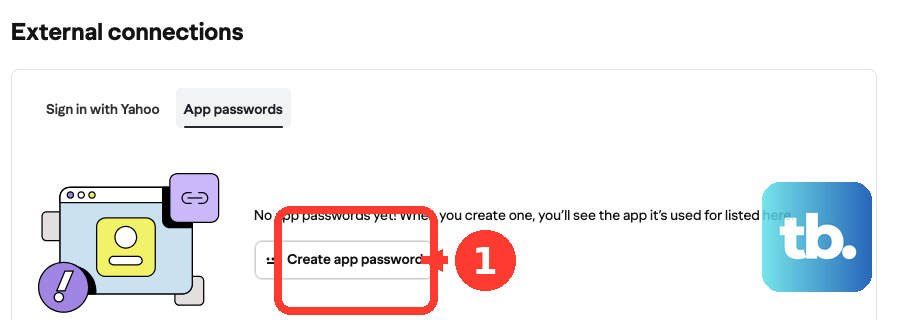
- 2.Under External connections, select Create app password.
- 3.Enter your application's name, then select Generate password.
- 4.Use the generated password to sign in to your mail client, then click Done.
A few more checks: verify any send-from address in the client, since an unverified address produces 553 errors. Set the app to manually pull from the server and limit connected devices to ones you currently use. Update the client if you get authentication errors, and make sure your ISP or security software is not blocking ports 995, 465, or 587.
App passwords stay active even after you change your main Yahoo password. To fully revoke access, delete them from Account Security under External connections.
Check Whether Yahoo Mail Is Down
If you have worked through the relevant fixes and nothing helps, the problem may be on Yahoo's side. Intermittent server-side incidents can cause errors that no user-side fix resolves.
Check an outage monitor for Yahoo Mail to see whether other people are reporting the same problem. If Yahoo Mail is down, there is no fix on your end. Wait for Yahoo to restore service and try again later.
Frequently Asked Questions
How do I know if the problem is my account or my device?
Sign in to Yahoo Mail in a web browser on a computer and send yourself a test email. If it arrives within about 5 minutes with no error, your account works and the issue is specific to your device, app, or browser. If it does not, the problem is account-wide.
Why did Yahoo reject my normal password in my mail app?
Third-party email apps that don't use Yahoo's own sign-in page, and accounts with two-step verification or Account Key turned on, need a generated app password instead of your regular password. Create one on your Yahoo Account Security page under External connections and use it to sign in.
My account is locked. How long until I can sign in?
After repeated failed sign-in attempts, the account unlocks automatically after 12 hours. For immediate access, use the Sign-in Helper with your recovery phone number or email address instead of waiting.
I cleared space in my full mailbox. Will the messages people sent meanwhile come back?
No. Mail sent to you while your mailbox was full is not stored and cannot be recovered, even after you free up space. Ask the senders to resend.
Why is Safari's "Clear History and Website Data" button grayed out?
Either there is no data to clear, or web content restrictions are set in Screen Time. It is not a malfunction. To clear cookies and cache while keeping your history, open Settings > Apps > Safari > Advanced > Website Data, tap Remove All Website Data, then tap Remove Now.
I changed my Yahoo password. Why does my old mail app connection still work?
App passwords stay active when you change your main Yahoo password and only stop working once you delete them. Go to Account Security > External connections, select Delete next to the app password, and confirm. If a connection persists, check that you deleted the correct entry.