You hit send on a Yahoo Mail message, and nothing happens. The email sits in your Outbox, you see a "Message not sent" error, or a confusing reply from MAILER-DAEMON lands in your inbox. Meanwhile, the rest of your mail seems to work fine.
The good news: most sending problems trace back to a short list of causes, and almost all of them are fixable in a few minutes. A weak connection, an oversized attachment, a temporary security hold, or stale settings in a third-party app cover the vast majority of cases.
Work through the fixes below in order. They are arranged quickest and most common first, so the early steps clear most situations before you ever touch server settings or app passwords. Paths are given for the web, the Yahoo Mail app on iOS and Android, and native or third-party mail clients where each fix applies.
Confirm the Email Didn't Actually Send
Before troubleshooting anything, rule out a false alarm. Open your Sent folder.
If the message is there, it left your account successfully, and any delivery problem is downstream (the recipient's side, their spam folder, or a bounce).
If it isn't in Sent, check your Drafts folder, where unsent messages wait.
Open the draft, confirm the address in the To field is spelled correctly, and send again.
Clear an Email Stuck in the Outbox
On mobile, a pending message lands in the Outbox, and a blocked connection keeps it there. This is the single most common cause of stuck mail.
In the Yahoo Mail app (iOS and Android), tap Inbox, then tap Outbox. (The Outbox only appears when a message is pending; otherwise it stays hidden.)
Next, tap the email to open it.
Then tap the Delete (trash) icon, then compose and send it again.
If a browser works on the same device but the app does not, your device settings may be blocking the app's internet access; check those permissions and allow it.
In the iOS native Mail app, the steps differ slightly. Open Mail and tap Mailboxes or your Yahoo account name in the top-left.
After that, scroll to your Yahoo mailbox and tap Outbox (also hidden unless a message is pending).
Then tap Edit, select the messages, then tap Trash.
Compose and send the message again.
Check Your Internet Connection
A weak or absent connection, or a device setting that blocks Yahoo Mail from reaching the internet, will leave mail unsent every time.
Confirm other apps can load, toggle Wi-Fi or mobile data, and make sure the Yahoo Mail app is allowed network access in your device settings.
Restoring the connection often releases a stuck message on its own.
Wait Out the "Message Not Sent" Error
If you see "Message not sent, please try again later," that is a temporary, server-side hiccup.
It typically resolves on its own within a few minutes to a few hours, so wait and try sending again.
If instead you are asked to provide security verification when sending, send yourself a test email using the desktop version of Yahoo Mail.
Confirming it is really you this way should remove the security request.
Stay Under the 25 MB Size Limit
The sum of all attached files in a single message cannot exceed 25 MB total.
This is not a per-file limit, and it applies to both incoming and outgoing mail.
An oversized message fails and stays in the Outbox.
If you are over the limit, remove or resize attachments.
For genuinely large files, upload them to cloud storage or a file-transfer service and paste the share link into the message body instead.
Release a Suspicious-Activity Sending Block
Yahoo can place a temporary sending block when it detects unusual behavior: a lot of emails in a short time, duplicate or repeated content, very large recipient groups, or messages piling up in the Outbox.
You keep full read and receive access while the hold is in effect, so the account is not fully locked.
Wait for the temporary hold to expire.
If your email contains hyperlinks, send it as plain text instead.
Avoid sending a large number of emails over a short period.
Remove and re-add the account in any non-Yahoo mail apps.
If none of those triggers describe what you were actually doing, treat the alert as a possible account compromise (more on that below) and run account recovery to secure the account.
Read a "Failed Delivery" Bounce
A reply from MAILER-DAEMON or Mail Delivery Subsystem means a message you sent was undeliverable and bounced back.
The bounce contains both the reason and a copy of your original message, so read it before resending.
Most bounces come down to the recipient address.
Double-check its spelling, since a single misplaced letter causes a failed delivery, and confirm the recipient account still exists and hasn't been closed or moved.
One variation is worth knowing: if you get a failed-delivery message for every incoming email, the culprit is usually a broken forwarding address on your own account.
Check your mail settings and fix or remove the bad forwarding rule.
Fix Sending in a Third-Party App (Outlook, Apple Mail, and Others)
If sending fails only in Outlook, Apple Mail, or another client, the account itself is probably fine and the app's configuration is the problem.
Start by confirming this: sign in to Yahoo Mail in a web browser and send yourself a test email, waiting up to five minutes.
If the web works but the app doesn't, focus on the app.
The most reliable reset is to delete your Yahoo account from the app and re-add it, which refreshes any corrupted settings.
When you re-add it, use Yahoo's current server values: Incoming (IMAP): imap.mail.yahoo.com, port 993, SSL required: Yes. Outgoing (SMTP): smtp.mail.yahoo.com, port 465 or 587, SSL required: Yes, authentication required: Yes. Username: your full email address ([email protected]). Password: a generated app password, not your normal account password.
A few specific errors have specific fixes.
An unverified email address on the account produces a 553 error when sending from a third-party app, so the fix there is to verify your address, not to re-enter settings.
If you see "Server password has changed" or "Authentication failed," update the app or reauthenticate it.
And make sure ports 995, 465, or 587 aren't being silently blocked by a firewall, antivirus, or your ISP; if they are, contact your ISP or security-software vendor.
To reauthenticate without removing the account, delete the existing password in the app's settings and re-enter it.
By client, use the exact flow for your app. Outlook: open the settings icon on the right, click Accounts, click Sign in next to your account, complete the Yahoo sign-in with the verification code, click Agree, then Open Outlook.
For iOS Mail (iOS 17 and 18): go to Settings > Mail > Accounts, select the Yahoo account, tap Re-enter password, and enter your credentials (plus a verification code if prompted).
For Mac Mail: open Mail > Settings, select the Yahoo account, open the Server Settings tab, delete and re-enter the password in both the Incoming and Outgoing sections, then save.
Generate an App Password for Two-Step Verification
If you have Yahoo Account Key or two-step verification enabled, your regular account password is rejected by third-party apps, and you must use an app password instead.
To create one:
- 1.Go to your Yahoo Account Security page.
- 2.Under External connections, click Create app password.
- 3.Enter the app's name, then click Generate password.
- 4.Use the generated password to log into your third-party app, then click Done.
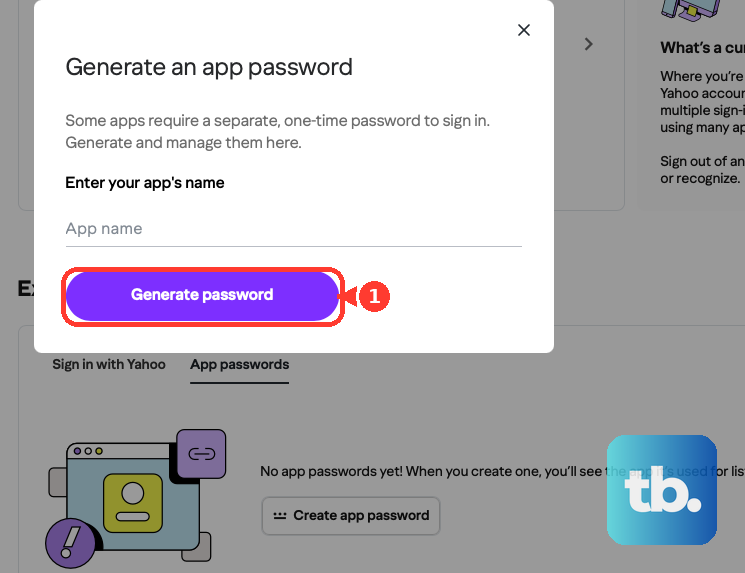
Generate it from a browser you have signed into Yahoo with for several days in a row, and avoid Incognito or private mode, which can make the generation fail.
If it won't generate, switch to webmail or the official Yahoo Mail app.
Note that app passwords stay active even after you change your main account password; the only way to invalidate one is to delete it on the Account Security page under External connections.
Rule Out Browser, Extension, and App Issues
On the desktop web, ad blockers inject code into your browser that can break Yahoo Mail's performance and functionality, so unblock ads on Yahoo Mail and try again.
Also use the latest version of a supported browser, and if problems persist, clear your cache and cookies or try a different browser entirely.
On mobile, an outdated or corrupted Yahoo Mail app can fail to connect to Yahoo's servers.
Keep the app updated, and if a message stays stuck after the steps above, uninstall and reinstall the Yahoo Mail app to clear corruption.
Check for a Compromised Account
If your contacts are receiving mail you didn't send, or your Sent folder is full of unknown messages, your account may be compromised; a hacker can even add suspicious sending names that trigger blocks.
If a sending block's listed triggers don't match your own behavior, treat it as a likely compromise, run Yahoo's account recovery, and secure the account.
AOL Mail: Two Easy-to-Miss Causes
If you use AOL Mail, the same connection and browser advice applies, plus two quirks worth checking first.
Look at your display name: if it contains any combination of the letters "AOL," the message will not go through, so remove it.
And pop-up blocking software or a firewall (such as McAfee) can interfere with sending, so temporarily disable the pop-up blocker (or add AOL to its allow list) and test with the firewall briefly turned off.
A simple computer restart to clear stale memory can also resolve sending after a long session.
Frequently Asked Questions
My email is in the Sent folder, so why didn't my recipient get it?
If a message is in Sent, it did leave your account. The problem is downstream: it may be in the recipient's spam folder, their address may be wrong, or it bounced. Check for a MAILER-DAEMON reply in your inbox for the specific reason.
Why can't I find my Outbox folder?
The Outbox is hidden in both the Yahoo Mail app and iOS Mail unless there is a pending message sitting in it. If sending is working, it simply won't appear in the folder list.
I changed my Yahoo password, so why does my old app password still work?
App passwords remain active even after a main-password change. The only way to invalidate one is to delete it on your Yahoo Account Security page under External connections, then generate a new one.
What does a 553 error mean when I send from an app?
A 553 error points to an unverified email address on your account. The fix is to verify your address rather than re-entering your server settings.
My settings look correct, but the app still won't send. What now?
A firewall, antivirus, or ISP can silently block ports 995, 465, or 587, which stops sending even with correct settings. Make sure those ports are open, and contact your ISP or security-software vendor if they are blocked.
Does the 25 MB limit apply to each file or the whole message?
It is the combined total of all attachments in a single message, not a per-file cap, and it applies to both incoming and outgoing mail. If you are over, share large files via a cloud link instead.