You open Yahoo Mail and the page just hangs. It might spin forever, freeze halfway through loading, or stay blank while your inbox never appears. On your phone, the app might sit there without pulling in new messages at all.
Most Yahoo Mail loading problems come from a short list of causes, and you can fix almost all of them in a couple of minutes. The usual culprits are a corrupt browser cache, an ad blocker, an outdated browser or app, or a broken sign-in connection.
Work through the fixes below in order. The quickest and most common ones come first, so you will probably be back in your inbox well before the end.
Check Whether Yahoo Mail Is Actually Down
Before you change anything on your end, rule out an outage. If Yahoo's servers are down, nothing you do locally will help, and you just have to wait.
Open an outage tracker and search for "Yahoo Mail." A clear spike in reports means the problem is on Yahoo's side. If nothing stands out, the issue is local, so continue with the fixes below.
A few scattered reports are normal even when the service is working, so look for a clear spike, not a handful of complaints.
Clear the Browser Cache and Cookies
This is Yahoo's first recommended fix. A corrupt cache can make webpages freeze, fail to load or stop responding, which matches the symptoms you are seeing. Clearing it makes the browser load Yahoo Mail from scratch.
Clearing cookies signs you out of most sites, so have your Yahoo password ready. Use the steps for your browser.
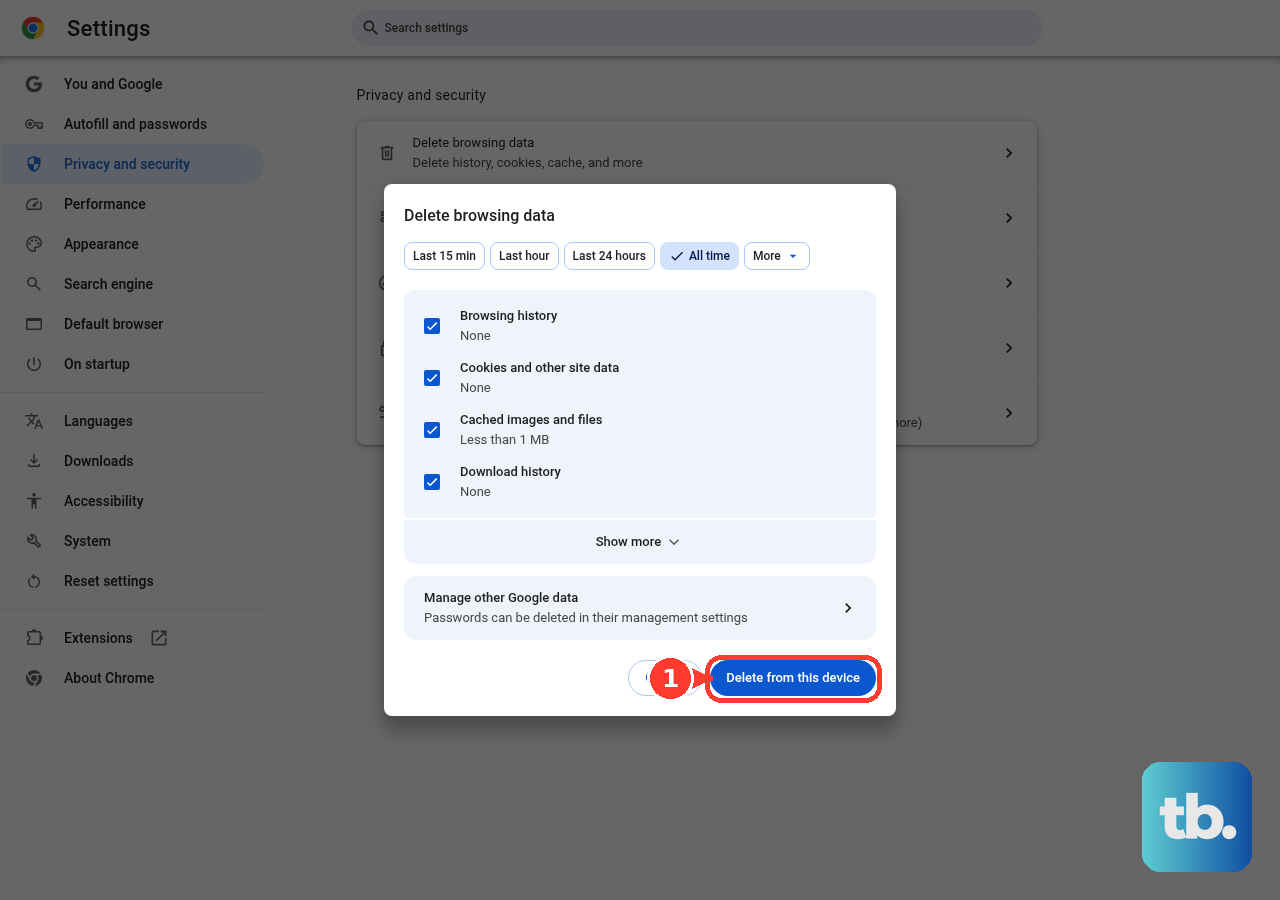
Google Chrome: Click the three-dot More menu at the top right and choose Delete browsing data. (You can also type "Delete browsing data" into the address bar and select the Action chip.) Set the time range to All time, check Cookies and other site data and Cached images and files, then click Delete data.
Microsoft Edge: Select Settings and more (...) > Settings > Privacy, search, and services. Under Clear browsing data, select Choose what to clear, pick a time range, check Cookies and other site data and Cached images and files, then select Clear now. The shortcut Ctrl + Shift + Delete opens the same options.
Mozilla Firefox: Open the menu and select Settings > Privacy & Security. In the Cookies and Site Data section, click Clear Data…, make sure both cookies and cached web content are checked, then click Clear.
Safari on Mac: Choose History > Clear History, use the pop-up menu to choose how far back to clear, then confirm. If Safari is turned on in iCloud, this also removes your history from your other Apple devices.
If you use the Yahoo Mail app on Android, you can do the same thing for the app. Go to Settings > Apps > Yahoo Mail > Storage, then tap Clear cache. If that doesn't help, also tap Clear data. Clearing the cache removes temporary files only, while clearing data also signs you out of the app. Either way, your emails stay on Yahoo's servers.
Whitelist Yahoo Mail in Your Ad Blocker
Ad blockers often stop Yahoo Mail from loading. Yahoo says they "add code into your browser in order to block ads, which can negatively impact email performance and functionality." They can even hide messages.
Open your ad-blocking extension and pause it for mail.yahoo.com, then reload the page. In AdBlock, click its icon and choose Always under Pause on this site. In Adblock Plus, turn off the This website toggle. In uBlock Origin, click the power icon. In Ghostery, click Trust Site.
Built-in blockers can also cause the problem. In Edge, set tracking prevention to Balanced. In Safari, turn off content blockers for the site. In Firefox, check Enhanced Tracking Protection. Some antivirus programs and home routers have their own ad blockers too, so allow yahoo.com there as well.
Update Your Browser and Enable JavaScript
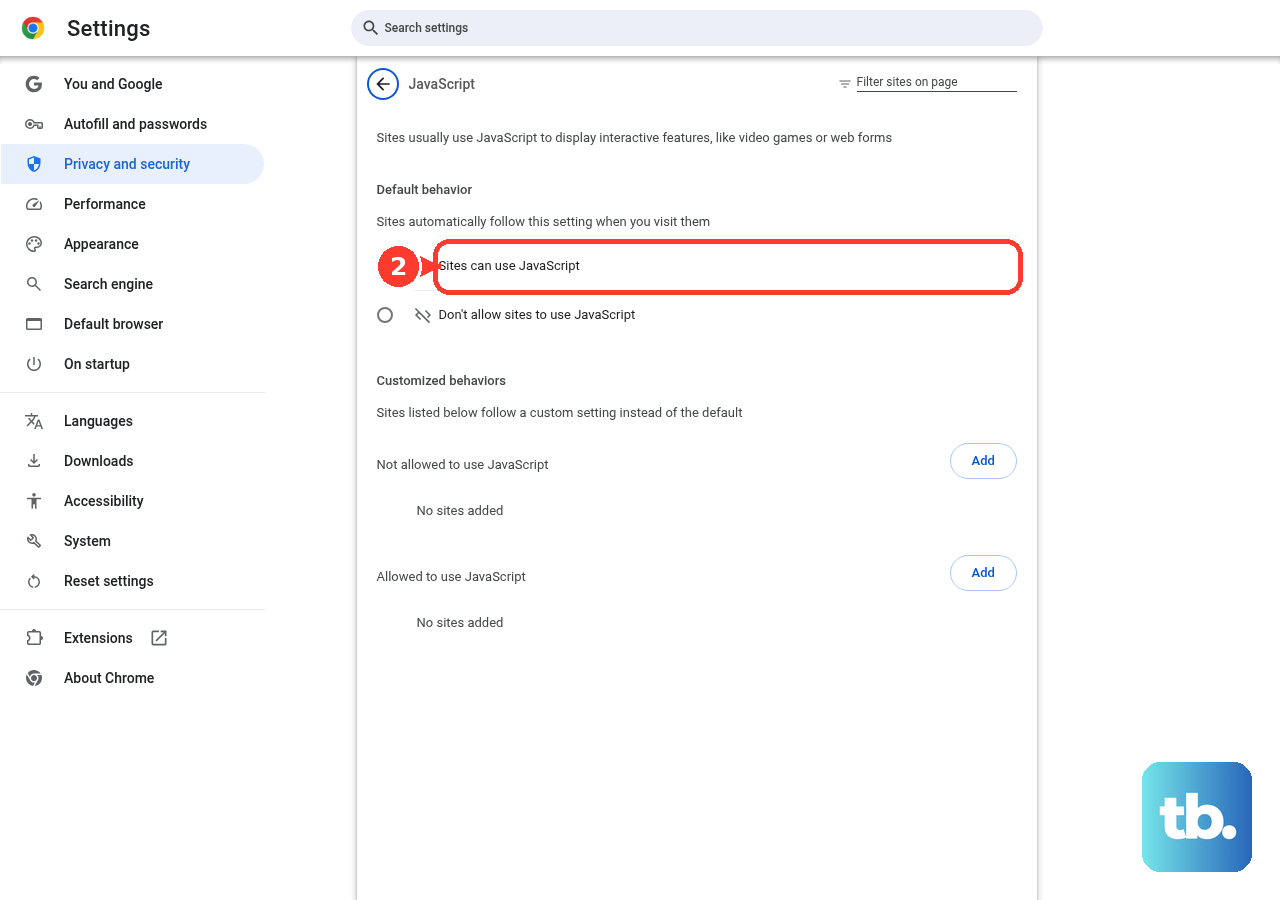
Yahoo Mail needs the latest version of a supported browser, and JavaScript must be turned on. An outdated browser or disabled JavaScript can leave the page broken or blank.
Update your browser, make sure JavaScript is enabled in its settings, then reload Yahoo Mail. If it still hangs, restart your computer, which is also one of Yahoo's official steps.
Disable Extensions, Antivirus, and Firewall Temporarily
Browser extensions can interfere with Yahoo Mail, and security software can block the connection completely. Test each one on its own and reload the page after every change.
First, turn off your browser extensions and reload. If that doesn't help, temporarily turn off your antivirus, antispyware and firewall, then try again. If you see a DNS error, you have a network connection problem to fix, not a Yahoo Mail problem.
Turn your security software back on as soon as you finish testing.
Reset Your Browser to Default Settings
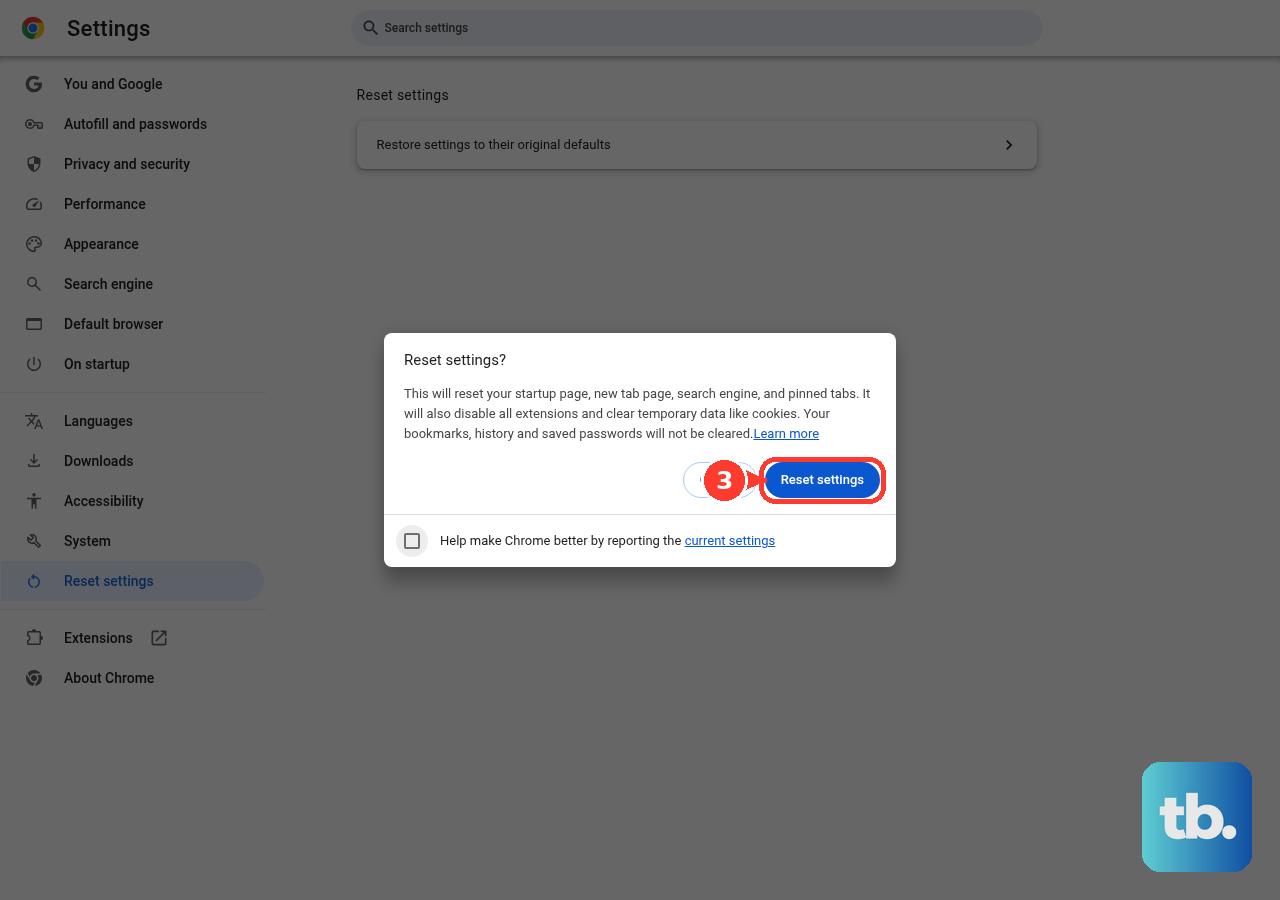
If the page still won't load, your browser settings may be corrupted. Yahoo's last desktop steps are to try Yahoo Mail on another computer or phone, then reset your browser to its default settings. If Yahoo Mail works on the other device, the problem is limited to that one browser or computer.
Update, Sign Out and Back In, or Reinstall the Mobile App
If the problem is on your phone, open Yahoo Mail in a browser on your computer first. If new mail shows up there but not on your phone, the problem is the app or the device. If mail isn't arriving anywhere, check your blocked senders, spam folder and filters instead.
An out-of-date app may not be able to connect to Yahoo's servers, and sometimes the app loses its connection to your account. Try these steps in order and test after each one:
- 1.Make sure the device is connected to the internet.
- 2.Update the Yahoo Mail app from the App Store or Google Play.
- 3.Sign out of the app, then sign back in.
- 4.On Android, go to Settings > Apps, tap Yahoo Mail, tap Force stop, confirm, and reopen the app.
- 5.Restart the device.
- 6.Uninstall the app and install it again.
- 7.Update the device's operating system (iOS or Android).
If you use Yahoo Mail in a mobile browser instead of the app, the same approach works. Check your connection, update the browser, clear its cache and cookies, turn off private browsing, restart the device, and try another browser if you need to.
Re-add the Account and Use an App Password
For Apple's Mail app on iPhone, Outlook or any other third-party email app, reconnecting the account often fixes loading and sign-in problems. Yahoo says most iOS Mail problems come from invalid settings, which app and system updates can corrupt. Update to the latest iOS, then remove your Yahoo account from Mail and add it back. If iOS Mail still won't connect, use the Yahoo Mail app instead.
If you use two-step verification or Account Key, some third-party email apps need an app password. This is a randomly generated code that lets an email app from another company access your Yahoo account, and your regular password won't work in those apps. To create one:
- 1.Sign in to your Yahoo Account Security page.
- 2.Under External connections, click Create app password.
- 3.Enter the app's name, then click Generate password.
- 4.Use the code with your full Yahoo email address to sign in to the email app, then click Done.
App passwords keep working even after you change your main password. To stop one from working, delete it on the Account Security page. Create app passwords in a browser you've used to sign in to Yahoo for several days in a row, and don't use Incognito mode. Customer care can't override this rule. If you still can't create one, use Yahoo Mail in a browser or the Yahoo Mail app.
Frequently Asked Questions
Why does Yahoo Mail load fine on my computer but not my phone?
That points to a problem with the app or the device, not your account. Update the Yahoo Mail app, sign out and back in, and reinstall it if you need to. On Android, clearing the app's cache and data can also help.
Will clearing my cache and cookies delete my emails?
No. Your messages are stored on Yahoo's servers, not in your browser cache. Clearing cookies signs you out, so keep your password handy.
I changed my Yahoo password but my mail app still will not connect. Why?
App passwords keep working after you change your main password, so the password change isn't what's blocking the app. Delete the old app password on your Account Security page, create a new one and sign in to the app with it.
Why can't I generate an app password?
You need to use a browser you've signed in to Yahoo with for several days in a row, and Incognito mode won't work. Customer care can't override this, so switch to your usual browser. If it still fails, use Yahoo Mail in a browser or the Yahoo Mail app.
Do I need an app password for Yahoo's own app?
No. App passwords are for third-party email apps that don't use Yahoo's sign-in page, such as Apple's Mail app or Outlook, when you have two-step verification or Account Key turned on. The Yahoo Mail app uses the normal Yahoo sign-in.
How do I know if it is a Yahoo outage and not my setup?
Check an outage tracker for Yahoo Mail. A clear spike in reports means the problem is on Yahoo's side, and you have to wait for Yahoo to fix it. If no outage shows up, the problem is local and the fixes above apply.