
Seeing the "SIM Card Not Provisioned MM2" error pop up on your Samsung Galaxy S25 Edge can stop you in your tracks. You can't make calls, send texts, or use mobile data. The error usually means your SIM card isn't properly registered with your carrier's network, and in my experience, it almost always has a straightforward fix.
The S25 Edge runs Android 15, and like any modern phone, it relies on a solid connection between the SIM card and your mobile provider. When something breaks that chain, an unactivated SIM, a suspended account, or even a loose connection, you get that dreaded "not provisioned" message. Let's run through the fixes, starting with the quickest ones.
Restart the S25 Edge First
A simple restart clears out temporary glitches and forces the phone to re-register with the network. On the Galaxy S25 Edge, press and hold the Volume Down and Side (power) buttons together for about 10 seconds until you see the Samsung logo. That's the force restart method, and it works even if the screen is frozen or unresponsive.
Once the phone boots back up, check if the error is gone. You'd be surprised how often this alone does the trick.
Toggle Airplane Mode
If a restart didn't help, try refreshing the network connection manually. Swipe down from the top of the screen to open the quick settings panel, then tap the airplane mode icon to turn it on. Wait about 30 seconds, then tap it again to disable it.
This forces the S25 Edge to scan for available networks from scratch. If the issue was a temporary handshake failure between the phone and your carrier, this usually resolves it.
Check Your SIM Card Activation and Account Status
If you just got a new SIM card for your S25 Edge, it might not be activated yet. Contact your carrier to confirm the activation went through. They can verify whether the SIM is properly registered on their end.
For prepaid users, check your account balance. If your plan ran out of funds or expired, the carrier may have suspended service temporarily. Top up your account and see if the error clears within a few minutes.
Remove and Reinsert the SIM Card
The SIM card tray on the S25 Edge can sometimes shift, causing a poor connection. Power off the phone, then use the ejector tool to pop the tray out. Inspect the SIM card for any visible scratches or damage, and check the tray itself for debris.
Reinsert the SIM card firmly until it sits flush in the tray, then slide the tray back into the phone. Turn the S25 Edge back on and see if the error disappears. This fix is especially worth trying if you recently dropped the phone or bumped it while carrying it.
Update Carrier Services
Android phones rely on Carrier Services, an app from Google that handles network communication. If it's outdated, it can cause provisioning errors on devices like the Galaxy S25 Edge running Android 15.
Open the Google Play Store, tap your profile icon, then go to Manage apps and device. Check the Updates available section and look for Carrier Services. If there's an update pending, install it and restart your phone afterward.
Manually Select Your Network
Sometimes the S25 Edge gets stuck trying to connect to the wrong network band or tower. Forcing a manual selection can bypass that. Go to Settings > Connections > Mobile Networks > Network Operators. Tap Search Networks, wait for the list to populate, then select your carrier.
The phone will attempt to register manually. If it succeeds, the error should clear immediately. If it fails, you'll get a similar message, but don't worry, there are more steps to try.
Reset Network Settings
This is a heavier fix, but it often resolves persistent provisioning errors. Go to Settings > General Management > Reset > Reset Mobile Network Settings. The S25 Edge will reset Wi-Fi, Bluetooth, and mobile network configurations back to default.
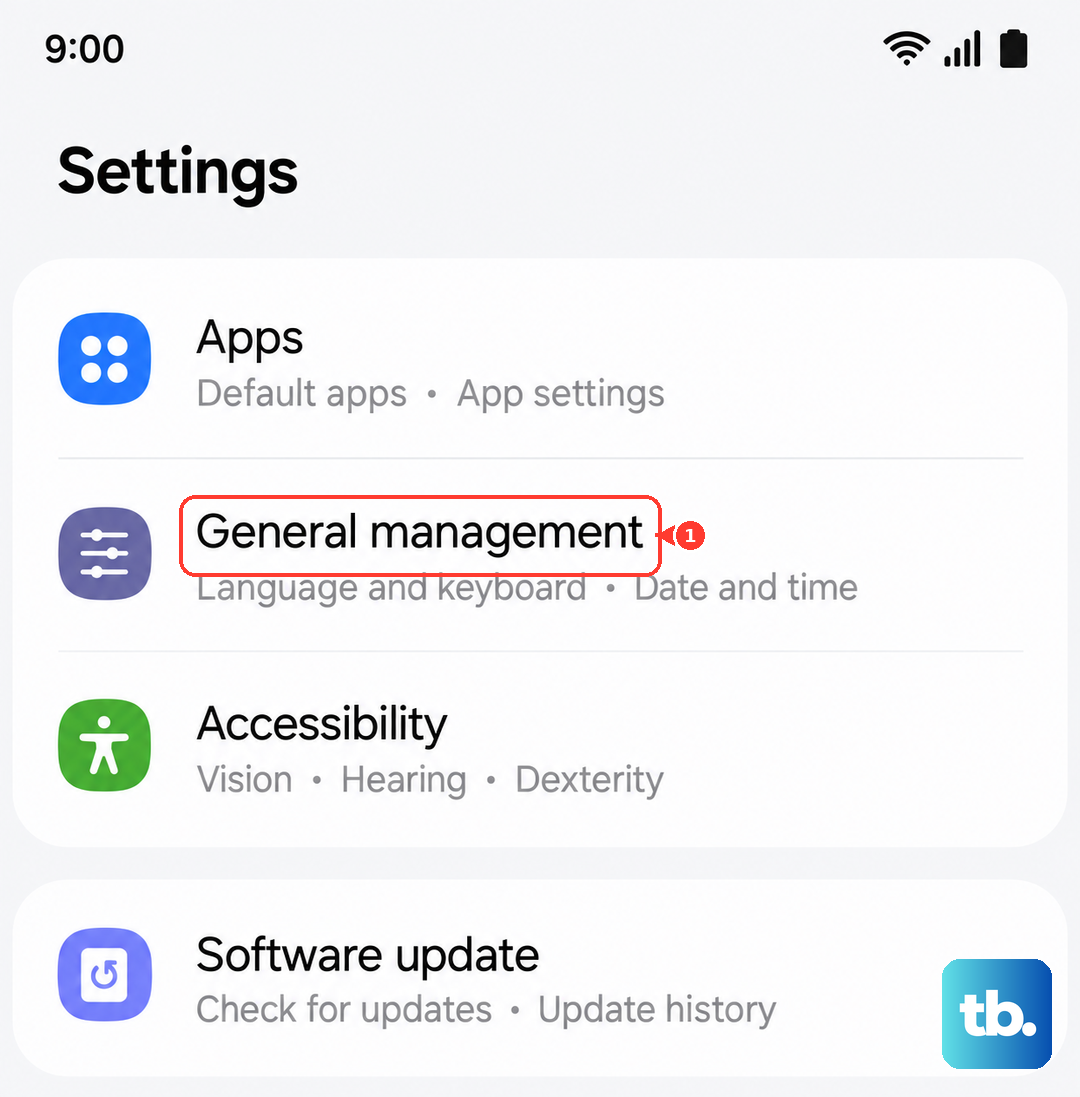
You'll need to reconnect to saved Wi-Fi networks afterward, and re-pair Bluetooth devices. But this step clears out any corrupted network profiles that could be causing the SIM not provisioned error. It's worth the minor inconvenience.
Test the SIM in Another Phone
If you've tried everything and the S25 Edge still shows the error, isolate the problem. Power off your phone, remove the SIM card, and insert it into a different compatible device. If the SIM works normally in another phone, the issue is with your Galaxy S25 Edge.
If it doesn't work in another phone either, the SIM card itself is likely damaged or deactivated. Your carrier can issue a replacement SIM, and most will activate it remotely within minutes.
Contact Your Carrier as a Last Resort
When none of the on-device fixes work, the problem is on the carrier's side. They can check whether your account is properly set up, whether there are any network outages in your area, or whether your SIM has been flagged as inactive. In rare cases, the provisioning data on their end gets corrupted and they need to push a fresh update to your line.
Most carriers can resolve this over the phone in under 10 minutes once you explain you've already tried restarting, reinserting the SIM, and resetting network settings. Start with the easiest fixes and work your way through, the S25 Edge is a reliable phone, and this error almost always has a simple explanation behind it.