
If your Redmi Note 13 Pro suddenly won't connect to your wireless earbuds, car, or speaker, it can feel like you're stuck in the past. Bluetooth glitches are pretty common on Android, especially with MIUI's layer on top, but the good news is they're usually fixable without a trip to a service center.
Let's start with the quickest fix that often works. Pull down your notification shade and tap the Bluetooth icon to turn it off. Wait about ten seconds, then tap it again to turn it back on. This simple reset of the Bluetooth radio can clear up a temporary hiccup. While you're at it, do the same for the device you're trying to connect to, putting it back into pairing mode.
Restart Your Redmi Note 13 Pro
If toggling Bluetooth didn't work, a full restart is your next best move. Press and hold the power button until the power menu appears, then tap "Restart." This clears the phone's RAM and stops any background processes that might be interfering with the connection.
You should also restart the Bluetooth accessory itself. Once both devices are back on, try the pairing process from scratch. I've found this resolves about half of the random disconnection issues people report.
Forget and Re-Pair the Problem Device
Sometimes a pairing gets corrupted. The fix is to remove that device's history from your phone and start fresh. Go to Settings > Bluetooth & device connection > Bluetooth.
Find the troublesome device in your list of paired items. Tap the gear icon next to it and select Forget. Now, put your accessory back into discovery mode and tap its name on your phone's Bluetooth screen to pair again. This establishes a clean connection profile.
Clear the Bluetooth System Cache
MIUI and Android store temporary data to make Bluetooth connections faster, but this cache can become corrupted. Clearing it is safe and won't delete your paired devices. Go to Settings > Apps > Manage apps.
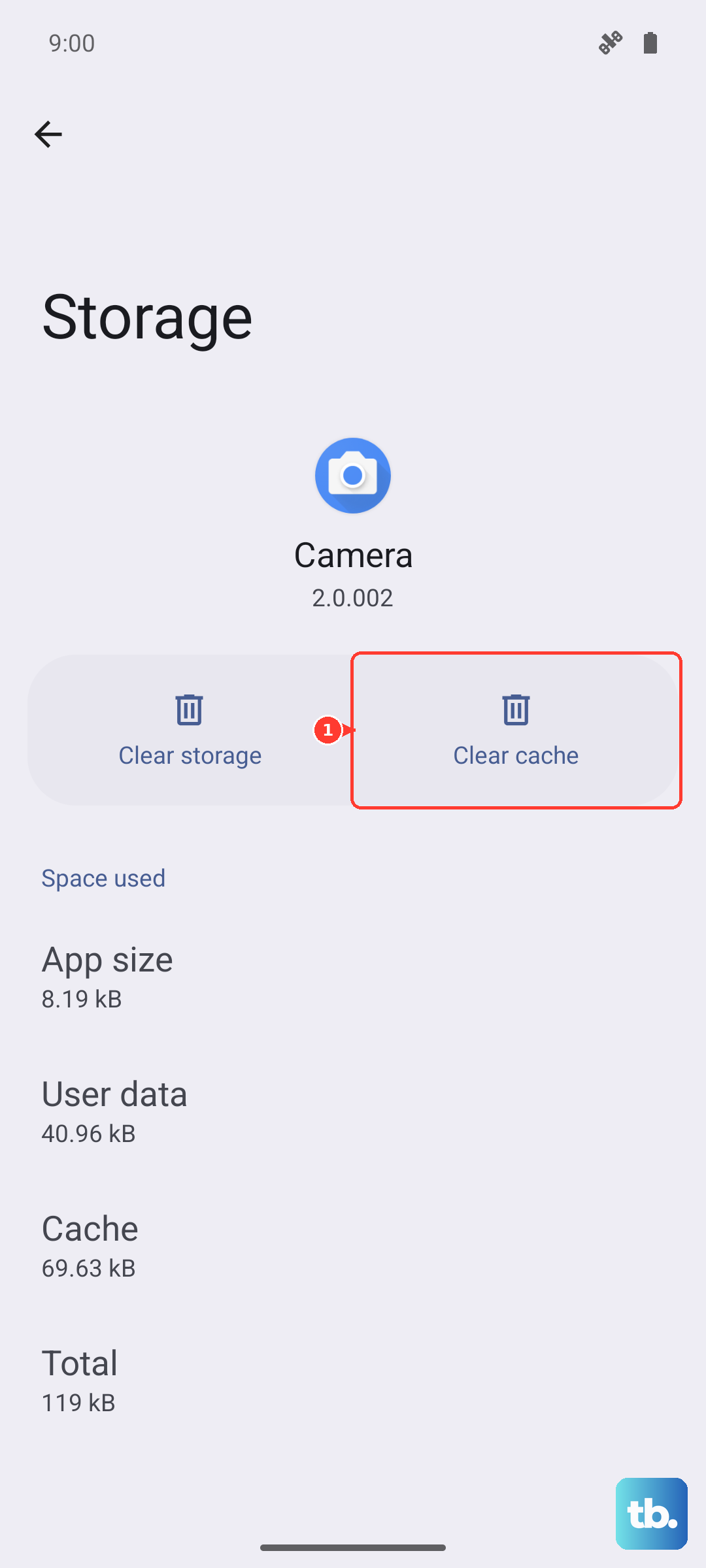
Tap the three-dot menu in the top right and select Show system apps. Scroll down and find the app simply called "Bluetooth." Tap on it, then go to Storage usage. Here, tap Clear cache. Restart your phone and test the connection.
Check for System and App Updates
Xiaomi frequently releases MIUI updates that include bug fixes for connectivity. An outdated system could be the root of your problem. Go to Settings > About phone > MIUI version and tap "Check for updates."
Install any available update. Also, if you're using a companion app for your headphones or smartwatch, like the Xiaomi Earbuds app or Galaxy Wearable, check the Play Store for updates there too. Compatibility improves with updates.
Boot Into Safe Mode to Isolate App Issues
A recently installed third-party app could be causing a conflict. Booting into Safe Mode temporarily disables all apps you downloaded. To enter Safe Mode on your Redmi Note 13 Pro, press and hold the power button until the power menu appears.
Then, tap and hold the "Power off" option until you see a prompt to reboot to Safe Mode. Tap "OK." If Bluetooth works perfectly in Safe Mode, you know a user-installed app is the culprit. Restart normally and try uninstalling recent apps one by one to find the offender.
Reset Your Network Settings
This is a more thorough step that resets all network-related configurations, including Wi-Fi, mobile data, and Bluetooth. It will make you re-enter Wi-Fi passwords and re-pair all Bluetooth devices. Go to Settings > Additional settings > Backup & reset.
Tap Reset phone and then select Reset network settings. Confirm the action. After the phone resets, you'll need to pair your Bluetooth accessories again from scratch, but this often resolves persistent, deep-seated connection problems.
Address Specific Connection Scenarios
For car Bluetooth issues, the process is similar but start in the car's infotainment system. Delete your Redmi Note 13 Pro from your car's paired phone list first. Then, forget the car on your phone as described earlier. With both devices cleared, initiate pairing from your car's system, not your phone.
If Bluetooth audio is choppy or keeps dropping, it might be due to the Snapdragon 7s Gen 2 chip throttling under heat. Close any demanding apps running in the background and move your phone and the connected device closer together, ensuring there are minimal obstructions.
Consider a Factory Reset
If you've tried everything and Bluetooth is completely non-functional, a factory reset is the last software step. This will erase all data on your phone, so you must back up everything important first. Use Xiaomi Cloud or transfer files to a computer.
To proceed, go to Settings > Additional settings > Backup & reset > Erase all data (factory reset). Follow the prompts. If Bluetooth still doesn't work after setting up the phone as new, the issue is likely hardware-related.