
If your Motorola Moto G Stylus 5G (2025) has stopped vibrating for calls and notifications, it can be easy to miss important alerts. The good news is this is usually a quick software or settings fix you can handle yourself.
Perform a Quick Restart
Before diving into settings, give your phone a simple reboot. Press and hold the Power button for about 10 seconds until you see the Motorola logo appear and the phone restarts.
This force restart clears out any temporary glitches in the system that might be stopping the vibration motor from working. It's the fastest thing to try and often solves the problem right away.
Check Your Sound and Vibration Profile
On your Moto G Stylus, the quickest way to check your sound mode is to press the Volume Up or Down button on the side of the phone. Look at the panel that pops up on the screen.
You'll see icons for Ring, Vibrate, and Mute. Make sure the phone isn't set to Mute, as this silences everything. If it's set to Vibrate, you should feel a pulse when you toggle it.
For more control, go into Settings > Sound. Here, you can toggle "Vibrate for calls" on and off. Sometimes just flipping this switch off and back on can kick the system back into gear.
Adjust the Vibration Strength
Your Moto G Stylus lets you control how strong the vibrations are. If the intensity is set too low, you might not feel it, especially if the phone is in a pocket or bag.
Navigate to Settings > Sound > Vibration & haptics. You'll find separate sliders for "Call vibration" and "Notification vibration."
Slide these all the way to the right for the strongest setting. You can also enable "Touch feedback" here to make sure you feel a subtle pulse when you tap the screen or use the fingerprint sensor.
Review App-Specific Notification Settings
Sometimes the issue isn't with the phone itself, but with how a specific app is configured. If your texts from Messages are silent but your WhatsApp alerts vibrate, you need to check the app's notification settings.
Go to Settings > Apps > See all apps. Find the app that isn't vibrating, like Google Messages or your email client, and tap on it.
Tap Notifications. Look for the specific notification category (like "Incoming messages" or "New mail") and make sure the "Vibrate" toggle is enabled. Some apps bury this setting, so you might need to tap into the notification category to find it.
Test in Safe Mode
If the vibration works fine in Safe Mode, you'll know a third-party app you installed is causing a conflict. This is a common culprit for weird system behavior.
To boot into Safe Mode, press and hold the Power button until the power menu appears. Then, tap and hold the "Power off" option on your screen. A prompt will ask if you want to reboot to Safe Mode, tap "OK."
Once in Safe Mode (you'll see "Safe mode" in the bottom corner), test the vibration by changing your sound profile. If it works, restart your phone normally to exit Safe Mode and start uninstalling recently downloaded apps one by one to find the culprit.
Update Your Phone's Software
Running outdated software can lead to bugs, including problems with hardware components like the vibration motor. Motorola regularly releases updates that include fixes for these kinds of issues.
Go to Settings > System > System update. Tap "Check for update." If an update is available, make sure your phone is charged above 50% and connected to Wi-Fi before installing it.
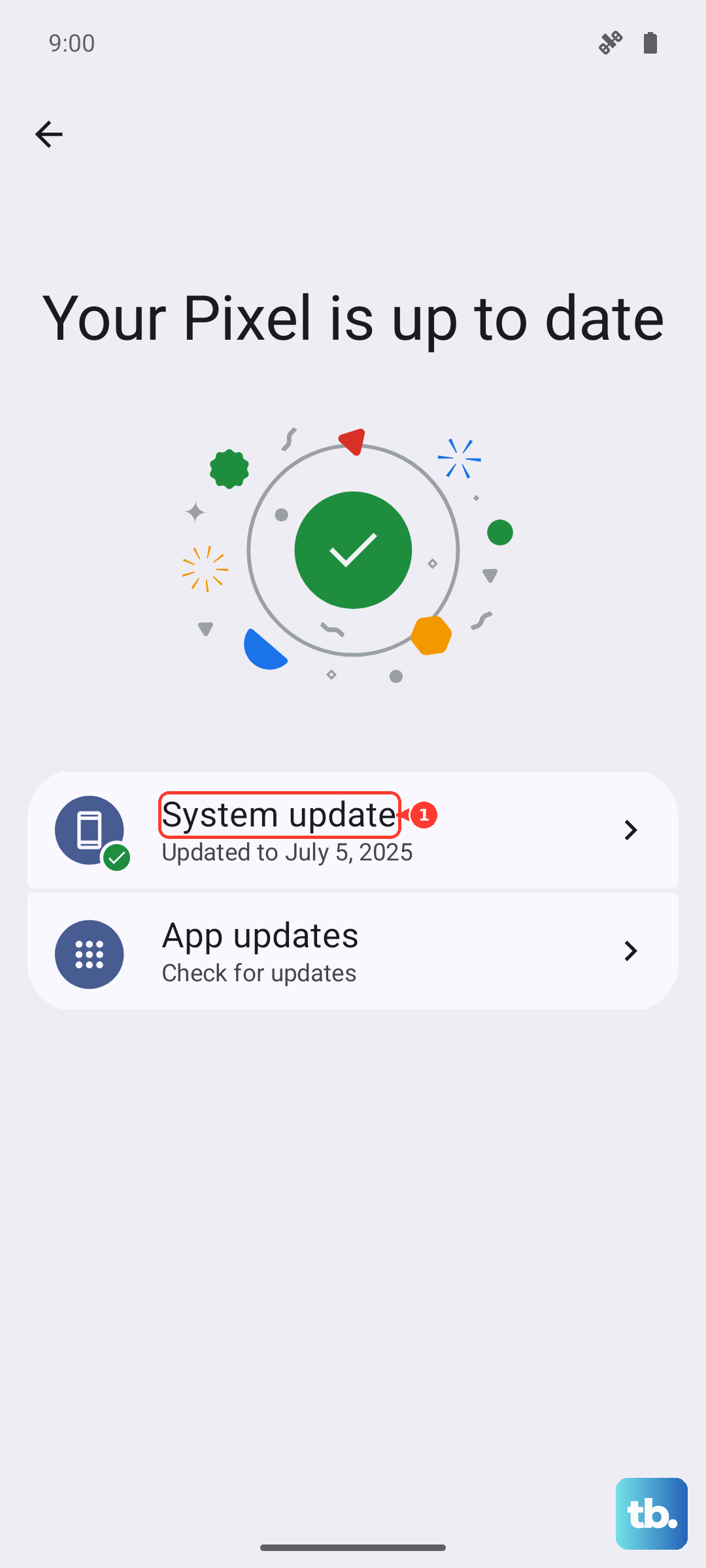
After the update installs and your phone restarts, check if your vibration is working again. I've seen minor point updates resolve similar glitches on other Motorola models.
Reset App Preferences or Network Settings
Before doing anything drastic, try resetting your app preferences. This won't delete any app data, but it will reset notification permissions, background data restrictions, and default app assignments.
Go to Settings > System > Reset options. Tap "Reset app preferences" and confirm. This can clear up conflicts caused by an app's settings overriding the system.
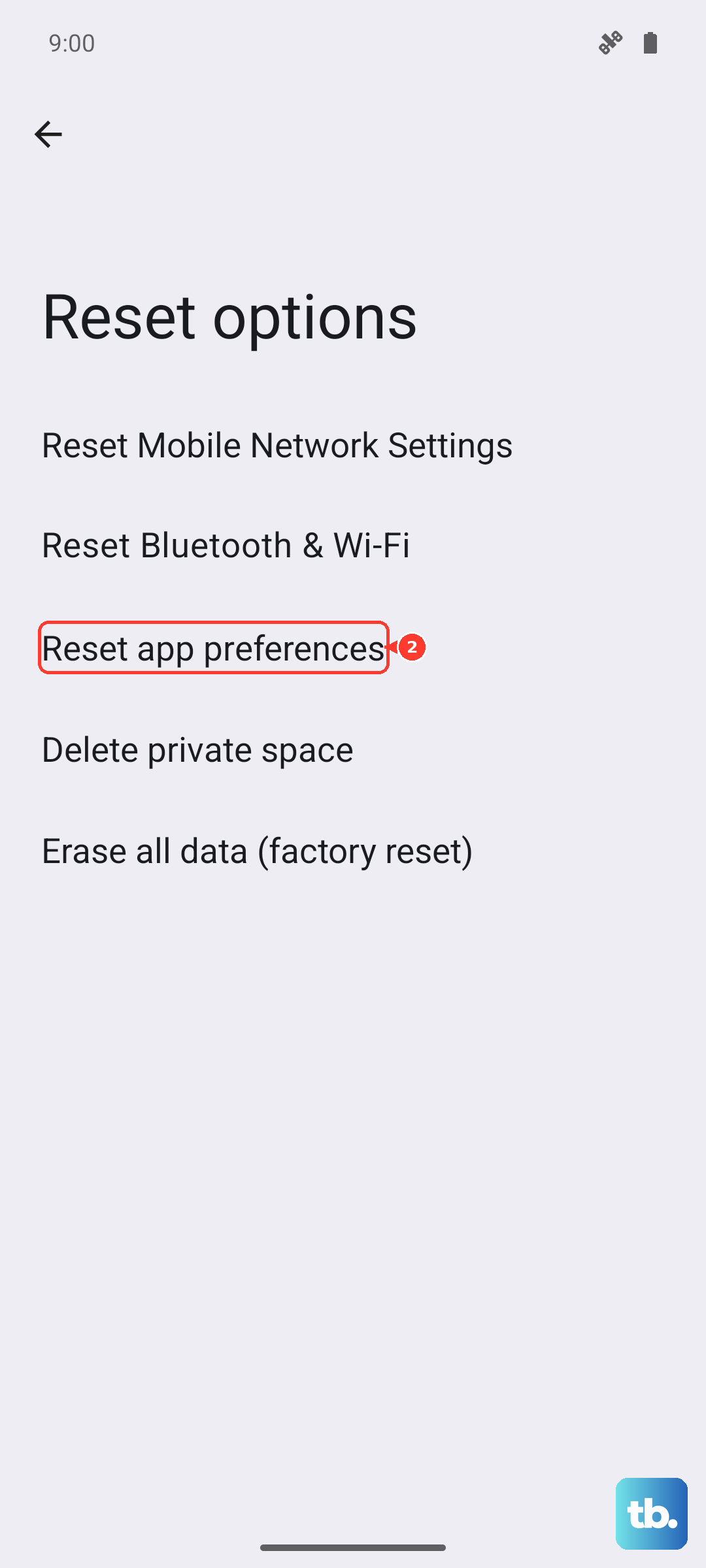
As a separate step, you can also try "Reset Wi-Fi, mobile & Bluetooth" from the same menu. It's a long shot for a vibration issue, but it's another non-destructive reset that has solved odd problems for some users.
Consider a Hardware Test
If none of the software fixes work, it's worth considering the hardware. The vibration motor in your Moto G Stylus is a small physical component that can potentially fail.
While Motorola doesn't have a public diagnostic code like some brands, you can try using the phone's built-in Help app. Open the Help app and look for a device diagnostics or tests section, sometimes called "Device diagnosis."
If you can't find a built-in test, pay close attention. Does the phone vibrate very faintly, or not at all? A complete lack of vibration, even during a force restart, points more strongly toward a hardware problem.