
If your iPhone SE 4 is taking longer to charge than you expect, it's likely not hitting its 20W fast charging potential. The right setup is key, as using an old charger or a worn cable can drop your charging speed down to a trickle.
Use a 20W USB-C PD Charger
Your iPhone SE 4 needs a specific type of power adapter to fast charge. You must use a USB-C Power Delivery (PD) charger rated for 20W or higher. The small 5W or 12W USB-A adapters from older iPhones won't cut it. I'd start by checking the fine print on your adapter for its wattage rating.
Apple's own 20W USB-C adapter is perfect, but any reputable brand's 20W, 30W, or higher USB-C PD adapter will work. The phone won't draw more than 20W, so a more powerful adapter is fine, it just gives you headroom for other devices.
Your Cable Must Be USB-C to USB-C
This is a common trip-up. For fast charging, you need a cable with a USB-C connector on both ends, one plugs into the 20W adapter, the other into your phone's USB-C port. Older USB-A to USB-C cables are limited to much slower speeds, no matter how powerful your adapter is.
Use the cable that came in the box with your iPhone SE 4, or ensure any replacement is MFi-certified for reliable performance. A frayed or damaged cable can also be the culprit, so inspect the connectors for any wear.
Check and Clean the USB-C Port
Take a close look at the USB-C port on the bottom of your phone. Pocket lint and dust can compact over time, creating a physical barrier that prevents the cable from seating fully. This poor connection can drastically limit power flow.
Power off your phone first for safety. Then, use a wooden toothpick or a soft, anti-static brush to gently dislodge any debris. Avoid metal objects like paperclips. A quick blast of compressed air can help too. A clean port is essential for that full 20W connection.
Manage Heat for Maximum Speed
Your iPhone SE 4 is designed to protect its battery by slowing down the charge if it gets too warm. Several everyday things can cause this. Using the phone intensively while charging, for gaming, video calls, or navigation, generates internal heat.
Thick cases can also trap heat. If the phone feels warm to the touch, try removing the case while it charges. Also, avoid charging in direct sunlight or on soft surfaces like a couch or bed, which insulate heat. A cool, hard surface like a nightstand is best.
Restart Your iPhone SE 4
A simple restart can clear out minor software glitches that might be interfering with the power management system. To restart, quickly press and release the Volume Up button, then the Volume Down button. Finally, press and hold the Side button until you see the Apple logo appear, then release.
Review Your Charging Settings
Head to Settings > Battery > Battery Health & Charging. Here, you'll find the Optimized Battery Charging feature. This is a good feature, it learns your routine and slows charging above 80% overnight to preserve your battery's long-term health.
However, if you're plugging in midday for a quick top-up and notice it's charging slowly past 80%, this feature could be the reason. You can temporarily turn it off if you need a full, fast charge immediately. Just remember to turn it back on later.
Update to the Latest iOS
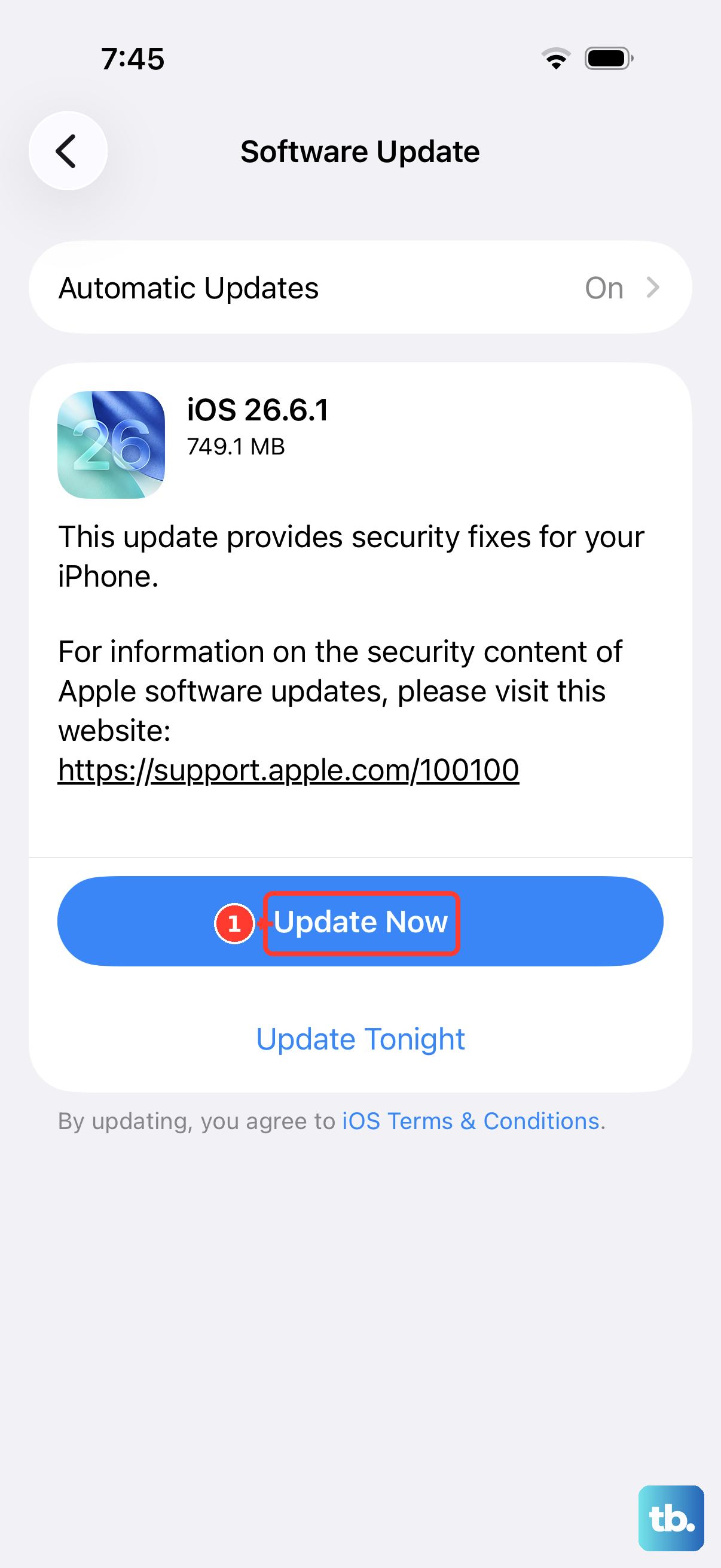
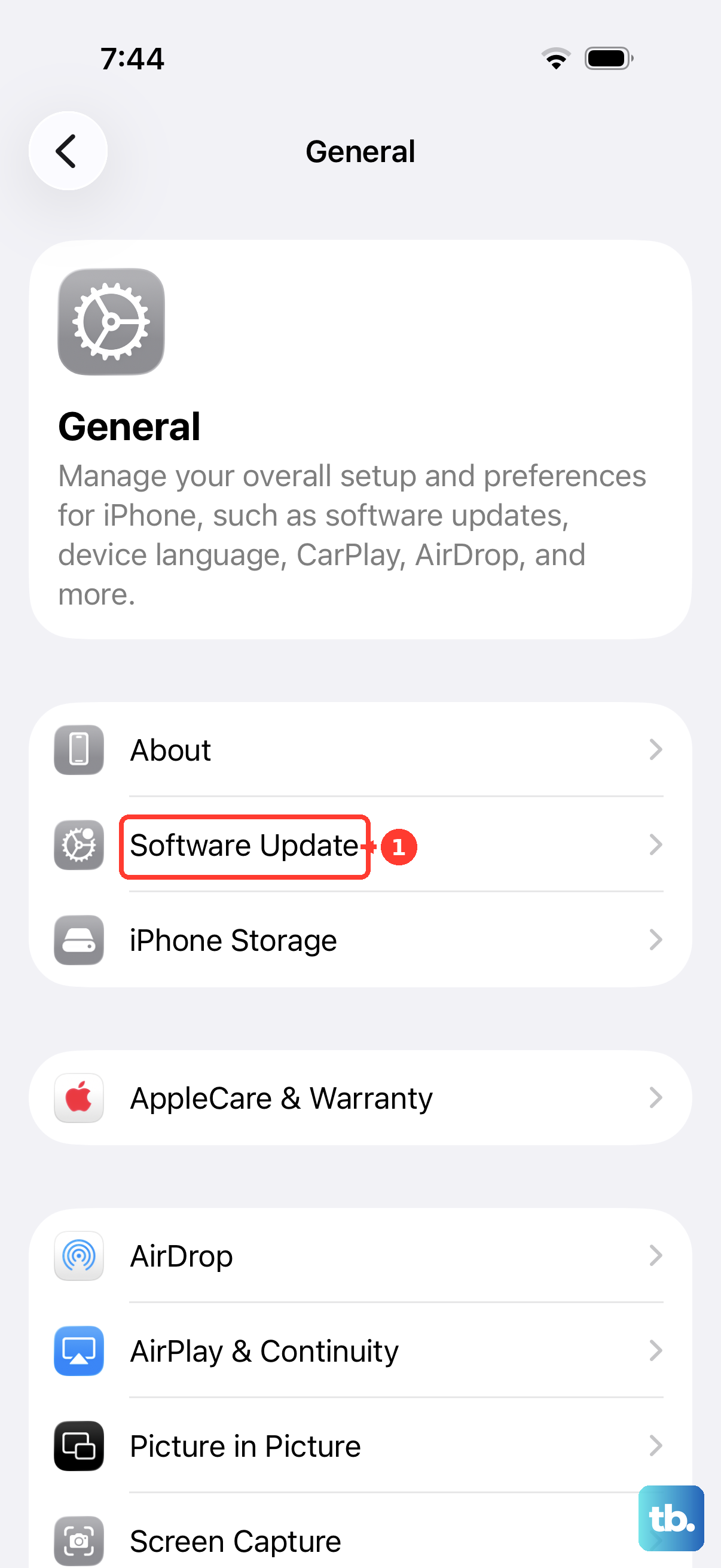
Go to Settings > General > Software Update. Apple releases iOS updates that can include improvements to power management and charging algorithms. Ensuring your iPhone SE 4 is running the latest available version of iOS eliminates any known software-related charging bugs.
Test Your Charging Gear
If you're still having issues, the problem is likely with your cable or adapter. Try borrowing a known-good 20W USB-C PD adapter and a different USB-C to USB-C cable. If your phone fast charges with the different gear, you've found the faulty component.
Cables fail over time, especially at the connectors where they bend. For wireless charging, remember that MagSafe or Qi2 chargers will deliver up to 15W, while standard Qi chargers will be slower. Always use a compatible power adapter with your wireless charger for the best speed.