
Unlock your iPhone 16 from carrier restrictions and use any network provider
What to Know
- Carrier Lock is a software restriction that ties your iPhone 16 to a specific cellular network.
- Contact your carrier first - they are legally required to provide the unlock for free if you meet their requirements.
- Your IMEI is key - you'll need this unique device identifier, which you can find in Settings > General > About.
- Third-party services are an option if your carrier can't or won't help, but choose carefully.
- Back up your iPhone before starting any unlock process, just to be safe.
If your iPhone 16 is asking for a network unlock PIN, it means the device is carrier-locked. This is common when you buy a phone on an installment plan directly from a provider like AT&T or T-Mobile. The lock prevents you from popping in a SIM card from a different company, which can be frustrating if you want to switch carriers or use a local SIM while traveling.
The good news is that unlocking it is usually straightforward. I'd start by contacting your current carrier, as that's the most reliable path. If that doesn't work, there are other methods to try.
Request the Unlock from Your Carrier
This is the official and recommended method. Under the wireless industry's voluntary CTIA Consumer Code, most major carriers will unlock your device once you've met their basic criteria. For your iPhone 16, that typically means the device is paid off, not reported lost or stolen, and has been active on the carrier's network for a certain period (often 60 days).
Start by visiting your carrier's website and searching for their "device unlock" policy page. For AT&T, you can submit a request directly online. T-Mobile and Verizon also have dedicated unlock request portals. You'll need to enter your iPhone 16's IMEI number and verify your account details.
The process is usually automated and can take anywhere from a few minutes to a couple of business days. Once approved, the carrier pushes the unlock to your device remotely. You often don't even get a code anymore; you just insert a new SIM card and it should work. If they do provide an unlock code, you'll enter it when prompted after inserting a non-carrier SIM.
Use the Built-in Carrier Settings Update
Sometimes, after your carrier approves the unlock, your iPhone 16 needs a nudge to recognize it. Make sure your phone is connected to Wi-Fi. Then, go to Settings > General > About.
If a carrier settings update is available, a prompt will appear on this screen. Tap "Update." This installs the latest carrier bundle, which can include the unlock authorization. After it completes, restart your iPhone and try the new SIM card again.
Perform a Network Settings Reset
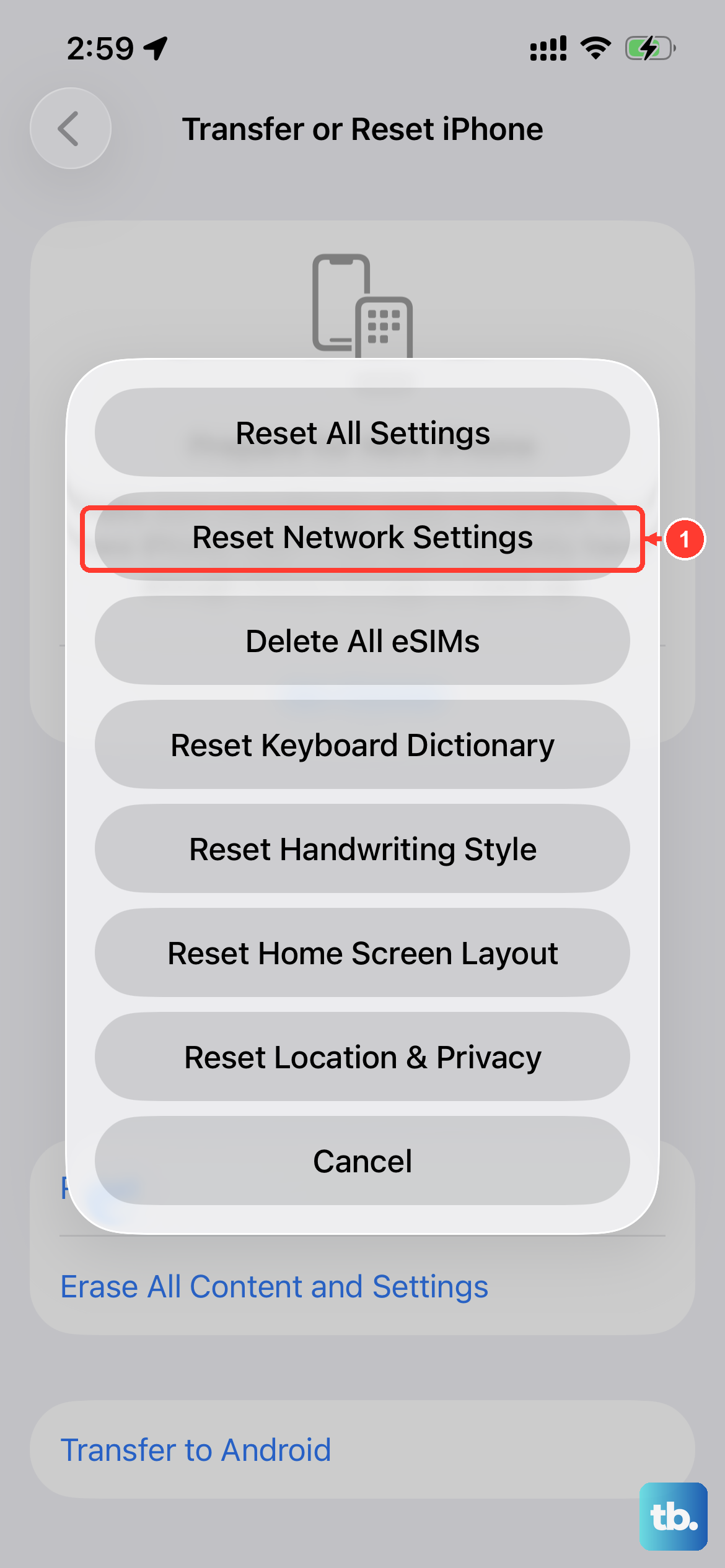
This is a good step if you've received confirmation that your iPhone 16 is unlocked but a new SIM still isn't working. It clears out any old network configurations that might be interfering. Go to Settings > General > Transfer or Reset iPhone > Reset.
Then, tap Reset Network Settings. You'll need to enter your passcode. Your iPhone will restart, and you'll have to reconnect to Wi-Fi networks and re-pair Bluetooth devices. Afterward, insert the new SIM card to see if it connects.
Restore Your iPhone via Finder or iTunes
A full restore can sometimes apply a pending carrier unlock that hasn't taken effect. This is a more involved step, so ensure you have a recent backup in iCloud or on your computer. Connect your iPhone 16 to a Mac or PC.
On a Mac with macOS Catalina or later, open Finder. On a PC or older Mac, open iTunes. Select your device, then choose "Restore iPhone." This will wipe the device and install a fresh copy of iOS 26. During the setup process, you can restore from your backup. The fresh install often finalizes carrier unlocks.
Check Lock Status with Apple
Apple maintains the activation policy for your iPhone 16 based on what your carrier reports. You can check this status directly. Visit Apple's official Check Coverage page and enter your device's serial number.
While this page is primarily for warranty status, the activation policy details can sometimes indicate if the device is unlocked. To confirm this on the device itself, open Settings > General > About and check the Carrier Lock field. If it says "No SIM restrictions," your iPhone 16 is unlocked. If it lists a specific carrier, it's still locked.
Try a Third-Party Unlocking Service
If your carrier is uncooperative (perhaps you're still under contract but need to travel), third-party services are an alternative. These services use contacts within carriers to submit unlock requests on your behalf. You provide your iPhone 16's IMEI number, and they work to get it whitelisted in the carrier's database.
Look for services with strong reviews and clear guarantees. Be wary of any service promising "instant" unlocks for your iPhone 16, as the process almost always requires waiting for carrier processing. A legitimate service will give you a realistic timeframe of 1-3 days.
Consider an R-SIM or Software Unlock (Advanced)
For iPhones that are permanently locked by carriers that no longer exist or refuse to unlock, some users turn to hardware interposer chips like R-SIMs. These are small chips that go between your SIM card and the iPhone's tray, tricking the phone into accepting any SIM.
This method requires careful installation and only works on certain iOS versions. It's considered a last resort, as it can be unreliable with iOS updates. Similarly, software-based unlocks (often called "imei unlocks" through special software) exist but are complex and not recommended for most users due to the risk of making the device unusable.
What to Do If You Get an "Invalid SIM" Error
If you insert a new SIM and see "Invalid SIM" or "SIM Not Supported," don't panic. First, make sure the SIM card itself is activated and working in another phone. Then, try the force restart sequence for the iPhone 16: quickly press and release the Volume Up button, then the Volume Down button, then press and hold the Side button until you see the Apple logo.
After the restart, go back to Settings > General > About and see if the carrier field updates. If the error persists, it likely means the carrier lock is still active, and you need to continue with the official unlock request process.











