You installed the iOS 27 developer beta and now your iPhone runs warm, the battery drains faster than it should, Siri stops responding, the Safari tab bar vanishes mid-browse, or an alarm will not stop from the Lock Screen. None of this means your iPhone is broken. These are documented beta 1 problems, and Apple's own iOS and iPadOS 27 release notes acknowledge dozens of known issues in this first build, many with workarounds.
First, a reality check. Apple announced iOS 27 at WWDC26 on June 8, 2026, headlined by the next generation of Apple Intelligence and an entirely new version of Siri called Siri AI. So far only the developer beta exists, available through the Apple Developer Program at developer.apple.com. Apple says a public beta arrives through the Apple Beta Software Program next month at beta.apple.com, meaning July 2026, and the finished update ships free this fall.
Everything you are running today is unfinished. Bugs, battery hits, and app incompatibilities come with the territory, and features can change or disappear before the final release. Here are the fixes that work, fastest first.
Back Up Before You Troubleshoot Anything Else
Apple's rule is blunt. Always back up your devices before installing beta software. If you skipped it, make a backup now anyway, but understand its limits.
To back up over iCloud, connect to Wi-Fi, go to Settings > [your name] > iCloud > iCloud Backup, turn on Back Up This iPhone, then tap Back Up Now and stay connected until it finishes.
One critical caveat from Apple. Backups created while using beta software might not be compatible with earlier versions of iOS. The backup you made before installing the beta is the one Apple tells you to restore from if you go back to iOS 26, so never delete it.
Restart Your iPhone the Way Apple Prescribes
A restart is the fastest general fix, and Apple lists a reboot as the official workaround for several beta 1 bugs, including Home Screen customization that fails to save and sluggishness after switching between posters with different icon tints.
- 1.On a Face ID iPhone, press and hold either volume button and the side button until the power-off slider appears. On a home-button iPhone, press and hold the side button instead.
- 2.Drag the slider, then wait 30 seconds for the device to turn off.
- 3.Press and hold the side button until the Apple logo appears.
Apple Already Lists These Bugs With Workarounds
Before you chase a mystery glitch, check Apple's official iOS and iPadOS 27 beta release notes for developers. If your bug is on the list, the fix is usually to apply the workaround and wait for the next build.
Siri Acting Up
Siri might not respond to your voice correctly in beta 1. Apple's workaround is to force quit the Siri app and relaunch it. In CarPlay, Siri may respond slowly when the device is running hot or the network is poor, so retry after cooling or with better reception.
Apple also warns that Siri functionality is limited while a software update installs, including calls to emergency services.
Safari, Messages, and Photos Glitches
If the Safari tab bar disappears, quit Safari and relaunch it. If GIFs or pasted images in Messages render at the wrong size, scroll the message offscreen, leave the conversation, or force quit Messages. Photos may quit unexpectedly when you re-enter the Extend tool, and Portrait mode blur may render incorrectly in Camera.
Alarms, CarPlay Buttons, and StandBy
If you cannot stop a ringing alarm from the Lock Screen, unlock the iPhone or say stop the alarm. If your steering wheel's next and previous track buttons do nothing in CarPlay, use the on-screen controls instead. StandBy clocks may be missing in this build.
Slow Searches and Stuck Downloads in the First Hours
Search assets might download slowly for languages and regions other than English and the United States, degrading search in first-party apps for up to a few hours after install. Podcasts may show Updating Library for several minutes on first launch; stay in the app while it works. Safari Intelligence features may look available before their assets finish downloading, so check progress under Settings > Apple Intelligence & Siri. Image Playground may show an error instead of download progress on first install; wait for the models to finish.
Other Acknowledged Quirks
A false unplug charger liquid detection alert can appear when the port is wet but empty. Mail older than six months might not be searchable by body content, though searches by sender and subject still work. AirPlay to Home Theaters fails when a PIN or password is required; Apple's workaround is to disable the Home Theater configuration. AirPods Max 2 firmware betas cannot be updated on beta 1, with support arriving in beta 2.
Battery Drain and a Warm iPhone Usually Settle Within Days
Heat and fast drain are the most common complaints in the first hours after installing. Apple says this is expected. Your device can feel warm when you complete a software update, particularly to a major release, and it cools when the process is complete.
Early testers report the same pattern, with drain settling after initial background indexing, though reports are mixed and some see good battery life from day one.
If heavy drain persists after several days, open Settings > Battery to see which apps are using the most power, then file a report through Feedback Assistant.
Keep Your Apps Updated Throughout the Beta Cycle
Apps that crash or misbehave on a new beta are often the app's problem, not the system's. Open the App Store, tap your account photo at the top, then tap App Updates. Tap Update next to a specific app or tap Update All.
To automate it, go to Settings > Apps > App Store and turn on App Updates.
When a Beta Build Will Not Download or Install
If an update stalls in Software Update, start with storage. Go to Settings > General > iPhone Storage and use Offload Unused Apps or delete apps you no longer need. Keep the iPhone plugged in and on Wi-Fi for the whole download.
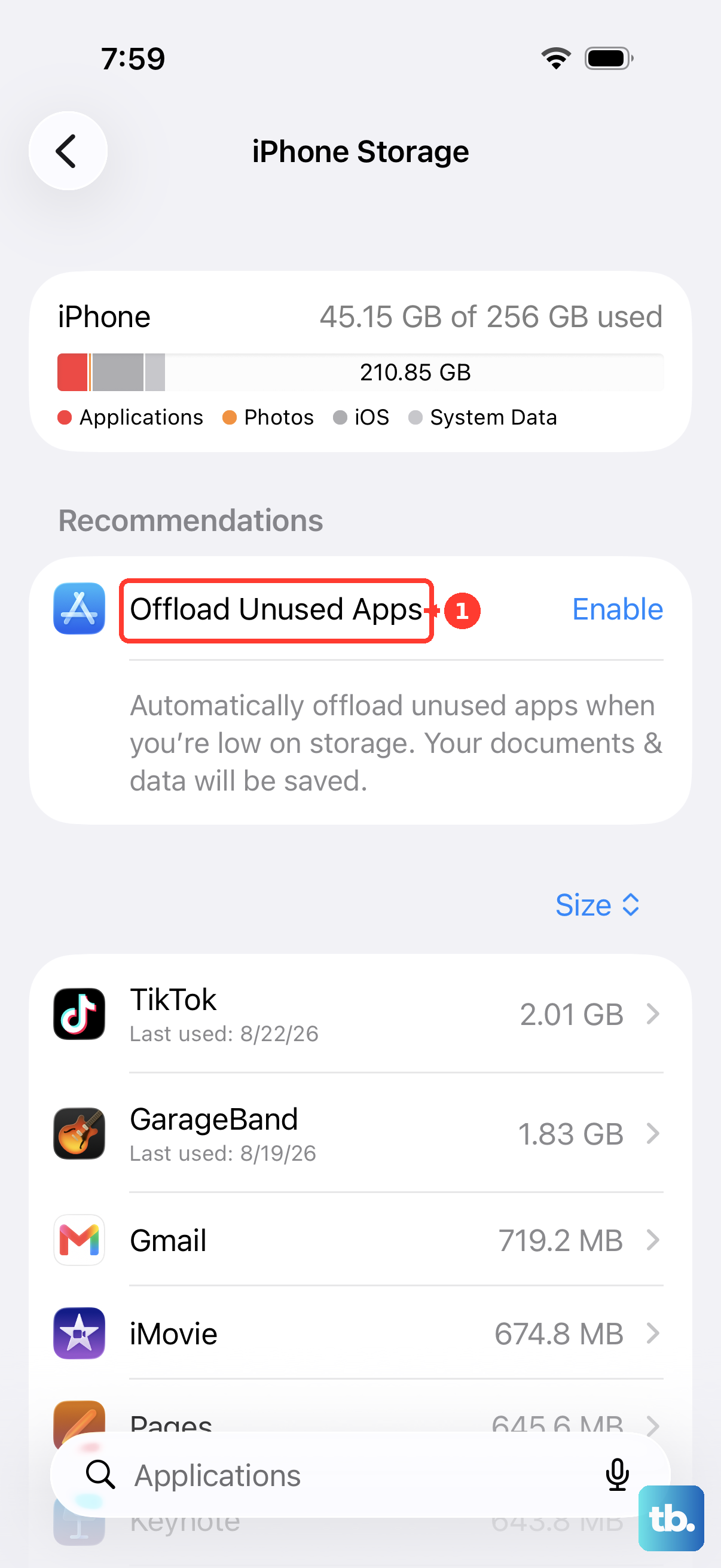
Still stuck? Delete the partial download. Go to Settings > General > iPhone Storage, find the iOS update, and tap Delete Update. Then return to Settings > General > Software Update and download it again. As a last resort, update using a Mac or iTunes.
Reset All Settings as the Data-Safe Deep Fix
For persistent connectivity glitches that survive restarts, Reset All Settings is the deepest step that does not touch your data. Go to Settings > General > Transfer or Reset iPhone > Reset > Reset All Settings.
Apple confirms that all settings, including network settings, the keyboard dictionary, location settings, privacy settings, and Apple Pay cards, are removed or reset to their defaults, while no data or media are deleted. Your photos, messages, and apps stay put, but expect to rejoin Wi-Fi networks and add your cards back to Apple Pay afterward.
Install Every New Beta Build Promptly
Beta bugs are typically fixed in later builds, and Apple's release notes already note AirPods Max 2 firmware beta support arriving in beta 2.
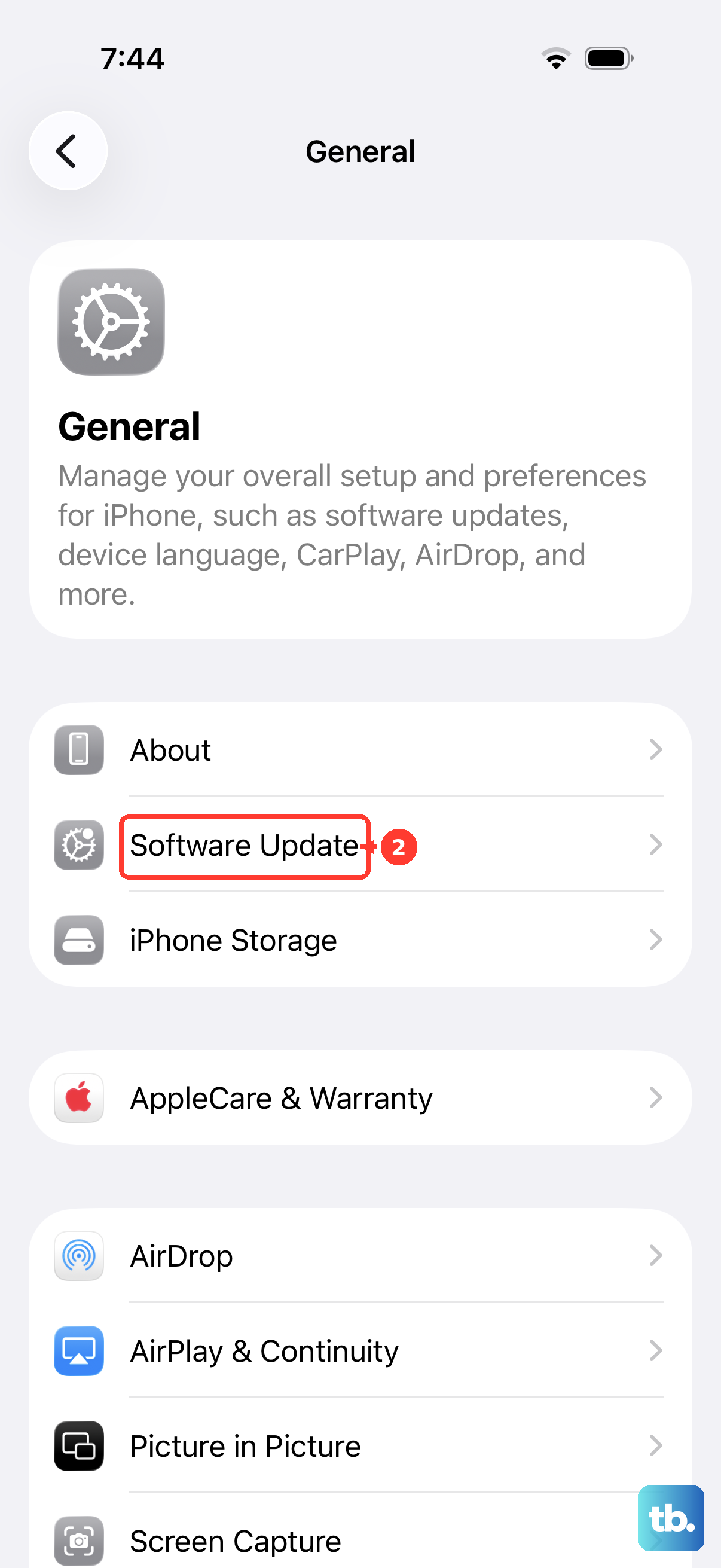
When a new developer beta is available, you can install it from Software Update. Enrollment lives at Settings > General > Software Update > Beta Updates, and the device must be signed in with the Apple Account you use on the Apple Developer website.
How to Leave the iOS 27 Beta Entirely
If the beta is unusable on your daily iPhone, Apple gives you two official exits.
- 1.The patient exit. Go to Settings > General > Software Update > Beta Updates and tap Off. You stay on your current beta build but stop receiving new betas, then install the next public release when it ships.
- 2.The immediate exit. Connect the iPhone to a computer and put it in recovery mode. On iPhone 8 or later, press and quickly release volume up, press and quickly release volume down, then hold the side button until the recovery mode screen appears. Choose Restore, which erases the device and installs the current non-beta iOS. Then restore the backup you made before installing the beta.
Backups made while on the beta might not work on earlier iOS versions. Once the iOS 27 public beta opens, Beta Software Program members can unenroll devices at beta.apple.com/unenroll-your-devices.
Report Every Bug Through Feedback Assistant
Beta testing only improves the fall release if Apple hears about your bugs. The Feedback Assistant app appears on the Home Screen by default on beta installs, and it is available on the web at feedbackassistant.apple.com.
Apple's guidance is specific. File one issue per report and let the app attach the sysdiagnose it collects automatically, which Apple says should be included with all reports, even if you think one is not needed. Submit feedback right away to increase the likelihood the issue is addressed by the public release.
Frequently Asked Questions
When does the iOS 27 public beta come out?
Apple says a public beta arrives through the Apple Beta Software Program at beta.apple.com next month, meaning July 2026, with no specific day named. As of June 11, 2026, beta.apple.com lists iOS 27 as coming soon, and the finished version ships free this fall.
Which iPhones support iOS 27?
Apple's compatibility list covers iPhone 17 Pro Max, iPhone 17 Pro, iPhone Air, iPhone 17, iPhone 17e, all iPhone 16 models including the 16e, all iPhone 15 and iPhone 14 models, all iPhone 13 and iPhone 12 models including the minis, iPhone 11, iPhone 11 Pro, and iPhone 11 Pro Max, plus iPhone SE second generation and later.
Do I need a specific iPhone for the new Siri AI?
Yes. Apple Intelligence is available on iPhone 16 models or later plus iPhone 15 Pro and iPhone 15 Pro Max, and Siri AI requires an Apple Intelligence-enabled device set to a supported language. Apple says Siri AI ships in beta later this year for devices set to English first, with more languages to follow. It will not be available in China while Apple works through regulatory requirements, and it will not be available initially in the EU on iPhone, iPad, and Apple Watch.
Is Siri now powered by Google Gemini?
Not exactly. Apple and Google announced a multi-year collaboration under which the next generation of Apple Foundation Models is based on Google's Gemini models and cloud technology, and Apple says the next generation of Apple Intelligence built on those models is what powers Siri AI, while Private Cloud Compute and Apple's privacy protections remain in place. Apple does not describe Siri as running on Gemini itself.
Is it normal for my iPhone to get hot after installing the beta?
Apple says a device can feel warm after a software update, particularly to a major release, and that it cools when the process is complete. If heat and drain continue past several days, check Settings > Battery and file a Feedback Assistant report.
Can I go back to iOS 26 after installing the iOS 27 beta?
Yes. Connect the iPhone to a computer, put it into recovery mode, and choose Restore, then restore the backup you created before installing the beta. Backups made while on the beta might not be compatible with earlier iOS versions.