
Seeing a "SIM Not Provisioned" message on your Infinix Note 40 Pro can stop you in your tracks. It usually means your phone can't connect to your mobile carrier's network, which blocks calls, texts, and mobile data.
The quickest thing to try is a simple restart. Press and hold the power button, then tap "Restart" on your screen. If your phone is frozen and won't respond, you'll need to force restart it instead.
For a force restart, press and hold the Power button and the Volume Down button together for about 10 seconds. Keep holding until you feel a vibration or see the Infinix logo appear, then let go. This can clear out a temporary software glitch that's messing with the SIM connection.
Check Your SIM Card and Tray
First, make sure your SIM is activated. If you just got a new SIM card or plan, it might not be live on the network yet. A quick call or chat with your carrier's support can confirm this.
Power your phone off completely. Use the SIM ejector tool that came in the box to pop open the tray on the side. Carefully take out the SIM card and give it a look. Check for any obvious scratches, cracks, or dirt on the gold contacts.
If it looks dirty, gently wipe the contacts with a soft, dry cloth. Blow any dust out of the SIM tray slot as well. Reinsert the card, making sure it's seated firmly and oriented correctly, then power your phone back on.
Refresh Your Network Connection
Your Infinix Note 40 Pro might just need a nudge to reconnect. Swipe down from the top of the screen twice to open the full Quick Settings panel. Tap the Airplane Mode icon to turn it on, wait about 15 seconds, then tap it again to turn it off.
You can also try manually selecting your network. Go to Settings > Network & Internet > Mobile network > Network operators. Tap "Search networks," wait for the list to populate, and then manually select your carrier's name from the results.
Update Your Phone Software
Running an old version of software can sometimes cause conflicts with network services. Infinix regularly releases updates for XOS that can fix bugs like this.
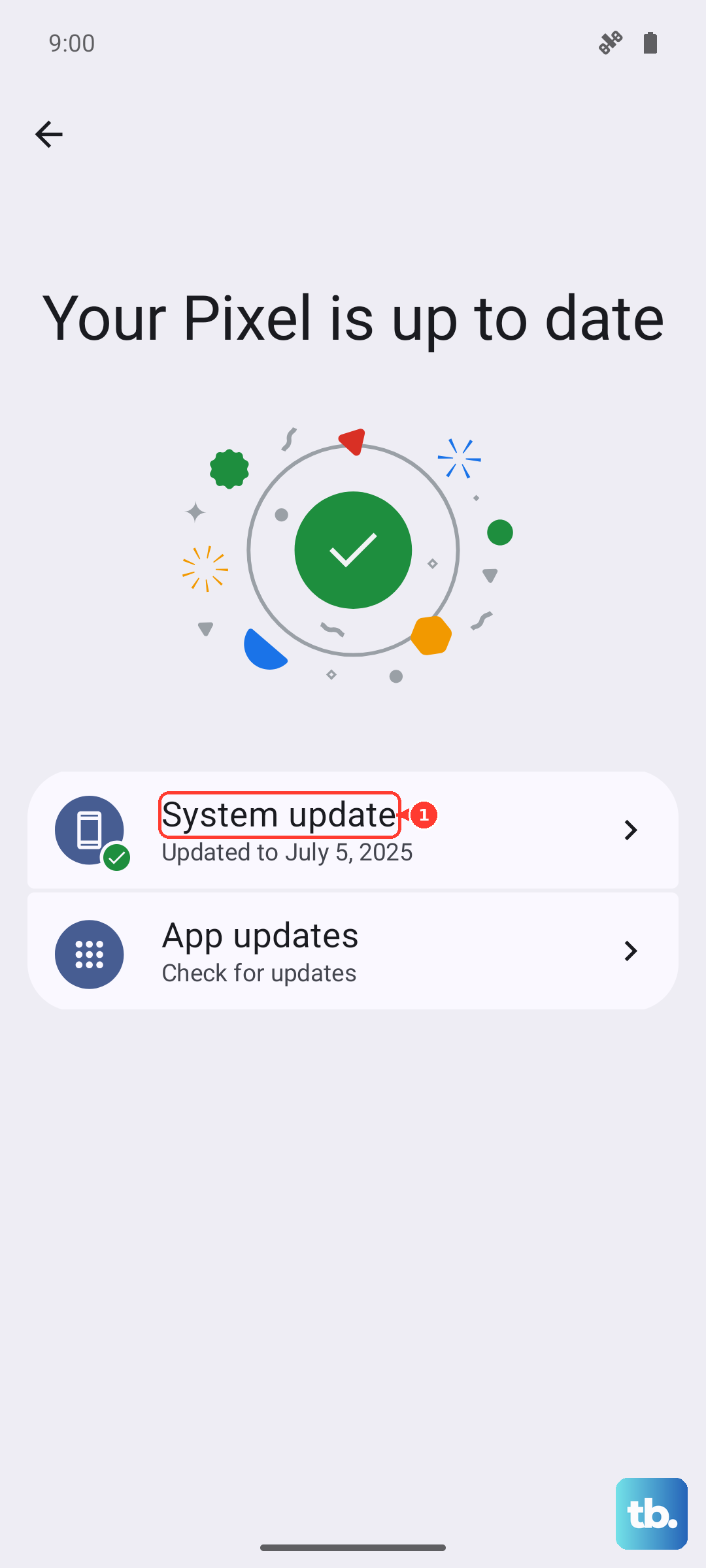
Head to Settings > System > System update and tap "Check for updates." If an update is available, connect to Wi-Fi and install it. I'd recommend doing this step, as it often resolves odd connectivity issues that pop up.
Reset Your Network Settings
If you're still stuck, resetting all network settings is a strong next step. This will wipe saved Wi-Fi networks, Bluetooth pairings, and mobile network configurations back to factory defaults.
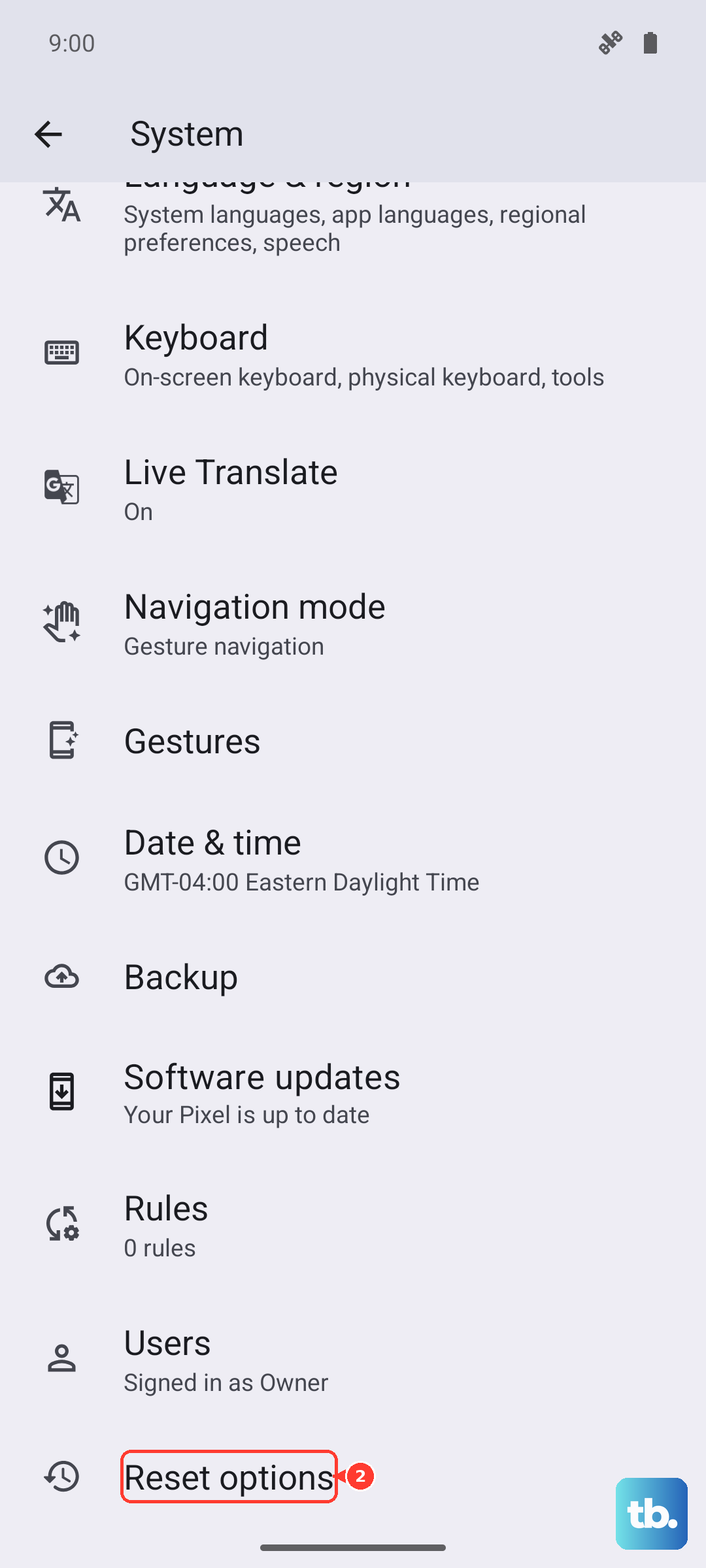
Go to Settings > System > Reset options. Tap "Reset Wi-Fi, mobile & Bluetooth." Confirm your choice by entering your PIN or password. After the phone reboots, you'll need to reconnect to Wi-Fi and your mobile network should re-register.
Check for Account or Carrier Issues
Sometimes the problem isn't with your phone at all. If you're on a prepaid plan, make sure you have enough credit on your account. You can usually check this through your carrier's official app or website.
There could also be a temporary network outage in your area. It's worth contacting your mobile provider directly. They can check if your line is active, if there's a service suspension, or if they need to reprovision your SIM on their end.
Test the SIM in Another Device
To really pinpoint the problem, try your SIM card in another unlocked phone. If the other phone also shows "SIM Not Provisioned," then the issue is definitely with the SIM or your carrier account.
If the SIM works perfectly in another phone, the issue is likely specific to your Infinix Note 40 Pro. In that case, after trying all the software fixes above, you might need to visit an authorized service center for hardware diagnostics.