

To delete your Twitter account, open Settings and privacy in the X app or on x.com, then Your account (Account on Android) and Deactivate your account, and confirm with your password. X deletes the account for good once 30 days pass without you signing back in, so deactivating is how you delete it. Before you start, save your X archive, and cancel X Premium yourself if Apple or Google Play bills you, because deactivating cancels only plans bought on x.com.
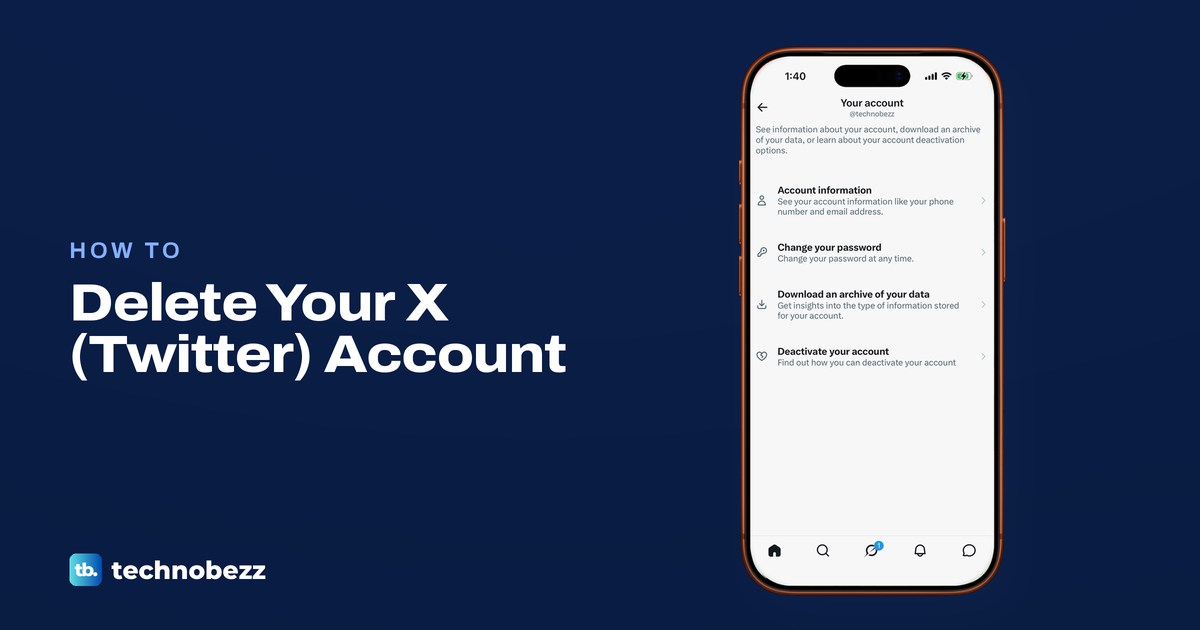
In the X app on our iPhone 17 Pro with iOS 26.6, the route was the menu, Settings and privacy, Your account, then Deactivate your account, the last of four rows. The row above it, Download an archive of your data, opened x.com and asked us to sign in again.
The short version
- Delete: Settings and privacy, Your account (Account on Android), Deactivate your account, then your password and the final confirmation.
- Wait: stay signed out for 30 days. Signing in during that time restores the account.
- Save first: request your archive and download the ZIP before you deactivate.
- Premium: cancel it with Apple (Settings, your name, Subscriptions) or in Google Play if you bought it there. An x.com plan cancels itself.
- Apps: revoke every connected app, even ones you use, because an app that signs in can reactivate the account.
Deactivating is how you delete an X account
X has no separate delete button. Its help page puts it plainly: "Deactivating your X account is the first step to deleting your account permanently." Deactivation lasts 30 days, and if you do not access the account in that time, X deletes it and your username is no longer tied to it.
That makes the 30 days a grace period. If you only want a break, the same steps work, as long as you sign back in before day 30. If you want the account gone, most of the work comes before you tap anything: your archive, your subscription, your username and the apps that can sign in for you.
Deactivating is also not a fix for a broken account. X says that missing posts, wrong follower counts, suspicious messages or a possible break-in will not be solved by deactivating and reactivating, so sort those out separately if that is the real problem.
Where to delete your X account on each device
The route is nearly the same everywhere, with one label that differs on Android. The iPhone row is what our iPhone showed up to the Deactivate your account row, and the rest follows X's Help Center.
| What you need to do | Where to go | What to expect |
|---|---|---|
| Delete from iPhone | X app, menu, Settings and privacy, Your account, Deactivate your account | Read the information, enter your password, then tap Yes, deactivate |
| Delete from Android | X app, menu or profile icon, Settings and privacy, Account, Deactivate your account | The same password and Yes, deactivate steps, in X's Android instructions |
| Delete from a computer | x.com, More, Settings and privacy, Your account, Deactivate your account | Read the information and click Deactivate, then your password and one Deactivate account button |
| Keep your posts and messages | Your account, Download an archive of your data | Request it, wait for X's email, download the ZIP before you deactivate |
| Stop Premium charges | The store that bills you | App Store and Google Play plans keep running, x.com plans cancel on deactivation |
| Change your mind | Sign in within 30 days | X asks you to confirm that you want to reactivate |
Save your X archive before you deactivate
X says that if you want your data, "you'll need to request it before you deactivate your account." The archive holds your profile, posts, Direct Messages, media, follower and following lists, Lists, and the interest and ad data X keeps. Once the account is deleted, X says you won't have access to any old posts, so this is the copy that lasts.
On our iPhone, Download an archive of your data was the third row in Your account, described as a way to "Get insights into the type of information stored for your account." Tapping it did not open an archive screen in the app. It opened x.com in a browser window inside the X app, with Continue with phone, Google and Apple buttons and an Email or username field, even though the app was already signed in.
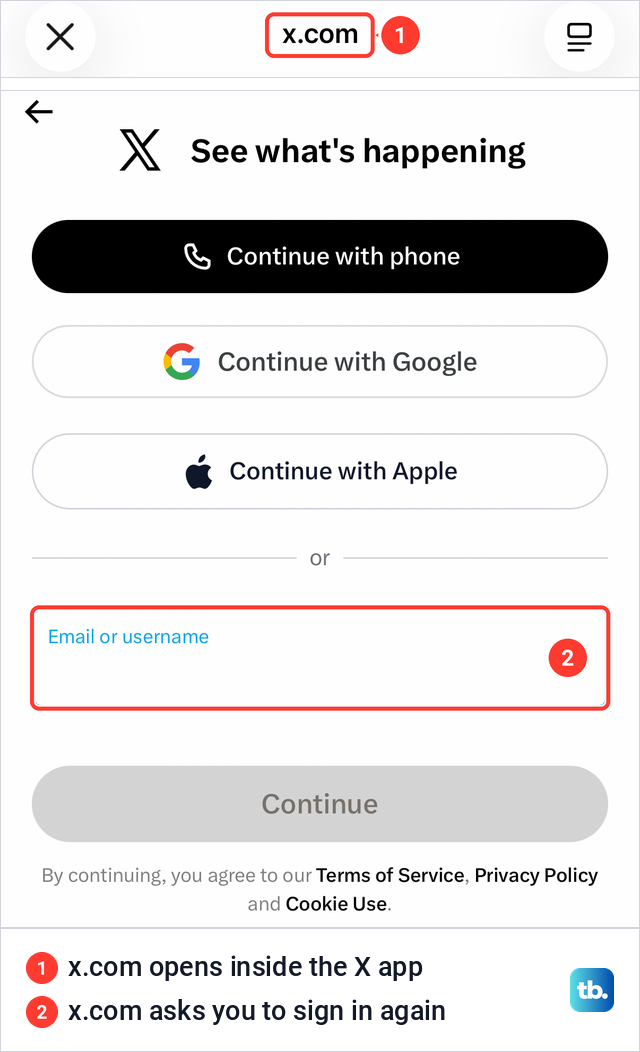
After you sign in, X's web steps are to confirm your password and select Request archive. X's separate archive article describes, for the app, a code sent to your email or phone and a Request data button instead, so enter the code if x.com asks for one.
X says preparing the archive can take a few days. When it is ready, X sends an email to your connected address or a push notification, and you download a .zip file while signed in. X asks you to confirm your email address before you request it and to download the file in the same browser you are signed in on, so wait until the ZIP is saved before you deactivate.
Cancel X Premium where you bought it
Deactivating does not stop every paid plan. X says subscriptions such as X Premium or Super Follows "purchased through the X app" stay active after you deactivate, while subscriptions bought on X.com cancel automatically. What matters is the store that bills you, not the device you use today.
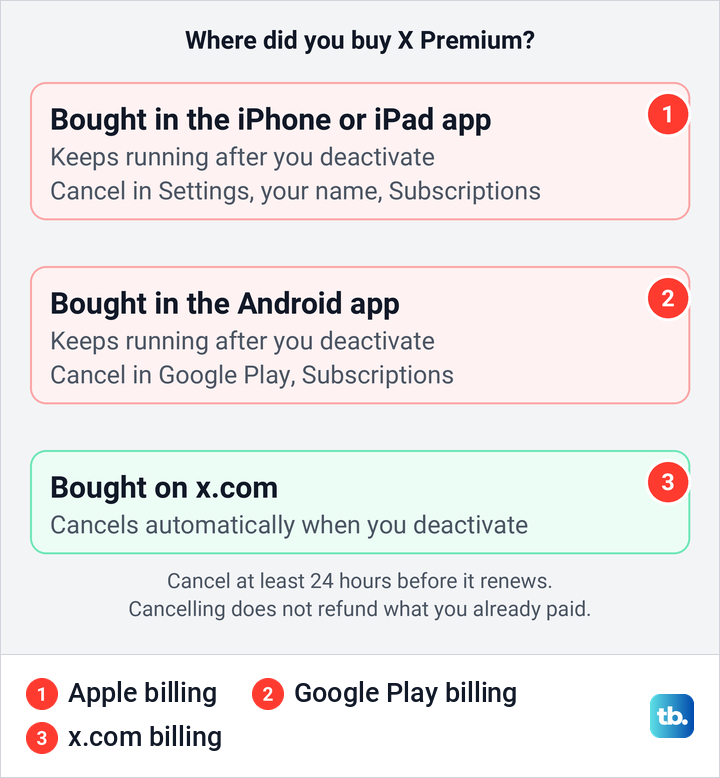
If Apple bills you, Apple's steps are Settings, your name, Subscriptions, the X subscription, then Cancel Subscription, and our steps to cancel a subscription on your iPhone show the same screens. If Google Play bills you, Google's steps are Subscriptions in Google Play, the subscription, then Cancel subscription. Google adds that uninstalling the app does not cancel it.
X says to cancel at least 24 hours before the plan renews, and that cancelling does not refund what you already paid. If you are not sure where you subscribed, our guide to find and cancel unwanted subscriptions helps you trace the charge to its store.
Free your username or email if you need it soon
Deactivating does not release your details straight away. X says the username and email address on a deactivated account stay unavailable to other accounts for 30 days, and a phone number does too unless you delete it from your settings before you deactivate. X also says you can change the username or email in Account information at any time, so move the old account to a spare email address you control and can verify first if you want the main one for a new account.
On our iPhone, Account information was the first row in Your account and opened without asking for the password. It listed Username, Phone and Email, each as its own row. After the 30 days, X says the old username is open for registration by other accounts, so it is not saved for you. A suspended account is the exception, because X keeps its username, phone number and email out of use for good.
Disconnect apps that can bring the account back
Signing in is enough to reactivate an X account, and that includes a third-party app signing in for you. X's answer to "why does it keep getting reactivated?" is that an app you authorized may be logging in, so it says to revoke third-party access before you go.
On our iPhone, Security and account access described itself as the place to keep track of "apps that you have connected to your account." Inside it, Apps and sessions held Connected apps, Sessions, Account access history and Logged-in devices and apps. Connected accounts, the row below Apps and sessions, is a different list, for the Google or Apple account you use to log in.
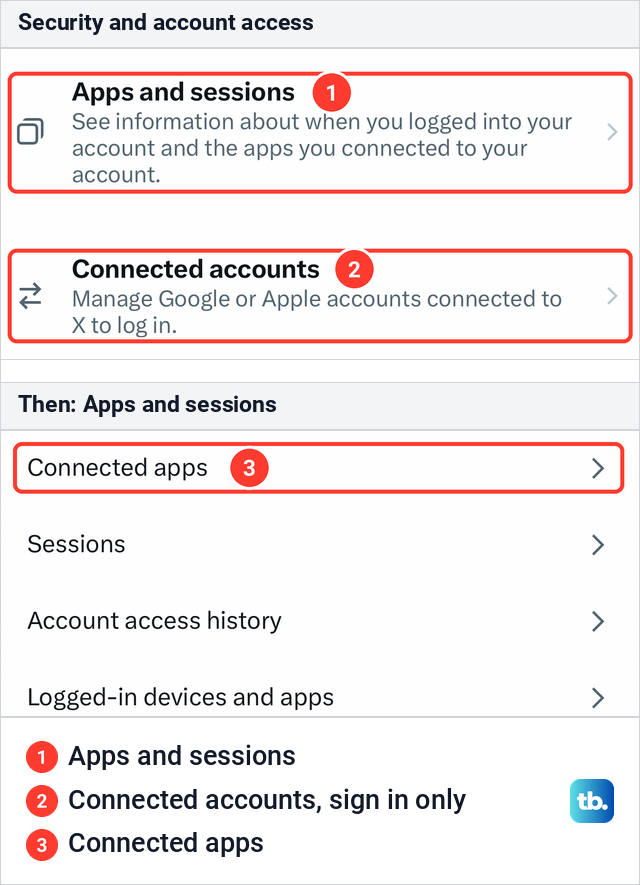
Open Connected apps and revoke access for every app listed, including ones you still use, since any of them could sign in during the 30 days. X's step is the Revoke access button next to the app, or at the bottom of the page after you open it. If X emails you that the account was reactivated and you did not sign in, X says the account may be compromised, so recover a hacked X account and change the password before you deactivate again.
How to delete a Twitter account on iPhone
These are the screens in the X app on our iPhone 17 Pro with iOS 26.6, up to the Deactivate your account row. X asks for the account's password near the end, so find your saved X password first if your iPhone usually fills it in for you.
Open the menu. On our iPhone, swiping in from the left edge of the timeline opened it, and X's instructions say to tap the navigation menu icon. Settings and privacy sits near the bottom, below a divider and above Help Center. The person icon with a plus sign at the top of the menu switches accounts, so check that the account you want gone is the one open.
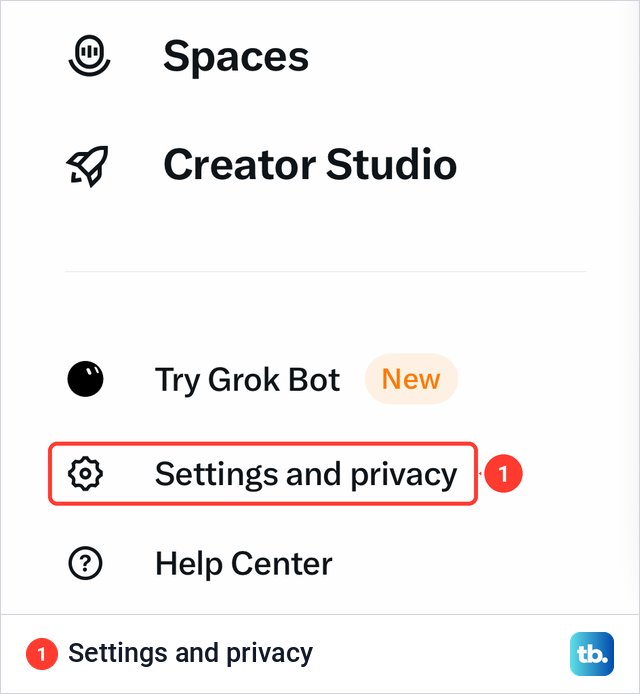
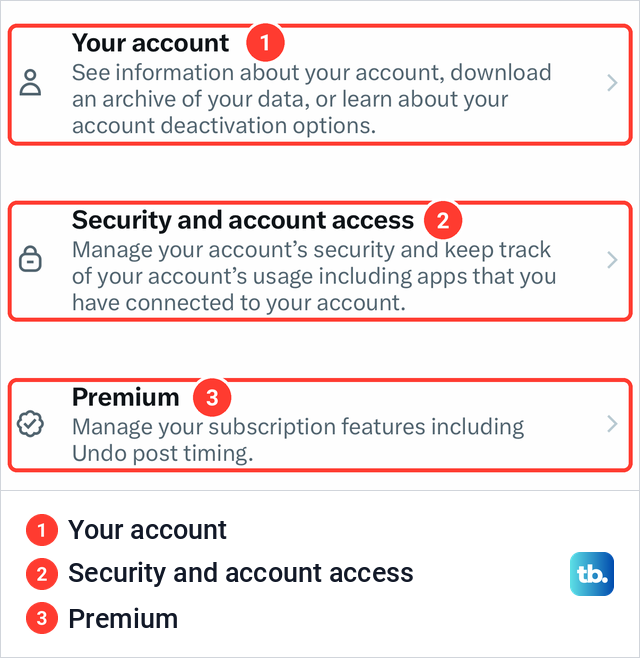
Tap Settings and privacy. Your account was the first row, described as the place to "download an archive of your data, or learn about your account deactivation options." Security and account access, where connected apps live, and Premium sat just below it.
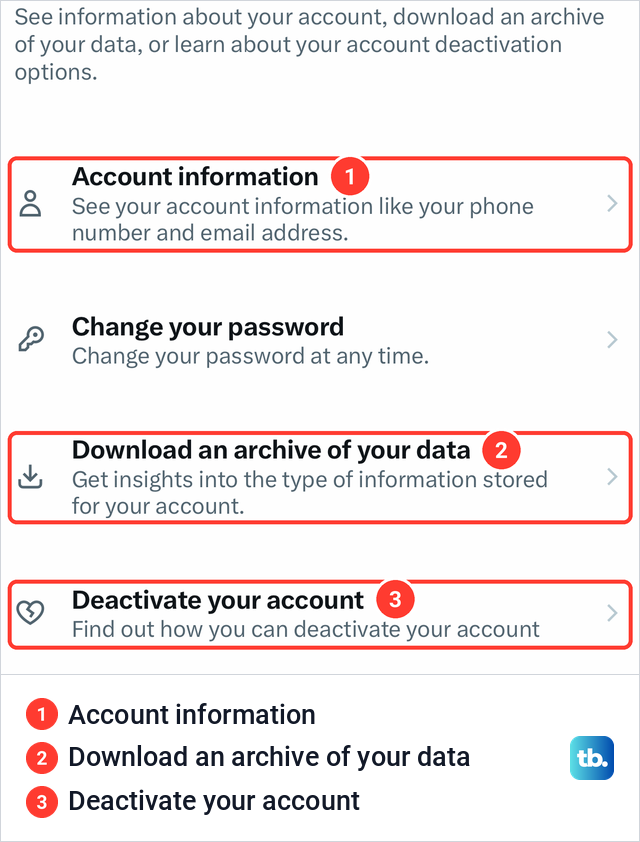
Tap Your account. It held four rows: Account information, Change your password, Download an archive of your data and Deactivate your account, subtitled "Find out how you can deactivate your account." Tap Deactivate your account.
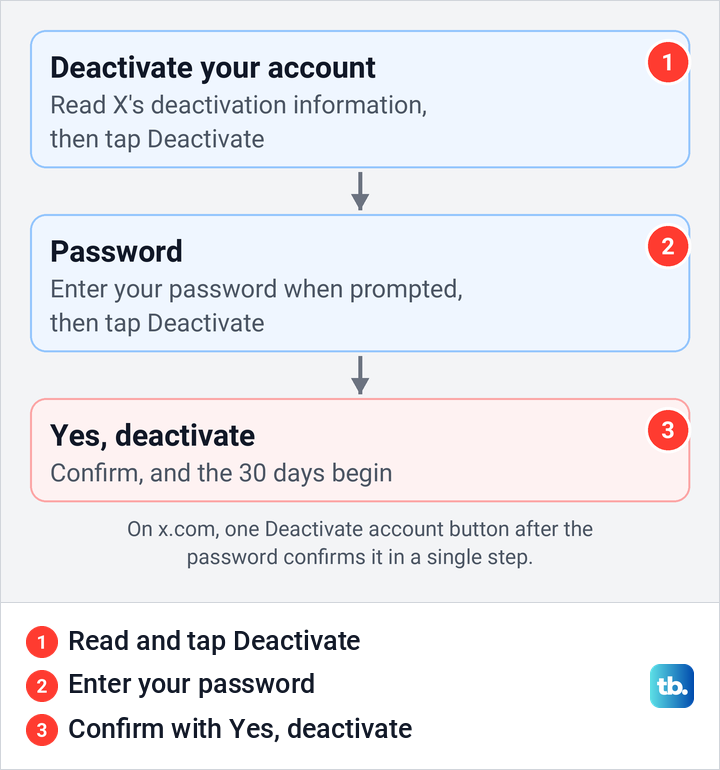
From here the steps follow X's instructions. Read the account deactivation information and tap Deactivate, enter your password when prompted and tap Deactivate again, then confirm with Yes, deactivate. X says that step starts the 30-day window.
How to delete your X account on Android
On Android, X's instructions use one different label. Tap the navigation menu icon or your profile icon, whichever your app shows in the top menu, then Settings and privacy. Tap Account, not Your account, then Deactivate your account.
X's remaining Android steps match the iPhone. Read the deactivation information and tap Deactivate, enter your password and tap Deactivate, then tap Yes, deactivate. If Google Play bills your Premium plan, cancel it there first, because deactivating leaves app purchases running.
How to delete your X account on a computer
On a computer the steps follow X's instructions for x.com, and they end with one confirmation instead of two. Sign in at x.com in your browser, then work through these four steps.
- 1.Click More in the menu on the left, then Settings and privacy.
- 2.In Your account, click Deactivate your account.
- 3.Read the deactivation information, then click Deactivate.
- 4.Enter your password and click Deactivate account to confirm.
The same Your account page on x.com holds Download an archive of your data, and X's web steps for it are to confirm your password and select Request archive. A computer is also the better place to open the archive, since X says it includes a file called Your archive for viewing your data in a desktop web browser.
What happens during the 30 days
X says your username and public profile can no longer be viewed on x.com, X for iOS or X for Android once you deactivate. Mentions of your username in other people's posts stay, but they no longer link to a profile. Your direct messages are not deleted during the 30 days, and X says the messages you sent are deleted along with the account.
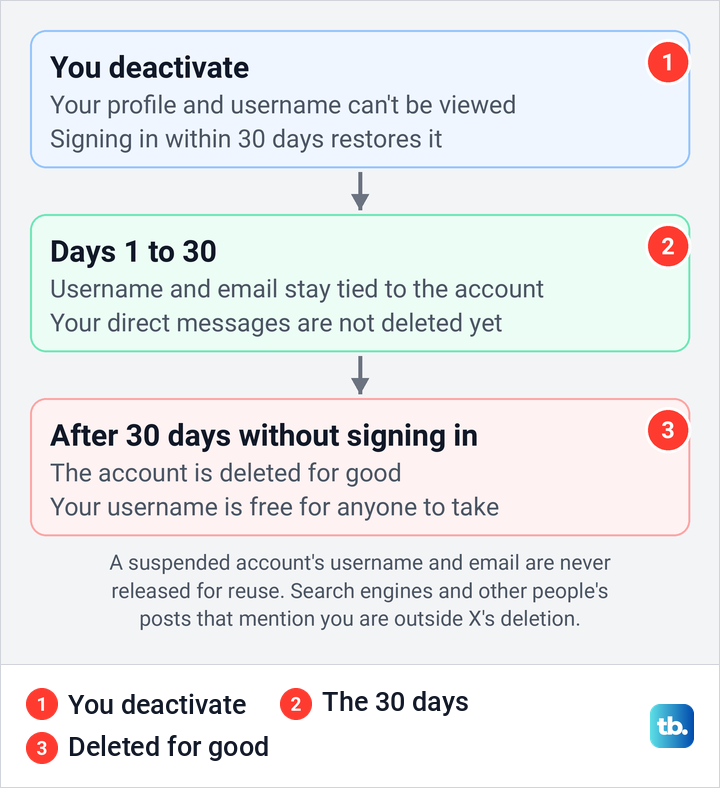
Some things sit outside the deletion. X says deleting the account won't remove your information from search engines like Google or Bing, because X does not control them, and that you can contact the search engine about it. X also says it may keep some information from a deactivated account for the safety and security of the platform.
After 30 days without a sign in, X says the account is permanently deleted, you can't reactivate it and you lose access to your old posts. Unless the account was suspended, the username then becomes available for registration by other X accounts.
Reactivate or start over on X
To cancel the deletion, sign in within 30 days on x.com or in the X app. X says you will see a notice asking you to confirm that you want to reactivate before you sign in, and that posts, followers and likes can take a while to come back.
After the 30 days there is nothing to restore. You can create a new account on X with the old email once it is free, but anyone may claim the old username first. If X still says the email or username is in use after 30 days, contact X support, which says it can clear your details from its system. If you forget the password during the window, X says to reset it with the Forgot Password link.
If X will not let you deactivate
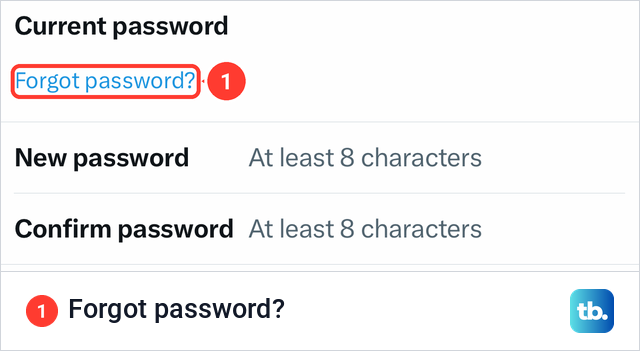
If X says your password is wrong, request a password reset email, as X's help suggests. On our iPhone, the Change your password screen in Your account also had a Forgot password? link under Current password.
If you lost the email address on the account, X says deactivation has to come from the confirmed account holder. Unless you can contact X from the confirmed email or still have the verified phone number, X says it cannot deactivate the account for you, so get that email back from your provider first.
A suspended account has its own order. X's help on suspended accounts says that to deactivate one, "you'll first need to file an appeal" through its appeal form, and only then submit a deactivation request if you still need it. Our steps to appeal an X account suspension cover the appeal itself. X also says the username, phone number and email of a suspended account are not available for reuse under any circumstances.
For a locked account, X's deactivation help says to submit a deactivation request and points to its help on unlocking the account. If the app crashes or Settings will not load, fix X when it is not working or use x.com on a computer.
How we tested this guide
We tested this in the X app on an iPhone 17 Pro with iOS 26.6, going through Settings and privacy up to the Deactivate your account row.
Frequently Asked Questions
Can I delete my Twitter account immediately?
No. X has no instant delete, so you deactivate the account and it is deleted after 30 days without a sign in.
Will signing in cancel the deletion?
Yes, during the 30 days. X shows a notice asking you to confirm reactivation before you sign in, and an app with access to your account can sign in for you, so revoke connected apps first.
Can I download my X archive after deactivating?
X says to request it before you deactivate. Wait for the email or notification and download the ZIP while the account is still active, because signing back in later to fetch it would reactivate the account.
Can I reuse my username or email on a new X account?
Not for 30 days, because X keeps them tied to the deactivated account. After that they can be used again, but the username is open to anyone, so another account may take it first. If X still says they are in use after 30 days, contact X support, which says it can clear your details from its system. A suspended account's username and email are never released for reuse.
Will deleting X stop X Premium charges?
Only if you bought Premium on x.com, which X cancels automatically when you deactivate. A plan bought in the iPhone or Android app keeps running until you cancel it with Apple or Google Play.
Why did my X account reactivate by itself?
X says a third-party app you authorized may be signing in for you. Revoke its access in Connected apps, and if you did not authorize any login, secure the account and change the password before you deactivate again.
Can I delete an X account without the password or old email?
Reset the password with the confirmed email or the verified phone number first. X says that without either one it cannot deactivate the account on your behalf.