

Facebook won't load, the feed won't refresh, or login keeps throwing connection errors. Check whether Facebook is actually down first, then move through the app, browser, device, and account fixes that solve problems on your end.
1. Check Facebook Somewhere Else First
Open Facebook on another surface before changing anything.
If the Facebook app fails, open facebook.com in a desktop or mobile browser.
If the browser fails, open the Facebook app.
Then switch the test: use another network, another device, or another browser.
If Facebook fails everywhere at the same time, treat it as a wider outage. If it works in one place and fails in another, keep going below.
2. Check Outage Reports
Search for facebook down or is facebook down, then compare several current results and timestamps.
Open a user-report tracker such as Technobezz Status, Downdetector, Down for Everyone or Just Me, StatusGator, or NordVPN Is It Down.
Search for Facebook, then check the 24-hour report graph, top reported issues, map, comments, and recent outage history.
Old outage articles stay indexed, so the date and time are the difference between useful and useless. These trackers are crowdsourced, not official Meta confirmation. A sharp spike in fresh reports tells you the problem is not just your phone, browser, or Wi-Fi.
You can run the same check for any major service at status.technobezz.com.
3. Look for Official Meta Updates
Meta does not have a complete consumer status page for the core Facebook feed and app. During a major outage, open X and search from:andymstone Facebook, or open Andy Stone's account directly, to check recent Meta communications for outage and recovery updates.
If Facebook problems affect ads, Pages, commerce, inboxes, or business tools, open Meta Status. Review product tiles such as Ads Manager, Meta Business Suite, Messenger Platform, WhatsApp Business Platform, and Marketing API for No known issues, Low disruptions, Medium disruptions, or High disruptions.
For developers, use the Platform Status Dashboard in Meta for Developers to check API and integration outages. Skip older tutorials that point to the old Facebook Platform Live Status or RSS pages.
4. Refresh Facebook and Reopen the App
Reload first, then restart the Facebook session if it still hangs.
On Facebook web, select the browser Reload or Refresh button.
If the page still fails, close the Facebook tab or window and reopen facebook.com.
On iPhone, open the App Switcher, swipe right to find Facebook, swipe up on the app, then tap Facebook from the Home Screen or App Library.
On iPad, open Exposé, swipe up on Facebook, then reopen it from the Home Screen, App Library, or Dock.
On Android, open your recent apps screen, close Facebook, then tap Facebook again.
This clears the stuck app session without deleting your account or app data.
5. Restart Your Phone or Tablet
A restart clears temporary device problems that make Facebook look down when the service is working.
On iPhone X or later, press and hold either volume button and the side button until the power-off slider appears, drag the slider, wait 30 seconds, then press and hold the side button until the Apple logo appears.
On Android, hold the power button or your device's power-menu key combination, then tap Restart.
If your phone only shows power off, tap Power off, wait for it to shut down, then turn it back on.
6. Update or Reinstall the Facebook App
On iPhone or iPad, open the App Store, tap the My Account button or your photo, tap App Updates, then tap Update next to Facebook.
To update everything at once, tap Update All.
On Android, open the Google Play Store, search for Facebook by Meta Platforms, Inc., then tap Update.
If updating does not fix the Android app, uninstall it, restart the device, then reinstall Facebook from Google Play or your device's app center.
On iPhone or iPad, touch and hold the Facebook app, tap Remove App, tap Delete App, tap Delete, then reinstall it from the App Store.
7. Clear Browser Data or Try Another Browser
If Facebook fails in one browser, open another browser and go to facebook.com. Try Firefox, Edge, Safari, or Chrome. When Facebook works in the second browser, fix the browser that failed.
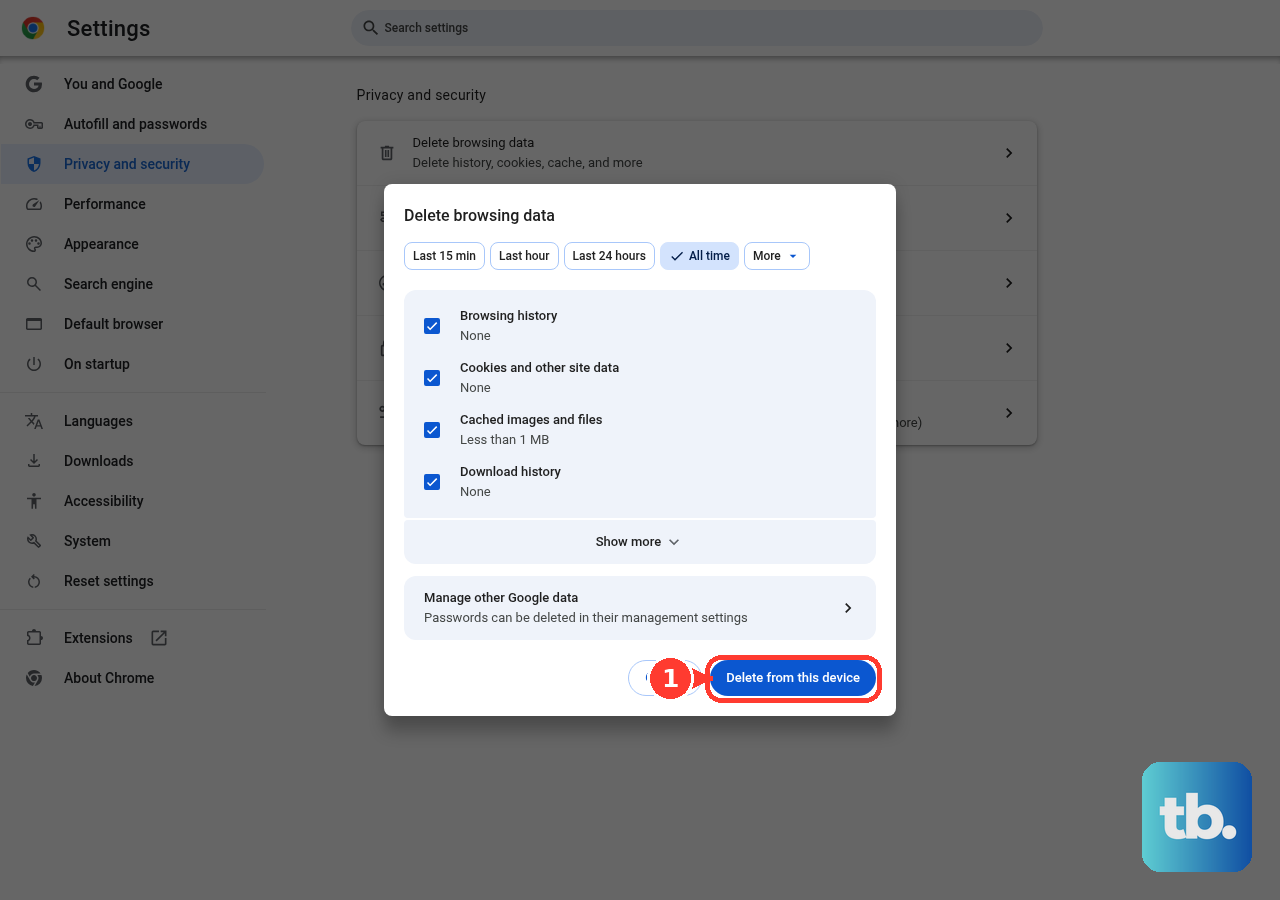
On Android, open Chrome, tap More, then Delete browsing data.
To pick specific data types, tap More options, select Cookies and site data and Cached images and files, then tap Delete data.
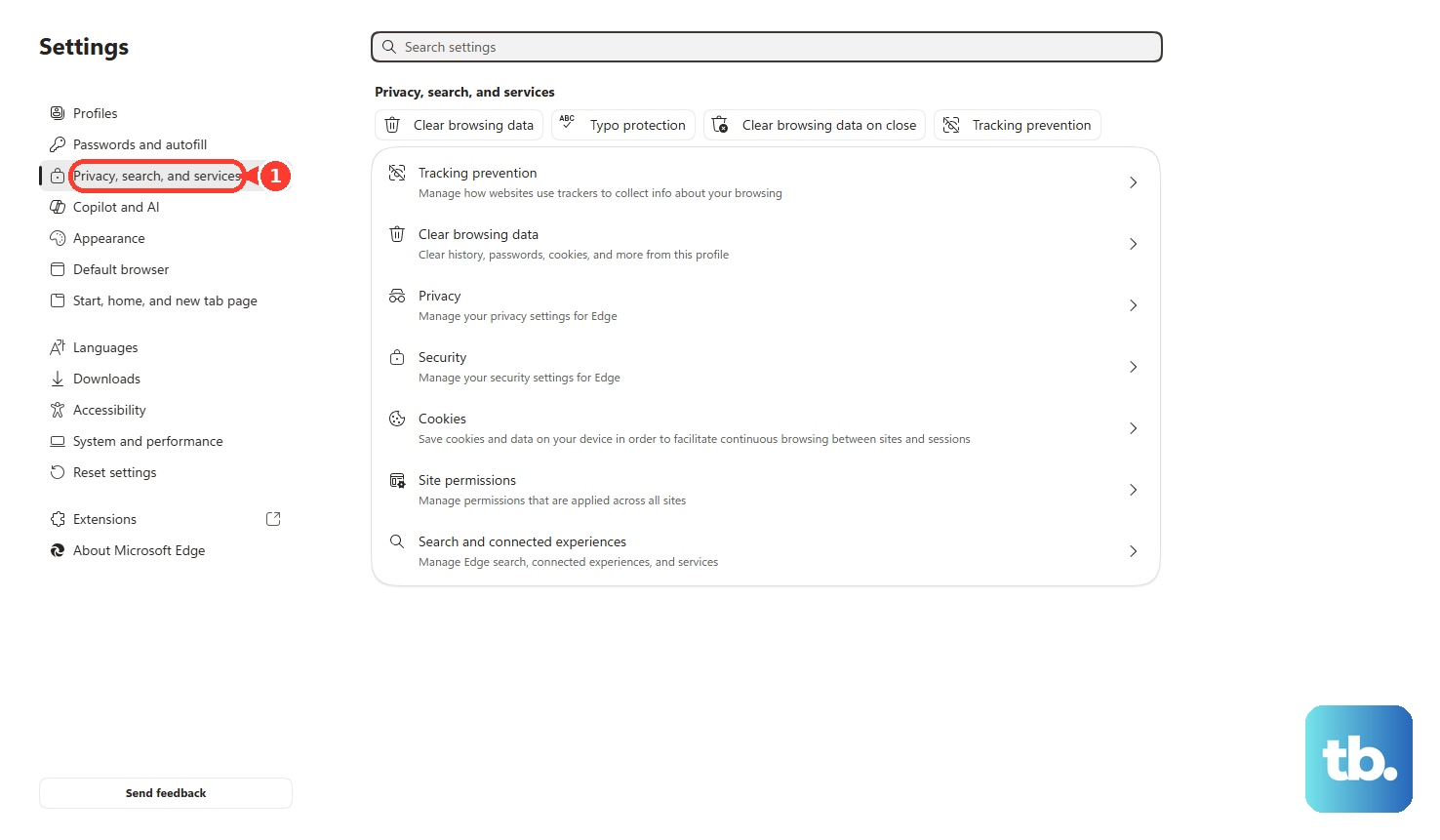
On Microsoft Edge desktop, open Settings and more, choose Settings, open Privacy, search, and services, go to Clear browsing data, choose Choose what to clear, select the time range and data types, then select Clear now.
8. Check Account Status or Report the Problem
When Facebook loads but one feature, profile, Page, or managed asset does not work, check your account status in Facebook through Help & support, then Account Status. Review your main profile and anything you manage for restrictions or Community Standards issues.
To report a technical problem from the app, return to the screen where the issue happened, shake your phone, tap Report problem, choose Include or Don't include logs, describe what happened, then submit it.
If shake reporting is off, open Menu, then Help & support, then Report a problem.
For advertisers, Page admins, creators, and business users, open Business Support Home, click Account status overview, select the restricted account or asset, then follow prompts such as Secure your account or Request review.
Frequently Asked Questions
How do I know if Facebook is down for everyone or just me?
Check Facebook on another device, browser, and network first. Then compare fresh outage tracker graphs, current search results, and official Meta communications.
Is Meta Status the official Facebook outage page?
Meta Status is official, but it focuses on business and developer products. For the core Facebook app and feed, use Meta communications, user-report trackers, and cross-device tests together.
Why does Facebook work in the app but not in my browser?
That points to the browser. Open another browser, then clear cookies and cached files in the browser that failed.
What should I do if only my Facebook account has problems?
Open Facebook, select Help & support, then Account Status. Review your profile and managed assets for restrictions or Community Standards issues.











