Maybe you are switching to a new email service, worried about losing years of receipts and conversations, or you simply want a copy of your messages stored safely on your own computer. Whatever the reason, you may have hunted through Yahoo Mail's settings looking for a tidy "Export" button and come up empty. That is not your mistake. Yahoo Mail genuinely does not include a one-click download tool, so saving your messages takes a slightly different route. The good news is that the route is reliable, free, and well supported once you know which path to take.
This guide walks you through the supported ways to back up and export your Yahoo Mail, starting with the most thorough method (pulling everything into a desktop email app) and ending with lighter options for saving just a few messages at a time.
Why There Is No "Export" Button in Yahoo Mail
Before you spend time searching for a feature that does not exist, it helps to set expectations. Yahoo states plainly that Yahoo Mail does not have an export feature. There is no single command that bundles your inbox into a downloadable archive file.
Instead, Yahoo points you toward a handful of supported alternatives. You can download your mail into a third-party email app using IMAP, print individual emails, copy and paste messages into a text editor, or forward emails to another address. For a complete and reusable backup, connecting an email app is the strongest choice, so that is where most of this guide focuses.
Step One: Generate a Yahoo App Password
Most third-party email apps do not use Yahoo's branded sign-in screen, which means your normal account password will not work for them. For these apps, Yahoo requires a separate app password. This is a one-time code generated specifically for the app you are connecting.
To create one, follow these steps:
- 1.Sign in and open your Yahoo Account Security page.
- 2.Under the External connections section, click Create app password.
- 3.Enter a name for the app you plan to use, then click Generate password.
- 4.Copy the one-time password that appears; you will paste it into your email app shortly.
- 5.Click Done.
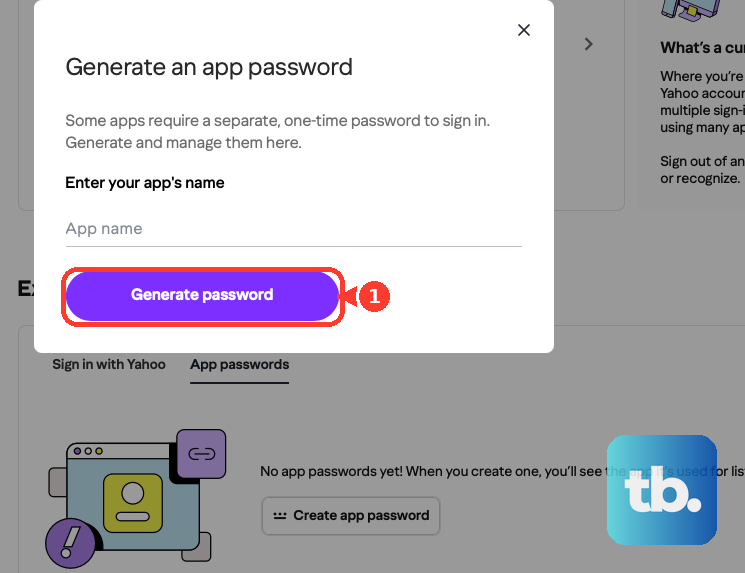
One practical tip from Yahoo: use a browser you have been signed into Yahoo with for several days, and avoid Incognito or private windows when generating the password. This reduces the chance of the request being blocked.
Step Two: Add Your Yahoo Account to an Email App Using IMAP
With your app password ready, open a desktop or mobile email app such as Outlook, Apple Mail, or Thunderbird. Each app phrases its setup screens a little differently, but they all ask for the same core information: an account type, an incoming server, a port, and your sign-in details.
When prompted, choose IMAP as the account type and enter these incoming settings:
- 1.Incoming server: export.imap.mail.yahoo.com
- 2.Port: 993
- 3.Security: SSL required
- 4.Username: your full Yahoo email address
- 5.Password: the app password you generated, not your usual Yahoo password
Note the server name carefully. For backing up and downloading your mail, Yahoo specifies export.imap.mail.yahoo.com on its dedicated download guidance. Once the app connects, it begins downloading copies of your messages, which gives you a local backup on your device.
Step Three: Add the Outgoing (SMTP) Server Settings
If you also want to send mail from this account inside the same app, you will need the outgoing server details. These let the app push messages out through Yahoo on your behalf.
Enter the following outgoing settings:
- 1.Outgoing server: smtp.mail.yahoo.com
- 2.Port: 465 or 587
- 3.Security: SSL required
- 4.Authentication: required
- 5.Username and password: your full Yahoo email address and the same app password
If your app offers a choice between ports, either 465 or 587 will work as long as SSL and authentication stay enabled. Sending capability is optional for a backup, but it is convenient to set up while you are already in the configuration screen.
Step Four: Keep a Copy on the Server
This setting matters more than any other, so do not skip past it. During setup, some apps ask whether you want to keep mail on the server. Yahoo warns that if your app asks this question, you should select yes, or your email will be deleted from your account when it is downloaded.
Choosing yes means the app pulls down copies for your local backup while the original messages stay safely in your Yahoo account. Choosing no can move your mail off Yahoo's servers entirely, which is the opposite of what you want when your goal is a backup. When in doubt, keep the originals on the server.
Step Five: Tell the App to Download Full Messages
A backup is only as useful as the content it captures, and many email apps cut corners by default. Yahoo notes that some apps only download a preview or snippet of your emails until you actually open each one.
Look through your app's settings for an option related to downloading full messages or making messages available offline, and make sure it is set to download the full contents of your email for offline use. This ensures your backup includes complete message bodies and attachments, not just subject lines and the first few words.
Step Six: Allow Enough Time for Large Mailboxes
If you have used your Yahoo address for years, you may have far more mail than you realize. Yahoo cautions that for accounts with a lot of content, the download can take several days or longer to download everything. It is best to start the process when you can leave your device on and connected.
Very large folders deserve special attention. Yahoo notes that folders containing 100,000 or more emails may run into problems during download. If one of your folders is that crowded, move some of the messages into a new folder first, then let the app sync the smaller folders. Breaking up an oversized folder this way helps the download complete cleanly.
A Lighter Option: Forwarding Emails Elsewhere
If you only want to preserve a handful of important messages, or you prefer to keep copies in a second mailbox, forwarding can serve as a lightweight backup. You can forward a single email to another address whenever you like.
Yahoo Mail also offers an automatic forwarding option in its settings, where you enter a forwarding address and verify it. There is an important catch, though. Automatic forwarding from free Yahoo Mail accounts was discontinued, so it now requires a paid subscription, such as Yahoo Mail Plus, and it may not be available in every location. Manual one-at-a-time forwarding remains available to everyone.
Other Quick Ways to Save Individual Messages
For one-off keepsakes, Yahoo's supported alternatives include some low-tech but dependable options. You can print individual emails, which most browsers and apps also let you save as a PDF file. You can also copy and paste the text of an email into a plain text editor and save it as a file on your computer.
These methods will not scale to thousands of messages, but they are perfect when you just need a clean record of a confirmation, a receipt, or a meaningful note without configuring an entire email app.
Frequently Asked Questions
Does Yahoo Mail have a built-in export or download feature?
No. Yahoo states that Yahoo Mail does not have an export feature. To save your messages, you use one of Yahoo's supported alternatives: download mail into a third-party app via IMAP, forward emails, print them, or copy and paste them into a text editor.
Why do I need an app password instead of my normal Yahoo password?
Third-party email apps that do not use Yahoo's branded sign-in page require a separate app password. You generate it on your Yahoo Account Security page under External connections, then enter that one-time password in your email app in place of your usual password.
Which incoming server should I use to back up my mail?
For downloading and backing up your mail, use the incoming IMAP server export.imap.mail.yahoo.com on port 993 with SSL required. Sign in with your full Yahoo email address and the app password you generated.
Will downloading my mail delete it from my Yahoo account?
It can if you choose the wrong option during setup. If your app asks whether to keep mail on the server, select yes. That preserves the original messages in your Yahoo account while your app keeps local copies as a backup.
Can I still set up automatic forwarding for free?
Not for free accounts. Automatic forwarding from free Yahoo Mail accounts was discontinued and now requires a paid subscription, such as Yahoo Mail Plus, and it may not be available in all locations. You can still forward individual emails manually at no cost.











