
If you bought your Google Pixel 9 Pro XL through a carrier like AT&T, T-Mobile, or Verizon, it's probably locked to that network. That means you can't just swap in a SIM from another provider and expect it to work. But getting it unlocked is straightforward once you know the process.
What to Know
- SIM Network Unlock PIN is an 8 16 digit code that removes carrier restrictions from your Pixel 9 Pro XL
- Contact your carrier first: most will give you the code for free if you meet their requirements
- Your IMEI number is essential: dial
*#06#to find it - Third-party services are an option when carriers can't or won't provide the code
- Don't guess the code: too many wrong attempts can permanently lock your device
What's a SIM Network Unlock PIN?
A SIM Network Unlock PIN (sometimes called a Network Unlock Code or Network Control Key) is a unique code that tells your Pixel 9 Pro XL it's okay to accept SIM cards from other carriers. When you buy a phone from a carrier, they lock it to their network so you can't switch to a competitor without their permission.
Unlocking gives you the freedom to use any compatible network. That means better contract deals, cheaper international roaming with local SIMs, and a higher resale value when it's time to upgrade.
Get the Unlock Code from Your Carrier
Check Your Eligibility
Before you request an unlock, make sure you qualify. Carriers usually require that the device isn't blacklisted or reported stolen. You also need to have completed your contract term (typically 12 to 24 months), cleared any outstanding payments, and kept the phone active on their network for the minimum required period.
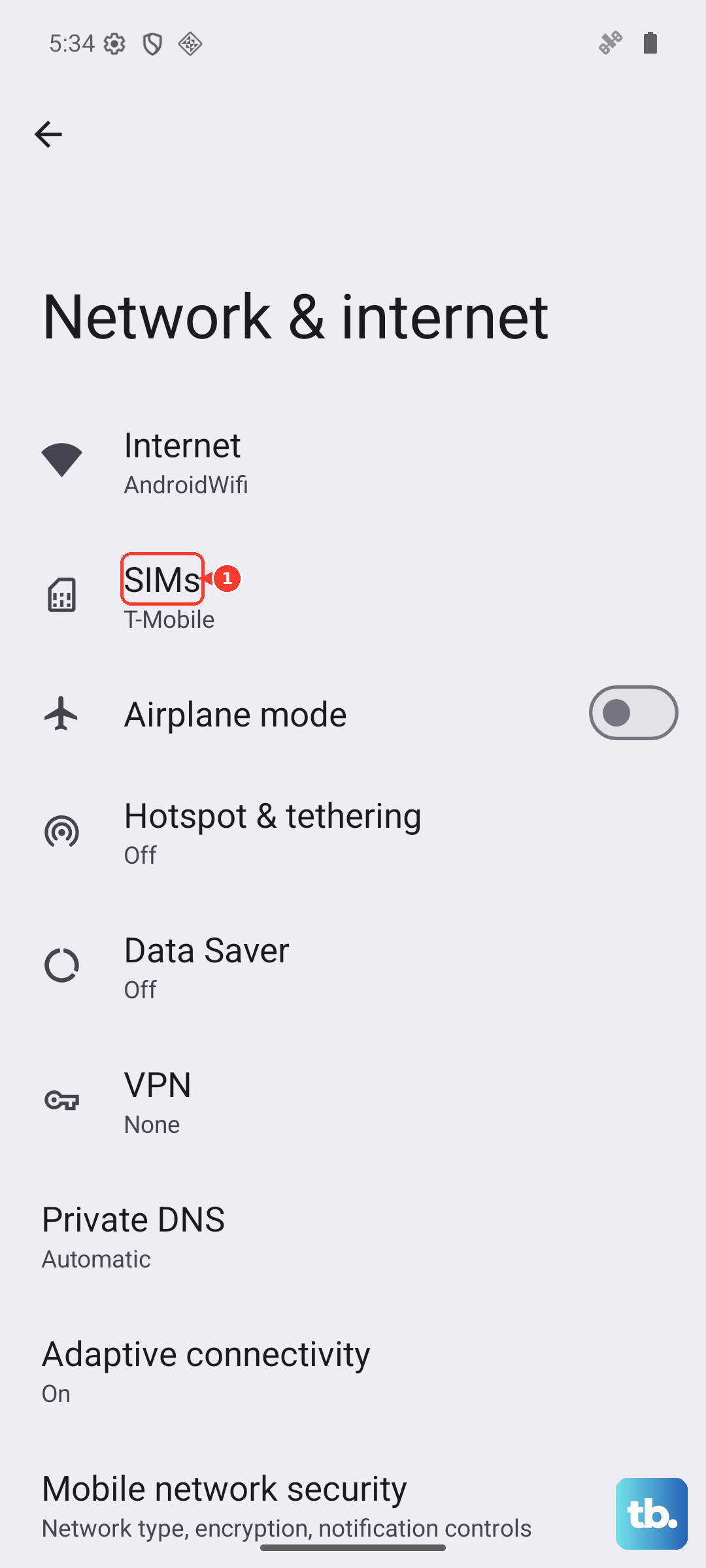
On your Pixel 9 Pro XL, you can check the carrier lock status by going to Settings > Network & internet > SIMs and tapping your carrier's name. If you see a message like "Carrier locked," you're on the right track.
Contact Your Carrier
Call your carrier's customer service or visit their website and ask for a "SIM Network Unlock PIN" or "Network Unlock Code." You'll need your IMEI number, which you can find by dialing *#06# on your Pixel. The representative will also verify your account ownership, so have your account password or billing details ready.
Most carriers will process the request within a few days. AT&T, for example, typically emails an 8-digit code. T-Mobile usually responds within 24 to 48 hours. Verizon no longer unlocks automatically after 60 days. As of 2026, postpaid devices unlock once they're purchased outright or the financing balance is paid off, and prepaid devices unlock after 365 days of active service.
Submit Your Request
After you've called or submitted an online form, wait for the carrier to process your request. This can take up to 7 business days, though many come through faster. Once approved, you'll receive your unlock code via email or text message. Save it somewhere safe, you'll need it in the next step.
Use the Unlock Code
Turn off your Pixel 9 Pro XL and remove your current SIM card. Insert a SIM card from the new carrier you want to use. Power on the phone, you should see a prompt asking for the unlock code. Type it in carefully. You usually get a limited number of attempts (often 10), so enter it correctly the first time.
If the code is accepted, the phone will confirm the unlock was successful. If you see any error, don't retry the same code, move to the troubleshooting section below.
Carrier-Specific Unlock Processes
AT&T Unlock Process
Call AT&T at 800.331.0500 and request a network unlock for your Pixel 9 Pro XL. Provide your IMEI and account verification. You'll receive an 8-digit unlock code via email. Insert a non-AT&T SIM and enter the code when prompted.
T-Mobile Unlock Process
Contact T-Mobile customer service. They'll verify your account and device eligibility. You'll typically get the unlock code within 24 to 48 hours. The default SIM PIN for T-Mobile is 1234 if you need it during the process.
Verizon Unlock Process
Call 800.922.0204 (from the US) or 908.559.4899 (internationally) and request a PIN Unlock Key. As of 2026 Verizon no longer unlocks automatically after 60 days. Postpaid devices unlock once fully paid off (purchased outright or financing balance cleared) and prepaid devices unlock after 365 days of active service, but you can still ask for help if needed. Follow the on-screen instructions with a new SIM card.
Use a Third-Party Unlocking Service
If your carrier can't provide the code, or you need it faster, third-party unlocking services are a reliable alternative. Just be careful, the space is full of scams.
Choose a Reputable Service
Look for services with positive reviews, clear guarantees, and a track record with Google Pixel devices. Avoid any service that claims "instant" or "free" unlocks, those are almost always scams. A legit service will charge a fee (usually $20 to $50) and deliver the code within 6 to 24 hours.
Provide Required Information
You'll need your Pixel 9 Pro XL's IMEI number (dial *#06#), your current carrier, the device model (Google Pixel 9 Pro XL), and your email address. Double-check everything before submitting, a single wrong digit can delay the process.
Complete Payment and Wait
Pay through a secure channel. The service will process your request and email you the unlock code. Once you have it, follow the same steps as with a carrier-provided code: insert a new SIM, enter the code, and confirm the unlock.
Troubleshooting Common Issues
SIM Network PIN Blocked
If you see a "SIM Network PIN Blocked" error after too many wrong attempts, you've triggered a security lock. Contact your previous carrier and ask for a Master Control Key (sometimes called an Unfreeze Code). Enter that code when prompted. You may see "Network Unlock Unsuccessful", that means the phone is unfrozen, so now enter your original SIM Network Unlock PIN to complete the process.
Device is Blocked
If your Pixel 9 Pro XL shows a "Device is Blocked" message, contact Google's support directly. They can issue a Master Unlock Code for your specific situation. After entering that code, you'll then enter your original SIM Network Unlock PIN. This extra security layer is rare but can happen on some devices.
Unlock Code Not Working
Double-check that you're entering the code correctly, including any dashes or spaces. Make sure you're using a SIM card from a different carrier (a prepaid SIM from a competitor works fine for testing). If the code still doesn't work, contact the provider (carrier or third party) who gave you the code. Don't keep guessing, too many wrong attempts can permanently lock your device, making it impossible to unlock without professional repair.