
When your Pixel 10a starts restarting on its own, it can feel like the phone has a mind of its own. Usually it's a software glitch, but hardware can play a role too. Let's work through the most common fixes.
Before diving in, make sure your important stuff is backed up. Go to Settings > System > Backup and confirm the most recent backup. That way a factory reset won't cost you anything.
Force Restart Your Pixel 10a
This is the quickest way to clear out a temporary glitch that might be causing the random restarts. Press and hold the Power button for about 30 seconds, or for up to 60 seconds until the device restarts. That's the official force restart for the Pixel 10a, and it works almost every time for software hiccups.
If the phone was stuck in a restart loop, this often breaks the cycle immediately. Try using the phone normally for a while after the restart to see if the issue comes back.
Boot Into Safe Mode
Third-party apps are a common source of system instability, especially if you recently installed something new. Safe mode temporarily disables all downloaded apps, leaving only the system apps running.
To enter Safe Mode, press and hold the Power button and Volume Up button together until the power menu appears. Then tap and hold the "Restart" option until you see a prompt to reboot into Safe Mode. Confirm and the phone will restart with "Safe mode" at the bottom of the screen.
If the random restarts stop while in Safe Mode, a third-party app is the culprit. You can start uninstalling recently added apps one by one until the problem goes away. When you're done, just restart the phone normally to exit Safe Mode.
Update Everything
Outdated software can cause all kinds of weird behavior, including random reboots. The Pixel 10a runs Android 16, so check for system updates first: go to Settings > System > System update and install anything available. Also tap Google Play system update on the same screen to get the latest security patches for Play Services.
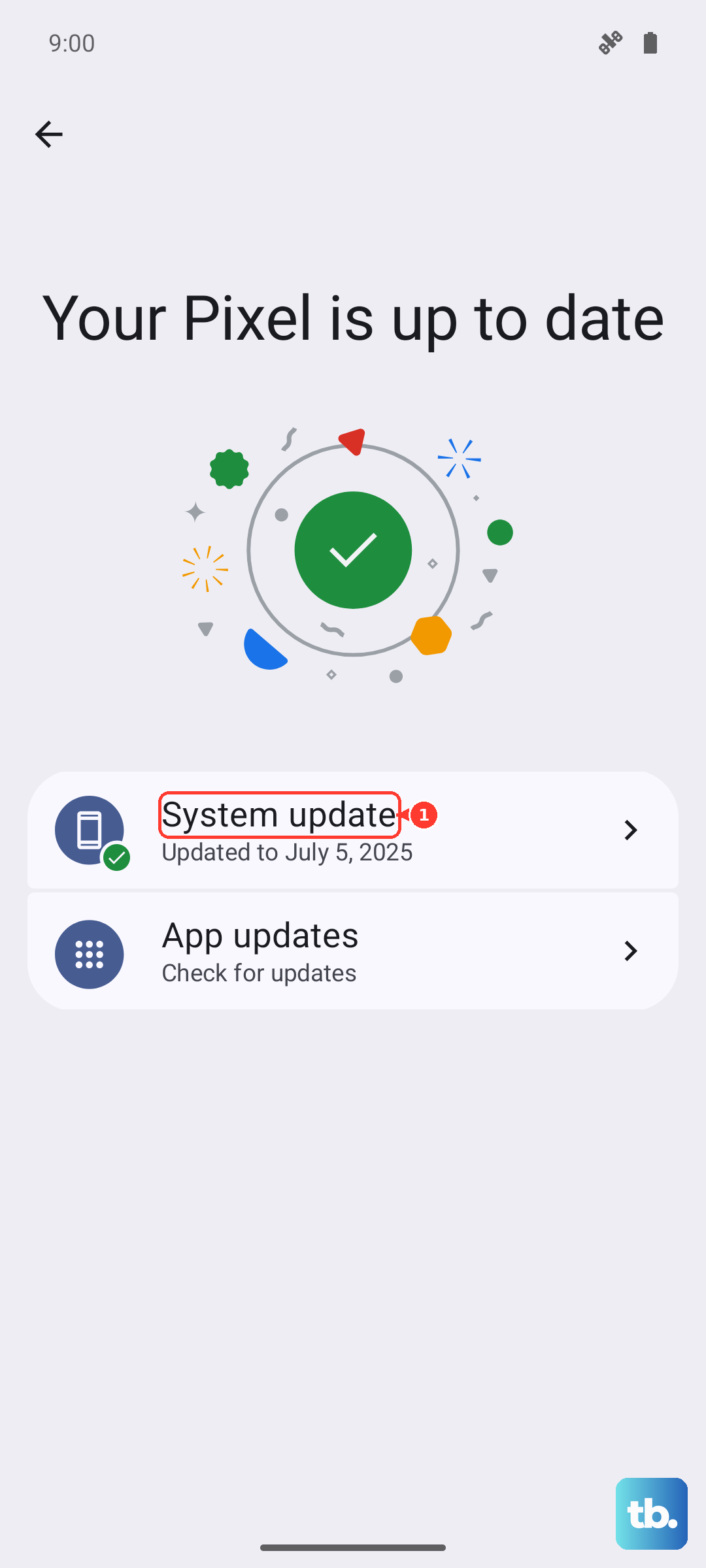
Next, update all your apps through the Play Store. Open the Play Store, tap your profile icon, then tap Manage apps & device > Update all. A fresh set of app updates can fix compatibility problems that were triggering restarts.
Free Up Storage Space
When the Pixel 10a runs low on storage, the system can become unstable and crash or restart. Go to Settings > Storage and see how much free space you have. If it's under a couple of gigabytes, that's a problem.
Tap Free up space and let the phone suggest files to delete. Old downloads, cached data, and unused apps are easy targets. You can also offload photos to Google Photos (if you use it) to free up a lot of room.
Check for Overheating Issues
Overheating is a known cause of random restarts on the Pixel 10a. The phone will shut down or restart to protect itself. If the device feels warm to the touch when the restarts happen, heat is likely the trigger.
Remove the case, keep it out of direct sunlight, and avoid heavy use like gaming or video streaming while it cools down. You can also check Settings > Battery > Battery diagnostics (if available on your unit) to see if any temperature warnings appear. If overheating is chronic, consider a charging cable swap or cleaning the port it might be interfering with heat dissipation.
Reset App Preferences
This doesn't delete your data, but it resets all app permissions, disabled apps, and default app settings. It's a safe step before a full reset. Go to Settings > Apps > See all apps, tap the three-dot menu in the top right, and choose Reset app preferences. Confirm the prompt.
You'll have to re-grant permissions to apps the next time you use them, and any default app choices (like for phone or browser) will be cleared. But it often resolves conflicts that were causing system instability.
Factory Reset Your Pixel 10a
If nothing else has worked, a factory reset wipes the slate clean. This removes all your data, so the backup from earlier is critical. Go to Settings > System > Reset options > Erase all data (factory reset). You'll be prompted to confirm, and the phone will restart and go through the first-time setup.
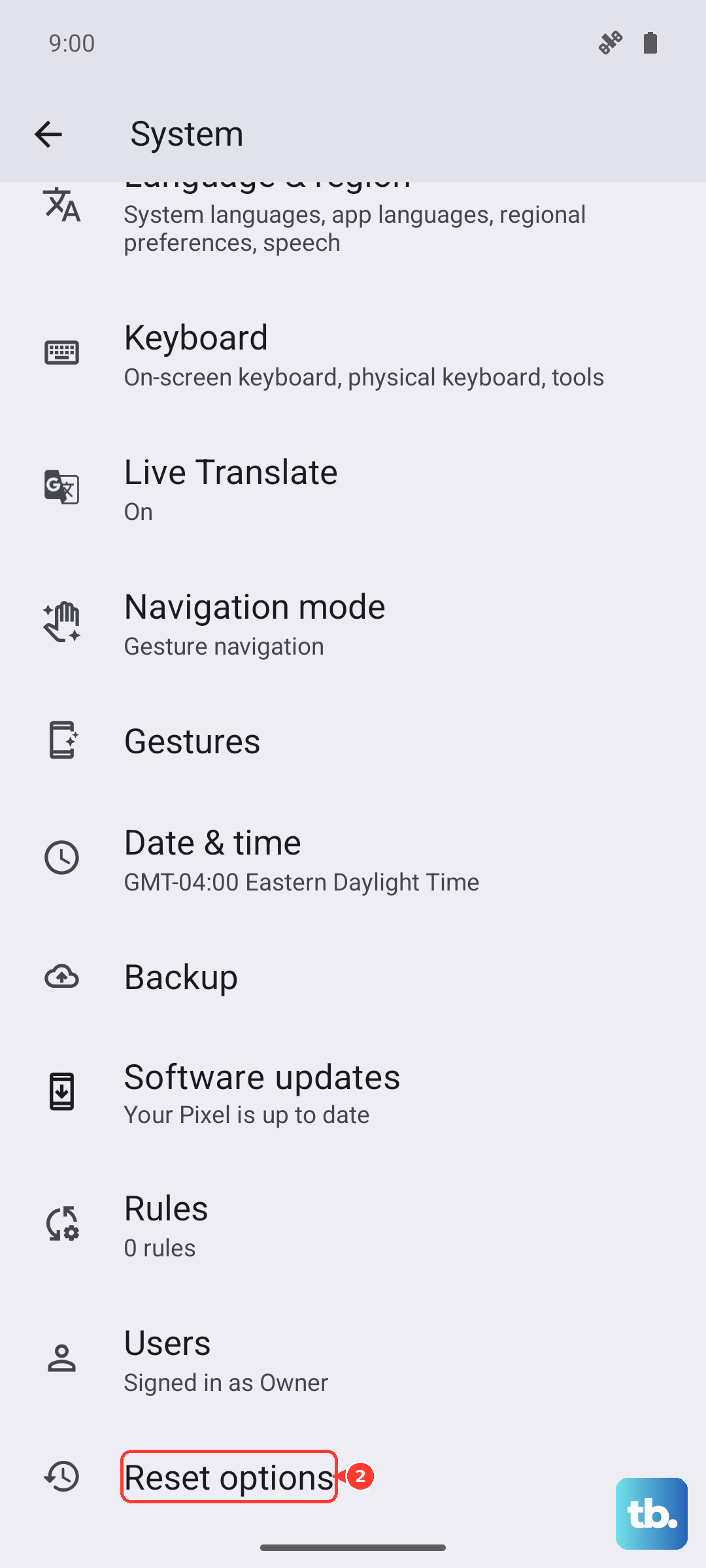
During setup, choose to restore from your backup. If the random restarts stop after the reset, it was a software issue. If they continue, we're looking at hardware.
Use Google's supported recovery path
Skip the old recovery-cache wipe step on Pixel. If the phone can boot, restart it, check Settings > System > Software update, check Storage, and use Safe mode to test whether a downloaded app is causing the problem.
If the phone still will not boot, stays on the logo, or keeps restarting, Google's documented button-based recovery path is a factory reset from Fastboot/Recovery. That erases the phone, so use it only as a last resort after non-destructive steps and backups have been considered.
Clean the Charging Port and Check Hardware
The Pixel 10a's charging port is a known trouble spot for debris. Lint and dust can block the USB-C connection, and a bad connection can cause the phone to overheat or behave erratically, sometimes triggering restarts. Gently clean the port with a wooden toothpick or a can of compressed air. Don't use anything metal.
Also try charging with a different USB-C cable, ideally a 45W PPS charger like the one Google recommends. If wired charging is flaky and you have a Qi wireless charger, use that as a backup the Pixel 10a supports up to 10W wireless charging. If the phone stays stable on wireless power but restarts when wired, the port or cable is likely the problem.
Removing and reinserting the SIM card can also help if the issue is related to the cellular radio. Use the SIM eject tool, inspect the card for damage, and pop it back in. If the phone still restarts randomly after all this, it might be a hardware issue that needs a repair shop to look at.