
Galaxy Buds 3 Pro audio cutouts can have several causes, including interference, a low battery, or outdated software. Music may stutter even while the buds stay listed as connected in your phone's Bluetooth menu. Start with simple connection checks before moving on to a reset or checking for physical damage.
Start by checking for interference and restarting the earbuds. Move your buds and phone away from Wi-Fi routers or running microwaves, and keep a clear path between them. Put both buds in the case and close the lid. Wait until the case light goes out, about 7 seconds, then try connecting them again.
Drop the Second Device
Your buds can switch between devices, but they cannot stay connected to your phone and tablet simultaneously. If another device is taking the connection, disconnect the buds from it first. In Galaxy Wearable on that device, tap the Menu icon, select Disconnect, and confirm if prompted.
Test it with just your phone connected. If the cutouts stop, check which device the buds are connected to before you start listening, and disconnect them from other devices when needed.
Give the App Cache a Quick Clear
You can try clearing Galaxy Wearable's cache if the app is acting up. On a Samsung phone, head to Settings > Apps > Galaxy Wearable > Storage > Clear cache. Keep in mind that Clear data resets the app, so you may need to set it up again afterward.
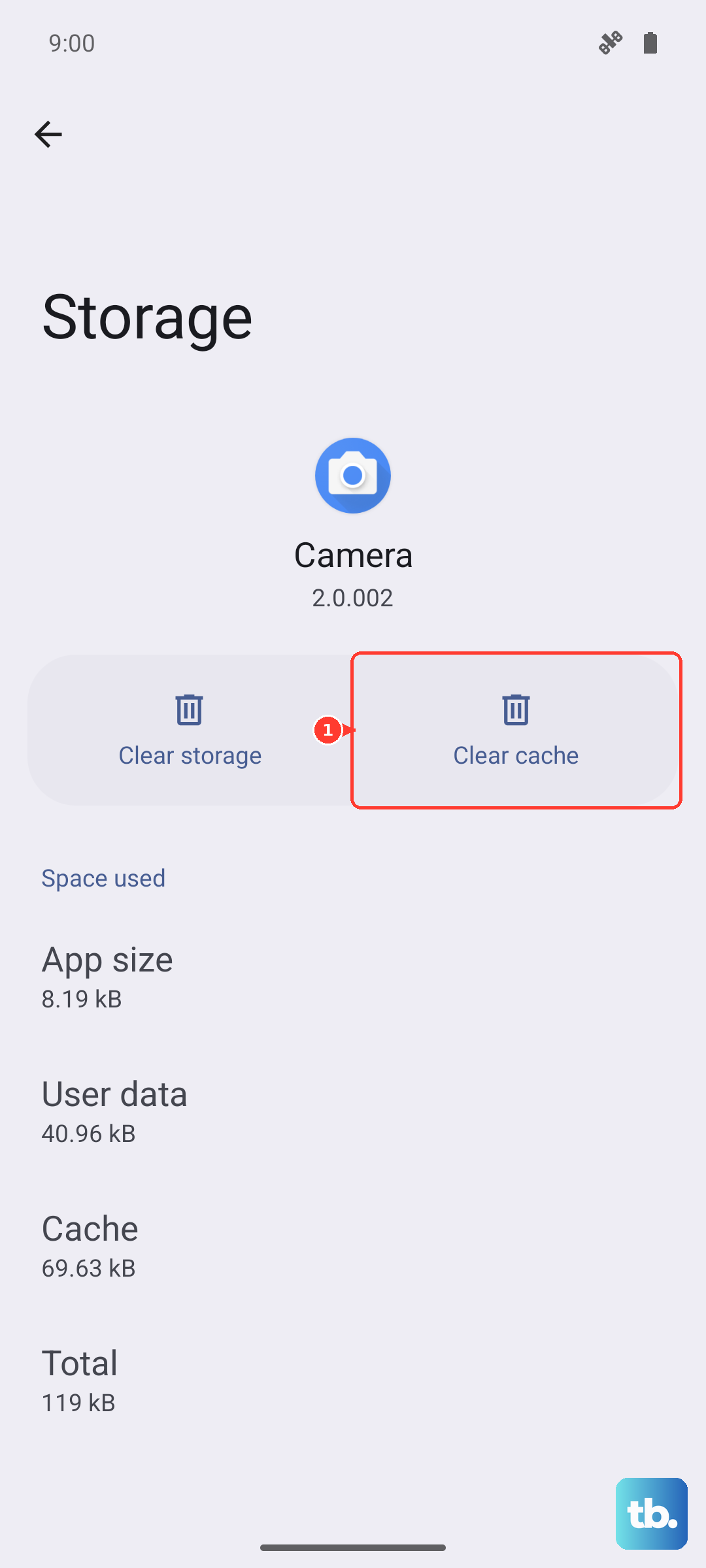
On other Android phones, look for Galaxy Wearable under your phone's app settings; the layout may differ. Galaxy Buds 3 Pro can connect to an iPhone through Bluetooth, but they do not support the Galaxy Buds app for iOS.
Check What's on the 2.4 GHz Band
Bluetooth and 2.4 GHz WiFi share the same spectrum, so nearby wireless devices can interfere with your buds. WiFi routers and running microwave ovens are worth moving away from. Keep your phone and earbuds within 30 feet of each other, with as few obstructions between them as possible.
Walk into a different room away from electronics or step outside. If the buds stay connected without cutting out, interference may be the cause. Try listening farther from your router or other electrical equipment, and avoid walls or other obstructions between your phone and the buds.
Update the Buds Firmware
Samsung has released several stability-focused firmware updates for Galaxy Buds3 Pro. To check manually, place both buds in the case with the lid open, then open Galaxy Wearable > Earbud settings > Earbuds software update > Download and install.
Make sure both buds are charged and connected to Galaxy Wearable. For a manual update, put both buds in the charging case and leave the lid open, then tap Earbud settings > Earbuds software update > Download and install. For an update popup, tap Update and follow the prompts.
Reset Through Galaxy Wearable
If clearing caches and updating firmware didn't help, try resetting the earbuds. Open Galaxy Wearable, tap your Galaxy Buds 3 Pro, tap Earbud settings, tap Reset, and confirm. Afterward, reconnect the buds to your phone through Galaxy Wearable.
To reconnect, place both buds in the case, close the lid for 5-6 seconds, and open it again. Select the buds in Galaxy Wearable and follow the setup prompts. Tap OK if a pairing confirmation appears.
Forget the Saved Pairing and Start Fresh
If connection issues persist after a reset, try removing the saved pairing from your phone. Open Settings > Connections > Bluetooth, find Galaxy Buds 3 Pro, tap the gear icon, and choose Unpair.
Now put both buds in the case with the lid open. Press and hold the Connect button on the bottom of the case, next to the USB-C port, for at least 3 seconds. The case LED cycles red, blue, and green to show it's in pairing mode. Galaxy Wearable should detect them and guide you through fresh setup.
Charge the Case and Buds Fully First
A low battery can affect audio quality, so check the buds' battery level before you dig into deeper fixes. Put both buds in the case, make sure the charging contacts are clean, and close the lid. Charge them for at least 30 minutes, then re-test before moving on to more involved steps.
For this charging check, connect the case's USB cable to a Samsung-approved charger adapter and plug it directly into a power outlet. The charging indicator lights up when the case gets power. The Galaxy Buds3 Pro case also supports charging on a compatible Qi wireless charging pad. Place both buds inside, close the lid and center the case on the pad.
Try Pairing to a Different Phone
If the cutouts only happen with one specific phone or tablet, that device or its connection may be the cause. Pair the Galaxy Buds 3 Pro to a different phone briefly. If they stay connected without cutting out, restart your original device and check for OS updates. On a Samsung phone, you can also try Settings > General management > Reset > Reset Wi-Fi and Bluetooth settings, then confirm with Reset settings and Reset. You'll need to reconnect to Wi-Fi and re-pair Bluetooth accessories afterward.
Inspect for Physical Damage
Cracks, loose parts, or other visible damage can impair the buds and their functions. Take a quick look at both buds with them out of the case. If you see damage, or the cutouts continue after troubleshooting, contact Samsung for service. Also check the speakers and air ducts for dirt or debris.