You type your Yahoo password, hit sign in, and get bounced back. Maybe the screen reads "Invalid ID or Password," maybe it just keeps reloading, or maybe your mail app on your phone suddenly stopped syncing. It is one of the most frustrating things that can happen with an email account you rely on.
Once you regain control, replace the old password with one that cannot be guessed. A free password generator creates a long random password locally in your browser, and nothing you generate ever leaves your device.
The good news: a rejected Yahoo password is rarely what it looks like. Most of the time the password itself is fine, and something small (a stuck key, a stale saved login, a mail app holding an old credential) is in the way.
Work through the fixes below in order. They run quickest and most common first, so you will likely be back in before you reach the bottom. Web, iPhone, Android, and third-party apps like Outlook and the built-in Mail app are all covered.
Check Caps Lock, Num Lock, and Auto-Capitalization First
Before assuming the password is wrong, rule out the silent typos. On a computer, Caps Lock or Num Lock being on changes the exact characters you type, so a correct password gets entered incorrectly.
On a phone, the keyboard auto-capitalizes the first character by default, which quietly breaks a password that starts with a lowercase letter. Tap to clear the field, turn off the shift key, and re-type slowly. This single check resolves a surprising number of "Invalid ID or Password" errors.
Update Your Browser's Saved Password
If your browser auto-fills your Yahoo login, it may still be submitting the old password after you changed it. The browser, not Yahoo, is feeding the wrong value.
Clear or update the saved Yahoo entry in your browser's password manager, then type the current password by hand. While you are at it, if the sign-in page is misbehaving rather than rejecting you outright, the issue may be browser-specific (corrupt cookies or an unsupported browser) rather than a real password problem.
Try a Different Browser or Clear Cookies
To find out whether the trouble is your account or your browser, sign in using a different supported web browser. If it works there, the original browser is the culprit.
If the sign-in screen keeps looping or reloading, do this:
- 1.On the sign-in page, click "Not you?".
- 2.Enter your Yahoo ID and password.
- 3.Click "Sign in".
- 4.If it still loops, clear your browser's cookies, then quit and restart the browser.
- 5.Try a different supported browser, or a different entry point such as the primary sign-in page or the Yahoo Mail sign-in page.
Reset a Forgotten Password With the Sign-in Helper
If you genuinely do not know the password, or you suspect someone changed it without your permission, use Yahoo's Sign-in Helper to verify your identity and set a new one.
Go to the Sign-in Helper at login.yahoo.com/forgot. Enter your recovery email address, or select "Use recovery phone number". Click Next. Follow the on-screen instructions to verify your identity and set a new password.
One helpful detail: if your account got locked from too many failed attempts, the Sign-in Helper restores access immediately, so you do not have to wait out the automatic 12-hour unlock.
Wait Out a Temporary Lock
Too many failed sign-in attempts in a row temporarily locks the account. If you do not want to run the Sign-in Helper, the lock clears on its own after 12 hours, and you can try again then.
Yahoo may also block sign-ins when it detects a security risk, a hidden or constantly changing IP address, or attempts from different locations in a short window. The recent-activity cleanup further down clears much of this blocking state.
Change Your Password From the Account Security Page
Once you are signed in, you can set a fresh password from the web: Go to the Yahoo Account security page at login.yahoo.com/account/security. Under "Ways of signing in," click Password. Enter your new password, then click Continue.
Gotcha: if there is no option to change the password, you have Account Key turned on. Disable Account Key first, then return here to set a new password.
Change Your Password Inside the Yahoo Mail App
You can do the same thing from the Yahoo Mail app on iOS or Android: Tap the profile icon. Tap "Manage Accounts". Tap "Account info". Tap Security.
Scroll down and tap "Change password". Enter your new password, then tap Continue. If your password contains characters that are not available on your mobile keyboard, change it from a desktop browser first so you can actually type it on the phone afterward.
Reauthenticate the Account in iPhone or iPad Mail
When the built-in Mail app stops syncing, the stored credential has usually gone stale and just needs to be re-entered. The path depends on your iOS version.
On iOS 18, open Settings, scroll to the bottom, and tap "Apps". Tap "Mail," then tap "Mail Accounts". Select your Yahoo Mail account, then tap "Re-enter Password".
Enter your Yahoo username and password. If prompted, choose where to receive a verification code, enter it, and continue.
On iOS 17, the path is Settings > Mail > Accounts; select your Yahoo account, tap "Re-enter password," enter your username and password, then enter a verification code if prompted and tap Next.
Remove and Re-add the Account on iPhone or iPad
If re-entering the password is not enough, remove the account and add it back so it picks up fresh connection settings.
Open Settings, scroll to the bottom, tap "Apps," tap "Mail," then tap "Mail Accounts". Select your Yahoo Mail account, tap "Delete Account," then confirm with "Delete from [device name]". Go back and tap "Add Account".
Select "Yahoo," looking for the Yahoo provider logo, which triggers Yahoo's secure sign-in. Enter your username and password and complete verification if prompted. Tap "Save" in the top right.
Choosing the Yahoo logo matters, because that secure sign-in lets you use your normal password without an app password. If your account checks out but native Mail still fails, install the official Yahoo Mail app and use that instead. To confirm the account itself works, log in to Yahoo Mail on a desktop and send yourself a test message; it should arrive within about five minutes.
Re-enter the Password in Mac Mail
On a Mac, the password lives in two places, and both need refreshing: In Mail, click the "Mail" menu and choose "Settings". Select your Yahoo Mail account from the list. Select the "Server Settings" tab.
Delete and re-enter the password in both the Incoming Mail Server and Outgoing Mail Server password fields. Click "Save".
Reauthenticate or Set Up Yahoo in Outlook
Outlook often rejects the regular Yahoo password because older builds did not support Yahoo's secure sign-in. To reauthenticate, open Outlook, click the settings icon, and select "Accounts". Click "Sign in" next to your email account, then click "Continue" to reach the Yahoo sign-in page.
Enter your Yahoo email and click "Next," then your password and click "Next". Choose how to receive the verification code, enter it, and click "Next". Click "Agree" to authorize access, then "Open Outlook".
If mail does not refresh, close and reopen Outlook. Newer Outlook builds (16308.10000 or later) support Yahoo's secure sign-in, so your regular password works. On older builds you must generate a Yahoo app password and paste that in place of your password (covered next). To add the account fresh, choose File, then "+ Add Account," enter the address, select "Connect," and follow the Yahoo sign-in prompts.
Generate a 3rd-Party App Password
If you have 2-Step Verification, Account Key, or an On-demand password turned on, certain third-party apps will not accept your normal password and need an app password instead.
Sign in to your Yahoo Account Security page at login.yahoo.com/account/security. Under "External connections," click "Create app password". Enter your app's name in the text field, then click "Generate password".
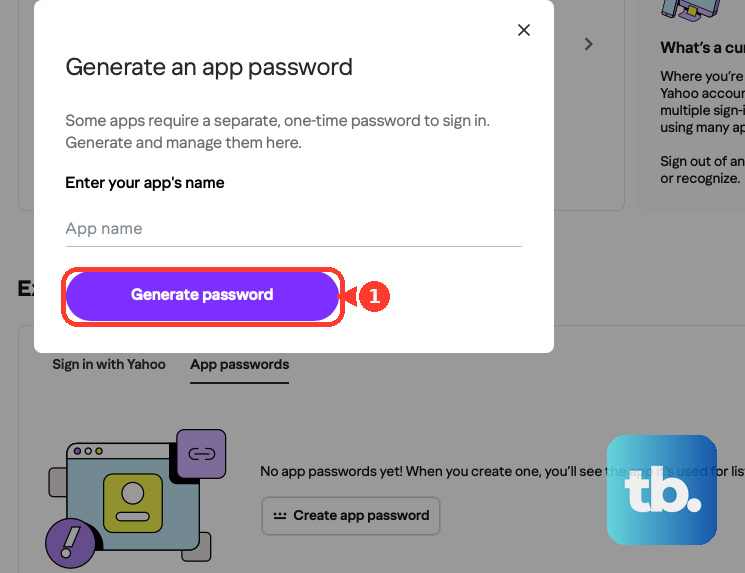
Copy the one-time password and use it to log into the app in place of your normal password. Click "Done".
Create it from a browser you have signed into Yahoo with for several days in a row, and avoid Incognito or Private mode, since eligibility is enforced and cannot be overridden. If app-password creation will not work, fall back to webmail or the official Yahoo app.
Delete an Old App Password and Generate a Fresh One
This is the fix people miss most. App passwords stay active even after you change your main Yahoo password, so resetting your password will not repair a broken mail app. The only way to invalidate one is to delete it.
Sign in to your Yahoo Account Security page. Under "External connections," open the app passwords list. Click "Delete" next to the password you want to remove, then click "Delete" again to confirm.
Then generate a new app password (using the steps above) and enter that in the app, rather than just re-typing the old one.
Clear Blocked Apps in Recent Activity
Previously connected apps or outdated security settings can block access entirely. Clearing them often resolves stubborn mobile sign-in failures.
On desktop, sign in, then go to Recent activity, open "Apps connected to your account," and remove all of them. On mobile, tap the Profile icon, then "Account info," then Recent activity, then "Apps connected to your account," and remove all, then re-add the account. After clearing this state (or clearing cache and cookies), expect to re-authenticate.
Frequently Asked Questions
Why does my Yahoo password still not work in my mail app after I reset it?
Because mail apps can store an app password, and app passwords do not change when you reset your main account password. Delete the old app password on your Yahoo Account Security page, generate a new one, and enter that in the app.
My account is locked. How long until I can sign in again?
A lock from too many failed attempts clears automatically after 12 hours. If you do not want to wait, the Sign-in Helper at login.yahoo.com/forgot restores access immediately.
There is no option to change my password on the security page. What happened?
That means Account Key is turned on. Disable Account Key first, and the option to set a new password will appear.
Do I need an app password for Outlook?
It depends on the build. Outlook builds 16308.10000 and later support Yahoo's secure sign-in, so your regular password works. Older Outlook Desktop and Outlook for Mac builds require a Yahoo app password generated on the Account Security page.
The iPhone steps do not match my screen. Why?
iOS moved the menu. On iOS 18 the path is Settings > Apps > Mail > Mail Accounts, while on iOS 17 it is Settings > Mail > Accounts. Use the path that matches your version.
How can I tell if it is my password or my browser?
Try signing in with a different supported web browser. If it works there, the browser was the problem (often corrupt cookies or stale autofill); if it fails everywhere, focus on the password and recovery steps.