Here’s how to save Sellers on eBay.
How to Save a Seller on eBay
When you're browsing eBay and find an item from a seller you want to remember, here's how to save them:
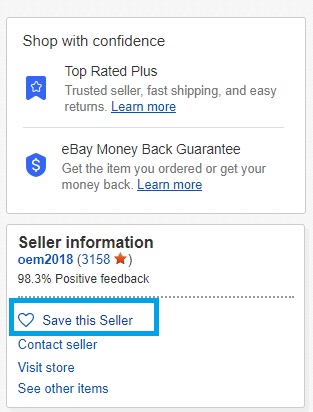
- 1.Click on the item you're interested in to view the listing details
- 2.Look for the "Seller Information" section on the right side of the screen
- 3.Click the "Save this seller" button located in that section
- 4.
 Click to expand
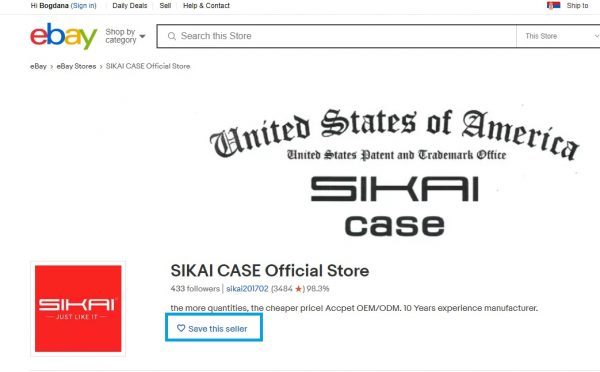
You can also save sellers directly from their store pages:
- 1.Click "Visit Store" from any of their listings
- 2.On the store page, find the "Save this seller" option at the top
- 3.Click it to add the seller to your saved list
- 4.
 Click to expand
How to Access Your Saved Sellers
Once you've saved some sellers, here's how to find them again:
- 1.Go to the eBay homepage
- 2.Click on the "Saved" tab located below the search bar
- 3.
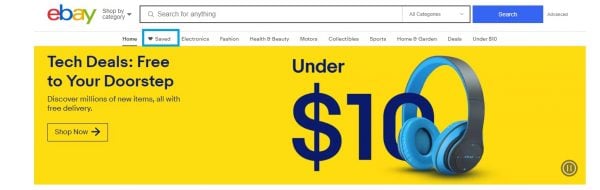 Click to expand
 - 4.Select "Sellers" from the options
- 5.You'll see all the sellers you've saved listed here
- 6.
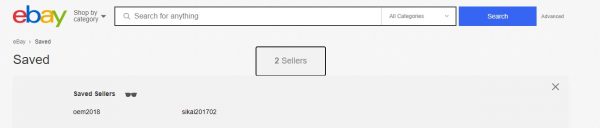 Click to expand
From this list, you can click on any saved seller to visit their store and browse their current inventory. This makes it easy to check back with sellers you trust or who consistently offer products you're interested in.
Saving sellers on eBay is a simple process that takes just seconds, but it can save you significant time when you're looking for specific products or want to keep track of your favorite stores. The feature is designed to help buyers build relationships with sellers they trust and make repeat shopping experiences more convenient.