Yahoo Mail authentication failed on iPhone stops Apple Mail from accepting a Yahoo sign-in, even when the mailbox still works elsewhere. The fix is to confirm the Yahoo account works first, then rebuild the iPhone Mail connection with Yahoo’s current sign-in path.
Check Yahoo Mail in a browser first
Use this when iPhone Mail rejects the account before you change settings on the phone. A browser sign-in shows whether Yahoo is ready to accept the login.
Open a browser, go to mail.yahoo.com, and sign in with the same Yahoo account.
Compose a new email, send it to yourself, and confirm it arrives within five minutes.
When Yahoo asks for a password change, account update, recovery step, or sign-in fix, complete it in the browser. After Yahoo Mail works on the web, return to iPhone Mail and try again.
Remove and add the Yahoo account again
The most common cause is an old or broken Yahoo sign-in saved inside Apple Mail.
Open Settings, go to Apps, choose Mail, and open Mail Accounts. That path is the iOS 18 and later layout. On iOS 17 or earlier, including iPhone models that never got iOS 18, open Settings, tap Mail, then tap Accounts instead, and make the same swap everywhere this guide sends you through Apps > Mail.
Tap your Yahoo account, select Delete Account, and confirm with Delete from my iPhone.
Go back to Mail Accounts, tap Add Account, choose Yahoo, and follow the Yahoo sign-in prompts.
Use the Yahoo provider screen instead of adding the address as a generic manual account.
Pick Yahoo for Yahoo-hosted addresses
Some addresses that do not end in @yahoo.com still belong under the Yahoo provider in Apple Mail. In Settings, open Apps, tap Mail, choose Mail Accounts, and tap Add Account.
Choose Yahoo when Mail asks for the provider. Apple lists Yahoo for @yahoo.com plus Yahoo-hosted domains including @sbcglobal.net, @cox.net, @rogers.com, @frontier.com, @myfrontiermail.com, and migrated @comcast.net accounts.
If you added one of those addresses under the wrong provider, remove it first. Use Delete Account, confirm Delete from my iPhone, then add it again with Yahoo.
Create an app password for other mail apps
This fixes authentication failures in mail apps that do not use Yahoo’s branded sign-in page.
Sign in to your Yahoo account and open the Yahoo Account Security page.
Under External connections, choose Create app password.
Enter the mail app’s name in the text field, then choose Generate password.
Use that one-time password in the third-party mail app.
Select Done when Yahoo finishes the process.
An app password stays active even after you change your main Yahoo password, so deleting it is the only way to invalidate it. To replace an old app password that no longer works, return to External connections, open the app passwords, choose Delete next to the old password, confirm Delete, and generate a fresh password.
Use the Yahoo Mail app or website
When you need mail working now, bypass Apple Mail and sign in directly through Yahoo.
- 1.Open mail.yahoo.com in a browser and sign in.
- 2.Open the App Store and search for Yahoo Mail: Your Email & Inbox.
- 3.Tap Get, Update, or Open, depending on what the App Store shows.
- 4.Sign in with your Yahoo account inside the Yahoo Mail app.
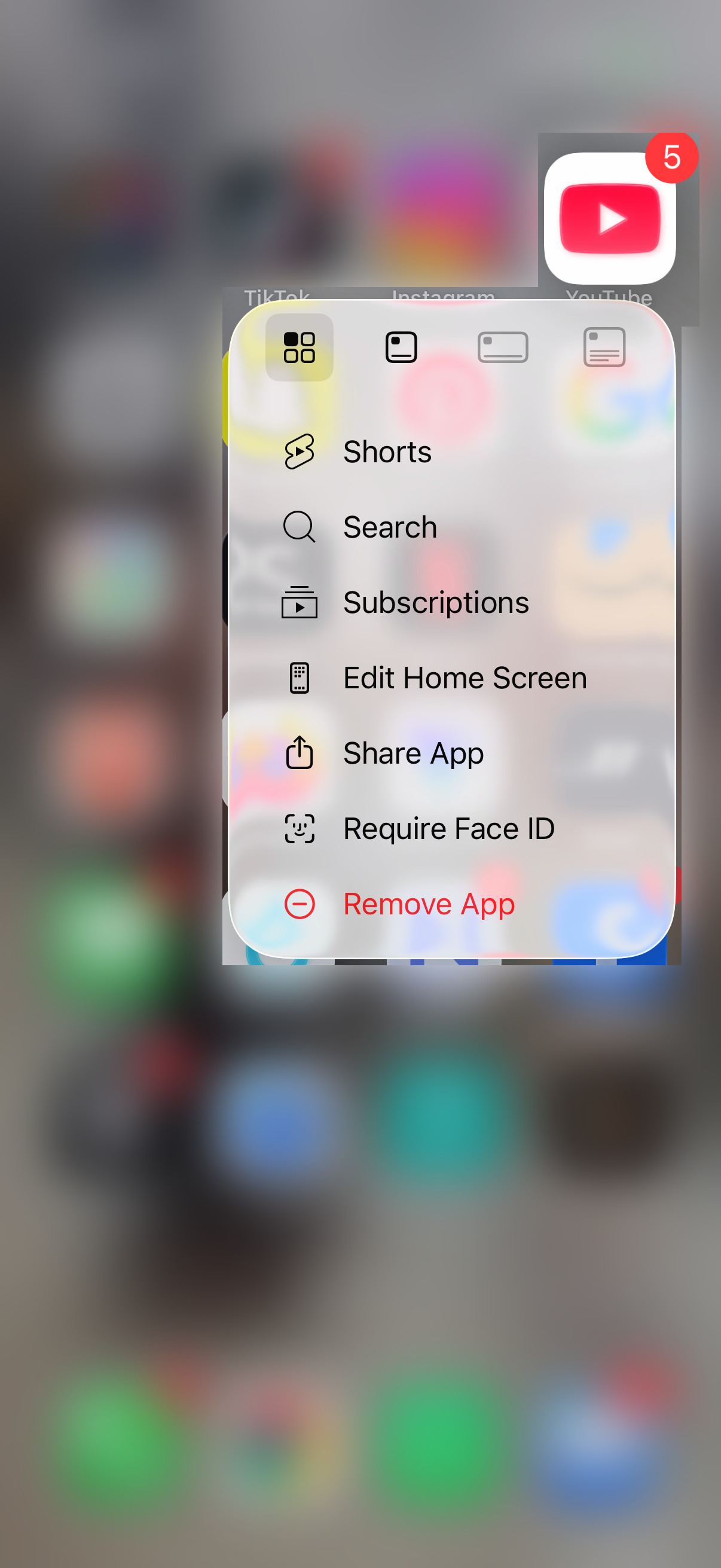
- 5.If the app keeps failing, touch and hold Yahoo Mail, tap Remove App, choose Delete App, confirm Delete, then reinstall it from the App Store.
Restart the iPhone and update iOS
Use this when Mail was working recently, the phone is stuck, or the authentication error appeared after a general iPhone problem. Restarting clears temporary app and network problems, and updating iOS keeps Apple Mail on the current system path Yahoo recommends for iOS Mail problems.
On iPhone X, iPhone 11, iPhone 12, iPhone 13, or later, press and hold either volume button and the side button until the power-off slider appears.
Drag the slider, wait 30 seconds, then press and hold the side button until the Apple logo appears.
On iPhone 6, iPhone 7, iPhone 8, or iPhone SE 2nd or 3rd generation, press and hold the side button until the power-off slider appears.
Drag the slider, wait 30 seconds, then press and hold the side button until the Apple logo appears.
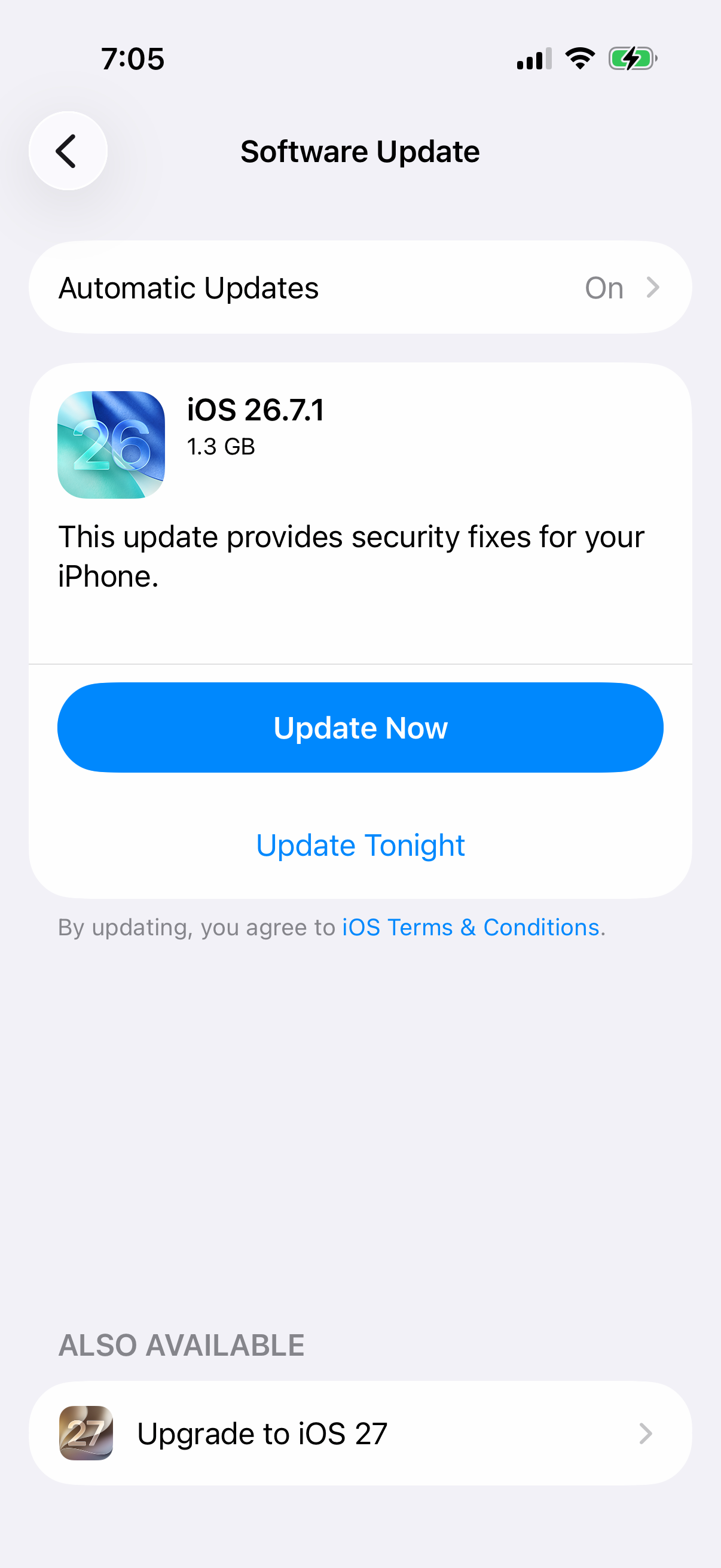
To update iOS, back up the iPhone, plug it into power, connect to Wi-Fi, and open Settings.
Go to General, choose Software Update, tap Download and Install, and follow the onscreen instructions.
When wireless updating is unavailable, connect the iPhone to a Mac with macOS Catalina or later and open Finder.
Select the device in the left sidebar, open General, choose Check for Update, then use Download and Update.
Clear stale Yahoo connected app access
Yahoo stores connected-app permissions that produce repeated mobile sign-in failures. Clear those permissions, then sign in again on the iPhone.
On a desktop browser, sign in to Yahoo, open Recent activity, go to Apps connected to your account, and remove the entries shown there.
From the Yahoo mobile app, tap the Profile icon, open Account info, go to Recent activity, and open Apps connected to your account.
In the Yahoo Mail app, use Manage accounts, open Account info, go to Recent activity, and remove the connected apps listed there.
If this does not fix the authentication failed message, remove the Yahoo account from iPhone Mail and add it again through the Yahoo provider.
Adjust Fetch for Yahoo in Apple Mail
Open Settings, then go to Apps.
Tap Mail, open Mail Accounts, and choose Fetch New Data.
Tap a time interval at the bottom of the screen.
Make sure Fetch is selected under Yahoo!.
Fetch does not replace a failed sign-in, but it fixes Yahoo Mail not updating correctly after the account is accepted.
Check blocked deletion on a managed iPhone
The most common cause is Screen Time or device management preventing Yahoo Mail app deletion and reinstall.
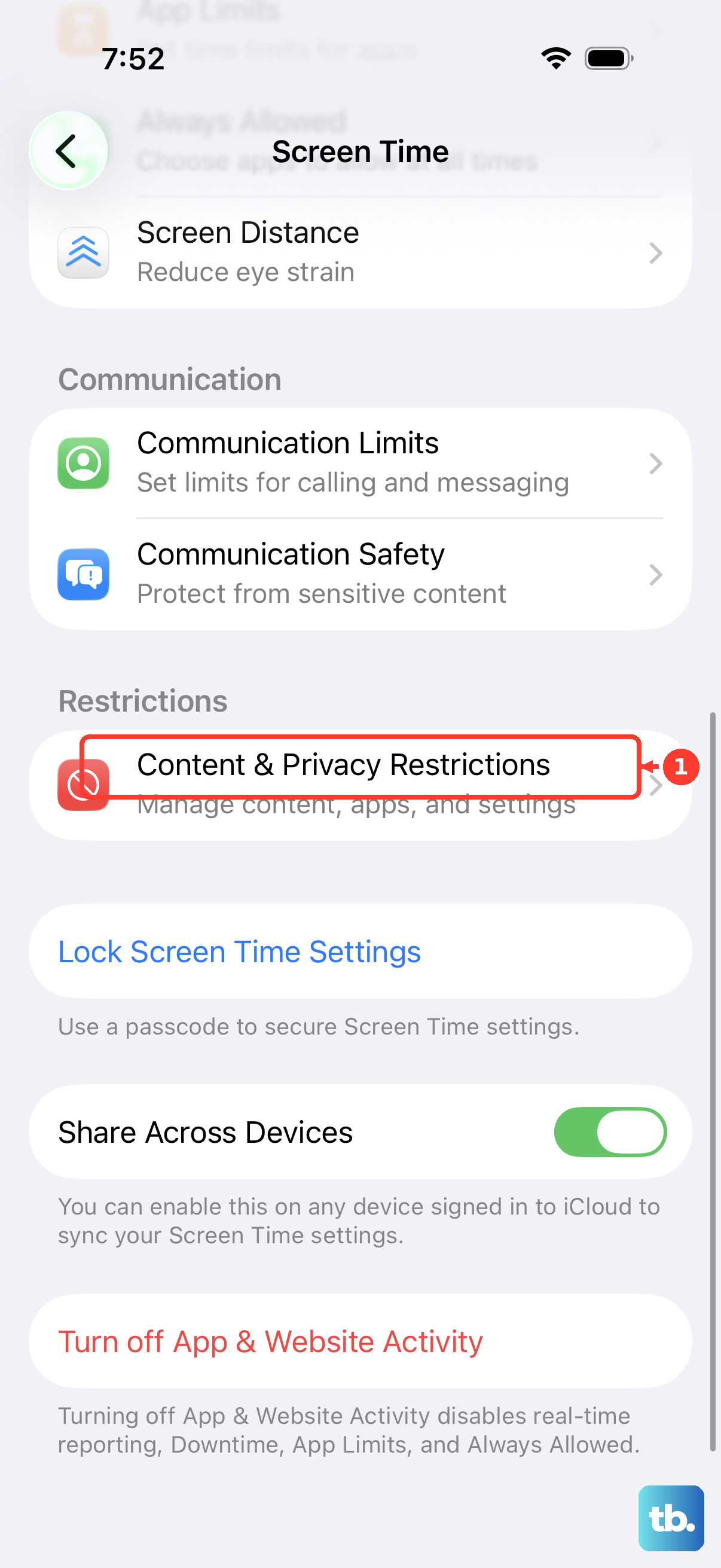
For a personal or family-managed iPhone, open Settings, go to Screen Time, choose Content & Privacy Restrictions, open iTunes & App Store Purchases, and check Deleting Apps.
For a school or work iPhone, open Settings, go to General, then VPN & Device Management.
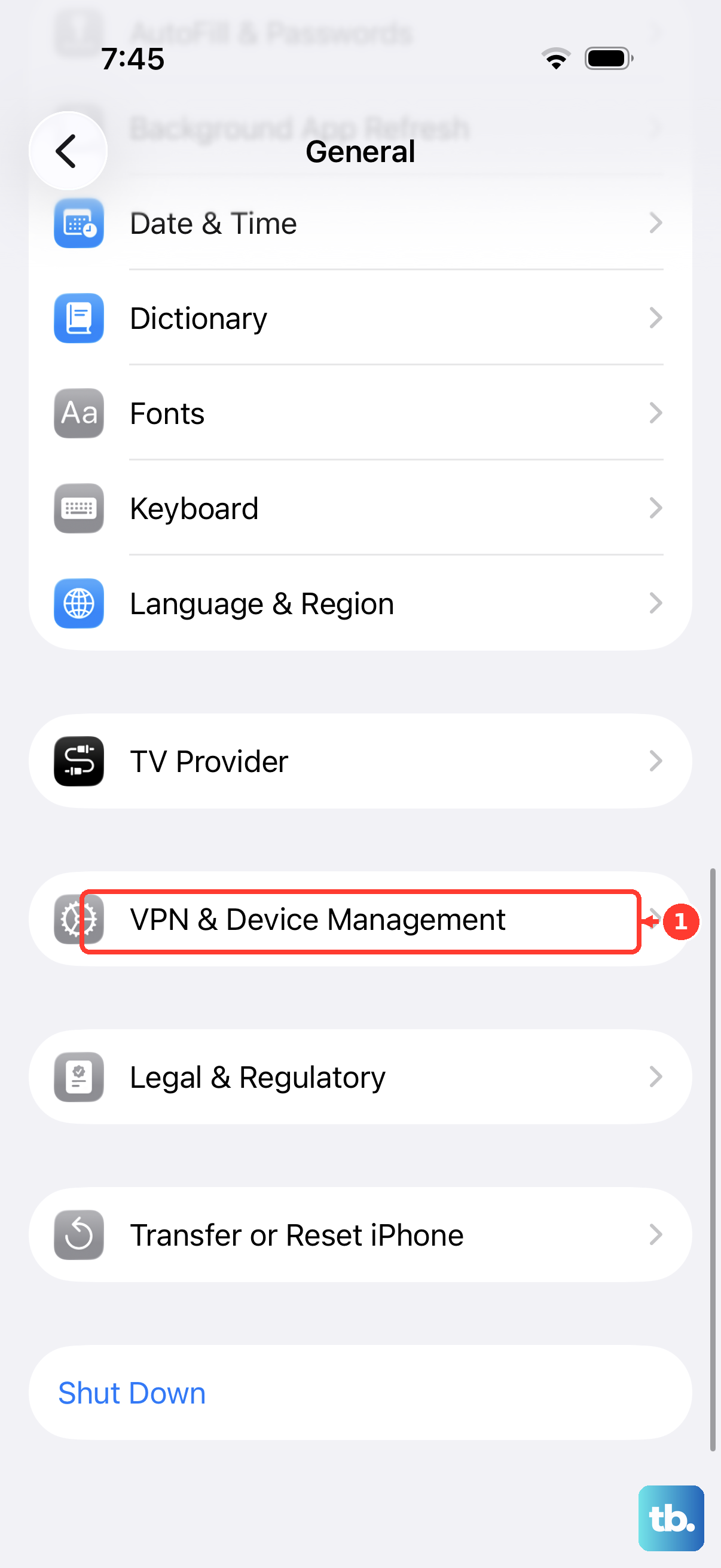
When a profile appears under Mobile Device Management, contact the organization’s IT admin or employer.
Do not use old less secure app access fixes for Yahoo Mail. Current Yahoo options are Yahoo secure sign-in, an app password for non-Yahoo sign-in clients, mail.yahoo.com, and the official Yahoo Mail app.
Frequently Asked Questions
Why does Yahoo Mail say authentication failed on my iPhone?
The saved Yahoo login in Mail is old or invalid, the account was added with the wrong provider, or Yahoo needs an account fix in a browser before iPhone Mail can sign in.
Should I use my normal Yahoo password in Apple Mail?
Use Yahoo’s normal sign-in flow when you add the account through the Yahoo provider in iPhone Mail. Use a Yahoo app password only for mail apps that do not use Yahoo’s branded sign-in page.
Will deleting the Yahoo account from iPhone Mail delete my emails?
Deleting the account from iPhone Mail removes it from the device. Your Yahoo mailbox stays available through mail.yahoo.com, the Yahoo Mail app, and iPhone Mail after you add the account back.
What replaced the old less secure apps setting?
Yahoo’s current options are removing and re-adding the account through Yahoo sign-in, creating an app password for unsupported third-party clients, using mail.yahoo.com, or using the Yahoo Mail app.