Shift Lock on Roblox PC stops working when Roblox settings, experience restrictions, Windows keyboard behavior, or damaged app files get in the way. Start inside the Roblox experience first, because the fastest fixes live in the same menu as the camera and movement controls. Then move to Windows and app repairs when the Shift key still does nothing.
Turn On Shift Lock in Roblox
The most common cause is simple: Shift Lock Switch is off inside the Roblox experience.
Join the experience, click the Roblox logo in the upper-left corner or press Esc.
Open the Settings tab.
Find Shift Lock Switch and set it to On.
Resume the experience or press Esc again.
Press Shift. When the experience allows Shift Lock, the camera and character movement switch into mouse-lock behavior.
Check Whether the Experience Blocks It
Use this when Shift Lock works in some Roblox experiences but not in one specific game. Roblox creators control whether mouse lock is available in their own experiences.
Open the Roblox menu with Esc.
Go to Settings and look for Shift Lock Switch.
If Shift Lock Switch is unavailable or controlled by the experience, test Shift Lock in another Roblox experience.
When only one experience is affected, the fix is not on your PC. Contact the creator from the experience page, group page, account page, or any Social Links they provide.
Change the Camera Mode
A camera setting changes how Shift Lock feels even when the key is registering. In the experience, press Esc or click the Roblox logo, then open Settings.
Find Camera Mode and switch between Classic and Follow. Resume the experience and press Shift again.
If changing Camera Mode fails, check Movement Mode next because ClickToMove changes the keyboard-and-mouse setup you expect on PC.
Use Mouse Plus Keyboard Movement
Press Esc inside the experience to open the Roblox menu.
Choose the Settings tab.
Find Movement Mode.
Set it to Mouse + Keyboard.
Resume the experience.
Press Shift again.
If ClickToMove was selected, moving away from it is the key change to test.
Turn Off UI Navigation Toggle
Roblox documents UI Navigation Toggle as controlling only whether the \ key enters and exits UI navigation mode, so it is not a Shift Lock setting. Turn it off if you keep entering UI navigation mode by accident while you play, then rule it out and move on to the Windows checks below.
Press Esc or click the Roblox logo while you are in the experience.
Open the Settings tab.
Set UI Navigation Toggle to Off.
Resume the experience.
Test Shift again.
Reset the Session
A stuck avatar or temporary camera state can break Shift Lock in the current Roblox session.
- 1.Click the hamburger menu in the upper-left corner and choose Respawn, or press R and choose Reset.
- 2.After your avatar reloads, press Shift again in the same experience.
- 3.Click the Roblox logo in the upper-left corner and choose Leave, or press L and choose Leave.
- 4.Reopen the experience and test Shift Lock again.
- 5.Close Roblox and restart Windows from Start, Power, Restart when the issue continues across experiences.
Update or Reinstall Roblox
Roblox app problems affect controls when the installed client is outdated or damaged. If you launch from the Roblox website, use an updated version of Microsoft Edge, Firefox, or Chrome, log in at roblox.com, open any experience, click the green Play button, and follow the Roblox Player install prompt.
If you use the Microsoft Store version, install the current app named Roblox - Windows. Open Microsoft Store and choose Check for Updates, which is the command Microsoft documents on its app-update page. If your Store window does not show that command, open Library and choose Get updates instead, the path Microsoft still documents for Windows 11 Store troubleshooting. You can also open the Roblox - Windows product page and update if offered.
For a deeper reset, open Start, Settings, Apps, Installed apps, choose the More icon next to Roblox or Roblox - Windows, then open Advanced options. Choose Repair first, and use Reset if Repair is unavailable or does not fix it.
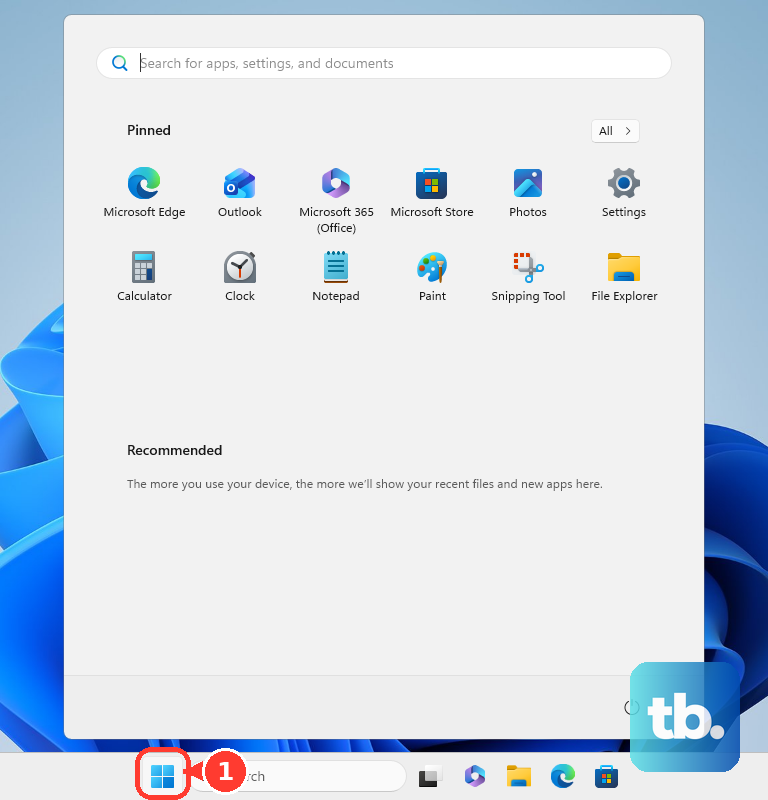
Roblox now directs Windows users to Roblox - Windows for the Microsoft Store version. Install it and sign in before removing the older Microsoft Store app named Roblox with the light gray icon.
Fix the Shift Key in Windows
Your Shift key is the real problem when Shift Lock fails everywhere or the key behaves strangely outside Roblox. For a USB keyboard, unplug it, wait briefly, reconnect it, try another USB port, bypass USB hubs, and inspect the cable for damage.
For a wireless keyboard, reconnect the device or USB receiver and check the batteries. Test the keyboard on another PC; if it fails there too, replace it.
Windows accessibility features also change Shift behavior. Press Shift five times to toggle Sticky Keys, or hold Right Shift for eight seconds to toggle Filter Keys, then return to Roblox and test again.
If the keyboard works but Roblox still ignores Shift Lock, install Windows updates or update the keyboard driver through Windows Update or Device Manager.
Clear Leftover Roblox Data
Use this when Shift Lock still fails after reinstalling, or when Roblox keeps acting broken after a normal uninstall. Corrupted local Roblox data survives a basic removal.
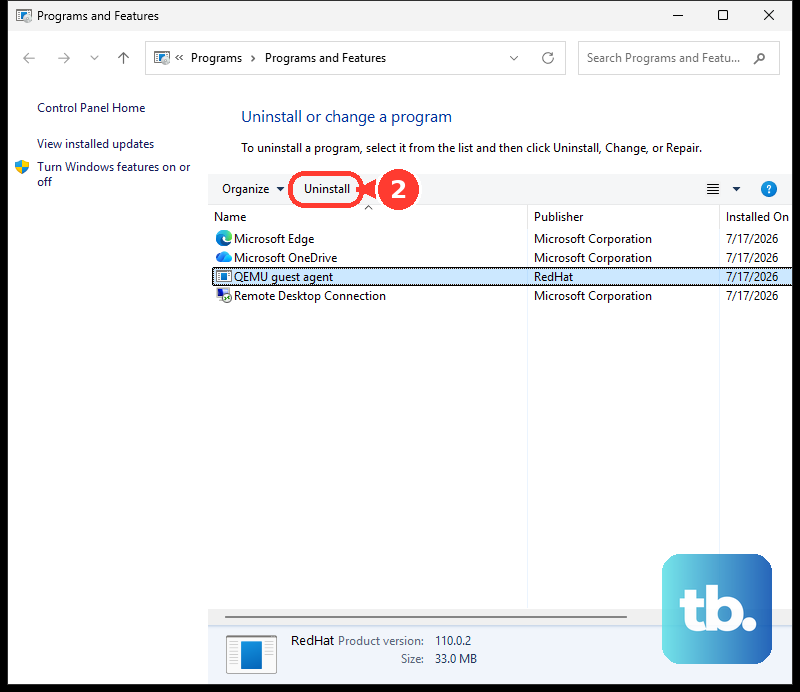
Uninstall Roblox first. On Windows 11, search for Control Panel from the taskbar, open Programs, then Programs and Features, right-click Roblox, and choose Uninstall or Uninstall/Change.
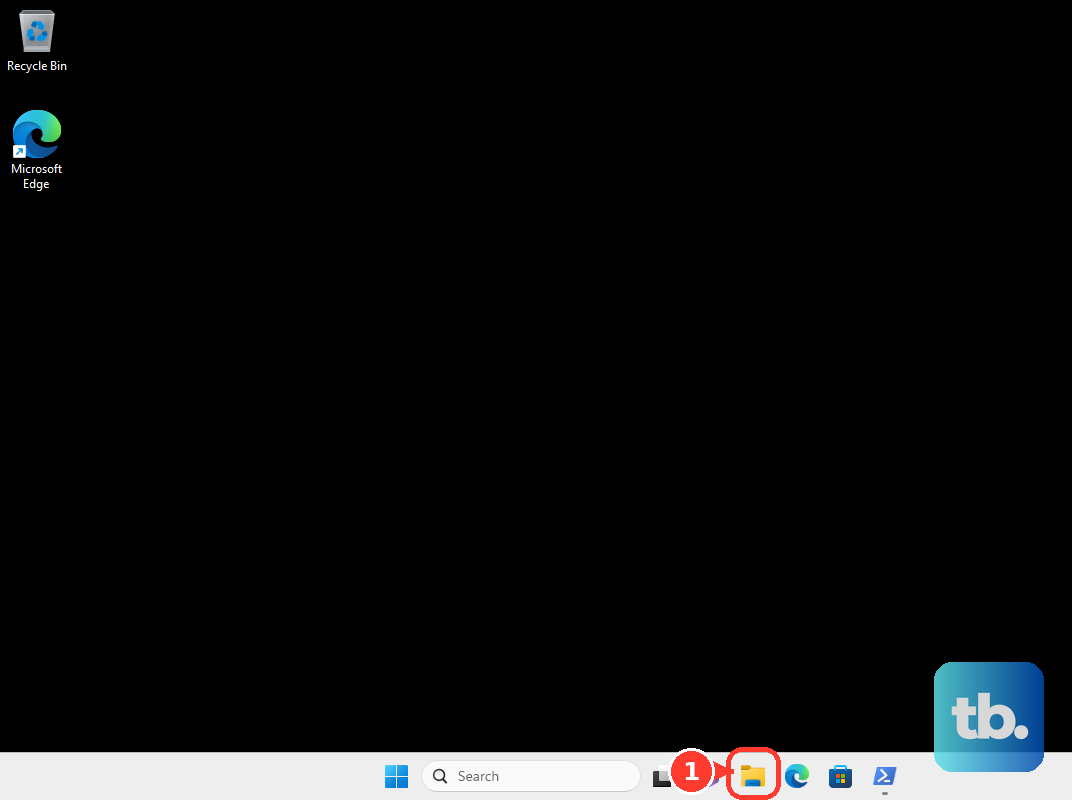
After uninstalling, open File Explorer and go to C:\Users\(Your Windows Username)\AppData\Local. Delete the Roblox folder.
Restart the computer and reinstall Roblox from the Roblox website or Microsoft Store.
If this fails, submit a Roblox Support request with your Roblox username, device, help category, OS version, error messages, and the exact steps that reproduce the Shift Lock problem.
Frequently Asked Questions
Why is my Shift Lock option missing in Roblox?
The experience creator controls mouse lock for that experience. Test another experience; if Shift Lock works there, contact the creator of the affected experience.
Does Roblox Shift Lock work with ClickToMove?
For the normal PC keyboard-and-mouse setup, set Movement Mode to Mouse + Keyboard instead of ClickToMove, then resume the experience and press Shift.
Can lag make Shift Lock seem broken?
Yes. If camera movement is delayed or stuttering, lower Roblox Graphics Quality from the in-experience Settings menu and close unwanted high-power apps.
What should I send Roblox Support if nothing fixes it?
Include your Roblox username, device, help category, OS version, error messages, and the exact steps that reproduce the Shift Lock problem.