Your Galaxy S25 looks perfectly healthy, full bars and a working data connection, yet that text you just typed sits there with a red exclamation mark, or your contact swears they never got it. Texting failures on an otherwise flawless phone are maddening, especially when calls and apps work fine. The good news is that Samsung's own guidance points to a clear, mostly painless path, and most of these problems are fixed in a couple of minutes without losing a thing. Here are the fixes worth trying, ordered from the safest and quickest to the heavier last resorts.
Start By Ruling Out Your Carrier And Signal
Before you touch a single setting, know this. Samsung states that trouble sending or receiving texts, or texts arriving slowly, is usually a carrier or service issue rather than a phone fault. That single fact saves a lot of wasted effort, so it is the right place to begin.
Check that your account is in good standing and your service is active. Then temporarily turn off Wi-Fi and confirm you have a signal showing in the status bar before you assume the phone is to blame. If you have no signal at all, or your carrier is having an outage in your area, no amount of phone tinkering will push that message through.
Give The Phone A Clean Restart
A simple restart clears the temporary glitches that quietly break messaging. It is the lowest-risk fix on this list and it resolves a surprising number of stuck-text situations.
Press and hold the Volume down button and the Side button together.
Wait for the power options to appear, then tap Restart.
Tap Restart again to confirm.
If the phone is frozen and will not respond, force a restart instead. Press and hold the Volume down button and the Side button (or Power button) simultaneously until the device turns off and turns back on. The screen goes black, then the Samsung logo appears.
Deregister iMessage If You Came From An iPhone
This is the single most overlooked cause of "my texts vanish," and Samsung calls it out directly. If you recently switched from an iPhone, you must deregister iMessage, otherwise messages from iPhone users can get stuck in limbo and never reach your Galaxy S25.
If you still have the old iPhone, open it and go to Settings > Apps > Messages and turn off iMessage. Then go to Settings > Apps > FaceTime and turn off FaceTime. If you no longer have the iPhone, you can deregister online using Apple's official Deregister iMessage tool, which works from any browser. Allow a little time after deregistering for the change to take effect across the network.
Inspect And Reseat The SIM Card
Your texts ride on the cellular connection, and a loose or damaged SIM can break that link. Power down, open the SIM tray, and verify the card is correctly seated, sitting flat, and free of obvious damage or dirt.
Reinsert it firmly and restart the phone. If you still suspect the SIM after reseating it, contact your carrier so they can test it on their end or send you a replacement.
Confirm The Right SIM And Default Texting App
If you run two SIMs, messages can fail simply because the wrong line is set to handle texting. Set the messaging line under Settings > Connections > SIM card manager, where you choose the PREFERRED SIM CARD for messaging.
It is also worth confirming the phone knows which app should send your texts. Go to Settings > Apps > Choose default apps > SMS app and select your preferred messaging app. If the default got switched, outgoing texts can quietly misbehave.
Refresh The Messages App By Clearing Its Cache And Data
When the messaging app itself becomes corrupted, clearing its stored files gives it a clean slate without touching your phone account. This refreshes the app and often revives stalled sending.
Open Settings > Apps > Messages > Storage.
Tap Clear cache.
Tap Clear data, then tap Delete.
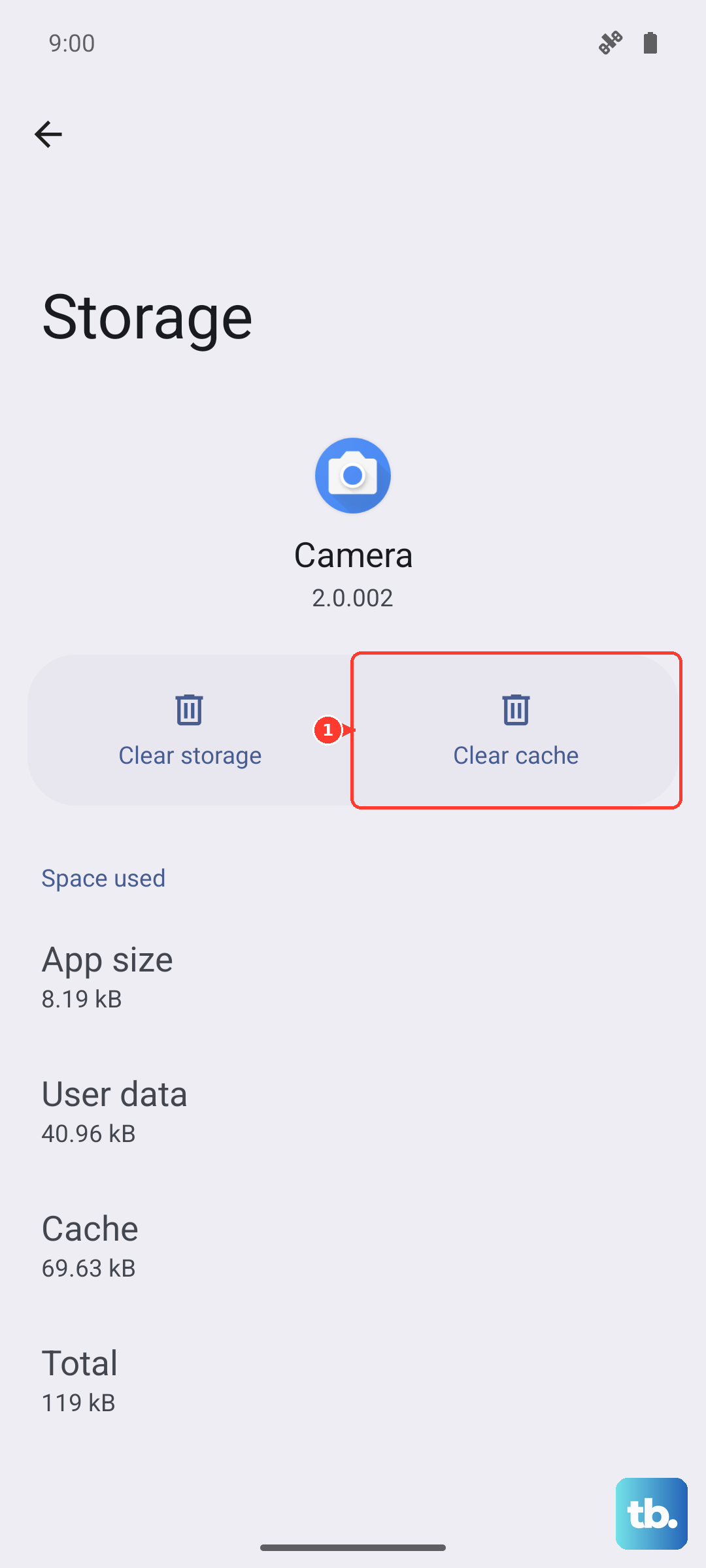
After this, reopen the messaging app and try sending again. This step affects the app's local data, not your account or your saved conversations on the server.
Make Sure You Have Not Blocked The Recipient
If texts fail to one specific person while everyone else gets through, a block is the likely culprit. It is easy to block a number by accident, so it is worth a quick check.
Open Samsung Messages and tap More options (the three dots).
Tap Settings > Block numbers and spam > Block numbers.
If the contact is listed, remove them from the block list.
It is also worth checking the Phone and Contacts apps, since a number can be blocked from more than one place.
Turn On Wi-Fi Calling For Weak-Signal Spots
If you live or work somewhere with poor cellular coverage, Wi-Fi Calling lets your phone use a Wi-Fi network when the cellular signal is too weak to rely on. This works only if both your phone and your carrier support the feature.
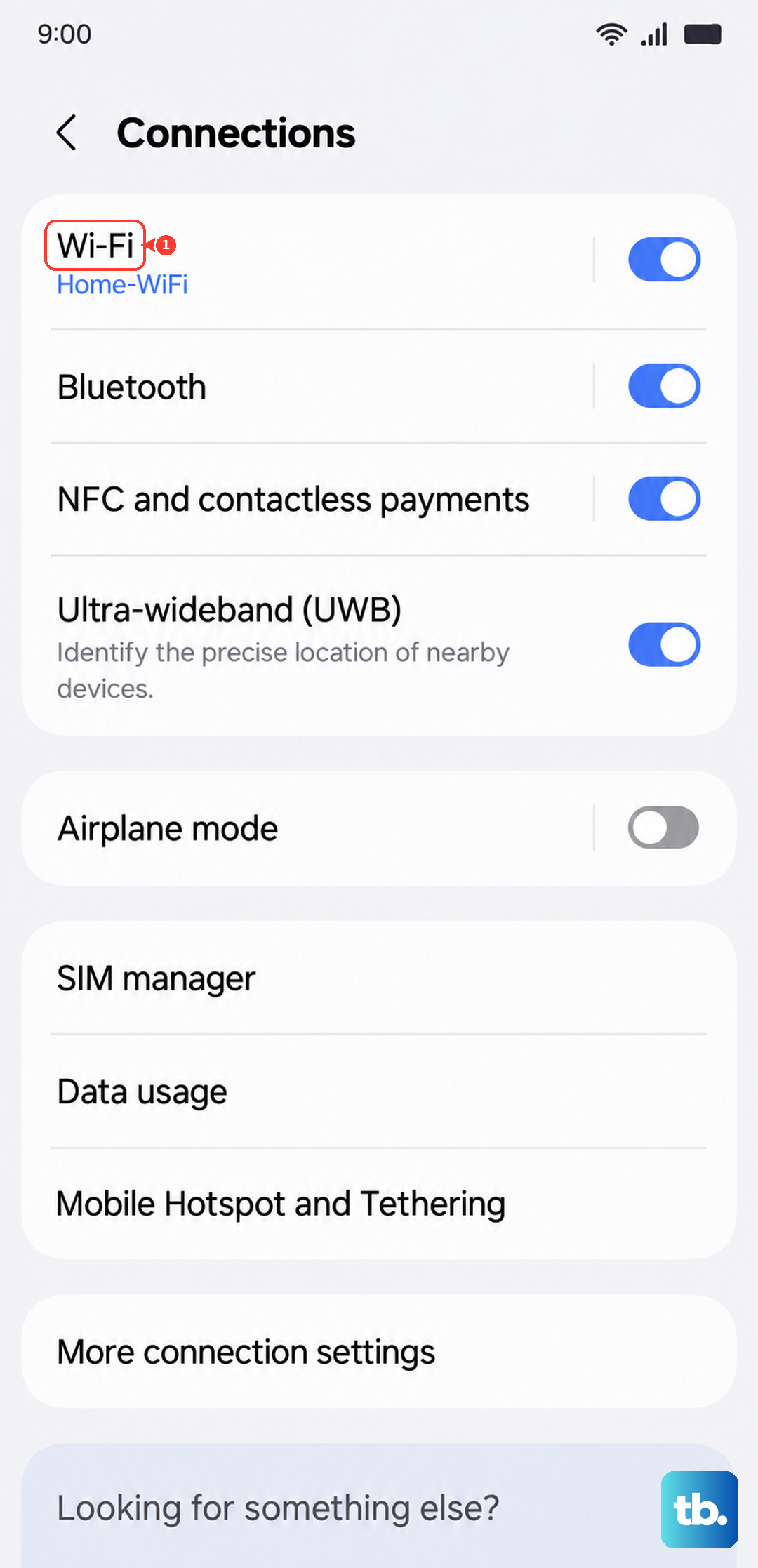
Go to Settings > Connections > Wi-Fi Calling, then tap the switch to turn it on. Connect to a reliable Wi-Fi network and try sending again. In a spot where your bars are low, this can be the difference between a message that sends and one that hangs.
Reset App Preferences To Restore Defaults
Sometimes a disabled service or an out-of-place default setting blocks messaging, and resetting app preferences puts those back to normal. Importantly, this does not delete any of your data; it only restores default app settings.
Open Settings > Apps.
Tap More options (the three dots, top right).
Tap Reset app preferences, then tap Reset.
Clear Out A Corrupted Network Configuration
If a tangled network setup is interfering with the carrier connection your texts depend on, resetting network settings rebuilds it cleanly. Go to Settings > General management > Reset > Reset mobile network settings (some variants label the broader option Reset Network Settings).
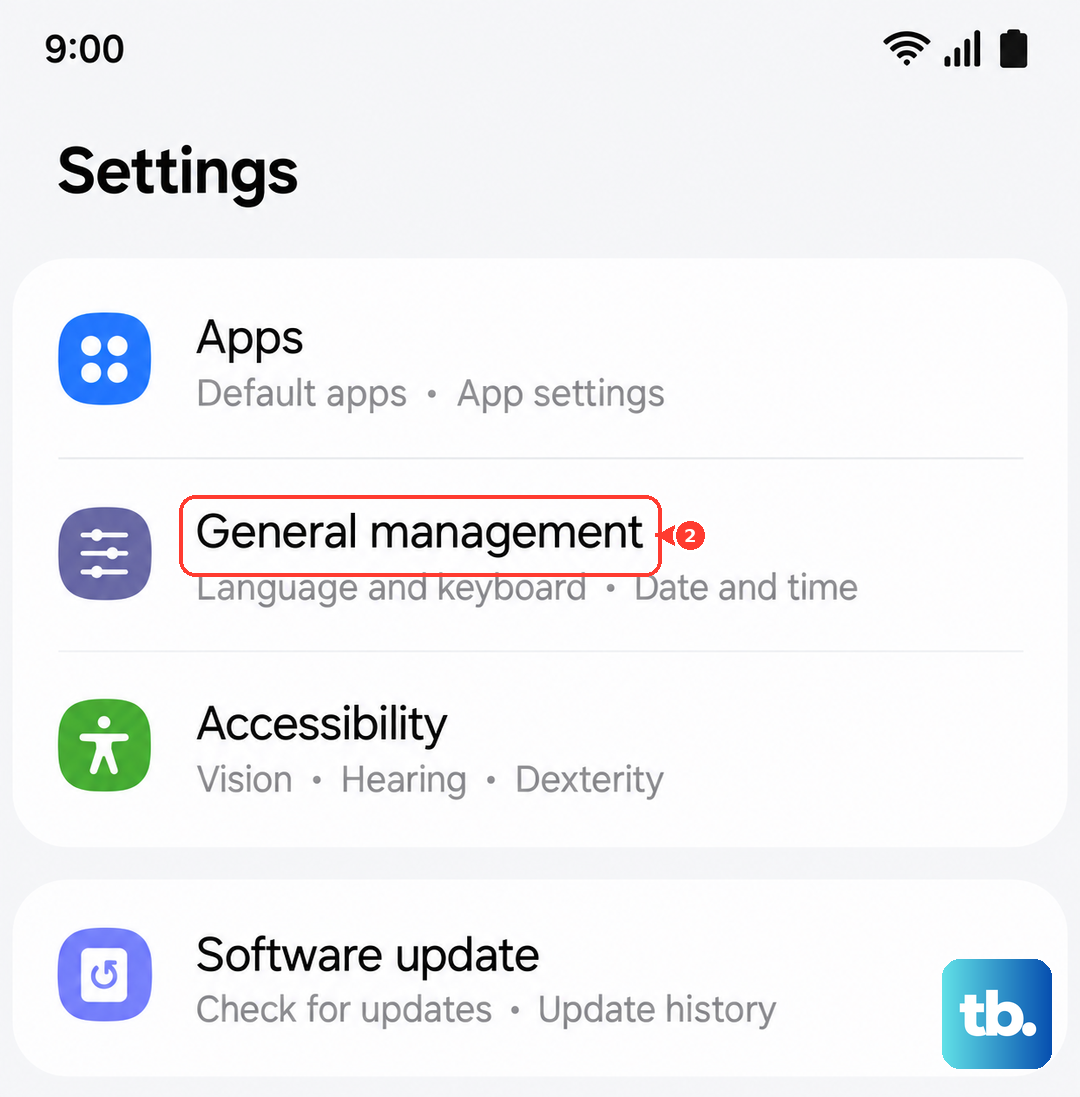
This re-establishes the connection your phone uses for texting. You will likely need to reconnect to Wi-Fi networks afterward, so have those passwords handy before you start.
Install The Latest Software Update
Messaging bugs are sometimes squashed in firmware, so keeping your Galaxy S25 current matters. Go to Settings > Software update (or System updates) > Download and install, then follow the on-screen steps. Some carriers require a Wi-Fi connection to download the update.
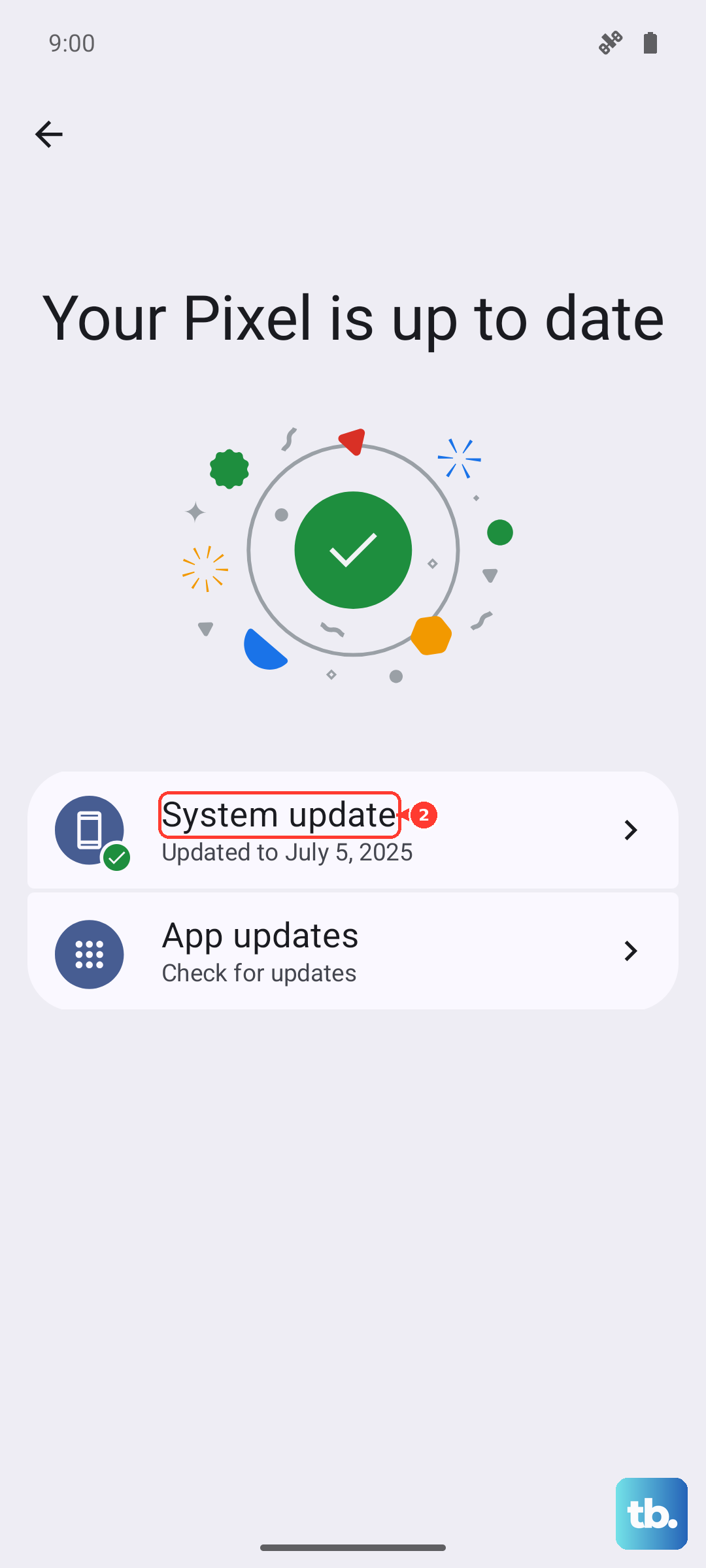
If you prefer to update from a computer, Samsung Smart Switch on a Windows PC or Mac can update the phone's software as well. The same desktop tool can back up your data, which sets you up nicely for the final fix if you ever need it.
The Last Resort Reset And When To Call Your Carrier
If nothing above works, a factory data reset wipes the phone back to its original state. This erases everything, so Samsung warns you to save any information you need beforehand, because personal data may not be recoverable afterward. Back up first using your Samsung account, your Google Account, or Smart Switch.
- 1.Go to Settings > General management > Reset > Factory data reset.
- 2.Review the listed accounts, then tap Reset.
- 3.Tap Delete all. Enter your security lock and Samsung account password if prompted.
Once the phone restarts and is set up again, test your texting. If the network or SMS problems persist even after a clean reset, that points back to the carrier or service side, so contact your carrier for further help.
Frequently Asked Questions
Why does my Galaxy S25 send some texts but not others?
If messages fail to one specific person, check that you have not accidentally blocked them in Samsung Messages under More options > Settings > Block numbers and spam > Block numbers, and also check the Phone and Contacts apps. If texts fail more broadly, it is more likely a carrier or signal issue, which Samsung says is the usual cause.
I switched from an iPhone and my texts keep disappearing. What do I do?
You almost certainly need to deregister iMessage. On the old iPhone, turn off iMessage and FaceTime in Settings > Apps. If you no longer have the iPhone, use Apple's official Deregister iMessage tool online to remove your number.
Will clearing the Messages cache and data delete my conversations?
Clearing the cache and data refreshes the app's locally stored files without affecting your account. Use Settings > Apps > Messages > Storage > Clear cache, then Clear data > Delete to give the app a clean start.
Does resetting network settings erase my photos or apps?
No. Resetting mobile network settings under Settings > General management > Reset only clears your network configuration, not your personal files or apps. A factory data reset, by contrast, erases everything, so back up first.
When should I just contact my carrier?
Samsung notes that texting failures are most often a carrier or service issue rather than a phone fault. If you have confirmed your account is active and your signal is fine, and the problem survives even a factory reset, contact your carrier to test your SIM or your line.