You are locked out of Facebook, and the usual lifelines are gone. The recovery email is one you can no longer sign into (a closed inbox, an old work address, an ISP email from a provider you left), or the phone number on file belongs to a SIM you no longer control. Maybe an attacker changed both, so every reset code lands somewhere you cannot reach.
The good news: Facebook still has paths back in that do not depend on receiving a code by email or text. They lean on proving who you are instead. The bad news worth knowing up front: none of these are guaranteed, there is no phone hotline, and a fully hijacked account is the hardest case of all.
Below are the methods that actually work, ordered quickest and most common first. Start with the simplest entry point, then escalate only if it fails.
Start at "Forgot Password" and Find Your Account
Every recovery begins by locating your account without logging in. On the Facebook login page, click Forgot password? below the password field. You can also go straight to facebook.com/login/identify/ or facebook.com/recover/initiate.
The Find Your Account page shows a single field labeled Mobile number or email. Despite the label, enter ANY identifier Facebook might still recognize: an old email, a phone number, your username, or your full name. Then click Continue.
Facebook tries to match it and shows the account it found. If the reset options offered are all ones you cannot access, look for a Try another way link to reveal other choices. If every email and phone option is unusable, choose the option indicating you no longer have access to any of them. That choice moves you out of code-based recovery and into identity verification, which is what the rest of this guide covers.
Do This From a Device You Have Used Before
Before you go further, run recovery from a browser or phone you have previously used to log into this account, on your usual network. Facebook weighs trusted-device and familiar-location signals when deciding whether to trust you. An unfamiliar device or location makes every verification step harder to pass.
If you have a phone, tablet, or computer that was once logged in, use it. This single choice can be the difference between a smooth review and a denial.
Provide a New Contact Method and Verify Your Identity
After you confirm you no longer have access to the listed email or phone, Facebook asks for a NEW email address or phone number it can use to reach you about the recovery.
Here is the single most important rule: the new contact you supply must NOT have ever been used on this Facebook account before. A fresh email or number that the account has never seen is required, or Facebook will not accept it.
From there, follow the on-screen prompts to prove the account is yours. Depending on your situation you may be asked to do one or more of the following:
- 1.Name the people shown in tagged photos from your account.
- 2.Answer questions about your account.
- 3.Upload a photo of a government-issued ID.
- 4.Record a short selfie video (a newer option).
Submit what is requested, then wait. An automated or human review checks your submission and responds to the new contact method you provided. If you are approved, Facebook walks you through setting a new password and you are back in.
Use the Optional Selfie Video to Verify
When the recovery flow offers it, you can verify your identity with a short selfie video instead of or alongside an ID. Choose the option to take a selfie video, then record the short clip with your phone's front camera as prompted.
Facebook uses that video together with its recognition of trusted devices and familiar locations to confirm it is really you. This is a current, supported method, not a rumor: Meta reports the expanded recovery experience helped cut new account hacks by more than 30% globally and improved recovery success. If the selfie-video choice appears, it is worth taking.
For a Hacked Account, Go to facebook.com/hacked
If an attacker is the reason you are locked out, use the dedicated compromised-account page. From a device or browser you have previously used to log into the account, go to facebook.com/hacked and work through the multi-step "secure your account" flow.
When email and phone codes are impossible because the attacker changed them, this flow routes you to identity verification and may request a government-issued ID. Provide what is asked, then wait for the review.
Be realistic here. When a hacker has changed BOTH the password AND the registered email and/or phone, code-based recovery is gone entirely, and you are forced down the ID or selfie path. This route may not work, and recovery can be extremely difficult, but it is the correct channel to try.
Try the In-App Support Hub and Meta AI Assistant
Facebook now has a centralized support hub built into the iOS and Android apps that brings recovery tools into one place. Inside the hub you can report an account issue and find quick answers using Meta AI-powered search.
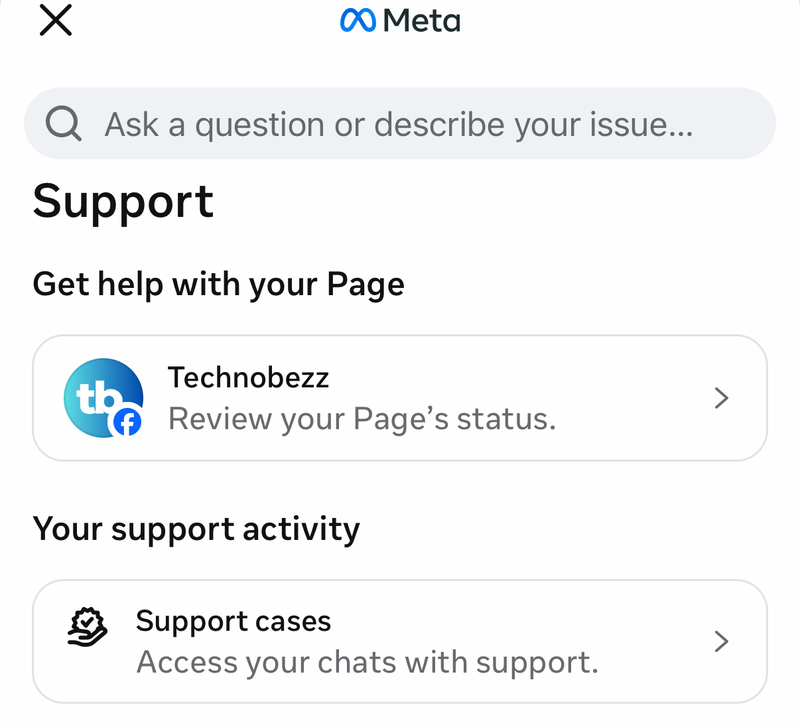
Meta is also testing an AI support assistant, first on Facebook globally, that offers more personalized help with account recovery, managing your profile, and updating settings. It is designed to handle recovery requests conversationally. One honest caveat: it has not been confirmed that the assistant can itself reset a password or unlock an account end to end, and many users still find it hard to reach a human. Treat it as another door to try, not a guaranteed fix.
Once you are back in, the same hub surfaces options to turn on two-factor authentication and passkeys so this does not happen again.
Do Not Wait on Trusted Contacts
If your plan was to have friends pass you a recovery code through Trusted Contacts, that door is closed. Facebook discontinued the feature; its own notice stated that chosen friends would no longer be able to help you get back on Facebook if you lose access.
A leftover Trusted Contacts setting may still appear under Password and security, but it will not actually get you back in. Do not rely on it. The recommended replacements going forward are keeping your email and phone current, enabling two-factor authentication (an authenticator app such as Google Authenticator or Authy, or a hardware key like a YubiKey), and saving your printed or downloaded recovery codes.
What to Expect, and What to Avoid
A few realities will save you frustration. ID and selfie reviews are not instant; third-party guides cite roughly 24 to 72 hours, and Meta gives no official timeframe, so be skeptical of any "one-minute" recovery claim. Many users are denied even after submitting extensive documentation, and there is no guaranteed path.
Guard against scams. Legitimate recovery happens only through facebook.com pages (login/identify, recover/initiate, hacked) or the in-app Support Hub. No third party can restore your account for you, and Facebook will never message you asking for your code.
Finally, if two-factor authentication is tied to a lost phone or an authenticator on a device you no longer have, and you saved no recovery codes, you will likely be funneled into the same ID or selfie verification rather than a clean reset. Having saved recovery codes in advance is the only reliable self-service bypass, which is why setting them up after you recover matters.
Frequently Asked Questions
Can I recover my account with no email and no phone at all? Yes, this is exactly what the identity-verification path is for. After choosing the option that says you no longer have access, you supply a brand-new contact method and prove ownership through tagged-photo questions, a government ID, and/or a selfie video. It is not guaranteed, but it does not require any of your old email or phone access.
Why won't Facebook accept the new email I entered? The new email or phone you provide during recovery must never have been used on this account before. If it was ever associated with the account, Facebook rejects it. Use a fresh address or number the account has never seen.
A hacker changed my email, phone, and password. Is recovery still possible? It is the hardest case. Code-based recovery is impossible once both contact methods are changed, so you must use facebook.com/hacked and go through ID or selfie verification. This may succeed, but it can also fail, so set your expectations accordingly and submit from a device you previously used.
How long does the ID or selfie review take? Meta does not publish an official timeframe. Third-party guides commonly cite about 24 to 72 hours for ID review. Treat any promise of near-instant recovery with caution.
Can my friends help me get back in through Trusted Contacts? No. Trusted Contacts has been discontinued, so chosen friends can no longer pass you a recovery code, even if a related setting still shows under Password and security. Rely on the official recovery flows instead.
Is there a phone number I can call for help? No. There is no recovery hotline. Your supported options are the web recovery flows on facebook.com and the in-app Support Hub with its Meta AI search and assistant; everything else claiming to restore accounts should be treated as a scam.