The new Siri in iOS 27, officially named Siri AI, takes a few things to get running. You need an Apple Intelligence-enabled iPhone, which means an iPhone 15 Pro, iPhone 15 Pro Max, any iPhone 16 model or later, or iPhone Air. You also need iOS 27 itself, your device language and Siri language both set to English, an Apple Account in an eligible region, and a confirmed spot off the waitlist Apple is using to roll the assistant out during the beta period.
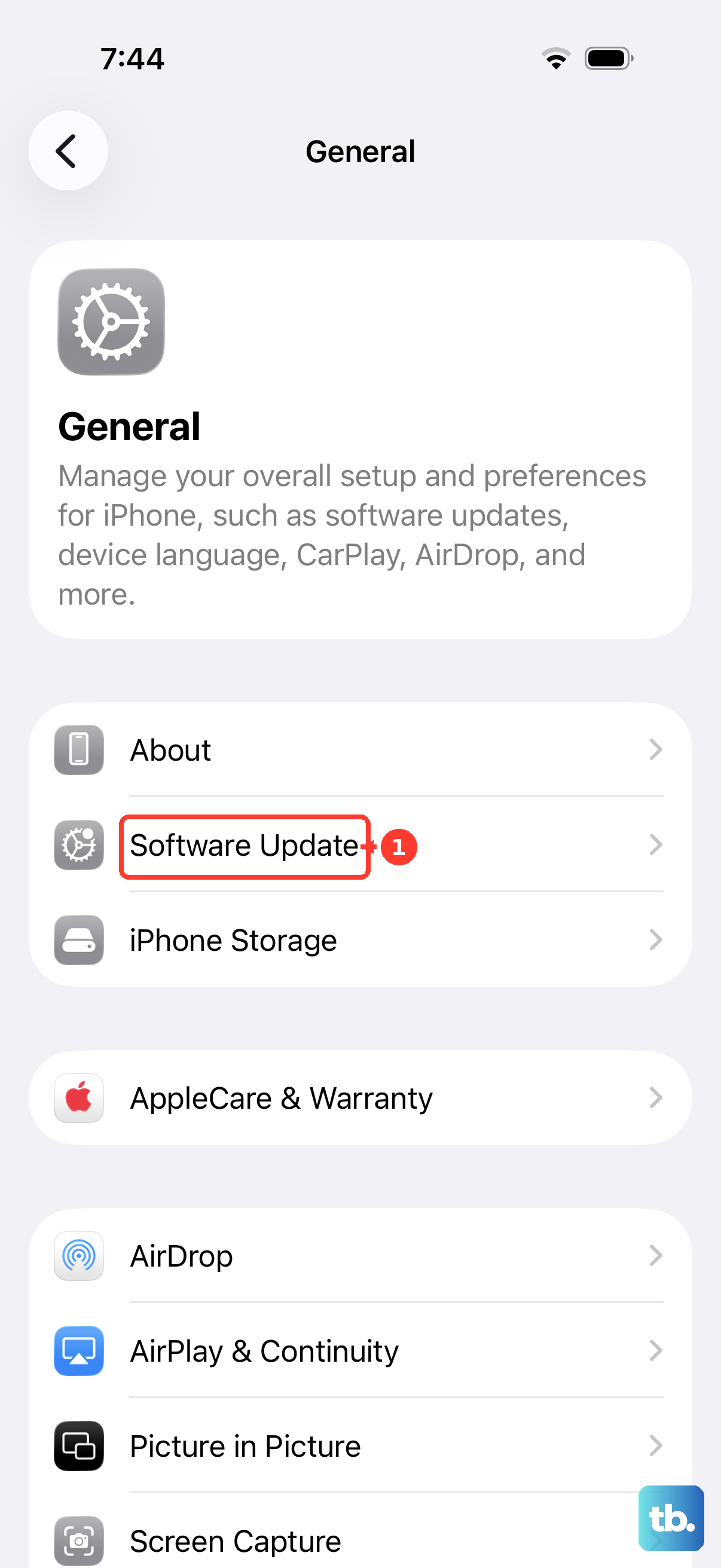
Know where things stand before installing anything. iOS 27 was announced at WWDC on June 8, 2026, and released on September 14, 2026. Siri AI is available in beta on the released version of iOS 27, so you do not need to install an iOS developer or public beta to try it. Back up your iPhone first, connect it to power and Wi-Fi, then check Settings > General > Software Update. Siri AI is still in beta, and its features and behavior may change.
What the New Siri Actually Does
Siri AI is a more capable and conversational assistant with personal context understanding, broad world knowledge, and onscreen awareness. In plain terms, it answers questions from the web on virtually any topic, holds a natural back and forth conversation, and lets you either type or talk.
It also works with your own data, pulling personal details from your messages, emails, and photos, and it performs systemwide actions in your apps. It can edit and write emails, texts, and documents conversationally. The Passwords app will also be able to update weak or compromised passwords with a tap in a future software update.
One detail is worth getting right. The next generation of Apple Foundation Models was co-created with Google using the technology behind the Gemini family of models. That does not mean Siri runs on the consumer Gemini product. Craig Federighi has explained that Apple uses none of the models Google deploys to its own customers, and the new models run on-device and on Apple's Private Cloud Compute.
Check That Your iPhone Makes the Cut
Siri AI has a much higher hardware floor than iOS 27 itself. Apple Intelligence and Siri AI are available on iPhone 16 models or later, plus the iPhone 15 Pro, iPhone 15 Pro Max, and iPhone Air.
On other platforms the requirements are iPad mini (A17 Pro), iPad models with M1 or later, MacBook Neo (A18 Pro), Mac with M1 or later, Apple Vision Pro, Apple Watch Series 9 or later, Apple Watch Ultra 2 or later, and Apple Watch SE 3 when paired with an Apple Intelligence-enabled iPhone with Siri AI enabled.
iOS 27 on its own is far more forgiving. The update supports iPhone 11 and later, along with iPhone SE (2nd generation) and later, which is the same compatibility floor as iOS 26. If you own an older supported iPhone, you can install iOS 27 now, just without the new assistant.
Install iOS 27 and Get on the Waitlist
Here is the full path from a stock iPhone to an active Siri AI conversation. Update your iPhone, check the language settings, and complete Siri AI setup to join the waitlist.
- 1.Confirm your hardware. You need an iPhone 15 Pro, iPhone 15 Pro Max, any iPhone 16 model or later, or iPhone Air for Siri AI to appear at all.
- 2.Install iOS 27. Back up your iPhone and connect it to power and Wi-Fi. Open Settings > General > Software Update and tap Download and Install if an update is available. You can use Siri AI on the released version of iOS 27; enrolling in an iOS beta is not required.
- 3.Set your device language and Siri language to English. Siri AI is currently available in English and requires both language settings to match. Your Apple Account must also be in an eligible region.
- 4.Join the waitlist. Open Settings > Siri and tap Try Siri AI (Beta). If Siri is off, tap Turn On Siri first. Follow the onscreen instructions to pick a voice, complete voice enrollment, and review your privacy settings. This adds you to the waitlist. Wait times vary, and Siri AI downloads automatically when your wait is complete.
- 5.Start your first conversation. Say "Hey Siri," hold the side button, or swipe down from the Dynamic Island to begin.
Talk, Type, and Swipe Through a Conversation
You can swipe down from the Dynamic Island to start a conversation, hold the side button, or simply say "Hey Siri." Speak naturally or type your request instead.
In the current beta, responses appear in that same top center area of the display, and swiping on a response opens follow-up questions so you can keep refining a request. Siri AI is still in beta, and its interface may change.
The assistant goes beyond iPhone too. On iPad and Mac it is integrated with Spotlight, and on Mac you can control-click an image, file, or text to ask about it. It also works on Apple Vision Pro by looking and speaking, on Apple Watch from the wrist, and inside CarPlay.
Use Onscreen Awareness and Personal Context
Onscreen awareness means you can ask about whatever is on your display without copying and pasting. For example, a conversation can run from getting a text about a potluck, to brainstorming what to bring, to adding a recipe to Notes.
Personal context turns Siri AI into a search engine for your own life. Ask it to find the restaurant a friend messaged you about, dig up a hotel confirmation number from an old email, or gather photos from a recent trip. It searches across messages, emails, photos, and more.
The assistant also takes systemwide actions in your apps. Examples include drafting an email from scratch and editing and sharing a set of photos, as well as editing and writing emails, texts, and documents through conversation.
Try the Siri App, Camera Mode, and Voice Settings
iOS 27 includes a dedicated Siri app that works like a chat history hub. It lets you revisit a past conversation or start a new one, and you can pin the conversations you care about. The app uses iCloud to privately sync your conversation history, so a chat you start on your Mac can continue on your iPhone, iPad, Apple Watch, or Apple Vision Pro.
There is also a Siri mode inside the Camera app. Together with Visual Intelligence, it lets you search, ask questions, and take action based on what is around you, triggered with a tap of the shutter button.
Finally, the voice itself is adjustable. You can pick a Siri voice during setup. Customizing its expressiveness and pace requires the AFM Core Advanced on-device model, available on iPhone Air, iPhone 17 Pro models, and iPhone 18 Pro models.
Regional Limits, Privacy, and Beta Safety
Availability has hard edges right now. Siri AI is available in beta in English. It is not available in the EU on iOS, iPadOS, or watchOS, although users with an EU Apple Account region can access it on macOS 27 Golden Gate and visionOS 27 when both device language and Siri language are English.
Siri AI does not currently work with a mainland China Apple Account region. Other Apple Intelligence features do not work on supported devices purchased in mainland China, or on devices purchased elsewhere when both your location and Apple Account region are mainland China.
On privacy, when Private Cloud Compute handles requests, personal data is not stored nor made accessible to Apple or anyone else, and outside experts can continue to verify this privacy promise at any time.
Treat the beta with respect. Make a full backup before installing an iOS update. Use the released version of iOS 27 to try Siri AI without installing an iOS beta on your daily driver. Siri AI itself remains in beta, so its feature behavior may change and wait times can vary.
Frequently Asked Questions
Does the new Siri run on Google Gemini?
No. Apple co-created its next generation of Apple Foundation Models with Google using the technology behind the Gemini family of models, but Craig Federighi has explained that it uses none of the models Google deploys to its own customers. The new models run on-device and on Apple's Private Cloud Compute, not on the consumer Gemini product.
Which iPhones support Siri AI in iOS 27?
iPhone 15 Pro, iPhone 15 Pro Max, any iPhone 16 model or later, and iPhone Air. iOS 27 itself installs on iPhone 11 and later plus iPhone SE (2nd generation) and later, but those older models do not get Siri AI.
When can I use Siri AI without installing a beta?
You can use Siri AI on the released version of iOS 27 without installing an iOS beta. Siri AI itself is still in beta and currently available in English. Update your compatible iPhone, then go to Settings > Siri > Try Siri AI (Beta) to begin setup and join the waitlist.
Is Siri AI available in the EU or China?
Siri AI is not available in the EU on iOS, iPadOS, or watchOS. Users with an EU Apple Account region can access it on macOS 27 Golden Gate and visionOS 27 with both device language and Siri language set to English. Siri AI does not currently work with a mainland China Apple Account region.
How long does the Siri AI waitlist take?
Wait times vary. You join through Settings > Siri > Try Siri AI (Beta), then complete the onscreen setup. Siri AI downloads automatically when your wait is complete.
Can Siri AI see and remember my personal data?
It can search your messages, emails, and photos to answer personal questions, and the Siri app syncs conversation history through iCloud. When Private Cloud Compute handles requests, personal data is not stored nor made accessible to Apple or anyone else.