Roblox is not removed the same way on every device, and a quick delete can leave the old app, a store copy, or local files behind. Use the path that matches where Roblox is installed, then reinstall only from Roblox or the official app store for that platform. These steps follow the verified vendor support paths checked in July 2026.
1. Remove Roblox from Windows Settings
On Windows 11 and current Windows 10, use Start > Settings > Apps > Installed apps, find Roblox, choose More, select Uninstall, and follow the on-screen directions.
This covers the Roblox desktop app and Microsoft Store-delivered Roblox when Windows lists it under Installed apps.
If you have both Roblox and Roblox - Windows, install and sign in to Roblox - Windows first, then uninstall the old app named Roblox.
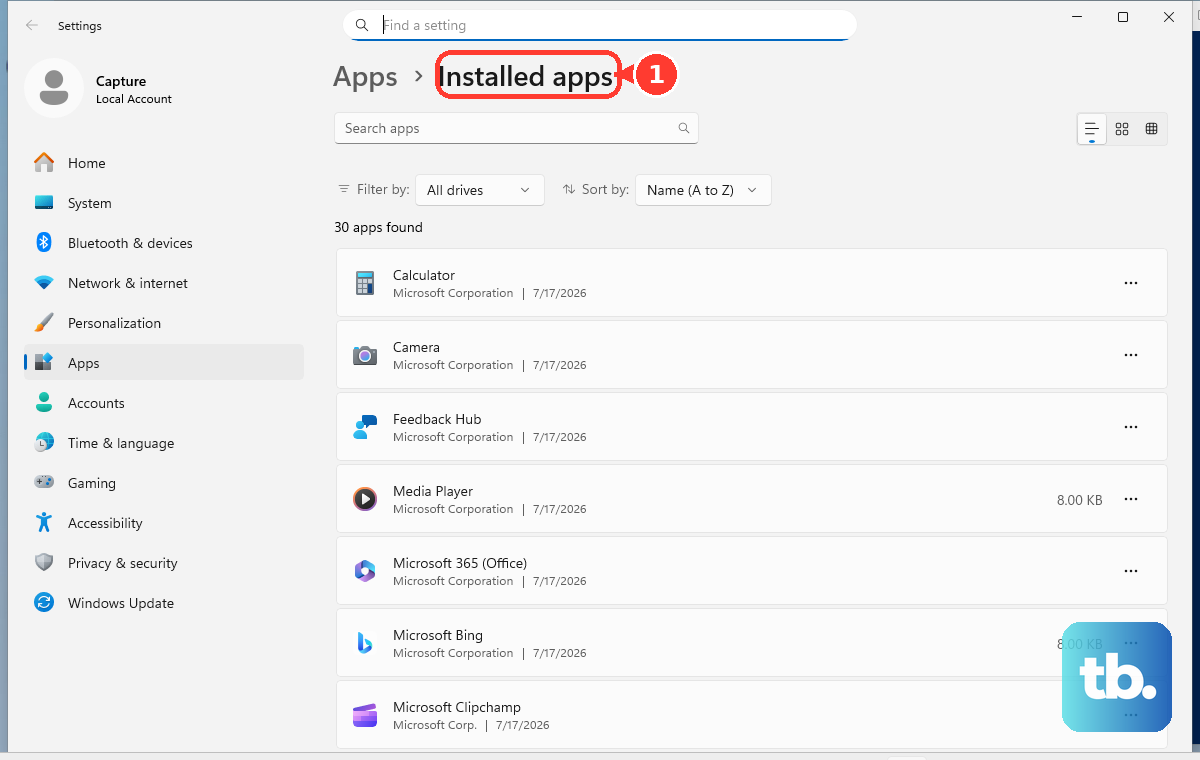
2. Clear leftover Roblox files on Windows
- 1.Uninstall Roblox first through Windows Settings, Start > All apps > Roblox > Uninstall, or Control Panel > Programs > Programs and Features > Roblox > Uninstall.
- 2.Right-click Start and choose File Explorer.
- 3.Go to C:\Users\(Your Windows Username)\AppData\Local.
- 4.Delete the Roblox folder.
- 5.Restart the PC before installing Roblox again.
For a clean reinstall, go to roblox.com/download and use the device-specific Roblox download option shown there.
3. Move Roblox to Trash on Mac
On a Mac, close Roblox completely before you remove it by pressing Command + Option + Esc, choosing Roblox or Roblox Studio, and clicking Force Quit.
Then use Finder > Applications, drag the Roblox icon to the Trash, or select the app and press Command-Delete.
Use Finder for Roblox removal on Mac, not Launchpad.
4. Delete Roblox from iPhone or iPad
This removes the Roblox app instead of only offloading it. Touch and hold Roblox on the Home Screen, then tap Remove App and Delete App. Tap Delete to confirm.
If Roblox is only in App Library, open App Library, touch and hold Roblox, tap Delete App, then tap Delete. If Delete App is missing, set Deleting Apps to Allow in parental controls, then delete Roblox again.
5. Uninstall Roblox on Android
Open Google Play Store, then tap the profile icon. Tap Manage apps & devices > Manage, select Roblox, then tap Uninstall.
To remove it through Android Settings instead, open Settings, select Application manager, choose Roblox Mobile App, then tap Uninstall.
On Android launchers with an uninstall target, open the apps drawer, tap and hold Roblox, drag it to Uninstall, and confirm.
6. Remove Roblox from Chromebook or Chrome
This fixes ChromeOS installs and Roblox.com shortcuts saved as Chrome web apps. On Chromebook, select Launcher, right-click Roblox, then select Uninstall or Remove from Chrome. Select Uninstall in the confirmation window.
For a Roblox.com Chrome web app on Windows, Mac, or Linux, open the web app window, select More > Uninstall [app name] > Remove, and select Also delete data from Chrome if you want Chrome web app data removed too.
7. Take Roblox off Fire tablets and consoles
On an Amazon Fire tablet running Fire OS 7 or newer, open the Games or Apps app and select the Menu icon. Select the Library tab, then select Downloaded. Find Roblox, select its three-dot menu, then select Delete from Device. On Fire OS 6 and older, use the Games & Apps tab > Library > Manage All Applications > Roblox > Delete from Device.
On Xbox, highlight Roblox, press the Menu button, select Manage game & add-ons or Manage app, choose Roblox, then select Uninstall all.
On PS5, go to Settings > Storage > Console Storage > Games and Apps, choose Roblox, then select Delete.
On PS4, highlight Roblox in the content launcher or Library, press the OPTIONS button, then select Delete.
8. Separate the app from your Roblox account
This fixes account-removal confusion because uninstalling Roblox does not deactivate or delete your Roblox account. To deactivate the account, go to Roblox privacy settings. Under Account Deactivation and Deletion, select Deactivate.
To request account and personal information deletion, use the Roblox support form. Select the desired Right To Be Forgotten option under Data Privacy Requests. Complete Roblox’s identity-verification steps.
Frequently Asked Questions
Does uninstalling Roblox delete my account?
No. Removing the app only takes Roblox off that device. Account deactivation and deletion are separate Roblox account actions.
What should I do if Roblox comes back after I remove it?
On a managed Android, school, company, or work-profile device, an administrator may control the app. If you do not see Uninstall, or only see Uninstall updates, you cannot permanently remove it yourself.
Should I offload Roblox on iPhone instead of deleting it?
Offloading removes the app binary but keeps documents and data, and the icon remains with a cloud symbol. Use Delete App when you want Roblox removed from the device.
Where should I reinstall Roblox after removing it?
Use roblox.com/download for the official Roblox download page, or reinstall from the official store for your device such as Google Play, Amazon Store, Microsoft Store, PlayStation, or Xbox.