

To teleport in Minecraft, turn on commands for your world, open the chat and type /tp followed by three coordinates, such as /tp 100 70 -250, then send it. To jump to another player instead, type /tp @s and their name. In Java Edition the setting you need is Allow Commands, and in Bedrock Edition it is the Cheats toggle, called Allow Cheats in older versions.
Bedrock's cheat switch has a cost. Turning on cheats there permanently stops achievements in that world, even if you turn cheats off again later.
The short version
- Turn commands on: Allow Commands in Java Edition, the Cheats toggle in Bedrock Edition, where it ends achievements in that world.
- Go to a place:
/tp X Y Z, for example/tp 100 70 -250. - Go to a player:
/tp @s PlayerName, or/tp PlayerName @sto bring them to you. - Short hops:
/tp ~5 ~ ~moves you 5 blocks east, and/tp ^ ^ ^5moves you 5 blocks the way you face. - Find your coordinates: press F3 in Java Edition, or turn on Show Coordinates in Bedrock Edition.
- No cheats: throw an ender pearl, or eat chorus fruit for a short random jump.
Choose the way you want to teleport
There are five command jobs and two items that move you without commands. Pick the row that matches what you want to do, then follow that section below.
| What you want | Use this | Needs commands | What to watch |
|---|---|---|---|
| Reach a place you know | /tp X Y Z | Yes | Pick a Y number with open air above solid ground |
| Reach another player | /tp @s PlayerName | Yes | The player must be in the same world right now |
| Bring a player to you | /tp PlayerName @s | Yes | On a server, you need permission to use commands |
| Move a set number of blocks | /tp ~5 ~ ~ | Yes | Positive X is east, not forward |
| Move the way you are facing | /tp ^ ^ ^5 | Yes | Looking up or down changes your height too |
| Land where you throw | An ender pearl | No | Aim at safe ground, never at lava |
| Make a short random jump | Chorus fruit | No | You cannot choose where you land |
Commands are the only way to pick an exact spot or to reach a friend, so most of this guide is about /tp. They have to be allowed in the world first, which is the next step. The two items work in any Survival world with no settings to change, but you have to find them first.
Turn on commands in Java Edition
For a new Java world, turn on Allow Commands on the world creation screen before you press Create New World. By default the setting is on for Creative worlds and off for Survival worlds, so a Survival player usually has to switch it on.
For a world you already have, press Esc to open the pause menu and select World Options. In the current release this button sits where Open to LAN used to be. Under General, turn on Allow Commands, which controls whether you can use commands in this world. In a Java Hardcore world, Allow Commands is not offered in World Options.
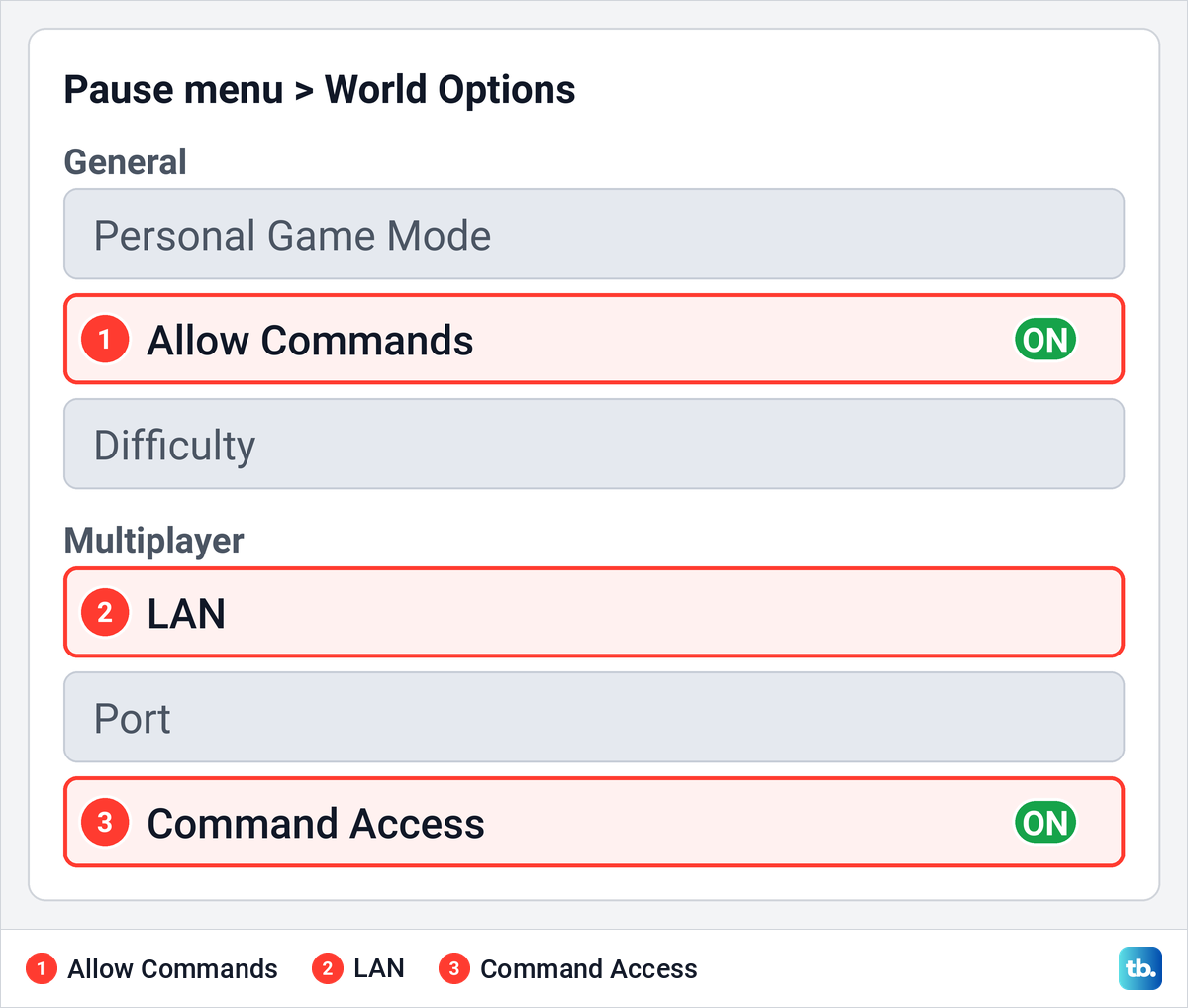
The Multiplayer section of the same screen is about other people. LAN changes who can join the world, and Command Access controls whether players who join can use commands. A friend who joins over your home network therefore needs Command Access turned on before their own /tp will work, even when Allow Commands is on for you.
Many older instructions send you to Open to LAN to turn commands on. That was right for older releases, where Open to LAN was where the Allow Commands switch lived, but its spot in the pause menu now belongs to World Options. If your menus look different from the ones described here, update Minecraft on your device before you follow the steps.
Turn on cheats in Bedrock Edition
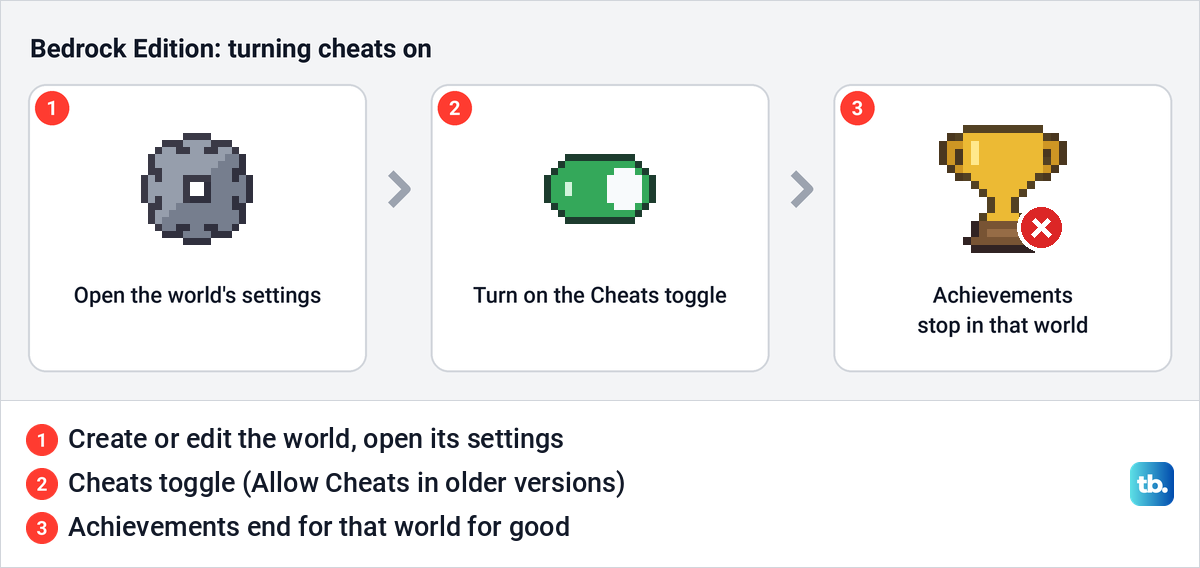
Read this before you flip the switch. Turning on cheats in Bedrock Edition permanently stops players from unlocking achievements in that world, even if you turn cheats off again later. If achievements matter to you, try commands in a separate Creative world rather than in your main Survival world.
For a new world, open the world's settings on the create screen and turn on the Cheats toggle. For a world you already have, edit that world from your world list and turn it on there. Older versions call the switch Allow Cheats and put it on the Game tab of the settings, so look for either name.
Setting a world's default game mode to Creative also turns cheats on, so a Creative world may already have them. There is also a second permission, operator commands, that a player needs before commands work in the chat. That one is on by default for new worlds you create, and the troubleshooting section below shows where to find it for other players.
Find the coordinates you need
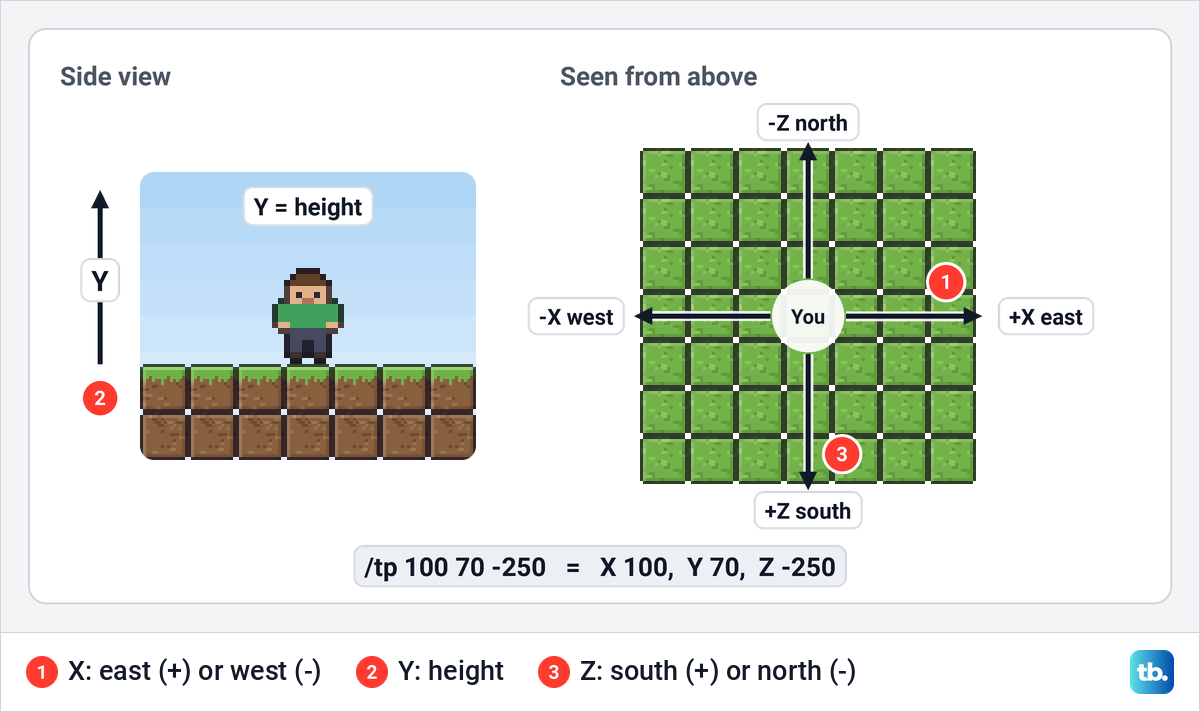
Every spot in a Minecraft world has three numbers. X is the position east or west, Y is the height, and Z is the position north or south. Commands always take them in that order, X then Y then Z, with a space between each one.
In Java Edition, press F3 to open the debug screen and read the line labelled XYZ, then press F3 again to close it. If F3 changes your laptop's brightness or volume instead, hold Fn and press F3.
In Bedrock Edition, pause the game, open Settings and turn on Show Coordinates, and the position then stays on screen while you play. This is also the method for Bedrock Edition on a Windows PC, because the F3 coordinates are a Java Edition feature.
To save a place for later, stand on it and write down all three numbers before you leave, including any minus sign. You can type those numbers later while you are in the same dimension, so go into the Nether or the End first if that is where you wrote them down. To keep a record of several places, you can also make a map in Minecraft to see the land around them, and keep your list of numbers beside it.
Teleport yourself to coordinates
Open the chat. On a computer, pressing / opens it with the slash already typed by default, and on a phone, tablet or console you use the game's chat button. Type the command with your three numbers and send it, which on a keyboard means pressing Enter.
/tp 100 70 -250That moves you to X 100, Y 70 and Z -250. Replace the numbers with your own, keep the minus sign on any negative number, and leave one space between the parts, with no commas. The longer form, /teleport @s 100 70 -250, does exactly the same job, and @s means you, the player typing.
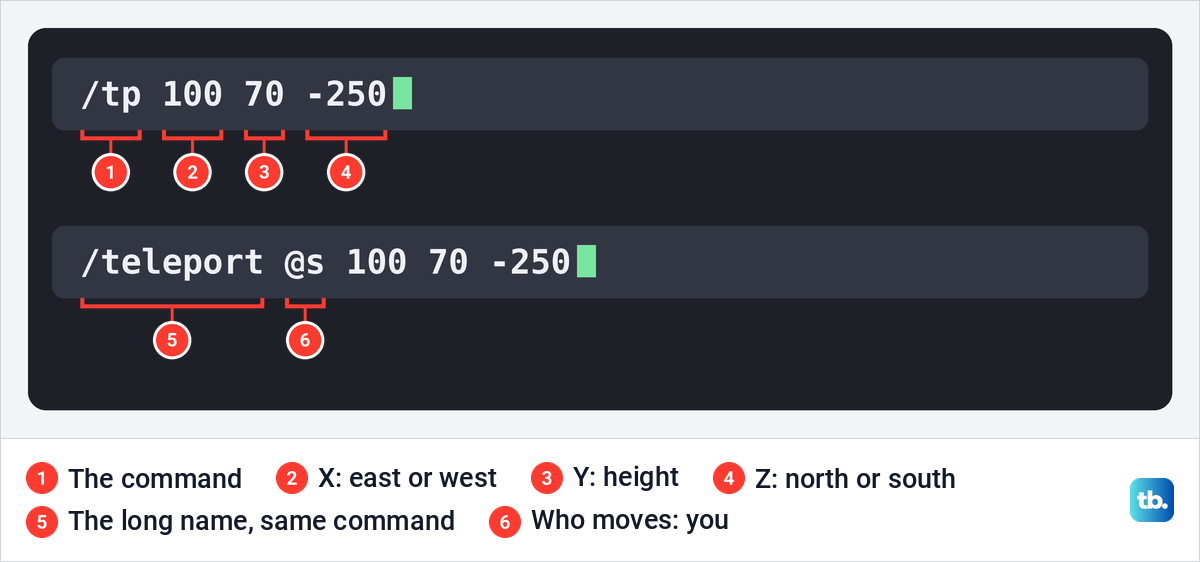
The Y number decides whether you arrive safely. Too low and you can end up inside rock, and too high and you fall from the sky. Copying all three numbers from a spot where you stood on the ground is the safest choice, and Bedrock Edition adds a block check, explained further down.
In Survival, a bad landing can also cost you your items. If you plan long jumps in a Java Edition world you care about, you can turn on Keep Inventory in Java so a fall or a lava pool does not empty your pockets.
Two keyboard shortcuts save typing. The Up arrow in an open chat brings back the last command you sent, which is handy for repeating a jump. In Java Edition, Tab also fills in the coordinates of the block you are looking at while you type a command that needs them.
Teleport to a player or bring them to you
To jump to a friend in the same world, type /tp @s followed by their player name. The first part after /tp is who moves and the second is where they go, so this command takes you to Alex.
/tp @s AlexSwap the two parts and the trip reverses: /tp Alex @s brings Alex to you. Write the name exactly as it appears in the game, because one wrong letter means the command finds nobody. The player also has to be in the world at that moment, since a player who is offline cannot be a destination.
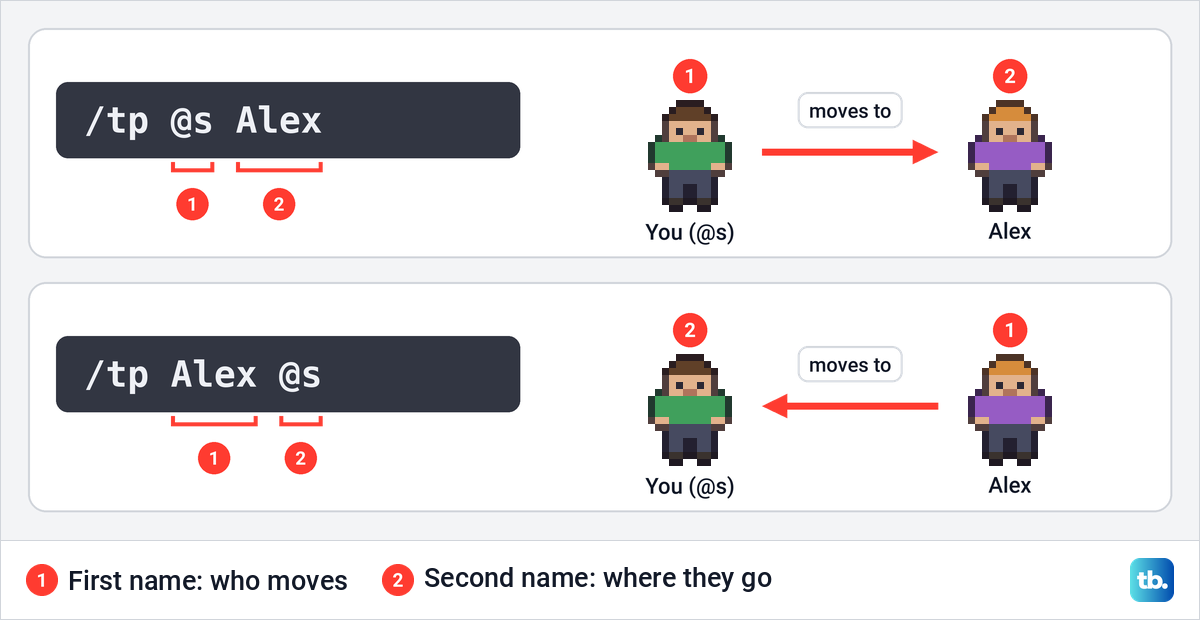
In Bedrock Edition, put a name that contains a space in quotation marks, as in /tp @s "Blue Fox". The place you go to must be one player or entity, so @a cannot be used as the destination.
Two shortcuts help in a busy world. @a means all players, so /tp @a @s gathers everyone where you stand. @p means the nearest player, which is not always you, so use @s whenever you mean yourself.
On a server or a Realm, commands depend on your permission level. If you started the server or Realm yourself you should have permission by default, and on someone else's server you need to ask its owner, who can make you an operator with /op and your name. If you look after a world for friends, our guide on how to make a Minecraft server covers the hosting side before you set command permissions.
Teleporting cannot get you into a world you have not joined. If the game will not let you in, follow the steps to fix an unable to connect to world error first, then use /tp once you are both inside. If multiplayer itself is blocked on the account, our guide on how to enable Minecraft multiplayer on your Microsoft account covers that setting.
Move a set distance with a tilde
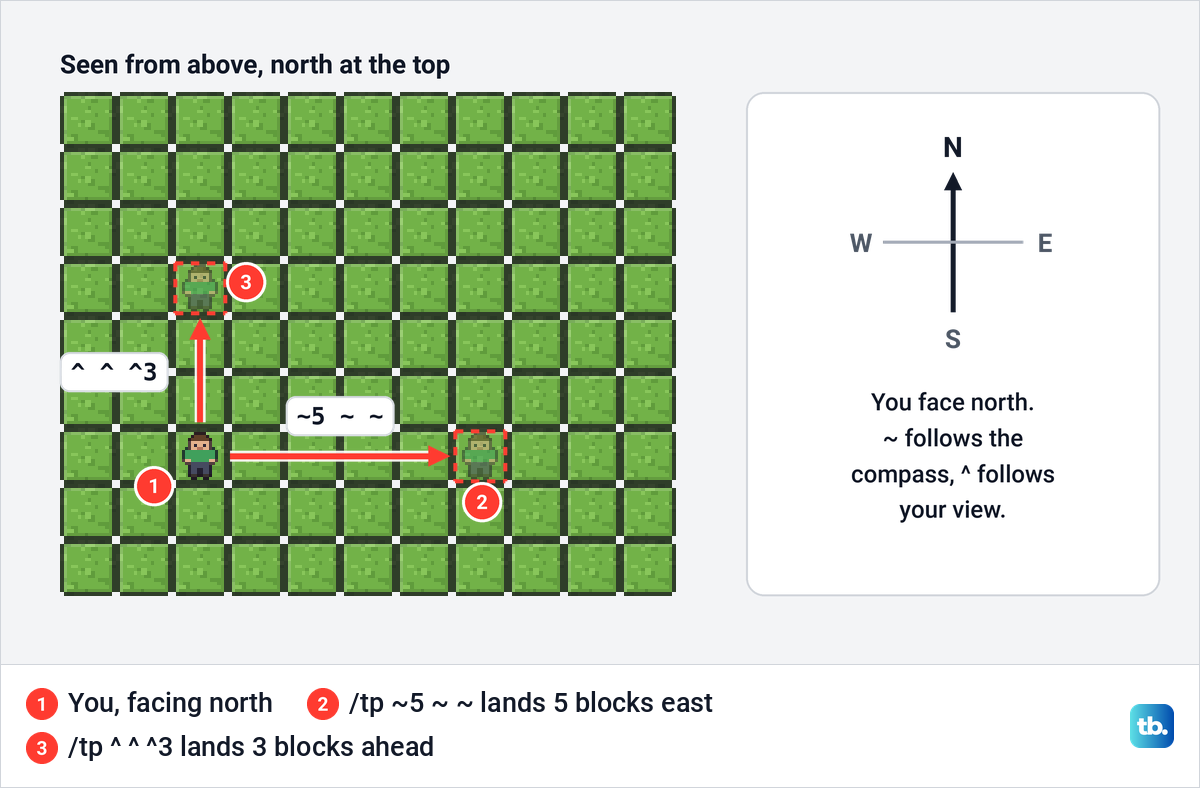
A tilde (~) stands for your current position on one axis, and a number after it adds that many blocks. So /tp ~ ~1 ~ lifts you one block, /tp ~ ~-1 ~ drops you one block, and /tp ~5 ~ ~ moves you five blocks east. All three parts are needed, even the ones that do not change.
The catch is direction. A number on the X part always moves you east, or west if it is negative, whichever way you happen to be looking. Calling /tp ~10 ~ ~ ten blocks forward is only right when you face east, and a number on the Z part moves you south, or north if it is negative.
Tildes are good for small, exact moves, such as lifting yourself three blocks with /tp ~ ~3 ~. For long trips, plain coordinates are easier to check against your F3 screen or Show Coordinates.
Move where you are facing with a caret
A caret (^) measures from your point of view instead of the compass. The three parts are left, up and forward, so /tp ^ ^ ^5 moves you five blocks straight ahead and /tp ^ ^ ^-1 moves you one block back. In the same way, /tp ^1 ^ ^ moves you one block to your left.
Forward means exactly where you are looking, up and down included. Look at the sky and the jump goes upward, and look at the floor and it can put you inside the ground. Look straight ahead at an open space before you use it. Facing east and looking level, a caret move and a tilde move on X point the same way.
Stop a Bedrock teleport into blocks
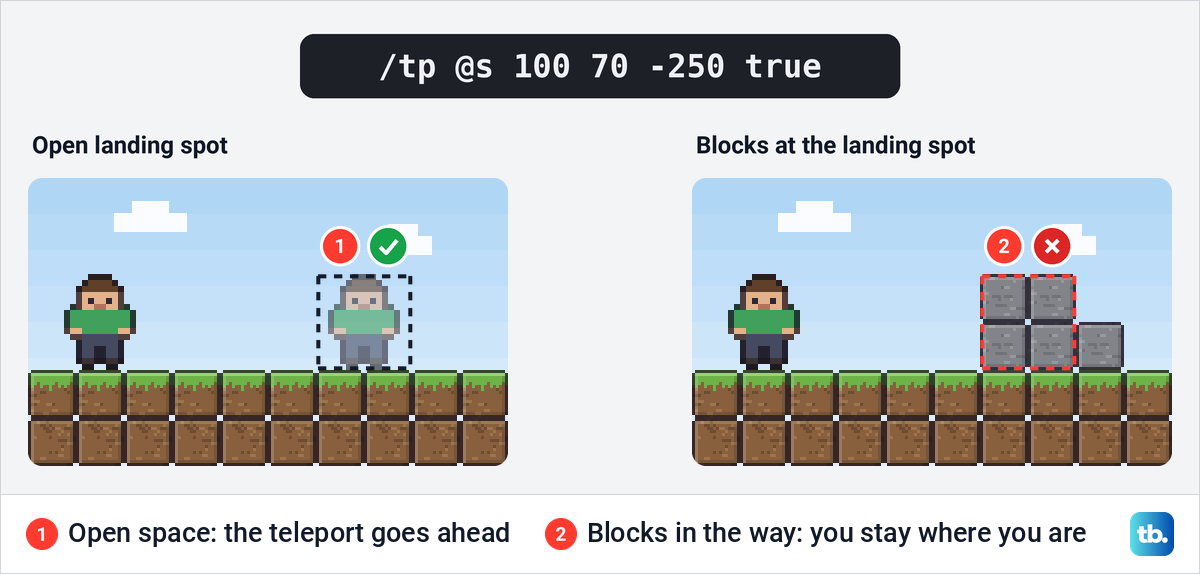
Bedrock Edition's /tp takes one extra word at the end. Add true after the coordinates and the game refuses the teleport if the spot where you would land is occupied by blocks. It is off by default, which is why a plain /tp can drop you inside a hill.
/tp @s 100 70 -250 trueThe check only looks for blocks in the way. It does not test for lava, water, a long drop or mobs, so treat it as a guard against getting stuck rather than a promise of a safe landing. Java Edition's /tp has no such option, so leave true off in Java.
Teleport without commands
Throw an ender pearl
An ender pearl is the game's built-in teleport, and it works in any Survival world with no settings to change. Hold it in your hand and press the use button, which is the right mouse button on a computer by default. The pearl flies in front of you and you teleport to the spot where it lands.
Aim before you throw, because where the pearl lands is where you end up. Never aim at lava. In Survival each throw uses up one pearl, so carry a few for a longer trip.
Pearls take some effort to collect. A defeated Enderman has a 50:50 chance of dropping one, and pearls also turn up in strongholds, trial chambers and some woodland mansions, or through trades with cleric villagers and piglins.
Eat chorus fruit
Chorus fruit grows on the outer islands of the End, which you reach after the Ender Dragon is defeated. Eating one restores four hunger points, and there is a chance it teleports you to a random nearby location as you eat.
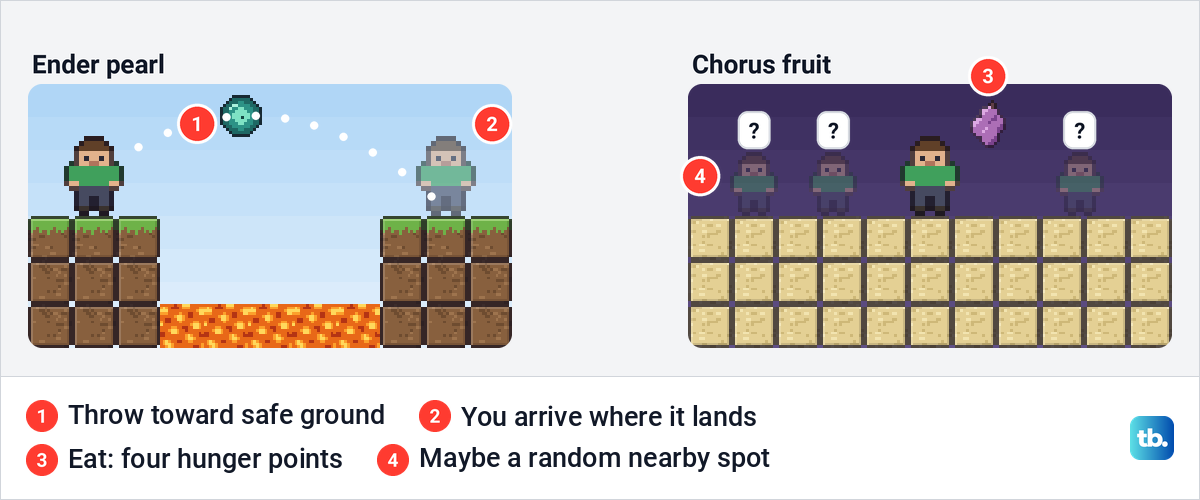
You cannot pick where chorus fruit sends you, so it works as an escape from a tight spot rather than a way to travel. For regular trips between the Overworld and the Nether without a command, make a Nether portal instead.
What changes between Java and Bedrock
For the everyday jobs covered here, /tp is written the same way in both editions. The differences are the setting you turn on, how you see your coordinates, Bedrock's achievement warning and its extra block check.
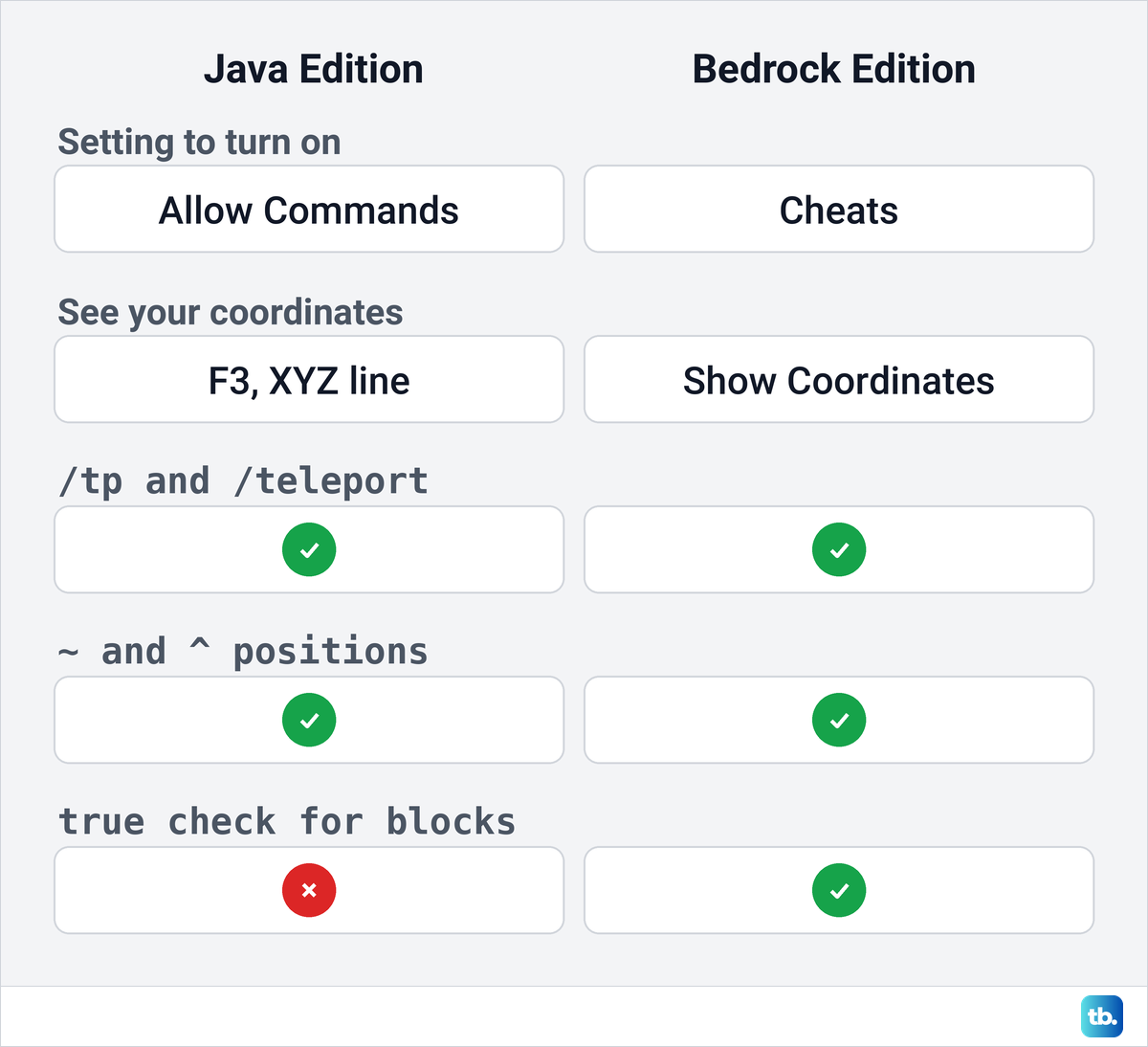
If a step here does not match your game, check your edition first and your version second. Consoles, phones and tablets run Bedrock Edition, while a Windows PC can have either edition installed.
Fix a teleport command that fails
If the game refuses /tp outright, commands are not allowed for you yet. Turn on Allow Commands in Java Edition or the Cheats toggle in Bedrock Edition, or ask the server owner for permission. In a Java Hardcore world, Allow Commands is not offered in World Options.
In a shared Bedrock world, the host also has to give you the operator commands permission. To find it, open the pause menu and select the icon to the right of the player, which shows a list of permissions with operator commands among them.
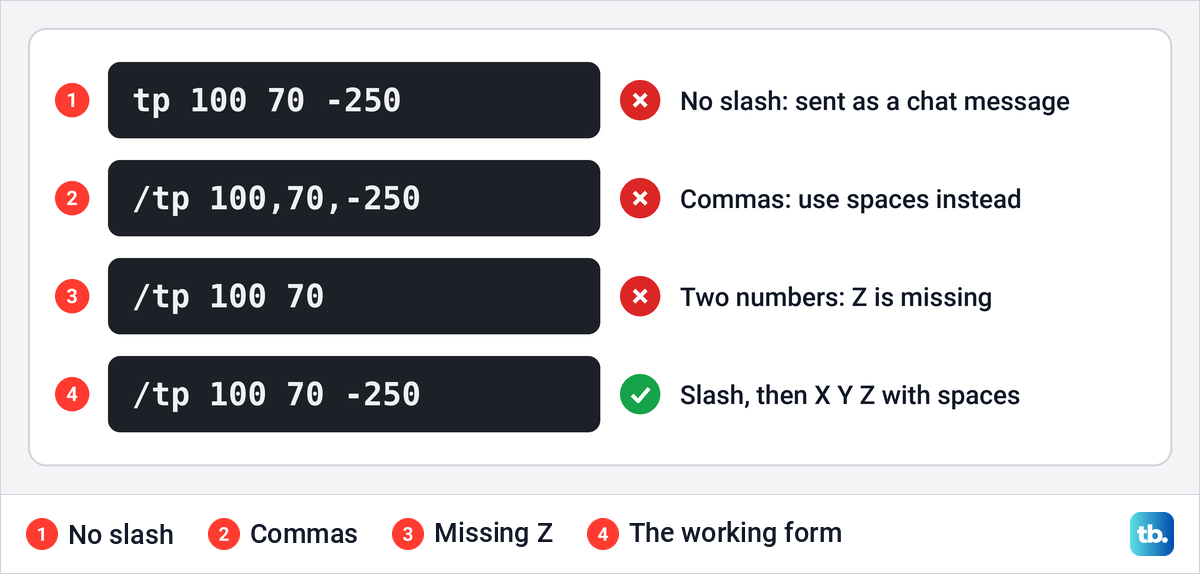
If the command shows an error, check the typing. A mistyped command shows an error that only you can see, and the command does not run. Every command starts with a forward slash, and the three numbers go in X Y Z order with spaces and no commas.
If a player teleport does nothing, check the spelling of the name and that the player is in the world now. A name with a space needs quotation marks in Bedrock Edition, and @s, not @p, is the safe way to mean yourself.
If you land in the wrong place, compare your numbers with the F3 screen or Show Coordinates. A swapped Y and Z, a missing minus sign or numbers written down in another dimension send you somewhere else entirely. Remember too that a tilde number moves you along the compass directions, not the way you face.
Frequently Asked Questions
How do I teleport to coordinates in Minecraft?
Turn on Allow Commands in Java Edition or the Cheats toggle in Bedrock Edition, open the chat and type /tp with three numbers in X Y Z order, such as /tp 100 70 -250. Find the numbers with F3 in Java Edition or Show Coordinates in Bedrock Edition.
How do I teleport to another player in Minecraft?
Type /tp @s followed by the player's name, for example /tp @s Alex. The player has to be in the same world, and you need permission to use commands there.
How do I bring a player to me?
Put the player's name first and @s second, as in /tp Alex @s. The first part is always the one who moves, and the second is where they go.
Why does my teleport command not work?
Commands are probably off for you, or the command has a typing mistake. Check the world's command setting or your server permission first, then the slash, the three numbers and the player's name.
Does turning cheats off bring Bedrock achievements back?
No. Turning on cheats permanently stops achievements in that Bedrock world, even if you switch cheats off again later.
Can I teleport in Minecraft without cheats?
Yes, with items. Throw an ender pearl and you land where it hits, or eat chorus fruit for a chance at a random nearby jump.
What do the ~ and ^ signs mean in a teleport command?
A tilde counts blocks from where you are along the compass directions, so ~5 ~ ~ is five blocks east. A caret counts from the way you face, so ^ ^ ^5 is five blocks straight ahead.