You need into your Yahoo Mail, but the password is the wall. Maybe you cannot recall it at all, maybe sign-in keeps throwing "Invalid ID or password," or maybe you just want to rotate it after a breach scare.
For the reset itself, a browser based strong password generator builds a long random password in one click. It runs entirely on your device, so the new password is never transmitted anywhere.
Whatever the trigger, the fix is one of two paths: if you can sign in, you change the password from your settings; if you cannot, you reset it through Yahoo's Sign-in Helper. Both take a couple of minutes.
This guide walks every verified method, on web, the Yahoo Mail app for iOS and Android, plus how to get Apple Mail and Outlook working again afterward. Work top to bottom; the quickest, most common cases come first.
Before You Start: Check Your Recovery Info
Self-service reset only works if Yahoo can verify it is you. That means a recovery phone number or a recovery (alternate) email must already be on the account, and the code goes to one of them.
Yahoo's official help warns that if your recovery options are outdated or inaccessible, you may not be able to regain access and would have to create a new account. So if you still have any access, confirm your recovery details now (steps are in the recovery section below).
Two more prerequisites worth knowing. SMS codes can only be sent to a mobile number, never a landline. And if you plan to change the password from inside settings, "Account Key" must be turned off, or the option to change it will not appear.
Reset a Forgotten Password with the Sign-in Helper
This is the path when you cannot sign in at all, or you suspect your account was compromised and someone changed the password. It runs entirely in a web browser, desktop or mobile.
- 1.Go to the Yahoo Sign-in Helper at login.yahoo.com/forgot.
- 2.Enter your recovery email address, or click "Use recovery phone number" to use your recovery phone instead.
- 3.Click "Next".
- 4.Follow the Sign-in Helper's instructions to verify your identity. Yahoo sends a verification code to your mobile number or recovery email.
- 5.Enter the verification code, then create and confirm a new, strong password as prompted.
If your account was compromised, sign in with the new password right away and review your account settings to undo any changes you did not make.
Change the Password from the Account Security Page
Use this when you remember your current password, you are signed in on a browser, and you simply want a new one (routine rotation or a post-scare reset).
Sign in and open the Yahoo Account Security page.
Under "Ways of signing in," click "Password".
Enter your new password.
Click "Continue".
If the change option is missing, you most likely have "Account Key" enabled. Disable Account Key first, then return to this page and the "Password" option will appear.
Change the Password Inside the Yahoo Mail App
You can do the same from the Yahoo Mail app on iOS or Android while signed in. The flow lives behind your profile icon.
Tap the profile icon.
In the Yahoo Mail app, tap "Manage Accounts". (Skip this step in other Yahoo apps.)
Tap "Account". (In non-Mail Yahoo apps this is labeled "Account Info".)
Tap "Security".
Scroll down and tap "Change password".
Enter your new password.
Tap "Continue".
If these in-app steps stall or the option does not load, open a mobile web browser instead and use the Account Security page or the Sign-in Helper. Both work the same on a phone browser.
Add or Update Your Recovery Phone and Email
Keeping recovery info current is what makes every future reset possible. Do this from a browser while signed in.
Sign in to the Yahoo Account Security page.
Under "Ways of signing in," click "Add email" or "Add phone number". (To add more than one, click "Phone numbers" or "Additional emails" first.)
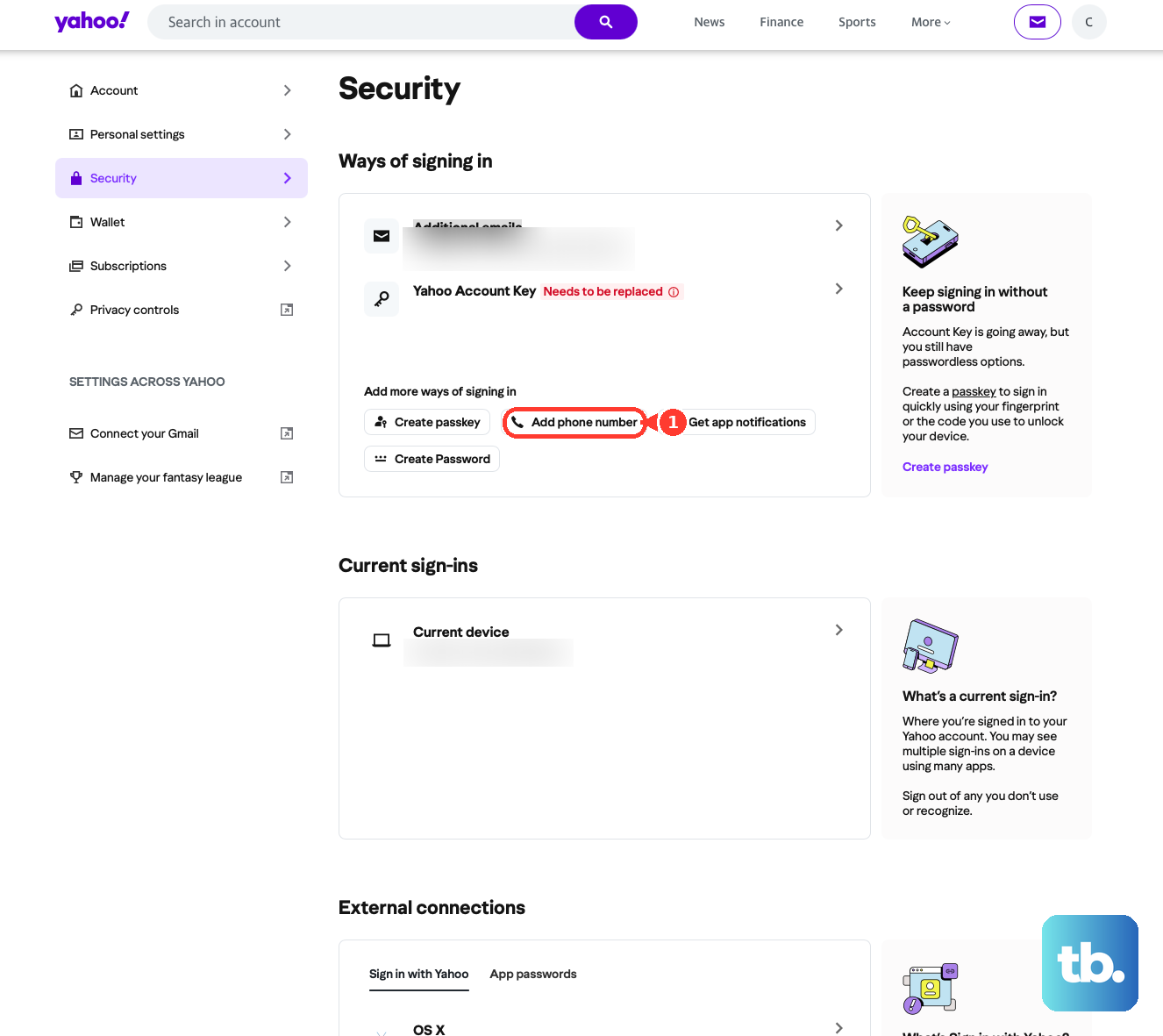
Enter the recovery information and click "Next".
Complete the verification prompts to confirm the new method.
To remove an entry, open "Phone numbers" or "Additional emails," click the trash icon next to it, then click "Remove email" or "Remove phone" and confirm. You can hold up to 10 email addresses (that count includes recently removed ones), and every method must be verified before it can be used.
From the Yahoo Mail app, the path is slightly different: tap the profile icon (upper left), then "Manage account privacy," then "Your privacy controls," then "Security." Under "Ways of signing in," tap "Add email" or "Add phone number" and follow the prompts to verify.
Reconnect Apple Mail on iPhone or iPad
Any password change breaks third-party clients, because the saved password no longer matches. On native Apple Mail, reauthenticate using the steps below (confirmed for recent iOS versions).
Open Settings, then Mail, then Accounts.
Select your Yahoo account.
Tap "Re-enter password" and enter your new Yahoo password.
If "Re-enter password" is greyed out or unavailable, delete the account, then tap "Add Account," choose "Yahoo," and re-add it with the new password. If you sign in using an app password, you may need to delete the old app password, generate a new one, and use that instead.
Reconnect Microsoft Outlook
Outlook also needs to be re-signed in after a reset. The client walks you back through Yahoo's sign-in page.
Open Outlook and click the settings icon on the right.
Click "Accounts".
Click "Sign in" next to your Yahoo email account.
Click "Continue" to go to the Yahoo sign-in page.
Enter your Yahoo email and click "Next," then enter your password and click "Next".
Choose where to receive a verification code, enter the code, and click "Next".
Click "Agree" to authorize Outlook, then click "Open Outlook".
If mail does not refresh afterward, close and reopen Outlook.
Generate an App Password for a Stubborn Client
Some mail clients need a dedicated app password rather than your main one. Create one from a browser you have been signed into Yahoo on for several consecutive days, and avoid Incognito mode.
Go to your Yahoo Account Security page.
Under "External connections," select "Create app password".
Enter a name for the app in the text field.
Click "Generate password".
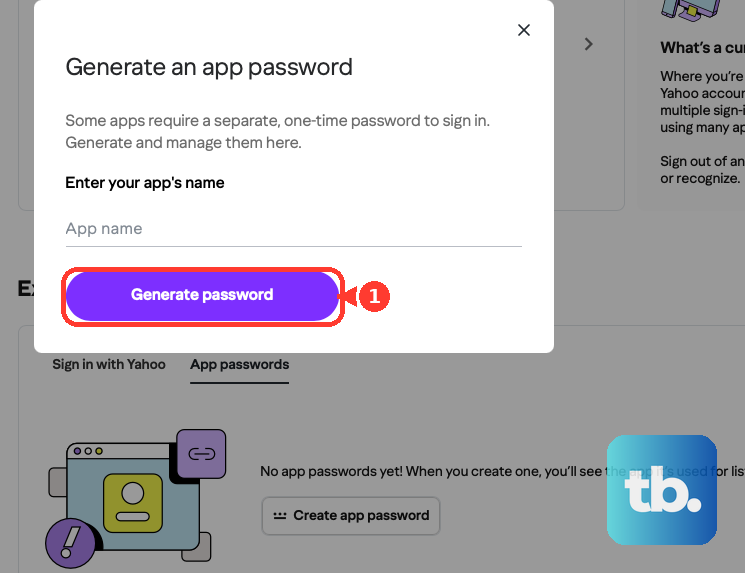
Use the one-time password shown to sign in to your third-party app, then click "Done".
Important: app passwords stay active even after you change your main account password. Changing the main password does not cut off a client that uses an app password; to revoke access you must delete the app password. Do that under "External connections" by clicking "Delete" next to it, then "Delete" again to confirm. If generation fails, use webmail or the official Yahoo app instead.
Fix "Invalid ID or Password" and Lockouts
If sign-in rejects a password you believe is correct, Yahoo's help points to a few culprits. Check that Caps Lock and Num Lock are off, since they change what you actually type. Update your browser's saved autofill, which may still be entering the old password after a change. And try a different browser to rule out a browser-specific issue.
After repeated failed attempts, Yahoo temporarily locks the account (up to a day, per Yahoo's help). This is often a typo or a near-identical Yahoo ID rather than a real intrusion. Wait it out, or recover through the Sign-in Helper once the lock clears.
Frequently Asked Questions
My verification code never arrived. What now?
First confirm you used a mobile number, not a landline, since SMS codes cannot reach landlines. Click "Resend" within the first five minutes, and check your spam folder, that your alternate email still exists, that your plan has not hit a sending or data limit, and that your internet provider is not blocking Yahoo.
The reset link says it expired. Is that normal?
Yes. A used or stale link returns "The URL has expired and you need to request a new one." Just request a fresh link and use it promptly.
Why is the "Change password" option missing from my settings?
That almost always means "Account Key" is enabled on your account. Disable Account Key first, then the option to change your password will become available on the Account Security page.
I changed my password, so why does my mail app still work with the old one?
If that app uses an app password, it keeps working until you delete that app password, because app passwords survive a main-password change. To cut off the app's access, delete its app password under "External connections" on the Account Security page.
I have no access to my recovery phone or email. Can I still get back in?
Yahoo's official help states that if your recovery options are outdated or inaccessible, you may not be able to regain access and would have to create a new account. This is why keeping a current recovery phone and email on file matters so much.
I am locked out after too many tries. How long until I can sign in?
Yahoo temporarily locks an account after a series of failed sign-in attempts, for up to a day according to Yahoo's help. Wait for the lock to clear, then sign in, or use the Sign-in Helper to reset if you still cannot recall the password.











