The NETGEAR default password is password, with username admin, both lowercase, on most unconfigured or factory-reset home routers. Once you change the administrator password, those defaults no longer work. To regain access, find a saved copy, use previously configured security questions to create a replacement, or factory-reset the router as a last resort.
Your router administrator password opens its settings, while your WiFi password connects devices to its network. Your MyNETGEAR account has a separate password for companion apps and services. Choose the recovery method for the login you need.
The short version
- Default login: Most unconfigured NETGEAR home routers use lowercase
adminandpassword. - Saved password: Your browser or password manager can reveal router credentials you previously saved.
- Password recovery: Previously configured security questions let supported routers reset the administrator password without a factory reset.
- Last resort: A factory reset erases personalized settings and requires you to set up the router again.
| Method | What you need | What it does |
|---|---|---|
| Factory-default login | Unchanged factory credentials | Opens router settings |
| Saved-password lookup | Previously saved router entry | Reveals the stored password |
| Security-question recovery | Serial number and configured answers | Creates a replacement password |
| Change password in settings | Current administrator password | Replaces a known password |
| Physical factory reset | Access to the powered router | Erases settings for fresh setup |
| Browser setup after resetting | Local connection to the router | Configures the router and new password |
| App setup after resetting | Compatible router and companion app | Completes setup through app prompts |
| Enable password recovery | Administrator access and a supported router | Prepares security questions for future recovery |
Try the default login on an unconfigured router
Connect your device to the router's network, then open routerlogin.net in a browser for a Nighthawk or supported NETGEAR home router. Enter admin as the username and password as the password. Newer routers require you to choose a different administrator password during setup, so the factory password does not override one you already created.
For Orbi, use orbilogin.local or orbilogin.com instead. The general default applies to most NETGEAR home routers using stock firmware, but mobile routers have model-specific credentials. Check your model's documentation for exceptions.
If a configured router rejects the default, check for a saved password before resetting anything. The older default 1234 is not the current general default, and trying it cannot undo an administrator password change.
Find a password you previously saved
Search your password manager for routerlogin.net, routerlogin.com, orbilogin.com, orbilogin.local, or the router's IP address. A matching entry can reveal the administrator password only if you saved it earlier. If the saved password no longer matches the router's password, continue to security-question recovery.
In desktop Chrome, open More > Passwords and autofill > Google Password Manager. Under Passwords, select the router entry and choose Show password, then complete device authentication when requested. On Android Chrome, open More > Settings > Google Password Manager, select the entry, and choose Show password. Authenticate if prompted.
On an iPhone or iPad running iOS or iPadOS 18 or later, open Passwords and unlock it with Face ID, Touch ID, or your device passcode. Choose the relevant category or Shared Group, then select the router website entry. On a Mac running macOS Sequoia or later, open Passwords, authenticate with Touch ID or your Mac user-account password, and select the saved router account.
Microsoft Password Manager in Edge requires a signed-in personal-account profile, and work or school profiles can be restricted by an administrator. In Edge, open the three-dot menu, then select Settings > Passwords and autofill > Microsoft Password Manager. Select the right arrow beside the router entry, authenticate when requested, and select the eye icon. In Firefox, open the menu and choose Passwords, find the router through Search Passwords, select its entry, and click the eye icon. Complete device authentication or enter your Primary Password if requested.
Reset a forgotten password with security questions
Use security-question recovery when you cannot find a working password. You need the router's serial number and the answers you configured before losing access. If recovery was not configured or you cannot answer the questions, move to the physical factory reset.
While connected to the router's network, open routerlogin.net for Nighthawk, or orbilogin.local or orbilogin.com for Orbi. Enter incorrect credentials three times to reach Router Password Reset; older Orbi systems use the Cancel entry point described below instead. Enter the router's serial number and select CONTINUE.
Answer the two previously configured security questions, then select CONTINUE again. Choose a new administrator password and security questions, then select NEXT. Use the replacement password for your next router login.
If three incorrect logins do not open the reset page, use the Cancel entry point that NETGEAR documents for older Orbi systems and in the RS700 and Orbi 970 RBE971 manuals, with password reset already enabled. Open orbilogin.com on Orbi or routerlogin.net on an RS700. In the login prompt, select Cancel, enter the serial number, and select Continue. Answer the security questions and select Continue, then enter and confirm a new password and configure new security questions. Select Next, then log in with the new password.
Change the password while you can still log in
If you know your administrator password, change it directly in the router settings. Connect locally, open routerlogin.net, and log in as admin using your current password. Select ADVANCED > Administration > Set Password, or use Settings > Administration > Set Password on Nighthawk Pro Gaming routers. Enter your current password, enter the new password twice, and select Apply.
For an Orbi 970 router RBE971, connect to Orbi, open orbilogin.com, and log in as admin. Select ADVANCED > Administration > Set Password. Enter the old password and the new password twice, then select Apply.
Changing the administrator password does not change the password devices use to join WiFi. If you also need to change that network credential, follow the separate steps to change your WiFi router password. Save each credential under the correct entry in your password manager.
Factory reset when password recovery fails
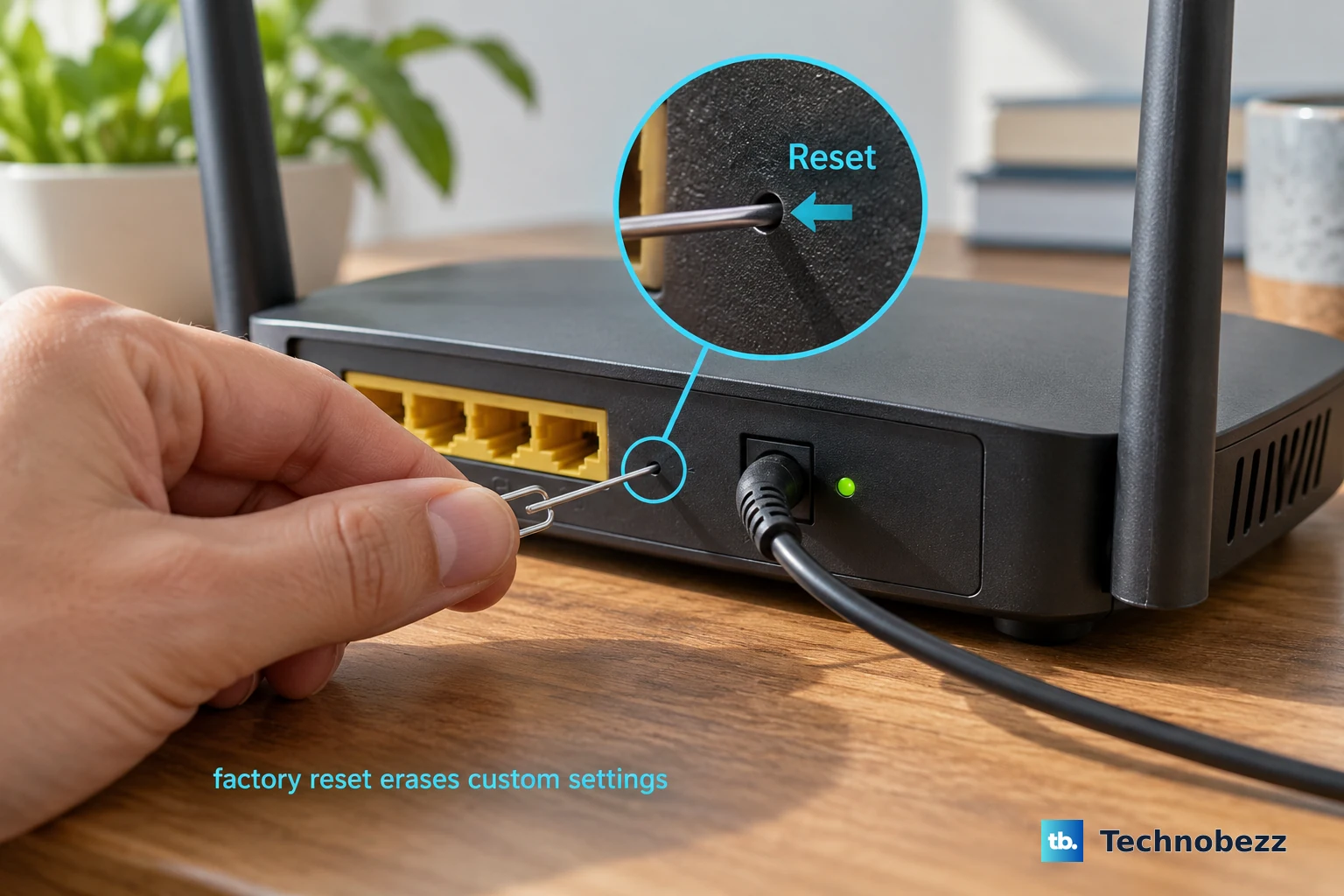
A physical factory reset is the fallback when saved credentials and security questions cannot restore access. It erases personalized settings and requires setup again, so use it after the less disruptive options. Keep the router powered on throughout the reset.
For models covered by NETGEAR's general home-router reset procedure, locate the rear Restore Factory Settings or Reset button. Press and hold it with a paper clip for seven seconds, then release it and allow the router to restart. NETGEAR's password-reset instructions specify 15 seconds for overlapping router models, so check your model's manual before starting because NETGEAR routers do not all use the same hold time.
On an RS700, hold the rear Reset button with a straightened paper clip for at least 10 seconds, then release it and wait for the restart to finish. On Orbi, hold Reset until the Power LED blinks amber. Reset the Orbi router to reset administrator credentials, since resetting only a satellite does not accomplish that.
Set up a new administrator password after resetting
Once the home router restarts, connect through a LAN Ethernet port or its default WiFi credentials. Open routerlogin.net and select If you don’t have a compatible smartphone, click here to use browser setup. Complete the setup wizard and choose a new administrator password when prompted.
For newer Orbi routers, join the default WiFi and open orbilogin.local, or try 10.168.168.1. Older Orbi routers use orbilogin.com or 192.168.1.1. Select If you don't have a compatible smartphone, click here, continue to Admin Account Settings, create the password, answer two security questions, and select Next.
For app setup on a compatible home router, make sure the router is powered on and its Internet port is connected. Get the NETGEAR Nighthawk app, launch it, scan the router's QR-code label when prompted, and complete setup. Follow the app prompts for your model.
For Orbi, get the NETGEAR Orbi app, sign in to MyNETGEAR, and select Set up an Orbi > Enable Camera and Scan. Scan the router QR code and follow the connection prompts. At Set Up Administrator Login, create the password and select NEXT, then answer two questions at Set Up Security Questions and select NEXT.
Enable recovery before you lose access again
After you regain access, configure password recovery if you did not already set it up. On routers with this control, open ADVANCED > Administration > Set Password, select Enable Password Recovery, and select Apply. Configure the security questions when prompted.
On R6900P, R7000P, RS400, and RS700, the control is named Enable Password Reset. Select it on the same settings path, choose two security questions, enter the answers, and select Apply. Orbi 970 RBE971 also uses Enable Password Reset on its Set Password page, where you configure two security questions and answers before selecting Apply.
Save the new administrator credentials in your password manager after completing the router's password-change or setup process. Updating a saved entry alone does not change the router password. Recovery must be enabled while you have administrator access; you cannot turn it on afterward to rescue an already-forgotten login.
Frequently Asked Questions
What is the default administrator password for a NETGEAR mobile router?
Your mobile-router default depends on the model and carrier edition. MR1100 AT&T and MR5100 AT&T use attadmin, while MR1100 EE uses password and certain MR1100 editions use admin. Other editions use a product-label password, so match the credentials to your exact device.
Where can you find the default administrator password on an M6?
On M6 MR6110 and M6 Pro MR6500, check the product label in the battery compartment for the default administrator login password. Connect to the hotspot and open http://192.168.1.1 to use it. That label password works only while the administrator password remains unchanged.
Can you view an M7 administrator password in the NETGEAR app?
On M7 MH7110 and MH7150, open the device dashboard and select the Settings icon, then Advanced Settings. In the Admin Settings section, tap the Password field and enter your mobile hotspot passcode if prompted to reveal it. These instructions apply to those M7 models, which differ from M7 Pro and Ultra.
How do you reset a forgotten MyNETGEAR account password?
Visit my.netgear.com, select Forgot password?, enter your account email, complete reCAPTCHA, and select Reset Password. Enter the emailed verification code, enter your replacement password twice, and select Submit. This changes your MyNETGEAR account password, while your router's local administrator password remains separate.
Can you find a router password saved to your Google account without the original device?
Visit passwords.google.com using the Google account that saved the credentials, select the router entry, and authenticate to reveal its password. The entry must have been saved to your Google account. A password stored only on a device is not necessarily available through that portal.
Can Siri find your NETGEAR administrator password?
On a supported iPhone or iPad, ask Siri to Show my passwords, authenticate, and select the router's saved website entry. Siri can help you locate stored credentials, but it cannot reset the NETGEAR router or reconstruct an unsaved password.