
The Google Pixel 10 Pro XL is a powerful phone, but that power generates heat. When you're dealing with an overheating phone that shuts off during charging or gets uncomfortably warm during normal use, you need fixes that actually work for this specific device. Here's what to do.
Take the Case Off and Do a Force Restart
This sounds too simple, but it's the first thing to try. The Pixel 10 Pro XL generates more heat during charging than previous models, and a thick case traps that heat against the phone. Pop the case off and let the aluminum frame breathe.
If the phone is already feeling hot, do a force restart right away. Press and hold the Power button for up to 60 seconds, then release when the device begins to reboot and the G logo appears. This clears any stuck background processes that might be pushing the processor harder than normal.
In my experience, this combination alone solves the overheating issue for a lot of Pixel 10 Pro XL owners. The phone runs cooler without the case, and the restart resets the thermal management system.
Check Your Charger and Cable
The Pixel 10 Pro XL supports up to 45W wired charging, but it's picky about which chargers deliver that speed. If you're using an old USB-C charger that only puts out 15W or 18W, the phone might still charge, but it can heat up more because the charging circuitry has to work harder to regulate the lower voltage.
For fastest and coolest charging, use a 30W+ USB-C PPS charger. PPS (Programmable Power Supply) lets the phone and charger negotiate the exact voltage and current, which reduces heat. Standard USB-C chargers without PPS support can cause the Pixel to run warmer during charging, especially if you're using the phone at the same time.
The charging cable matters too. A worn or low-quality USB-C cable can introduce resistance that generates heat at the port. Try the cable that came in the box, or grab a certified 100W-rated USB-C cable. If the charging port feels hot to the touch, swap the cable immediately.
Check the Charging Port for Damage
Some Pixel 10 Pro XL units shipped with a defective charging port. If your phone consistently overheats while charging, especially with multiple chargers and cables, the port itself could be the problem. Look inside the USB-C port with a flashlight. Bent pins, lint buildup, or any visible damage means the port needs replacing.
You can try cleaning the port gently with a wooden toothpick or a plastic spudger. Metal tools can short the pins, so stick with something non-conductive. If cleaning doesn't help and the phone still overheats, the port hardware is likely faulty. This is a known issue on some early production units.
Wireless Charging Alignment Is Critical
Qi2 wireless charging on the Pixel 10 Pro XL supports up to 25W, but only if the coil alignment is perfect. The charging coil sits closer to the rear camera bump than you might expect. If the phone is even slightly off-center on the charging pad, the charging efficiency drops dramatically, and that wasted energy turns into heat.
Center the phone carefully on the wireless pad. The ideal position is with the camera bump just above the center of the pad. If your wireless charger has alignment magnets (Qi2 supports this), make sure they snap into place. Without proper alignment, the phone can get noticeably warm while barely gaining any charge.
Update to the Latest Android 16 Software
Google has been pushing thermal management updates since launch. Open Settings > System > Software update and check if you're on the latest version. Early Android 16 builds had a known bug where the phone would overheat and shut off during charging, especially with third-party chargers. Later patches addressed this by adjusting the charging curve.
While you're in settings, go to Settings > Battery > Charging optimization and make sure it's turned on. This lets the phone learn your charging habits and slow down the charge rate when it predicts you'll be plugged in for a while, which keeps temperatures lower overnight.
Close Background Apps and Disable 5G
Android 16 does a decent job managing background processes, but some apps still run wild. Open Settings > Apps > See all apps and look for anything using abnormal battery. Social media apps, mapping apps, and games are the usual culprits. Force stop anything that doesn't need to be running.
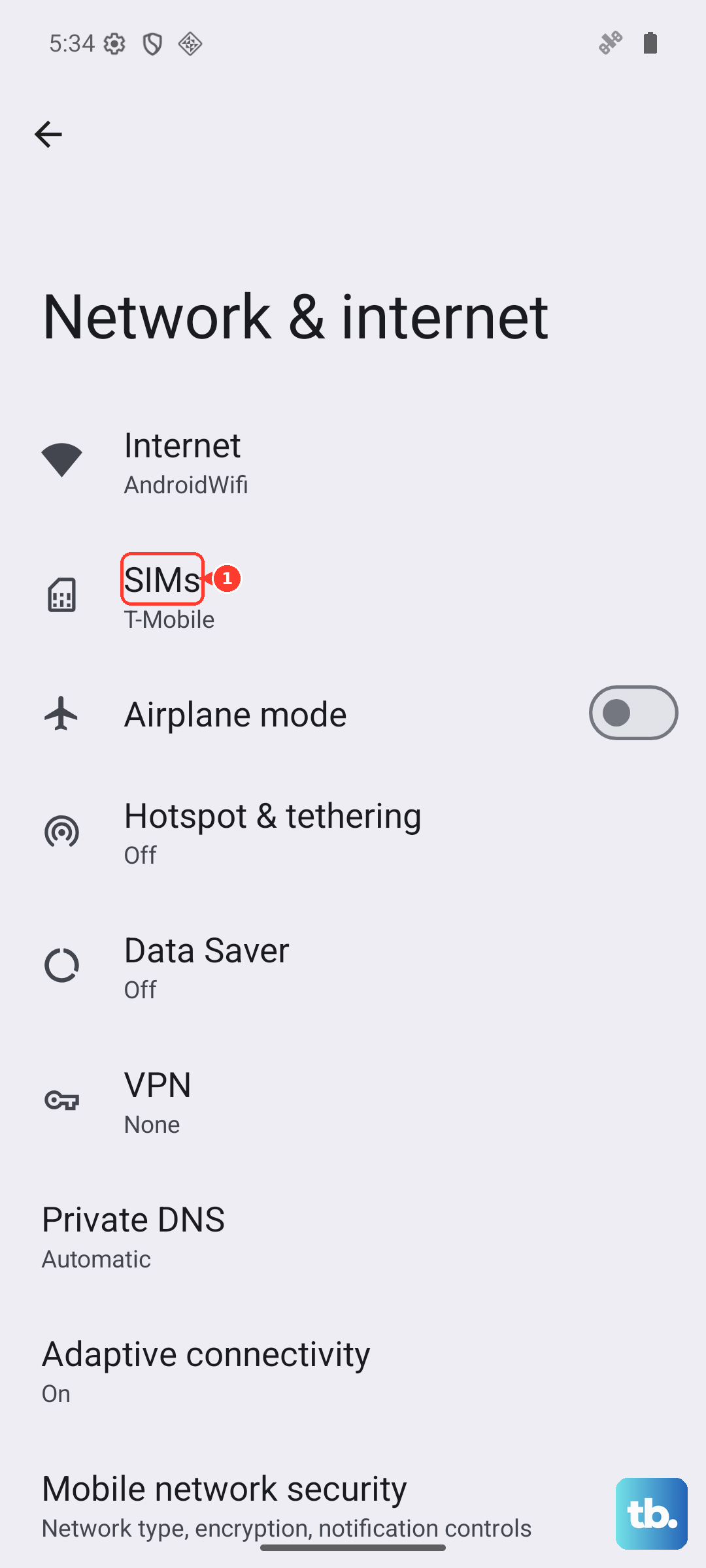
5G connectivity can also push the Pixel 10 Pro XL's modem hard, especially in areas with weak signal. If the phone feels warm even when you're not using it, switch to LTE. Go to Settings > Network & internet > SIMs > Preferred network type and select LTE. The phone will run noticeably cooler.
Avoid Heavy Use While Charging
This one is straightforward but worth saying: don't game, stream video, or run benchmarks while the phone is plugged in. The Pixel 10 Pro XL already generates heat during fast charging, and adding a processor-intensive task on top can push temperatures past the thermal threshold. The phone will shut itself off to protect the battery, but it's better to just let it charge in peace.
If you need to use the phone while it's charging, stick to light tasks like texting or browsing. And keep that case off during charging sessions.
When the Fix Is a Different Charger
Some users report that their Pixel 10 Pro XL charges slowly and runs hot with certain USB-C chargers, even ones that claim high wattage. This usually comes down to PPS compatibility. Google's own 45W charger works reliably, but third-party options from Anker, Ugreen, and Spigen that support PPS are also solid choices.
If your phone consistently overheats with one specific charger but not others, that charger is the problem. Toss it and grab a PPS-compatible replacement. The phone's charging circuitry is designed to negotiate the safest voltage curve, and non-PPS chargers force it into a less efficient mode that generates extra heat.
The Pixel 10 Pro XL runs warm by nature thanks to its powerful hardware. But if it's shutting off or getting uncomfortably hot, one of these fixes will almost certainly solve it. Start with the case and the charger, update the software, and check that port alignment on wireless pads. That covers the vast majority of cases.