You enter your password, hit sign in, and Yahoo Mail bounces you right back to the login screen. Maybe you see "Invalid ID or Password," maybe the page just reloads, or maybe your phone's Mail app suddenly says your account stopped working.
The good news: almost every Yahoo sign-in problem traces back to a short list of causes, and most are quick fixes. The trick is working from the quickest, most common cause down to the deeper ones.
Start at the top of this guide and stop as soon as you're back in. The fixes are ordered fastest first, with the exact menu paths for web, iPhone, Outlook, and native Mail.
Check Caps Lock, Num Lock, and Auto-Capitalization First
An "Invalid ID or Password" error means the ID and password you entered don't match what Yahoo has on record. The most common cause is the keyboard itself: Caps Lock and Num Lock silently change the characters you actually type.
On a phone, the keyboard often auto-capitalizes the first letter of your password, so it no longer matches what you set.
Look at the first character and fix it manually if needed.
If your password contains special characters that aren't on your device's keyboard, you can't type it on that phone.
Change the password from a desktop computer instead.
Turn Off Autofill or Update Your Saved Password
If you recently changed your Yahoo password, your browser may keep filling in the old one. The sign-in fails even though you're "sure" the password is right.
Update your browser's saved-password (autofill) settings so it stops inserting the outdated entry.
Then type the current password by hand to confirm it works.
If you never changed it and it still fails, someone else may have changed it. Use the Sign-in Helper (covered below) to get back in, then review your account settings and undo anything you didn't change.
Try a Different Browser to Isolate the Problem
This single test saves a lot of wasted effort. Open Yahoo Mail in a different supported browser and try to sign in.
If you get in on the other browser, your account is healthy and the problem is isolated to your usual browser, almost always cookies, cache, or autofill.
Don't bother resetting your password in that case.
If you fail on every browser, the issue is account-related, so move on to the recovery steps below.
Use a Supported, Updated Browser
Yahoo works best with the newest non-beta versions of Firefox, Chrome, Safari, and Edge. Internet Explorer is no longer supported.
Features can break on an outdated browser or on an old operating system that can't be updated.
Update both the browser and the OS where possible.
Reset the Sign-In Cookie When the Screen Keeps Reappearing
A sign-in loop, where clicking Sign in just brings the login screen back, is usually a corrupted or stale sign-in cookie.
On the sign-in page, click Not you?, enter your Yahoo ID and password, then click Sign in.
If the loop continues, clear your browser's cookies, then quit and restart your browser.
Still stuck? Switch to a different supported browser, or try signing in from the primary Yahoo sign-in page or the Yahoo Mail sign-in page.
Fix Cookies When "Keep Me Signed In" Won't Hold
By default Yahoo keeps you signed in for two weeks unless you sign out. If you're getting signed out sooner, that's usually a cookie problem, not an account problem.
If your browser auto-clears Yahoo cookies, reset it to accept cookies from Yahoo.
If the cookie file is corrupted, clear cookies on your desktop or mobile device, then sign back in to restore the persistent login.
If security software is deleting cookies, disable that program or change its settings.
Make sure you're using the same browser you previously signed in with, since switching browsers requires a fresh sign-in. The Account security page and Account Key also ask you to sign in again by design.
Recover a Forgotten Password or Locked Account With Sign-In Helper
If you forgot your password or Yahoo ID, or your account locked after too many failed attempts, the Sign-in Helper is the tool. A locked account unlocks automatically after 12 hours, but the Helper gets you back in immediately.
- 1.Open the Yahoo Sign-in Helper.
- 2.Enter your recovery email, or click Use recovery phone number.
- 3.Click Next.
- 4.Follow the prompts. Yahoo sends a verification code to your recovery phone or email to confirm it's you, then lets you set a new password.
Once you're back in, create a strong new password and consider turning on two-step verification.
Change Your Password While Signed In
If you can still get into your account and just want a fresh password, do it from the security page.
Go to the Yahoo Account security page.
Under "Ways of signing in," click Password, enter a new password, and click Continue.
In the Yahoo Mail app, tap your profile icon, then Manage Accounts, Account, Security, and Change password (at the bottom of the screen). If the app method fails, use your mobile browser instead.
If no Password option appears, Account Key is probably on and must be disabled before you can set a password.
Sign In When You Don't Get the Account Key Prompt
Account Key replaces your password with a phone notification. If you enabled it but the prompt never arrives, there's no password to type.
Confirm notifications are enabled in both the Yahoo Mail app and your device settings, then click Resend on the Yahoo page.
If it still doesn't arrive, sign in with a text or email code instead:
- 1.Go to the Yahoo sign-in page, enter your email, and select Next.
- 2.Click Use text or email to sign in or Try another way to sign in.
- 3.Enter the missing digits of your phone number and select Submit.
- 4.If you have your phone, click Yes, text me a verification code. If not, verify using your alternate email.
- 5.Enter the code you receive, then select Continue.
Text codes only go to mobile numbers, not landlines. If you see an "Uh-oh" message, you've hit the daily text limit. Wait 24 hours, then sign in using the Yahoo Mail app on your phone.
Generate an App Password for Third-Party Apps
Non-Yahoo email apps that don't use Yahoo's own sign-in page can't use your normal password. They need an app password, a randomly generated code you enter once in that app.
Sign in to the Yahoo Account security page.
Under "External connections," select Create app password.
Enter your app's name.
Click Generate password.
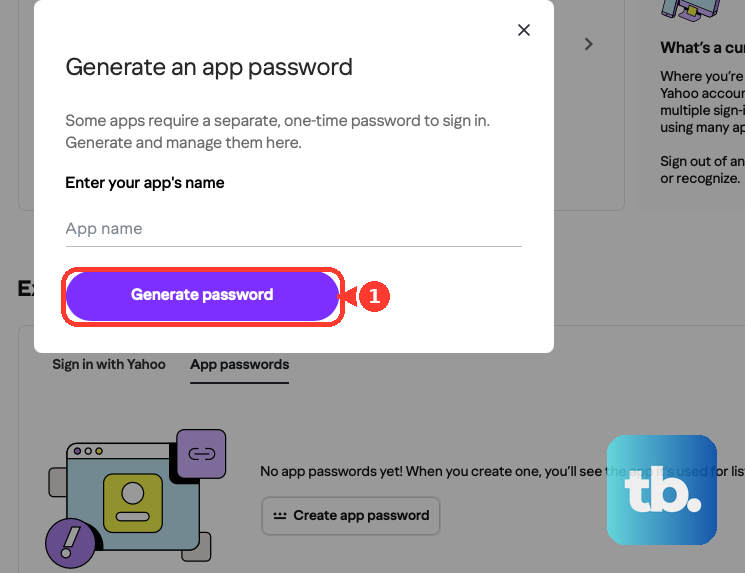
Use the generated password (with your email address) to log in to the third-party app, then click Done.
Use a browser you've signed into Yahoo with for several days in a row, and avoid Incognito mode, or generation can fail. Support can't override this eligibility check, so if it keeps failing, use Yahoo Mail on the web or the official Yahoo Mail app.
App passwords stay active even after you change your main password. Deleting the entry under "External connections" is the only way to invalidate one.
Fix Sign-In Errors in the Yahoo Mail Mobile App
On iOS and Android, start with the basics: confirm the device didn't auto-capitalize the first letter.
Tap I forgot my password if it's truly lost.
If your password has characters not on your keyboard, change it from a desktop.
If you recently cleared cache and cookies in your mobile browser, you've simply been signed out and just need to sign in again.
Clear Connected Apps to Unstick a Mobile Sign-In
A stale authorization can wedge the app. Clearing connected apps forces a clean reauthentication. You'll need to reconnect any third-party apps afterward.
Desktop method: sign in to your Yahoo Account.
Click Recent activity, open "Apps connected to your account," click remove next to all entries, then sign in on your mobile device.
Mobile method: tap the Profile icon.
Tap Account info (in the Mail app, tap Manage accounts first), tap Recent activity, open "Apps connected to your account," tap remove next to all entries, then sign in again.
Re-Enter or Re-Add the Account on iPhone or iPad
When a connected account stops signing in, the stored sign-in has usually expired. First try re-entering the password. The Settings path differs by iOS version.
iOS 18 and later: Settings > Apps > Mail > Mail Accounts > tap the Yahoo account > Re-enter Password > enter your username and password and verify if prompted.
iOS 17: Settings > Mail > Accounts > tap the Yahoo account > Re-enter password > enter username and password > verify if prompted.
If re-entering the password doesn't work or the option isn't there, remove and re-add the account.
iOS 18 and later: Settings > Apps > Mail > Mail Accounts > Yahoo account > Delete Account > confirm > Add Account > Yahoo > enter credentials and verification code > Save.
iOS 17: Settings > Mail > Accounts > Yahoo account > Delete Account > confirm > Add Account > Yahoo > enter credentials.
Deleting the account removes its data from your device, so first check that your mail is still on Yahoo's website.
When you re-add it, pick the Yahoo provider logo so iOS uses Yahoo's secure sign-in.
Re-Enter the Password in Mail on Mac
On macOS Mail, refresh the stored credentials directly. Open Mail > Settings, select the Yahoo account, and open the Server Settings tab.
Delete and re-enter the password in the Password fields under both the Incoming Mail Server and Outgoing Mail Server sections, then click Save.
Reconnect Your Yahoo Account in Outlook
Outlook can reauthenticate through Yahoo's own sign-in page. Open Outlook, click the settings icon, and select Accounts.
Click Sign in next to your email account, then click Continue to reach the Yahoo sign-in page. Enter your Yahoo email and password, then choose how to receive the verification code and enter it.
Click Agree to let Outlook access your Yahoo account, then click Open Outlook. Close and reopen Outlook if mail doesn't refresh.
Because this happens on Yahoo's own sign-in page, use your regular Yahoo password there, even if the account was originally set up with an app password.
Reauthenticate in Any Other Connected App
For any other third-party or native mail app, the general fix is the same.
Delete your existing Yahoo password from the app's settings, then re-enter the password you use in that app.
If the app uses an app password, delete the current app password from your Yahoo Account security page, generate a new one, and enter that instead.
Frequently Asked Questions
My account is locked. How do I get in before the 12 hours are up?
Lockouts from too many failed attempts clear automatically after 12 hours, but the Sign-in Helper at login.yahoo.com/forgot lets you back in immediately by verifying with your recovery phone or email.
I can sign in fine on another browser. Does that mean my account is broken?
No, the opposite. If a different browser works, your account is healthy and the problem is isolated to your usual browser's cookies, cache, or autofill, so skip the password reset and clear cookies instead.
Why does my old app password still work in some apps after I changed my main password?
App passwords stay active even after you change your main account password. The only way to invalidate one is to delete it under "External connections" on your Account security page.
My password has special characters and won't type on my phone. What now?
If the characters aren't on your device's keyboard, you can't enter that password on the phone at all. Change it from a desktop computer, then sign in on mobile with the new one.
The "Change password" option is missing on the security page. Where did it go?
That usually means Account Key is on. Disable Account Key first, and the password option will reappear so you can set a password.
I lost my password and my recovery phone and email. Can support reset it for me?
If your recovery details are outdated or you can't reach them, you may not be able to regain access. Yahoo's advice is to create a new account and keep its recovery information current.