You typed your bellsouth.net address and password, hit sign in, and nothing happened, or worse, you got bounced back to the login screen with an error. The good news is that your account almost certainly still works; the way you reach it has simply changed. BellSouth.net email is now part of AT&T Mail, so the sign-in path, the password rules, and the recovery steps all run through AT&T instead of a separate BellSouth website. Work through the fixes below in order and you should be back in your inbox quickly.
Why Your BellSouth Login Suddenly Feels Different
BellSouth.net email is now delivered as AT&T Mail, an AT&T email service provided through AT&T's partnership with Yahoo. Your eligible bellsouth.net address keeps working for sending, receiving, and managing mail, but you access it through AT&T Mail rather than an independent BellSouth portal.
That single change explains most failed logins. People still try to find a standalone BellSouth site, enter an old password, or set up a mail app the old way. Once you sign in through AT&T with the correct credentials, the address behaves normally again.
You can reach your mail at currently.com (then select Mail), or from AT&T's BellSouth email login page. Both open AT&T Mail webmail through the AT&T and Yahoo sign-in flow.
Sign In at the Correct AT&T Mail Address
Start at the right front door. Go to currently.com and select Mail, or use the BellSouth email login page and select Login, then enter your full bellsouth.net email address and password.
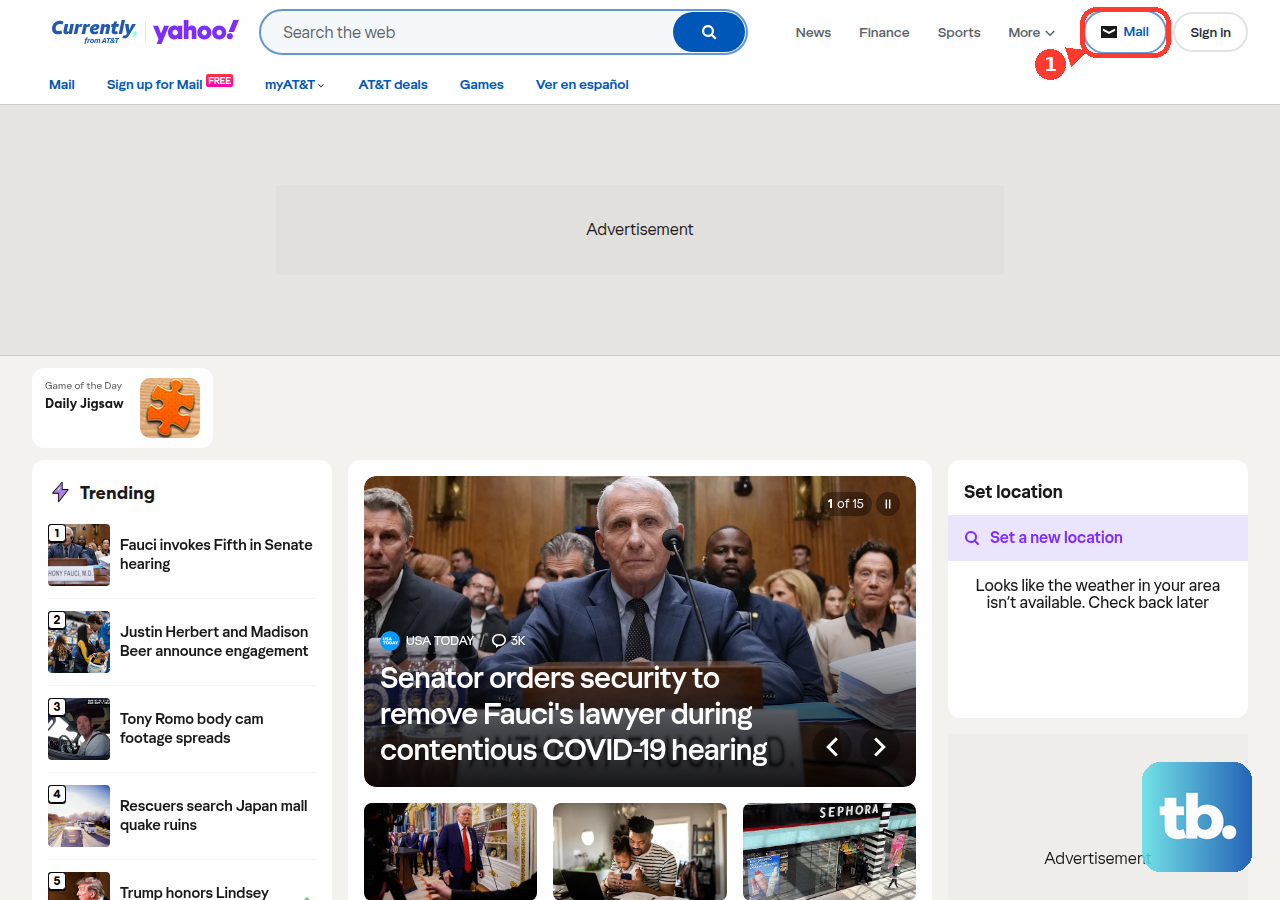
Type both fields carefully. A simple typo in the ID or password is one of the most common reasons a sign-in fails, so slow down and confirm each character. If you usually rely on autofill, try entering the credentials manually this time in case a saved, outdated password is being inserted.
Remember that the address itself has not been retired. It is simply accessed through AT&T Mail now, so there is no need to hunt for a separate BellSouth login service.
Try Your AT&T ID Password First
Here is a detail that trips up a lot of people: the password you use for your email and the password you use for your AT&T ID are the same password. They are not two separate logins.
If you recently changed your AT&T ID password for any reason, try signing in to your email with that new password before you assume something is broken. Many sign-in failures are simply a case of entering an old email password after the shared password was already updated. Update the password on every device that checks your mail, too.
Reset the Password if It No Longer Works
If the correct password still will not let you in, reset it. You will need your AT&T ID and the last name associated with that ID.
- 1.Open AT&T's reset your password page.
- 2.Enter your AT&T ID and the last name tied to the ID.
- 3.Choose your verification method and follow the prompts.
- 4.Enter and confirm your new password.
Because your email and AT&T ID share one password, resetting it changes both at once. After the reset, return to currently.com and sign in to Mail with the new password.
Wait Out a Locked Account
For your protection, AT&T may lock the account after too many failed sign-in attempts, usually because a wrong or mistyped password was entered repeatedly. Once the lock is in place, repeated tries will not get you in.
You have two ways to recover access. You can wait an hour and then try again, or you can reset your password using the steps above. If you choose to wait, avoid repeated attempts in the meantime, since more failed tries can keep the account locked.
A lock also deletes any Secure Mail Keys on the account, so if you use a desktop or phone mail app that relies on one, create a new key after you get back in.
Clear Up Browser Problems
When your credentials are correct but webmail still misbehaves, the browser is often the culprit. Make sure you are using an up-to-date browser with JavaScript turned on, and update it or switch browsers if needed.
A quick test is to open AT&T Mail in a different web browser. If it loads there, the issue is local to your usual browser. Next, verify that your browser accepts cookies, then clear your cookies and cache from the browser's Preferences, Settings, or Options menu.
One more check rounds this out. Disable browser tools or add-ons one at a time to see whether an extension is interfering with email access, then re-enable the ones you trust once you have found the offender.
Rule Out Security Software Conflicts
Firewall, antivirus, and anti-spyware software can conflict with email programs and browsers, sometimes blocking the connection before you ever reach the login screen.
Check the settings in each of these tools, then disable them one at a time to test whether one is blocking access. Once you confirm which program, if any, was the cause, turn the software back on so your device stays protected.
Set Up a Mail App With OAuth or a Secure Mail Key
If your trouble is in a mail app rather than webmail, the requirements are different. To get AT&T email in a third-party app, you must use either OAuth or a Secure Mail Key. Apple Mail, Outlook Mobile, Gmail, and the Yahoo Mail app on current phones use OAuth, while Outlook 2010 through 2019 and Mozilla Thunderbird need a key. If an app offers Yahoo in its list of email providers, it supports OAuth.
To create a 16-character Secure Mail Key, sign in to your AT&T account profile.
- 1.Choose Settings and confirm the account you are updating (select Switch for a different one).
- 2.Select Add secure mail key, enter a nickname, and select Create.
- 3.Select Copy to copy the key.
- 4.In your mail app, replace the existing password with the key. For IMAP, replace it for both the incoming and outgoing servers.
Keys never expire, but you need a separate one for each AT&T email address and subaccount. Your regular password still works for webmail at currently.com.
Enter the Official Server Settings
If sign-in works in webmail but your mail app still fails to connect, double-check the server settings. They apply to bellsouth.net addresses as well as att.net and other AT&T domains.
For IMAP, set the incoming server to imap.mail.att.net on port 993 with SSL on, and the outgoing server to smtp.mail.att.net on port 465 (or 587) with SSL and authentication on. If you use POP3 instead, set the incoming server to inbound.att.net on port 995 with SSL on, and the outgoing server to outbound.att.net on port 465 with SSL on.
In every case, use your full email address as the username. For apps that do not support OAuth, enter your Secure Mail Key in the password field rather than your regular account password.
Recover and Secure a Hacked Account
If you received a notice that your address sent spam, or you see other signs of compromise, treat sign-in trouble as a possible security issue. Change your password immediately, then scan all your devices with up-to-date antivirus and anti-malware software and install the latest operating system security updates.
Next, review your email settings and look for anything you did not set yourself. Check your signature, your sending name and reply-to address, any forwarding or linked accounts, and your blocked addresses list, deleting anything you do not recognize.
After you have confirmed your devices are clean and your settings are valid, change your password one more time. This final change locks out anyone who may have captured the previous password before you cleaned up the account.
Frequently Asked Questions
Is my bellsouth.net email address still active?
Yes. Eligible bellsouth.net addresses continue to work. They are now delivered through AT&T Mail, so you access yours by signing in through AT&T at currently.com (then selecting Mail) or the BellSouth email login page.
Why does my email password keep failing after I changed my AT&T password?
Your email password and your AT&T ID password are the same password. If you changed the AT&T ID password, sign in to email with that new password. If it still fails, use AT&T's reset your password page, which updates both at once.
What do I do if my account is locked?
AT&T may lock the account after too many failed sign-in attempts. To get back in, either wait an hour and try again, or reset your password. Afterward, create a new Secure Mail Key for any app that used one, because a lock deletes existing keys.
Why won't my mail app connect even though webmail works?
Third-party apps require either OAuth or a Secure Mail Key. If your app does not support OAuth, create a Secure Mail Key under Settings in your AT&T account profile and use it instead of your password, and confirm the IMAP or POP and SMTP server settings are correct.
Which server settings should I use for BellSouth email?
For IMAP, use imap.mail.att.net port 993 (SSL) incoming and smtp.mail.att.net port 465 or 587 (SSL) outgoing. For POP3, use inbound.att.net port 995 (SSL) incoming and outbound.att.net port 465 (SSL) outgoing. Your username is your full email address.