

You type your email and password, hit log in, and it doesn't work. The password might be rejected, Facebook might say it can't find your account, a two-factor code might never arrive, or the app might spin and send you back to the login screen. Most Facebook login problems fall into a few types, and each has an official fix. This guide goes through them in order, from the quickest fix to the slower identity checks, and tells you what to expect at each stage.
Pin down which kind of lockout you actually have
The fix depends on what is failing, so first work out which situation you're in. The most common one, and the quickest to fix, is a forgotten or mistyped password when you still control the email or phone on the account. The second is when you no longer have access to the email address or mobile number Facebook has on file. The third is when two-factor authentication blocks you because you can't receive or generate the login code.
The last type is a glitch: correct details get rejected, Facebook says it can't find your account, or the app or browser misbehaves. Each type has its own official path below. If you're not sure which one you have, start with the password reset, because it fixes most lockouts by itself.
One safety note before you start. Whenever you can, begin recovery on a device and network you've used to log in before. Facebook uses familiar devices to help confirm who you are, so using one improves your odds at every step. If you think someone else got into your account, go to facebook.com/hacked on that familiar device instead.
Run the official Find your account flow first
For an ordinary login problem, this is the best place to start. It's quick if you still control the account's email or phone.
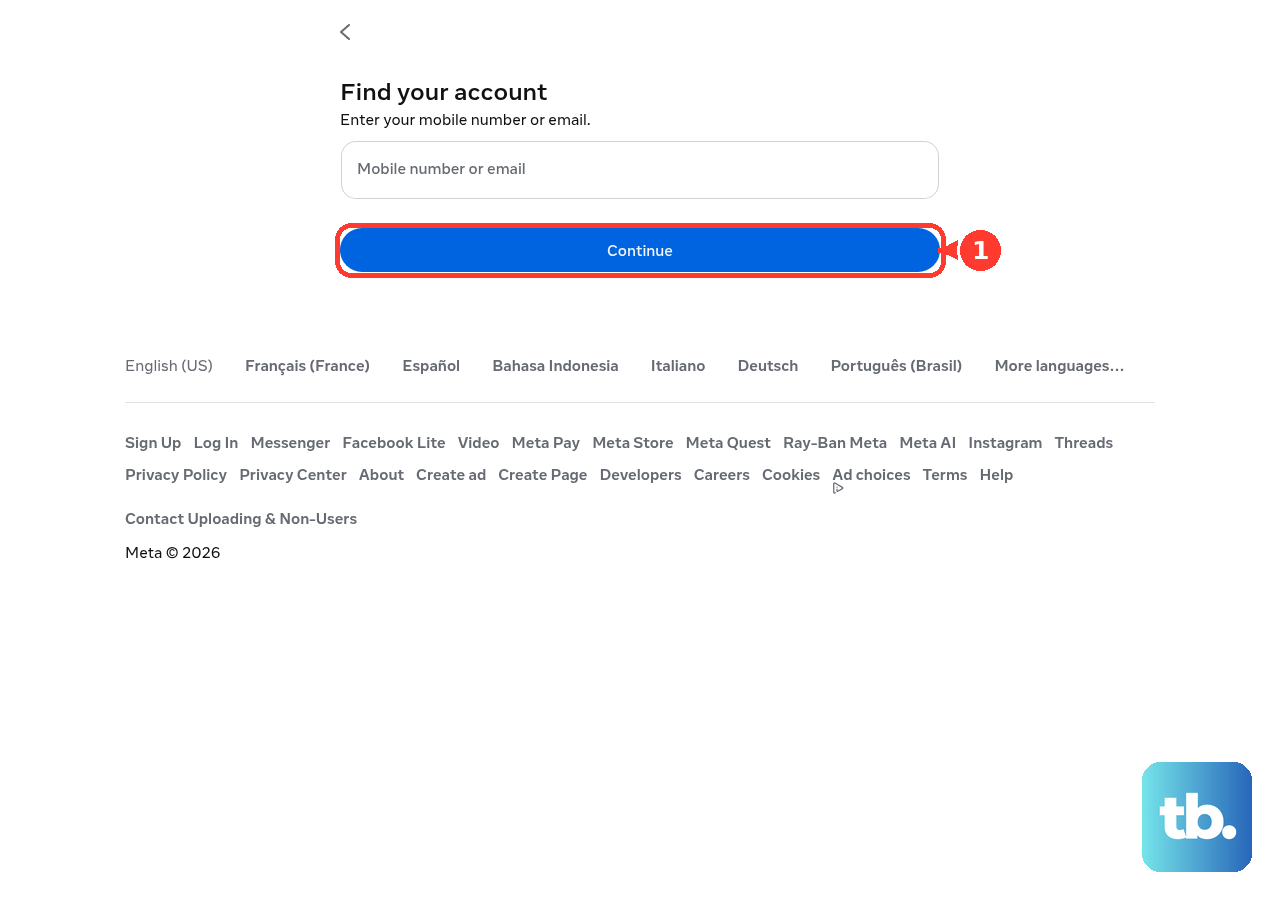
- 1.Go to the Find your account page. It asks you to enter your mobile number or email and has a Continue button.
- 2.Enter the email address, mobile number or username linked to the account, then select Continue.
- 3.Once Facebook finds the account, choose where to send the code, such as the email address or phone number already on the account.
- 4.Enter the code Facebook sends, then set a new password and use it to log in.
If the code doesn't arrive, check your spam or junk folder and make sure your phone has signal. Then wait a few minutes before you ask for a new code. Choose a new password that's easy for you to remember but hard for anyone else to guess.
When the credentials look right but login still fails
Sometimes the password isn't the problem. You might be entering an email or username Facebook doesn't recognize, or the app might be misbehaving.
Check that you're typing the right email or phone number, and include the correct country code for phone numbers. Try any other email address or phone number you might have added to the account in the past. If the app keeps sending you back to the login screen, try updating the app or logging in at facebook.com in a web browser. If Facebook still can't find the account, go through the Find your account flow above using a different email, phone number or username.
If you no longer control the email or phone on the account
Recovery is harder here, but there is still an official way to do it. Use Facebook's guide to recovering your account without access to your email or phone.
On a computer or phone you've used to log into Facebook before, open the Find your account page and enter any email, phone number, account name or username linked to the account. Select No longer have access to these? and follow the prompts. When Facebook asks for new contact details, use an email or phone number that has never been used on your Facebook account. After the security check confirms you own the account, you can reset your password.
Your chances are lower if you don't control the email or phone on file and have no saved recovery codes. In that case Facebook falls back on identity checks, such as a photo of your government ID. That review can take time and isn't guaranteed, as the last section of this guide explains.
If two-factor authentication is what's locking you out
If two-factor authentication is what's stopping you, first give it a few minutes, because your mobile carrier can delay text message codes. If that doesn't help, try these options, in order:
- 1.Approve the login from another device where you're already logged in to Facebook. Look for the login approval in that device's notifications.
- 2.Enter a one-time recovery code you saved earlier instead of the two-factor code.
- 3.If neither works, go back to the code screen and ask for help. On a computer, select Need another way to authenticate?, then Other Options, then Get more help. On Android or mobile web, tap Having trouble?. On iPhone or iPad, tap Need help?.
- 4.Confirm your identity with the method Facebook offers. That can be uploading a photo of a government-issued ID, answering security questions, or confirming through trusted contacts.
Keep one hard limit in mind. Recovery codes only help if you created and saved them before you lost access. You can't generate them once you're locked out, so if you never saved any, your only route is Facebook's identity check.
The Meta Account Recovery Hub when the Facebook flows stall
If the Facebook steps don't solve it, go to Meta's Account recovery & support hub. It's the official recovery and support page for Facebook, Instagram and Threads.
The hub points you to identity checks and recovery steps that match your situation, so use it when a simple password reset isn't enough. Treat it as a backup that works across Meta's apps, not your first step.
What recovery realistically looks like, start to finish
If you forgot your password, mistyped your details or hit an app or browser glitch, and you still control the email or phone on the account, the Find your account flow is very likely to work quickly. The code arrives right away, and you're often back in within minutes.
Your chances drop when you don't control the email or phone on file and have no saved recovery codes. Then Facebook relies on identity checks. Facebook says that once you've confirmed your identity, you'll usually get instructions for getting back in within 1 to 2 business days, sent to the email or phone on the account. There's no fixed timeline for every case, and complicated cases can take longer.
Recovery isn't guaranteed. If Facebook can't confirm you own the account, it can refuse access. There's no phone number that lets ordinary users skip these steps. The Help Center does offer a chat with a Meta AI support assistant. Anyone promising a shortcut isn't offering an official one, so always start from the Find your account page or the Meta hub.
Stay safe while you recover, and protect the account afterward
Scammers target people while they're trying to recover an account, so a few rules matter. Never share a verification code, password or two-factor code with anyone, including someone who says they're from support. Don't create a new account to appeal or report the locked one, because it can complicate your case. Before you enter your password or upload an ID, check that you're on a real facebook.com or meta.com page and not a lookalike site.
Above all, never pay a third party offering "account recovery," "unban" or "reinstatement" services. These are usually scams. The real recovery steps are free and run directly through Facebook and the Meta hub.
Once you're back in, set up Facebook login recovery codes so a future lockout takes minutes to fix. You need two-factor authentication turned on first. Then go to Settings & privacy > Settings > Meta Account > Login and security > Two-factor authentication, select your account, then choose Additional methods > Recovery codes and Get new codes. Save the 10 codes somewhere safe and offline.
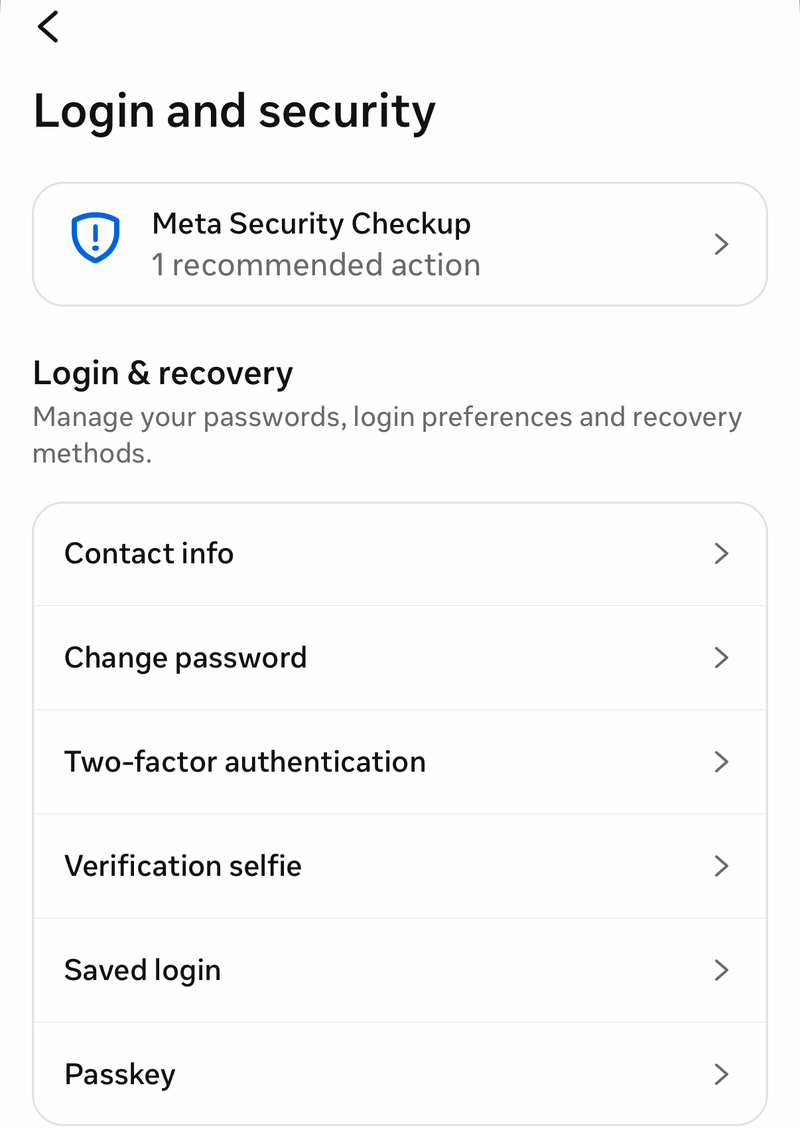
Also make sure the email and phone number on the account are up to date and ones you control, and check where you're logged in.
Frequently Asked Questions
How fast can I get back into Facebook if I just forgot my password?
If you still control the email or phone on the account, it's usually quick. The Find your account page at facebook.com/login/identify sends a reset code right away. Once you enter it and set a new password, you're often back in within minutes.
What if I can't access the email or phone number on my account?
Use a computer or phone you've logged in on before and go to facebook.com/login/identify. Enter any email, phone number, name or username linked to the account, then select No longer have access to these? and follow the prompts. You'll add new contact details that have never been used on your Facebook account, then pass a security check before you reset your password.
I lost my two-factor code and never saved recovery codes. Can I still get in?
Try approving the login from another device where you're already logged in. If that doesn't work, use the help option on the code screen. On a computer that's Need another way to authenticate? > Other Options > Get more help, on Android it's Having trouble?, and on iPhone it's Need help?. Then confirm your identity. You can't generate recovery codes once you're locked out, so this route depends on Facebook's identity check and isn't guaranteed.
How long does Facebook's identity review take?
After you confirm your identity, you usually get instructions for getting back in within 1 to 2 business days, sent to the email or phone on the account. There's no fixed timeline for every case, and complicated cases can take longer.
Is recovery guaranteed if I submit my ID?
No. If Facebook can't confirm you own the account, it can refuse access. There's no phone number that lets you skip these steps. Any third party promising paid "recovery" or "reinstatement" is not official and is usually a scam.
What should I do once I'm back in to avoid this again?
Turn on two-factor authentication, then set up recovery codes in Meta Account > Login and security > Two-factor authentication > Additional methods > Recovery codes, and save them offline. Make sure the email and phone on the account are up to date and ones you control, and check where you're logged in.