You charged your AirPods 4 with Active Noise Cancellation last night, popped them in this morning, and the battery readout is already plunging before lunch. With Apple rating these earbuds at up to 4 hours of listening with ANC on, a fast drain can be normal heavy use, a tired charging case, or a software hiccup that a few minutes of settings work will clear. The fixes below run from the easiest and safest to the official reset and service path, so start at the top and stop as soon as your runtime is back to normal.
If you suspect one side has failed, an online quick headphone test settles it quickly. Play each channel on its own and you will know whether it is the headphones or the source.
Start by getting your software current
Outdated software is a common cause of battery and noise-control problems, so this is the first thing to rule out. Make sure the iPhone or iPad you pair to is running the latest iOS or iPadOS, then confirm your AirPods 4 (ANC) are on the latest firmware.
AirPods firmware updates install automatically while the earbuds are in their case, connected to power, and within Bluetooth range of an iPhone, iPad, or Mac that is on Wi-Fi. To check the version, open Settings > Bluetooth, tap the Info button next to your AirPods, then scroll to the About section. Leaving the case on a charger near your phone overnight is the simplest way to let any pending update land.
Make sure the case itself is actually charged
A run-down case makes the earbuds seem to drain fast, because they keep topping up from an empty reservoir. The case status light tells you where you stand, with green meaning charged and amber meaning less than one full charge remains.
Put the AirPods in the case to charge and keep the case itself topped up. You can charge the case with a USB-C cable, a Qi-certified charger, or an Apple Watch charger. For reference, Apple rates runtime at up to 4 hours with ANC on and up to 5 hours with noise control off, and a 5-minute charge gives about 1 hour of listening, so a quick top-up before you head out goes a long way.
Read each earbud and the case separately
Before you assume the whole set is failing, find out which part is actually losing charge. This tells you whether one earbud is draining faster than the other or whether the case is the real culprit.
- 1.Open the lid, or remove the AirPods from your ears.
- 2.Hold them near your iPhone.
- 3.Go to Settings > Bluetooth and tap the Info button next to your AirPods.
- 4.Check the charge shown for the left bud, the right bud, and the case.
If one bud is consistently far lower than the other, that points to a hardware issue worth noting for later. If the buds look healthy but the case drains, your power source or the case is where to focus.
Turn on charging notifications so you are never caught flat
This will not extend runtime, but it stops the surprise of reaching for your AirPods and finding them dead. Charging notifications alert you when the battery is low and when charging is complete, and this feature is officially supported on AirPods 4 (ANC).
Wear your connected AirPods, then go to Settings > [your AirPods] > Battery > Charging Notifications and switch it on. The alerts give you time to top up before a long stretch away from a charger.
Dial back noise control to reclaim hours
Active Noise Cancellation and Adaptive Audio use more power, which is why Apple rates up to 4 hours with ANC on against up to 5 hours with noise control off. If you do not need the cancellation right now, switching modes is the single biggest battery lever you have.
To change modes, press and hold the stem on either AirPod until you hear a chime. You can also open Control Center, touch and hold the volume control, tap the Listening Mode button at the bottom left, and choose a mode. To make the Off mode available in that cycle, go to Settings > tap the name of your AirPods, then turn on Off Listening Mode. If you prefer ANC but want it lighter, go to Settings > tap the name of your AirPods > Adaptive Audio, then drag the slider to adjust how much noise is allowed through.
Confirm noise cancellation is behaving, not just running
Sometimes ANC seems weak or audio behaves oddly, which can feel like a battery problem even when the charge is fine. Start by confirming Active Noise Cancellation is actually on and that Adaptive Audio is not enabled when you expected full cancellation.
Because AirPods 4 (ANC) is an open-fit model with no silicone ear tips, there is no Ear Tip Fit or Acoustic Seal Test to run, since that test only applies to the AirPods Pro line. What you can do is avoid blocking or covering the external microphones, since the system relies on them for noise control. To verify the earbuds are sensing correctly, play audio and remove one AirPod, and it should pause automatically.
Leave Optimized Battery Charging working for you
Optimized Battery Charging reduces wear and improves long-term battery lifespan by limiting the time the earbuds spend fully charged, and it is supported on AirPods Pro and AirPods 3 or later. It learns your routine and finishes charging just before you typically need them, so the battery holds its capacity longer over the months ahead.
You can find it under Settings > [your AirPods] > Battery > Optimized Battery Charging. Leave it on for the best long-term health. If charging behaves oddly or you know you need a guaranteed full charge before a long day, you can toggle it off in that same place, then turn it back on afterward.
Reset your AirPods 4 (ANC) to a clean state
If the runtime is still poor after the steps above, a reset returns the earbuds to factory settings and clears a software state that can throw off battery and noise control. This is the official restore procedure for this model, and it does not use the legacy 15-second setup-button hold from older AirPods. A reset restores the earbuds to factory settings, so you will need to set them up and re-pair them afterward.
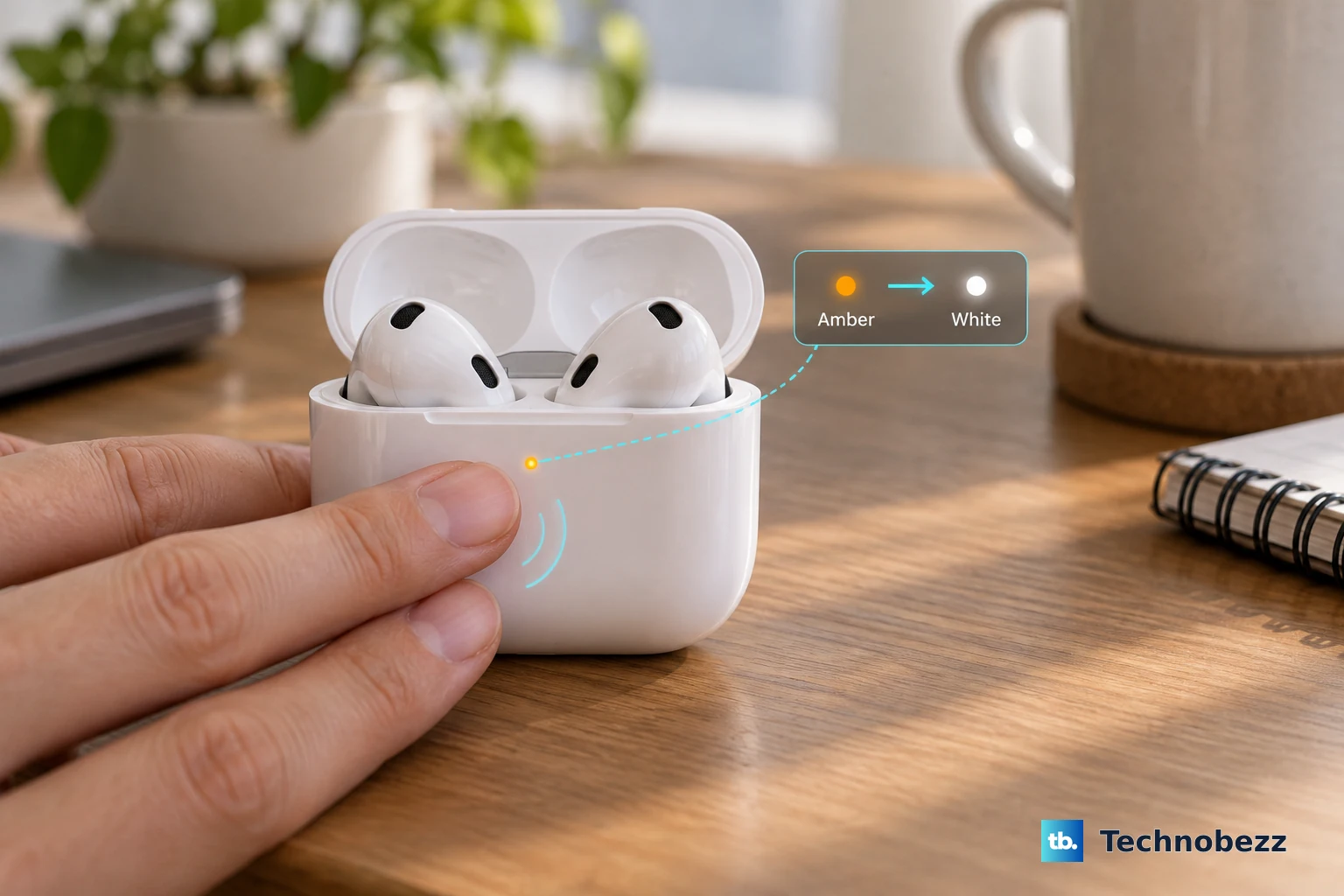
- 1.Put the AirPods in their case, close the lid, then wait 30 seconds.
- 2.Open the lid, then double-tap the front of the case three times.
- 3.Watch for the status light to flash amber, then white, which confirms the reset.
After the reset, re-pair the AirPods to your device. If Active Noise Cancellation or battery still is not working as expected once they are back in use, the next step is a clean re-pair, then service.
Forget the device and re-pair from scratch
A corrupted connection can cause battery and noise-control glitches that survive a simple reset, and a fresh pairing clears it. Be aware of what this does first, because forgetting the AirPods removes them from all devices signed in to the same Apple Account, so you will need to set them up again.
- 1.On your iPhone, go to Settings and tap the name of your AirPods at the top of the screen.
- 2.Tap Forget This Device.
- 3.Place the AirPods in the open case next to your iPhone to re-pair.
Setting them up again as if they were new often restores normal battery behavior when a glitchy link was the hidden cause.
When to book service
If Active Noise Cancellation or battery life still is not working as expected after you have updated, reset, and re-paired, Apple says you might need service. Set up an appointment at an Apple Store or with an Apple Authorized Service Provider.
An Apple Store or Authorized Service Provider can also update firmware for you if you do not have an Apple device nearby to do it automatically, which is worth knowing if you suspect the earbuds never received the latest version. Bring the case along, since the battery readouts you checked earlier will help them pinpoint whether one bud or the case is the weak link.
Frequently Asked Questions
How long should AirPods 4 with ANC last on a charge?
Apple rates the earbuds at up to 4 hours of listening with Active Noise Cancellation on and up to 5 hours with noise control off. A 5-minute charge in the case gives about 1 hour of listening, so heavier ANC and Adaptive Audio use will legitimately shorten your runtime compared with leaving noise control off.
Does turning off ANC really save battery?
Yes. Active Noise Cancellation and Adaptive Audio draw more power, which is why the rated runtime drops from up to 5 hours with noise control off to up to 4 hours with ANC on. Press and hold the stem until you hear a chime to switch modes, and turn on Off Listening Mode in Settings > [your AirPods] so the off option is available in the cycle.
Is there an ear tip fit test to improve battery life?
No. AirPods 4 (ANC) is an open-fit model with no silicone ear tips, so the Ear Tip Fit and Acoustic Seal Test do not apply to it, since those are for the AirPods Pro line. Instead, confirm ANC is actually on, make sure Adaptive Audio is not enabled when you want full cancellation, and avoid covering the external microphones.
How do I reset AirPods 4 with ANC?
Put the AirPods in their case, close the lid, and wait 30 seconds. Open the lid, then double-tap the front of the case three times, and the status light flashes amber, then white to confirm the reset. A reset restores the earbuds to factory settings, so re-pair them to your device afterward.
Should I leave Optimized Battery Charging on?
For long-term battery health, yes. It limits how long the earbuds sit fully charged and finishes charging just before you usually need them, which reduces wear over time. You can toggle it off under Settings > [your AirPods] > Battery > Optimized Battery Charging if you need a guaranteed full charge for a specific day, then turn it back on.