You are expecting an email in your Yahoo Mail, but the Inbox stays empty. Maybe a single sender never reaches you, or maybe nothing at all has arrived for hours. Either way, the message you need is missing.
Most of the time this comes down to a handful of fixable causes: the mail landed in Spam, a filter quietly moved it, an address got blocked by accident, or your mailbox is full. On phones, an outdated app or a dropped account connection is usually the culprit.
Work through the steps below in order. They are arranged quickest and most common first, and they cover Yahoo Mail on the web, the Yahoo (or AOL) Mail app on iOS and Android, the iPhone Mail app, and Outlook and other third-party clients.
Send Yourself a Test Email First
Before changing any settings, confirm where the problem actually lives. This one check saves you from chasing the wrong fix.
- 1.Sign in to your Yahoo Mail account on a computer.
- 2.Send yourself an email.
- 3.If it arrives with no error, your Yahoo account can receive mail from the web. Keep checking Spam, blocked addresses or domains, filters, and mobile or client-app setup if one sender or one device is still missing mail.
- 4.If it does not arrive, check the info on any failed-delivery message.
- 5.If an error message appears, follow the instructions included with that error.
Note which result you get. It points you to the right section below.
Check the Spam Folder
One Yahoo-documented reason a message goes missing is that it landed in Spam. Check Spam manually, because Yahoo says Spam and Trash are not included in search results.
Open the Spam folder in the left sidebar. Look for the missing email. If you find a legitimate message, mark it as Not Spam. Marking it Not Spam helps future messages from that sender reach your Inbox.
Review Your Blocked Addresses
If you blocked a sender by mistake, their mail simply never lands. Yahoo allows up to 1000 blocked addresses, so the list is easy to forget. These steps are for Classic Yahoo Mail.
Click the Settings icon, then click More Settings and click Security and Privacy. Under Blocked addresses, review the list. To unblock, mouse over an address and click the Delete icon.
If you use Yahoo Mail Plus and domain blocking is available in your locale, a blocked domain can stop messages from that domain. In New Yahoo Mail, click the More options icon, select Settings, click Security and Privacy, and remove the domain under Block unwanted sender domains with the Delete icon.
Check for a Filter Diverting Your Mail
A filter can automatically move incoming messages to another folder, or even to Trash, before you ever see them in the Inbox. Review your filters in New Yahoo Mail.
Click the More options icon, then select Settings. Click Filters.
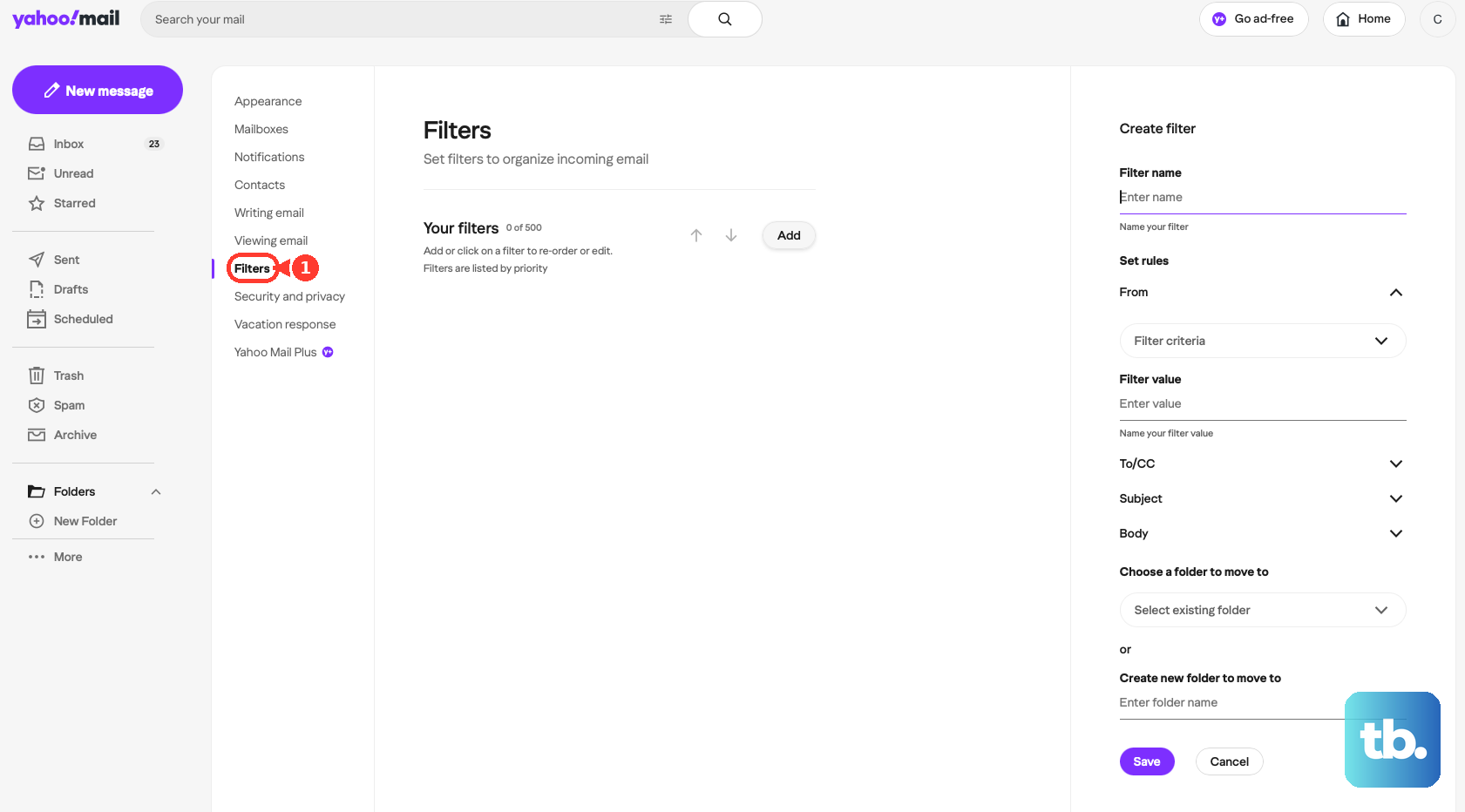
Click a filter to see its rules and the folder it routes mail to. To edit, open the filter, change the name, rules, or folder, then click Save. To delete, select the filter, then click the Delete icon.
Look closely at any filter whose destination is not the Inbox. That is where your missing mail may be piling up.
Free Up Your Mailbox Storage
Yahoo includes 20 GB of free storage. When it fills up, you can neither receive nor send mail. Worse, messages sent to you while you are full are not stored and cannot be recovered, so clear space promptly.
Delete old or large emails. Review and remove large attachments. Empty your Spam and Trash folders.
If deleting is not enough, upgrade options exist (for example, Yahoo Mail Plus with 200 GB). This fix applies whether you use Yahoo Mail on the web or on mobile.
Verify Your Reply-To Address
An incorrect or unintended reply-to or send-only address can misdirect responses. Confirm it is set correctly in New Yahoo Mail.
Click the More options icon, then select Settings, and click Mailboxes. Select the email address you want to change the reply-to address for, then select the intended address from the Reply-to address menu. Click Save.
If you need to add a send-only address first, click Add under Send-only email address, enter it, click Verify, then open the verification email and follow the instructions. In Classic Yahoo Mail the path is Settings icon, then More Settings, then Mailboxes.
Update the Yahoo or AOL Mail App
If the web works but your phone does not, start here. An outdated app can fail to connect to Yahoo's servers.
First, confirm the problem is device-specific by checking your email on a computer. Open your device's app store, then install the latest version of the Yahoo Mail app.
This applies to both iOS and Android. If updating does not restore delivery in the app, Yahoo also recommends signing out and back in or uninstalling and reinstalling the Yahoo Mail app.
Remove and Re-Add the Account in the App
If the connection between the app and your account is lost, re-authenticating fixes it. These steps work on iOS and Android.
Tap the Profile icon, then tap Manage Accounts and tap Edit. Beside your account, tap Remove, then tap Remove again to confirm.
To sign back in, tap the Profile icon, tap Manage Accounts, tap Add Account, then enter your email address and password. If problems persist, uninstall the Yahoo Mail app entirely, reinstall a fresh version from the app store, and sign back in.
Clear App Data and Cache on Android
Corrupted temporary files can cause lag or messages that will not open. Treat this as a secondary mobile fix; it is framed for opening and lag issues rather than for not receiving, but it is harmless and quick.
Open the Android settings app, then tap Apps and tap Yahoo Mail. Tap Storage, then tap Clear data and Clear cache. This deletes temporary files and then refreshes them. You will not lose your mail.
Fix the Native Mail App on iPhone or iPad
If you read Yahoo through Apple's Mail app, the issue is often a Fetch setting or a lost connection. Apple's troubleshooting covers the essentials.
Confirm the device has a working internet connection. Sign in to Yahoo Mail on the web to confirm your address and password are correct. Adjust the fetch schedule under Settings > Apps > Mail > Mail Accounts > Fetch New Data, then choose Automatically, Manually, or a schedule.
Check Settings > Notifications > Mail and adjust Alerts, Sounds, and Badges. Verify whether two-step verification requires a special app password from Yahoo. If it still fails, remove and re-add the account under Settings > Apps > Mail > Mail Accounts, tap the account, tap Delete Account, then add it again.
Keep two quirks in mind. On iOS 11 and later, automatic Fetch only runs when the device is charging and on Wi-Fi, so mail can look like it is not arriving until those conditions are met. Also, if Push is not offered for the account, iOS falls back to Fetch, so real-time delivery may not happen.
Use the Correct Settings in Outlook and Other Clients
Third-party clients need the right server settings and the right kind of password. The server values are the same everywhere:
Incoming mail (IMAP): imap.mail.yahoo.com, port 993, SSL required: Yes. Outgoing mail (SMTP): smtp.mail.yahoo.com, port 465 or 587, SSL required: Yes, authentication required: Yes. Username: your full email address ([email protected]).
The password depends on the client. For Outlook desktop on Microsoft 365 Current Channel, use your regular Yahoo password when Outlook shows Yahoo OAuth sign-in. For third-party email apps that do not use Yahoo's branded sign-in page, Yahoo says to generate and use an app password.
Generate a Yahoo App Password
If your third-party email app does not use Yahoo's branded sign-in page, Yahoo says to generate and use an app password. This is especially relevant for older or generic clients and for accounts using Account Key or two-step verification.
Sign in to your Yahoo Account Security page. Find the External connections section, then select Create app password. Enter your app's name in the text field, then click Generate password.
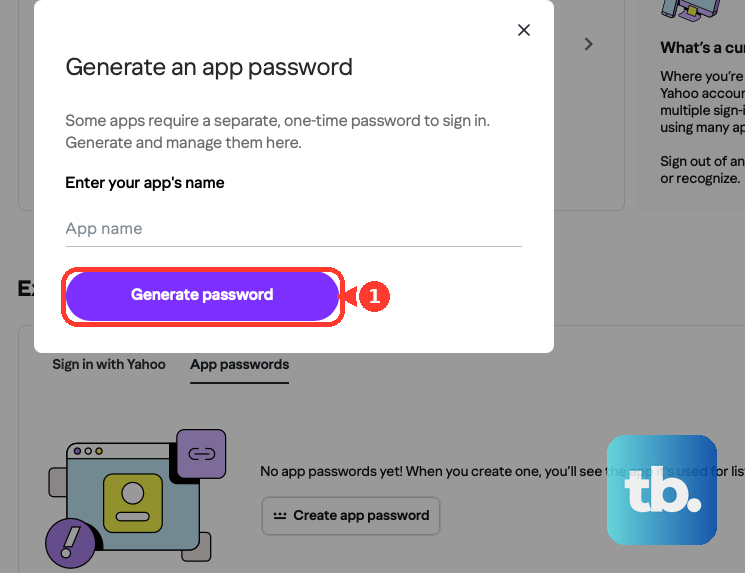
Use the one-time password to log in to your third-party app, then click Done. Two things to know. Generate it from a browser you have signed into Yahoo with for several consecutive days, and avoid Incognito mode, or generation may fail. App passwords stay active even after you change your main Yahoo password, so to revoke access you must delete the app password, not just change your password.
Re-Activate an Inactive or Recycled Account
If recovery or reset emails will not arrive, the account may be inactive or recycled. Yahoo can block recovery emails to recycled addresses to prevent identity theft.
Sign in to your Yahoo email account first. Signing in restores the account's ability to receive email.
Check With the Sender
If your test email arrived fine but one specific person's messages never do, the problem is likely on their end.
Confirm the sender entered your full, complete email address correctly. If delivery still fails, have the sender contact their own email provider for support.
Frequently Asked Questions
Why did emails sent to me disappear while my mailbox was full?
When a Yahoo mailbox is full, incoming messages are not stored and cannot be recovered. Any mail sent during the full period is permanently lost, so it is important to keep space free.
My Yahoo Mail web menus do not match these steps. Why?
Yahoo has two web interfaces. Classic Yahoo Mail uses the Settings icon, then More Settings. New Yahoo Mail uses the More options icon, then Settings. The navigation differs between them, so match the steps to your interface.
Should I use my regular password or an app password in Outlook?
For Outlook desktop on Microsoft 365 Current Channel, use your regular Yahoo password when Outlook shows Yahoo OAuth sign-in. For third-party email apps that do not use Yahoo's branded sign-in page, generate and use a Yahoo app password.
I changed my Yahoo password, so why does an old app still have access?
App passwords remain active even after you change your main password. To truly cut off access, delete the specific app password from your Yahoo Account Security page rather than just changing your password.
Why does mail arrive late on my iPhone?
On iOS 11 and later, automatic Fetch only runs while the device is charging and connected to Wi-Fi. If Push is not offered for your account, iOS uses Fetch instead, so messages may not appear in real time until those conditions are met.
Does clearing the Android app cache delete my emails?
No. Clearing data and cache deletes temporary files and then refreshes them without removing your mail. It is best used for messages or attachments that will not open or that lag, rather than as a primary fix for not receiving.