You press the Side button on your Galaxy A16, wait for the lock screen, and the 6.7-inch Super AMOLED display stays completely dark. Maybe the phone buzzes or rings but shows nothing, maybe it froze in the middle of an app, or maybe it will not react at all after a long night off the charger. A black or blank screen on the A16 (and the A16 5G) is almost always one of a handful of fixable causes, and most of them never touch your data. Work through the steps below in order, starting with the gentlest, and stop as soon as the display comes back.
Give the battery a long charge and force the power on
A fully drained 5,000mAh battery is one of the most common reasons an A16 looks dead. When the cell is flat enough, the screen will not light at all, even though the phone itself is perfectly fine. Plug it into a known-good wall outlet using a charger and USB-C cable you trust, and leave it connected without touching it.
Because the A16 ships without a charger in the box, it is worth confirming the adapter and cable actually work on another device first. Samsung notes the charging indicator can be slow to appear, so do not panic if the screen stays dark for the first several minutes.
- 1.Connect the phone to a suitable charger and let it charge for at least 1 hour. The battery charging indicator may take up to 10 minutes to appear on the display.
- 2.With the phone still connected, press and hold the Side (power) button for 15 to 20 seconds.
- 3.Watch for the Samsung Galaxy logo, which confirms the phone is starting up again.
Force a restart with the Volume down and Side buttons
If the phone clearly has power but the screen is black or frozen, a forced restart reboots it without erasing anything. This is the first thing to try for any unresponsive black screen, and it clears most temporary software hangs.
Press and hold the Volume down button and the Side button at the same time for approximately 10 seconds, until the screen turns off and the Samsung logo appears, then release. If 10 seconds does nothing, keep holding, because the official guidance also describes holding the Volume down and Side buttons for up to 20 seconds. Once the logo shows, let the phone finish starting on its own.
Rule out a damaged cable, blocked port, or liquid exposure
Sometimes the screen is dark simply because the phone never charged, and a physical problem is to blame. Inspect the phone, charger, and cable for visible damage, remove any case that covers the charging port or buttons, and gently clear dust or lint from the USB-C port with a soft, dry brush. A blocked or wet port can stop charging for safety, and if you see a water drop icon on screen, that means the A16 has detected moisture and paused charging until the port dries.
The A16 carries an IP54 rating, which resists splashes but is not full waterproofing, so liquid can still get inside under the wrong conditions. Eject the SIM tray and shine a light into the slot to look for moisture or corrosion. Samsung phones place a Liquid Damage Indicator inside this slot that changes from white to pink or red after contact with liquid, and a pink or red indicator points to liquid exposure that needs professional service rather than a home fix.
Boot into Safe mode to expose a misbehaving app
If the A16 turns on but goes black after the lock screen, or while you are using one particular app, a downloaded app is a likely culprit. Safe mode starts the phone with only its original software loaded, so you can tell whether something you installed is causing the blackout.
- 1.Power the phone off completely.
- 2.Turn the device on, and when the Samsung logo appears, press and hold the Volume down button until the phone finishes starting.
- 3.Confirm that "Safe mode" appears in the lower corner of the screen.
If the black screen problem disappears in Safe mode, a third-party app is responsible. Uninstall the apps you added most recently, then restart the phone normally to leave Safe mode and return to standard operation. If the problem comes back, repeat the process and remove the next suspect.
Install the latest software update on the phone
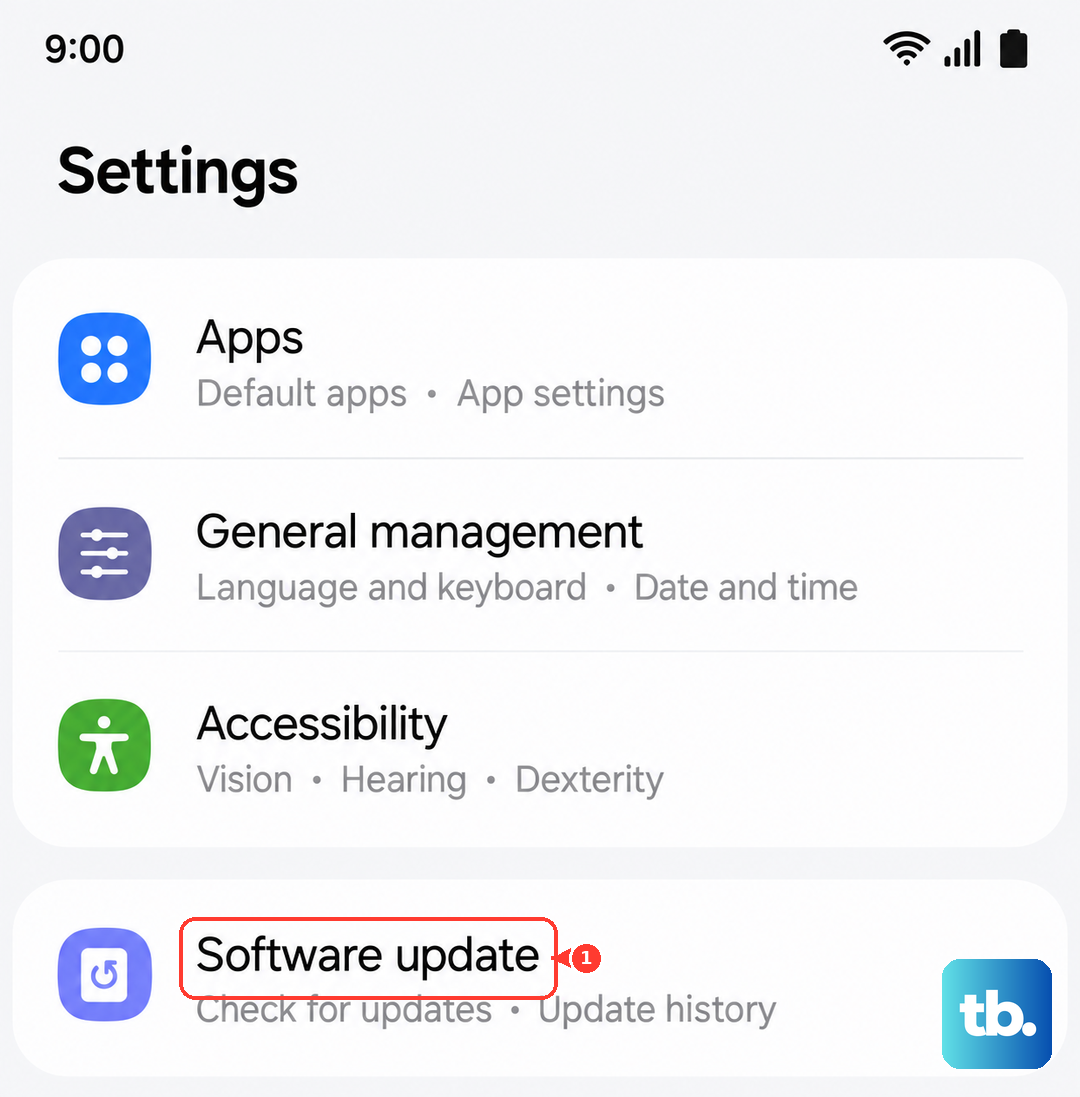
An outdated build can trigger display and stability glitches, and Samsung pushes fixes for exactly these issues. Samsung supports the A16 with several years of major operating system upgrades and security updates, so there is often an update waiting. When the screen is usable again, install whatever is available.
Go to Settings > Software update > Download and install, then tap Install now. The exact labels can vary by model and carrier, so you may instead see something like Check for software updates. Keep the phone on Wi-Fi and well charged while it works, since it will reboot to finish applying the update.
Repair the firmware with Smart Switch on a computer
When the screen is too unresponsive to reach Settings at all, you can reinstall the phone's software from a computer instead. Samsung's free Smart Switch app for PC and Mac, downloaded from Samsung's official website, can refresh or recover the firmware over a USB cable while the phone itself is barely cooperating.
- 1.Install Samsung Smart Switch on a PC or Mac and open it.
- 2.Connect the A16 to the computer with a USB-C cable.
- 3.Follow the on-screen prompts to update or recover the device software, and leave the phone connected until it finishes.
This often revives a phone that hangs on a black screen after a failed update, without the data loss that a full reset involves.
Factory data reset when nothing else clears the screen
A factory data reset is the last software step, and it erases everything on the phone, so only use it if the black screen persists and you can still reach Settings. Back up your photos, contacts, and anything else important before you begin, because the data cannot be recovered afterward. Samsung's own warning reads, "Please save any information you need prior to the factory reset because your personal information may not be recovered."
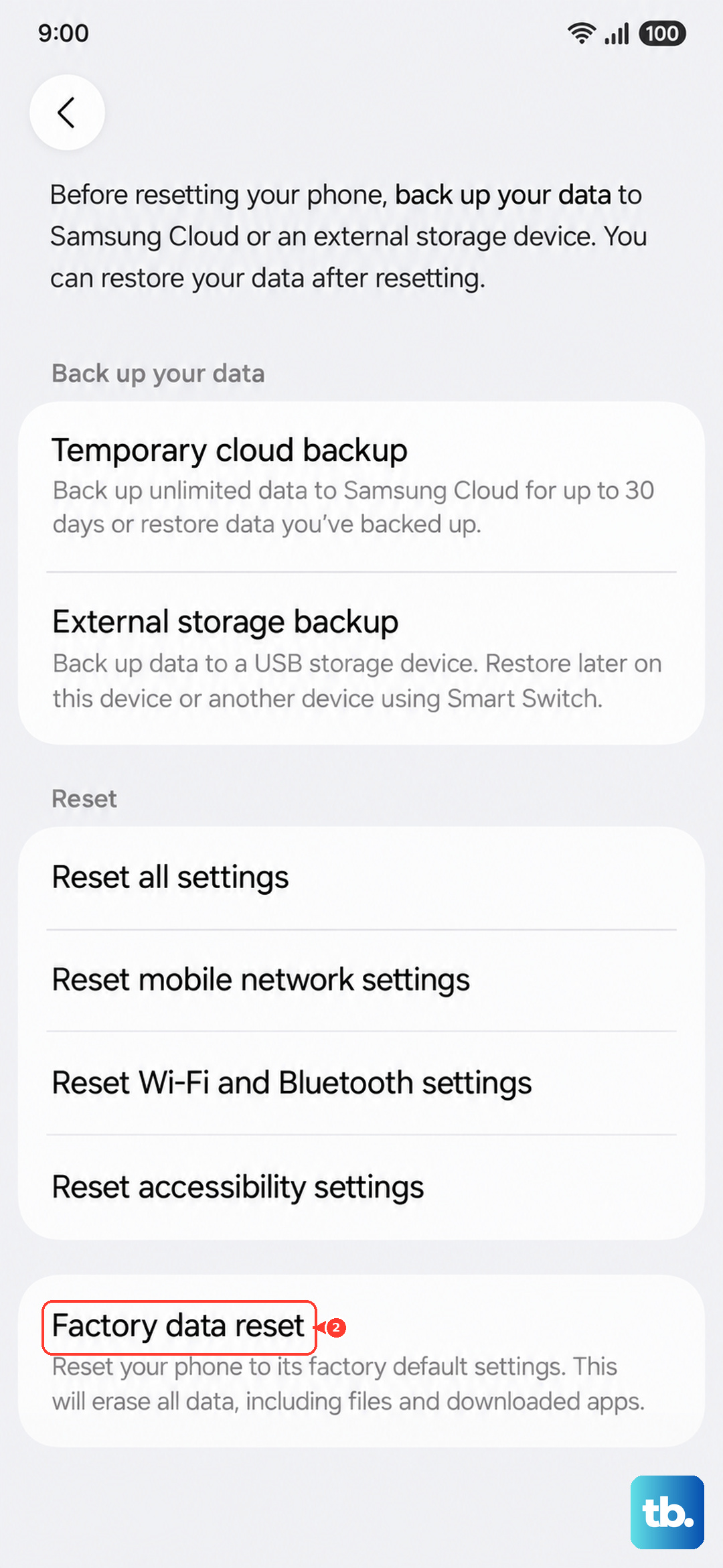
Once you have a backup, go to Settings > General management > Reset > Factory data reset, review the information shown, then tap Reset. Enter your PIN or pattern and your Samsung account password if you are prompted, and let the phone wipe itself and restart. After it reboots, you can sign back in and restore from your backup.
When to hand the A16 to Samsung for service
If the display still will not turn on after a long charge, a forced restart, and the software steps above, the phone needs professional attention. A black screen that survives all of those fixes usually points to a hardware fault in the display, the battery, or another internal component rather than software.
Contact the Samsung Support Center or an authorized service center to arrange a repair. Mention any liquid exposure right away, especially if the Liquid Damage Indicator looked pink or red, since that changes how the device should be handled. For on-device diagnostics and support requests before you book service, the Samsung Members app can help confirm whether the hardware is reporting a fault.
Frequently Asked Questions
How do I force restart a Galaxy A16 that is stuck on a black screen?
Press and hold the Volume down button and the Side button at the same time for approximately 10 seconds, until the screen turns off and the Samsung logo appears, then release. If it does not respond, keep holding the two buttons for up to 20 seconds. This reboots the phone without deleting any data.
My A16 was dead overnight and will not turn on, so what should I do first?
Charge it with a known-good charger and USB-C cable for at least 1 hour, and remember the charging indicator can take up to 10 minutes to appear. Then press and hold the Side button for 15 to 20 seconds until the Samsung Galaxy logo shows. A deeply drained 5,000mAh battery often looks exactly like a completely dead phone.
Does a factory reset erase everything on the phone?
Yes. A factory data reset wipes the device, and Samsung warns that your personal information may not be recoverable afterward, so back up everything important first. Only use it if the black screen continues and you can still reach Settings > General management > Reset.
How can I fix the software if the screen is too unresponsive to open Settings?
Install Samsung Smart Switch on a PC or Mac, connect the A16 by USB-C, and follow the prompts to update or recover the phone's software. This can restore a phone that hangs on a black screen without the data loss of a full reset.