
If your OnePlus 13 is refusing to send picture messages or group chats, it's a frustrating roadblock. On OxygenOS 15, this usually comes down to a data setting, a configuration hiccup, or a temporary app glitch. Let's walk through the fixes to get your multimedia messages flowing again.
Confirm Your Mobile Data is On
MMS doesn't travel over your regular SMS pathway or Wi-Fi. It requires an active mobile data connection. First, pull down the quick settings shade from the top of your screen and make sure the mobile data icon is enabled.
If you have a strong signal but it's still not working, try toggling Airplane mode on for a few seconds and then off. This forces the phone to re-register on the network and can clear up a temporary data handshake issue.
Check the MMS Settings in Your Messages App
The built-in Messages app on your OnePlus 13 has specific settings for multimedia. Open the Messages app and tap the three-dot menu in the top right, then go to Settings > Advanced.
Here, ensure that Auto-download MMS is turned on. If you're traveling, you might also want to enable Auto-download MMS when roaming, though be mindful of potential charges.
Verify Your APN Configuration
This is a very common culprit. The Access Point Name (APN) tells your phone exactly how to connect to your carrier's data and MMS services. An incorrect setting here will block MMS.
Go to Settings > Mobile network > select your SIM > Access Point Names. Your carrier's correct APN should already be listed and selected. If you see multiple, or if the settings look blank, you'll need to input them manually.
I'd recommend contacting your carrier's support or visiting their website to get the exact, up-to-date APN settings for your OnePlus 13. Pay special attention to the fields labeled MMSC, MMS proxy, and MMS port.
Clear the Cache for Your Messaging App
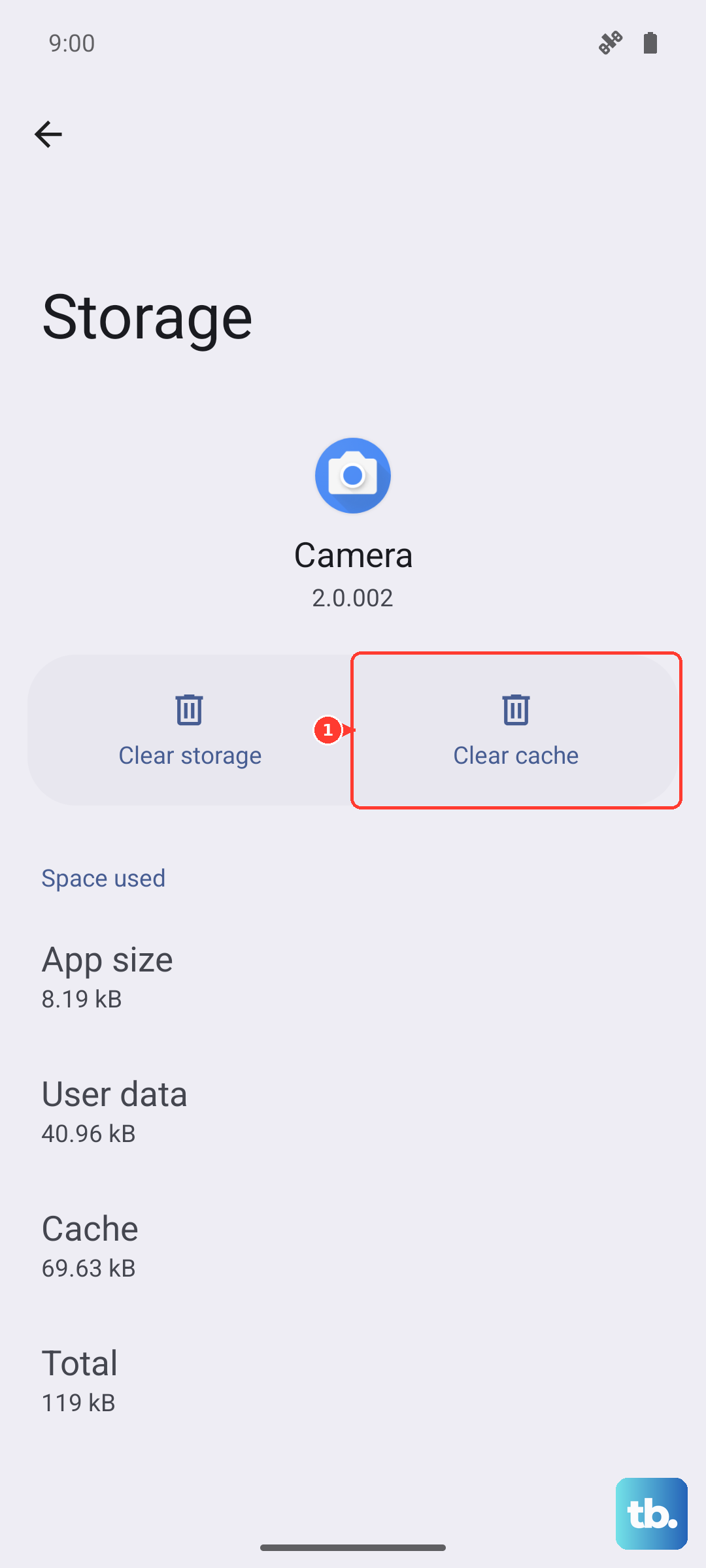
Temporary files can get corrupted and interfere with sending. This step won't delete your messages. Head to Settings > Apps > Manage apps.
Find and tap on Messages. Go into Storage usage and tap Clear cache. After doing this, restart your phone and try sending an MMS again.
Perform a Network Settings Reset
If the APN looks right but things are still broken, a network reset can wipe out deeper configuration errors. This will erase all saved Wi-Fi networks, Bluetooth pairings, and cellular settings, so you'll have to reconnect to Wi-Fi afterward.
Go to Settings > Additional settings > Back up and reset > Reset phone. Here, choose Reset Wi-Fi, mobile & Bluetooth. Confirm the reset and let your phone reboot.
Ensure You're Not Using a Data-Saving Mode
OxygenOS has aggressive battery and data optimization features that can sometimes restrict background data for apps, including messaging. Open Settings and go to Battery > More battery settings.
See if Super power saving mode or Sleep standby optimization is enabled, as these can limit functionality. Also, go to Settings > Apps > Manage apps > Messages > Mobile data & Wi-Fi. Make sure Allow background data usage is turned on.
Check for a Software Update
Early builds of OxygenOS 15 can have bugs that affect connectivity. OnePlus frequently releases updates to patch these issues. Go to Settings > About device > tap on OxygenOS version to check for an update.
If an update is available, install it. I've seen updates specifically mention "improved network stability" or "fixed messaging issues," which are often related to MMS problems.
Try Google Messages as an Alternative
Sometimes the issue is with the specific messaging app. A great test is to install Google Messages from the Play Store and set it as your default. It often handles MMS configuration more reliably across different carriers.
After installing, open it and follow the prompts to make it your default SMS app. Then, try sending a photo message. If it works, you know the problem is with the OnePlus Messages app's configuration or data.
Make Sure You Have Enough Storage
Your OnePlus 13 needs a bit of free space to process and store incoming MMS messages. If your storage is critically low, it can fail silently. Go to Settings > About device > Storage to see your available space.
Try clearing out some old downloads or cached data from other apps if you're below 1GB of free space. This is rarely the sole cause, but it can contribute to the problem.
Contact Your Mobile Carrier
If you've tried everything on the phone side, the issue might be on your account. There could be a provisioning error, or MMS might be blocked on your line. Give your carrier's support a call.
Ask them to verify that MMS is enabled on your account and that your IMEI (your phone's unique identifier) is properly registered on their network for all services. They can also resend the provisioning signals to your phone, which can often kick things back into gear.