Your iPhone may be using Apple Live Voicemail, carrier voicemail, or both. Live Voicemail turns off in Settings, while the voicemail mailbox on your wireless line is controlled by your carrier. Start with the iPhone switch, then use the carrier option that matches your plan.
Turn Off Live Voicemail First
This fixes Apple Live Voicemail on iPhone, not the voicemail mailbox from your carrier. Open Settings, then tap Apps and tap Phone. Tap Live Voicemail, then turn off Live Voicemail.
Stop One Live Voicemail In Progress
Use this when a caller is being sent to Live Voicemail right now and you only want to stop that one message. It does not change your Live Voicemail setting for future calls. On the incoming Live Voicemail screen, tap Stop.
Remove Carrier Voicemail Through Your Carrier
For AT&T Wireless, ask AT&T to remove the voicemail feature and mailbox. Use the Chat button when it appears. Call 611 from your AT&T wireless phone, or call 800.331.0500 from another phone. For AT&T PREPAID, call 800.901.9878.
For Verizon, Basic Visual Voicemail stays on iPhone. Remove only the paid Voicemail to Text for iPhone add-on from My Verizon under Products & plan perks, or from the My Verizon app on the Account tab.
Removing AT&T voicemail permanently deletes the voicemail box.
Use iPhone Call Forwarding
Call forwarding sends calls to another number before they reach voicemail.
- 1.Open Settings.
- 2.Tap Apps, then Phone.
- 3.Tap Call Forwarding and turn on Call Forwarding.
- 4.On Dual SIM models, choose the line you want to change.
- 5.Tap Forward To, enter the forwarding number, then tap Back.
Forward AT&T Calls Away From Voicemail
This fixes AT&T calls reaching voicemail by routing them to another number instead. Use your AT&T wireless phone, because AT&T call forwarding changes from that phone. Open Settings, then tap Apps and tap Phone.
Tap Call Forwarding, then turn on Call Forwarding. Tap Forward To. Enter the forwarding number, then tap Back.
Forward Verizon Calls Instead
The most common Verizon workaround is forwarding calls to another active US 10-digit voice-capable line. Open the Phone app, then tap Keypad.
Dial *72 followed by the 10-digit number to forward all calls, then place the call. Dial *71 followed by the 10-digit number to forward only unanswered calls, then place the call. To stop forwarding, dial *73 and wait for the confirmation tone or message.
Fix T-Mobile Voicemail Duplicates
Duplicate Visual Voicemail alerts on T-Mobile are handled with the $0 VVT block, not by deleting an iPhone voicemail app. Add VVT block through your T-Mobile account online, or ask T-Mobile support to add it.
To bypass voicemail on T-Mobile, open the Phone app and tap Keypad. Dial **21*1+PhoneNumber# for unconditional forwarding, then tap the Call button.
For conditional forwarding, use **61*1+PhoneNumber# for no-reply, **62*1+PhoneNumber# for not-reachable, or **67*1+PhoneNumber# for busy. Tap the Call button after entering the code.
Skip Old Voicemail Tricks
This prevents wasted time on codes and app fixes that do not turn off iPhone voicemail. Do not use ##004# as an iPhone voicemail shutoff. On T-Mobile, that code resets call forwarding to default.
Do not delete a voicemail app to remove iPhone voicemail. iPhone Visual Voicemail is built into the Phone app.
Do not turn off Apple Intelligence voicemail summaries expecting voicemail to disappear. That only turns off summaries.
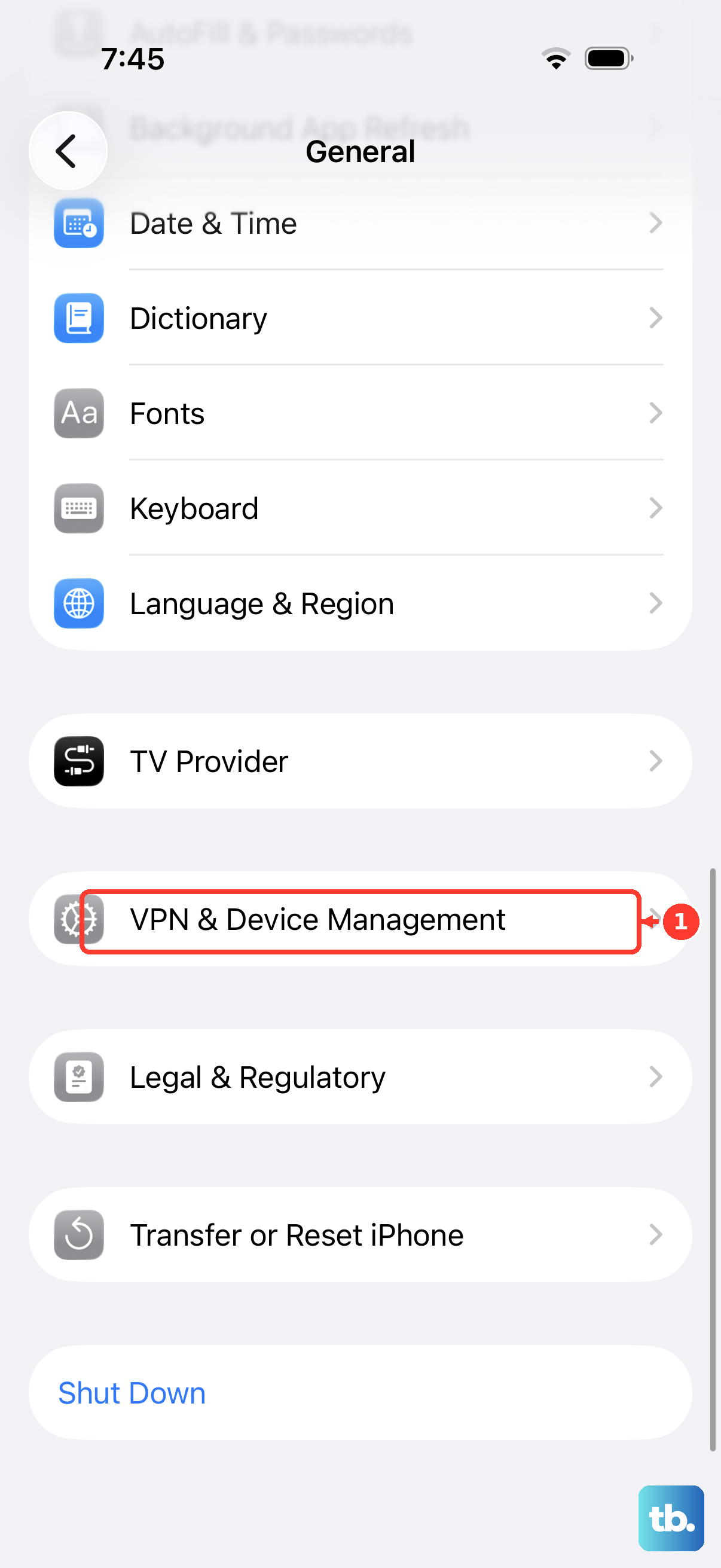
For work or school iPhones, open Settings, tap General, then tap VPN & Device Management to check whether the device is managed.
On a supervised iPhone running iOS 17.2 or later, ask the administrator to apply the Allow Live Voicemail restriction, which prevents the user from using Live Voicemail.
Frequently Asked Questions
Can I turn off voicemail from the iPhone Phone app?
No. The Phone app does not include a universal switch that removes carrier voicemail from your wireless line. Use Settings for Live Voicemail and your carrier for the mailbox.
Does call forwarding delete my voicemail box?
No. Call forwarding sends calls to another number before voicemail answers, but the carrier mailbox remains on the line.
Can Verizon remove Basic Visual Voicemail on iPhone?
No. Verizon says Basic Visual Voicemail cannot be removed on iPhone. The paid Voicemail to Text for iPhone add-on can be removed.
What is the difference between Live Voicemail and carrier voicemail?
Live Voicemail is Apple’s iPhone feature for live message screening. Carrier voicemail is the mailbox attached to your wireless service.