Stuck in Private Browsing on your iPhone? You can return to regular Safari tabs in a few taps, with different controls depending on your layout. Switching modes leaves your private tabs open, so closing those pages takes a separate action.
Leave Private Browsing with a new Safari tab
This opens a regular Safari tab, including in the iOS 26 Compact layout. Open Safari, tap More (…), then choose New Tab.
Find Safari's controls in your layout
Safari's tab layout determines whether you see More (…) or the overlapping-squares Tabs button. In the iOS 26 Compact layout, tap More (…), then choose All Tabs.
Swipe left on the tab bar at the bottom to select a regular Tab Group. Your private tabs stay open separately. For the Bottom or Top layout, tap Tabs, the overlapping squares, then swipe left to a regular Tab Group.
The older [number] Tabs instructions apply to iOS 17 and earlier. The overlapping-squares Tabs button still works in the iOS 26 Bottom and Top layouts.
Close the private tabs you want to leave behind
Switching groups leaves your private pages open. Within the Private group, open the tab overview through More (…) > All Tabs, or tap Tabs in the Bottom or Top layout. Tap Close (×) on each unwanted tab, then swipe left on the bottom tab bar to select a regular Tab Group. Closing private pages and returning to regular browsing are separate steps.
Clear all private tabs together
For a whole group of private tabs, use Safari's bulk-close control. Open the Private group's tab overview through More (…) > All Tabs, or Tabs in the Bottom or Top layout. Touch and hold Done, then tap Close All [number of] Tabs.
This closes tabs in the selected group, so check that you are in Private before tapping. Swipe left on the bottom tab bar to select a regular Tab Group. If the bulk-close method fails, use Close (×) on each private tab as described above.
Use Chrome's Incognito controls
If you're browsing in Chrome, its private mode is called Incognito. Chrome has separate controls for returning to regular tabs and ending the private session.
Open Chrome, then tap Switch tabs. Swipe right or left between the Incognito and regular tab collections to select your regular tabs. Switching collections alone does not end the Incognito session.
To end the session, tap Switch tabs again, then select the Incognito icon. Tap Edit, then choose Close all tabs. All Incognito tabs must be closed to end the session.
For repeated prompts about opening incoming links in Incognito, open More (…) > Settings > Privacy and security. Turn off Ask to open links from other apps in Incognito. This stops those prompts; it does not disable Incognito or close existing tabs.
Restrict future access with Screen Time
Leaving Private Browsing does not prevent someone from opening it again. Screen Time lets you block Safari entirely, including regular browsing. It does not disable private modes in other browsers.
Open Settings > Screen Time. For a child managed through Family Sharing, select the child's name before continuing. Open Content & Privacy Restrictions.
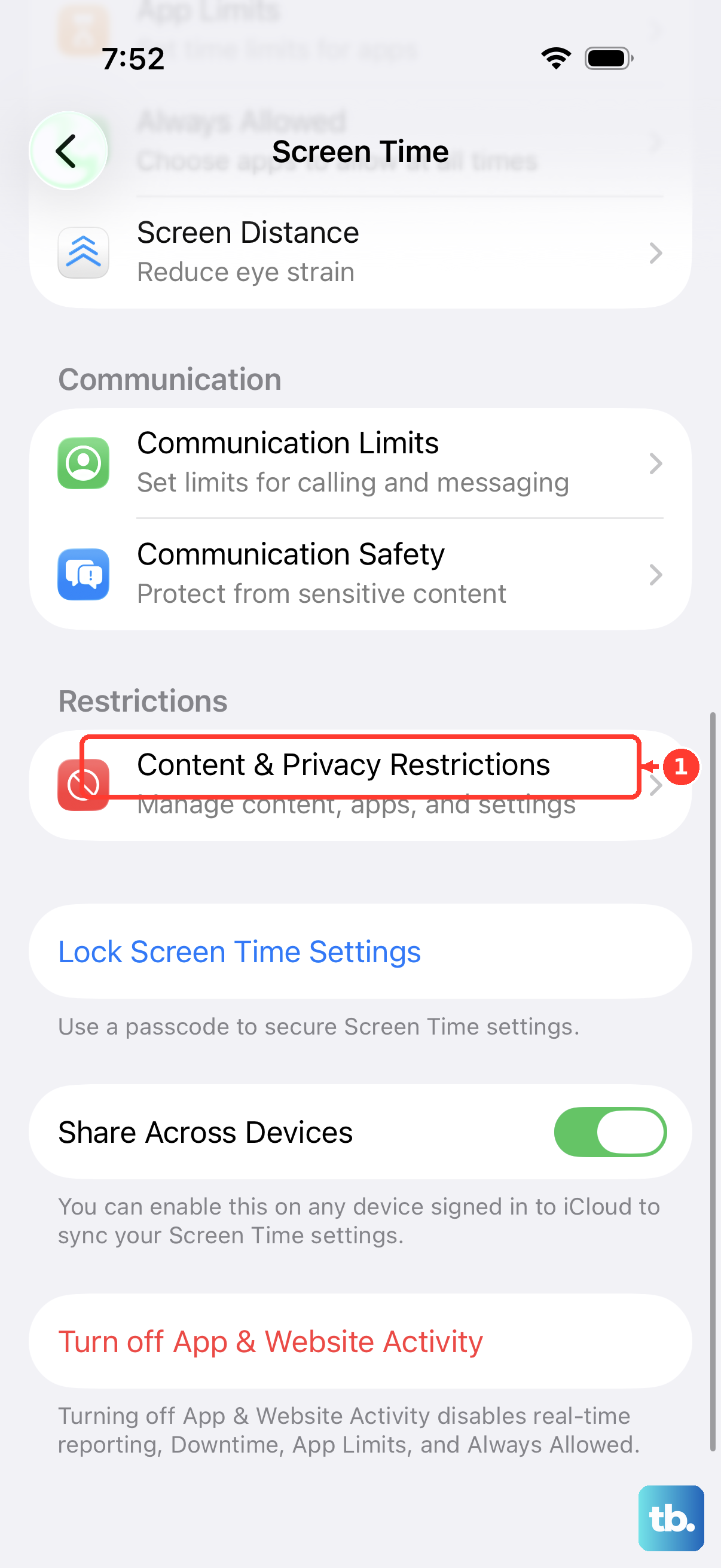
Turn on Content & Privacy Restrictions, then open Allowed Apps & Features.
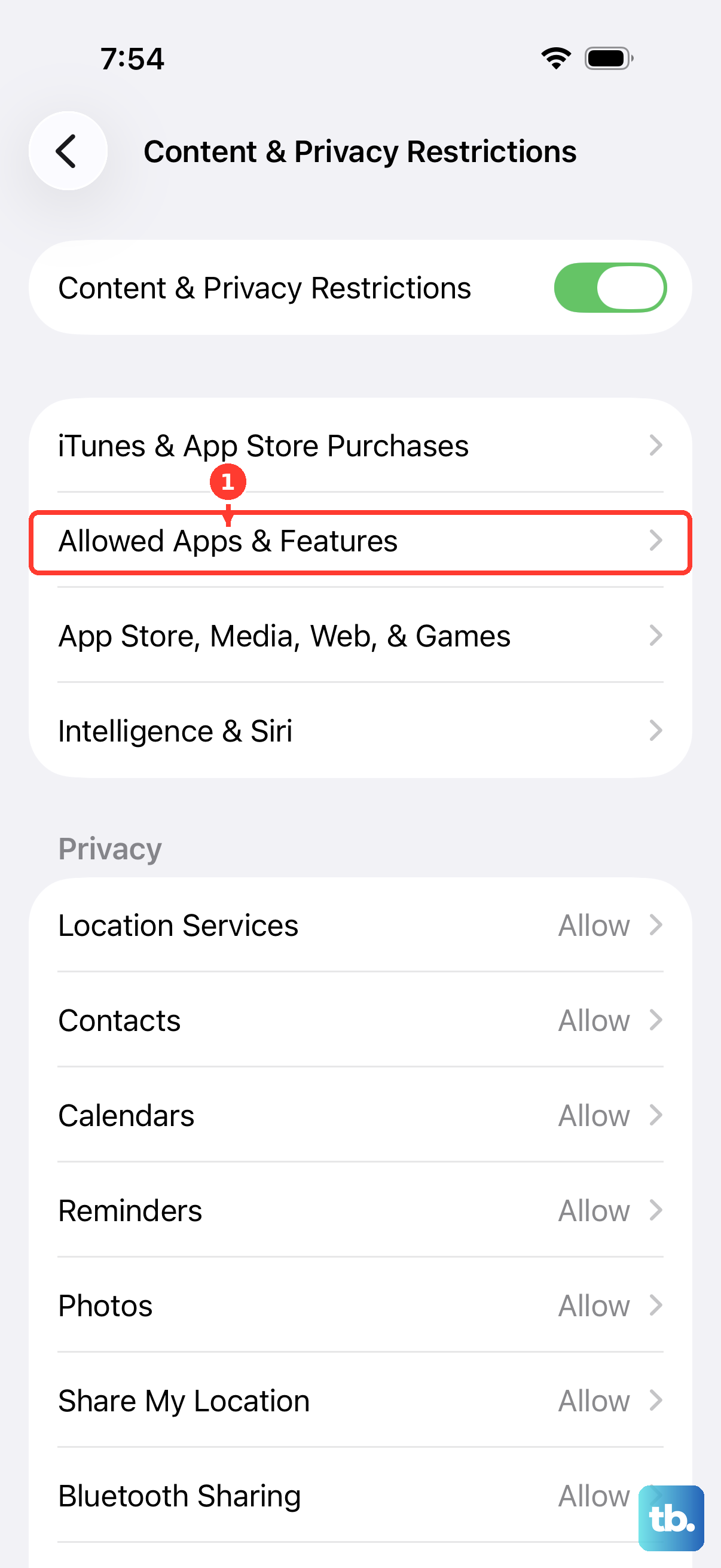
Turn off Safari. Limit Adult Websites is a web-content restriction. Apple does not describe it as a dedicated switch for disabling Private Browsing on current iOS.
If blocking all of Safari does not meet your needs, ask the administrator of a supervised work or school iPhone running iOS 26 or later to disable Safari Private Browsing specifically. That option requires device management; it is not an ordinary Settings toggle.
Frequently Asked Questions
Does closing Safari turn off Private Browsing?
No. Leaving Safari or locking your iPhone only locks your private tabs. They stay open, and Face ID, Touch ID, or your passcode reopens them. Open a regular tab or switch to a regular Tab Group to leave Private Browsing.
Does turning off the Face ID requirement turn off Private Browsing?
No. The Face ID, Touch ID, or passcode requirement controls access to private tabs. Changing it does not change your browsing mode.
Will changing my default browser close my private tabs?
No. Changing the default browser changes where links open. It does not close existing private sessions.
How do I leave private browsing in Firefox on iPhone?
Open Firefox.
Tap the numeric tab icon.
Select Tabs. Firefox closes private tabs when you leave private browsing by default.
The Close Private Tabs setting under Settings > Privacy controls automatic closure when leaving private browsing or quitting.