Many laptops don't have a separate right mouse button, so opening a context menu isn't always obvious. You can still right-click with a two-finger tap, a corner press or a quick settings change. Below you'll find the gesture for Windows, Mac, Chromebook and Ubuntu. There are also keyboard and accessibility options for when the touchpad won't cooperate.
Right-Click on a Windows Laptop Touchpad
On a Windows 11 laptop, use whichever of these gestures your touchpad supports to open the context menu.
- 1.Move the pointer over the file, link or item you want to right-click.
- 2.Tap the touchpad with two fingers at the same time.
- 3.Or physically press down on the lower-right corner of the touchpad.
- 4.If your laptop has separate buttons below the touchpad, press the right one. Some HP touchpads have an unmarked right-click zone instead.
When Two-Finger Tap Does Nothing on Windows
First check whether the two-finger tap setting is turned off.
Open Start > Settings > Bluetooth & devices > Touchpad and expand Taps. Turn on Tap with two fingers to right-click, then try the gesture again.
The same panel has a Press the lower right corner of the touchpad to right-click checkbox, which controls the corner press. Dell recommends clearing that box if you keep right-clicking by accident when your hand rests on the pad. Two-finger tapping still works after you clear it.
If you've swapped the left and right mouse buttons for left-handed use, the corner moves too. Press the lower-left corner instead, because Windows mirrors the right-click zone.
Some gestures need a Precision Touchpad. If these options are missing, check your laptop maker's own touchpad controls. On HP notebooks, search for Control Panel, open Hardware and Sound, and select Mouse under Devices and Printers to find the touchpad button and gesture settings.
MacBook Trackpad Secondary Click
Apple calls right-clicking "secondary click." It works on MacBook built-in trackpads and compatible Magic Trackpads.
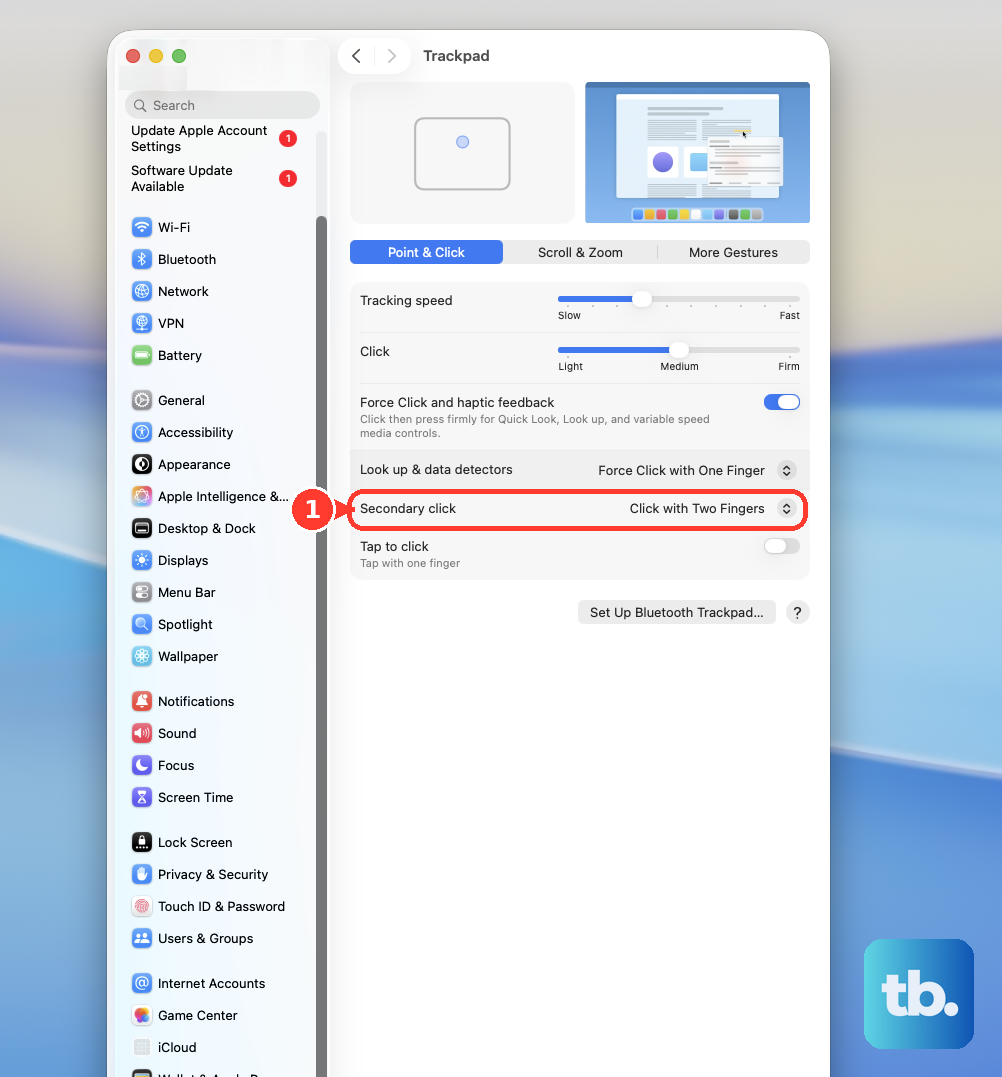
Put the pointer over the item and click or tap the trackpad with two fingers.
If nothing happens, open System Settings > Trackpad and check the Secondary click menu. Pick a gesture there. Click with Two Fingers is one option, and the choices you see depend on your trackpad.
You can skip gestures entirely by holding Control while you click. Control-click opens the same shortcut menu. If you use Apple's Magic Keyboard with Touch ID and Numeric Keypad (USB-C), you can also press the Contextual Menu key below F13.
Don't confuse Force Click with right-click. Apple treats pressing harder on the trackpad as a separate action for things like looking up a word, not as a secondary click.
How Chromebooks Handle Right-Click
On a Chromebook, tap the touchpad with two fingers or press it down with two fingers to open the right-click menu.
You can also hold Alt and click with one finger. It's handy when two-finger gestures feel awkward.
If taps don't register at all, select the time, then go to Settings > Device > Touchpad (or Touchpad and mouse) and turn on Tap to click.
If your Chromebook has a touchscreen, touch and hold an item directly on the screen to open its menu.
Set Up Right-Click on Ubuntu Linux
Ubuntu's standard GNOME desktop supports both two-finger taps and presses.
- 1.Open Activities, search for Mouse & Touchpad, and open it.
- 2.Make sure the touchpad is switched on, then enable Tap to Click.
- 3.Tap the touchpad with two fingers spread slightly apart over the item.
- 4.If you'd rather press than tap, go to the Touchpad tab and choose Two-Finger Push or Corner Push under Clicking.
Use Keyboard Shortcuts to Open the Same Menu
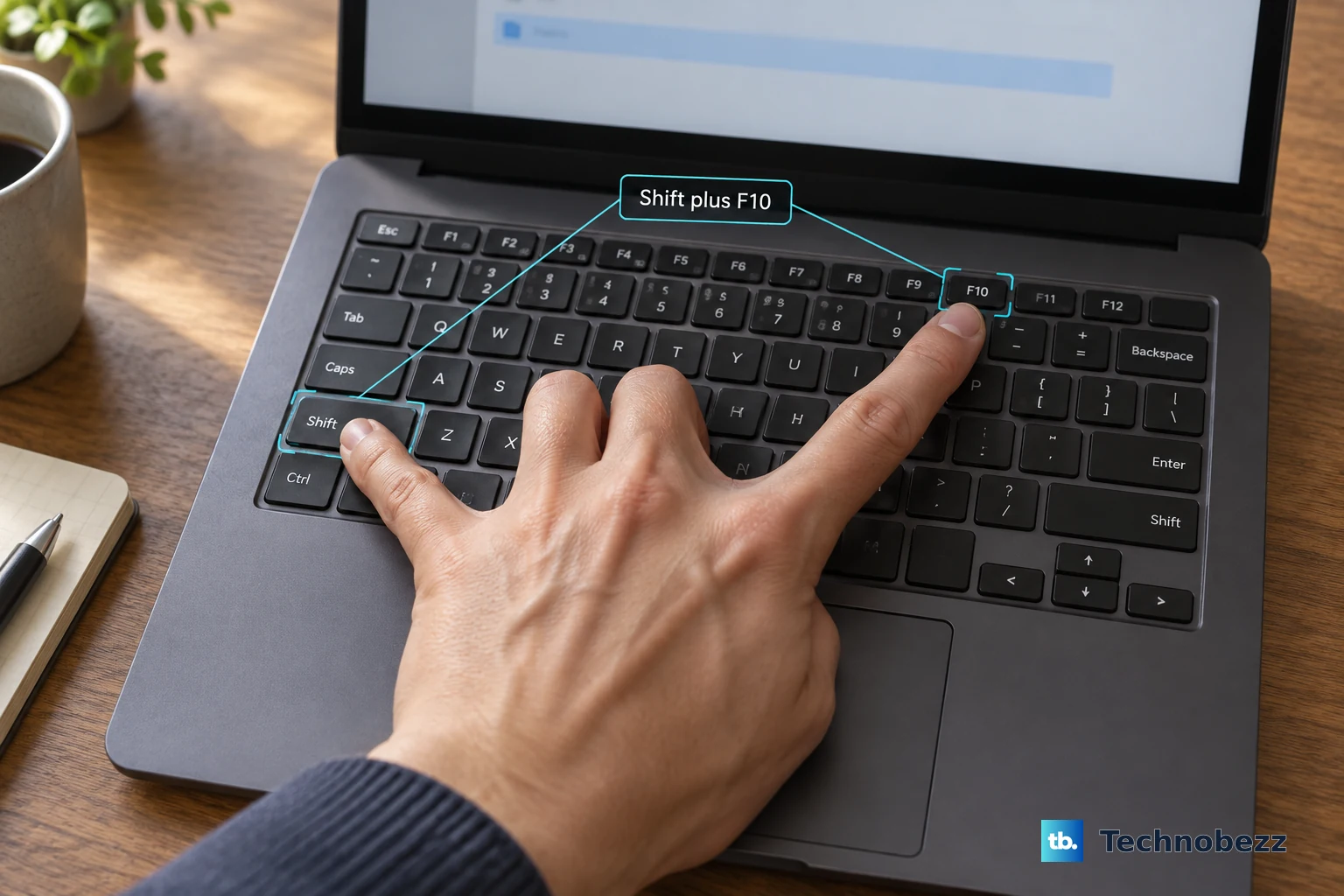
You can open the context menu without touching the touchpad. On Windows 11, select an item and press Shift+F10. On some laptops, you need to hold Fn to make the F10 key work. In Microsoft 365 apps, a keyboard's Menu key does the same thing.
Hold Shift while you right-click a file in File Explorer to go straight to the full Show more options menu. In Firefox, the same Shift trick skips a website's custom menu and shows the browser's own menu.
On a Windows touchscreen laptop, touch and hold an item on the screen to open its menu.
Skip older instructions that point to Settings > Devices > Touchpad. That is the Windows 10 location, and Microsoft ended regular Windows 10 support on October 14, 2025. Boot Camp's trackpad panel only applies to Intel Macs running Windows. Windows Speech Recognition commands are outdated too, because Voice access replaced them in Windows 11 22H2 and later.
If none of this opens a menu, try a different app or website first. Some apps swap in their own menu or block it, so a missing menu doesn't prove the touchpad is broken. On a work or school laptop, administrators can turn off right-click menus through policy, so ask your IT department to check.
Accessibility Tools That Right-Click for You
These tools let you right-click without doing touchpad gestures at all.
On Windows, open Start > Settings > Accessibility > Mouse.
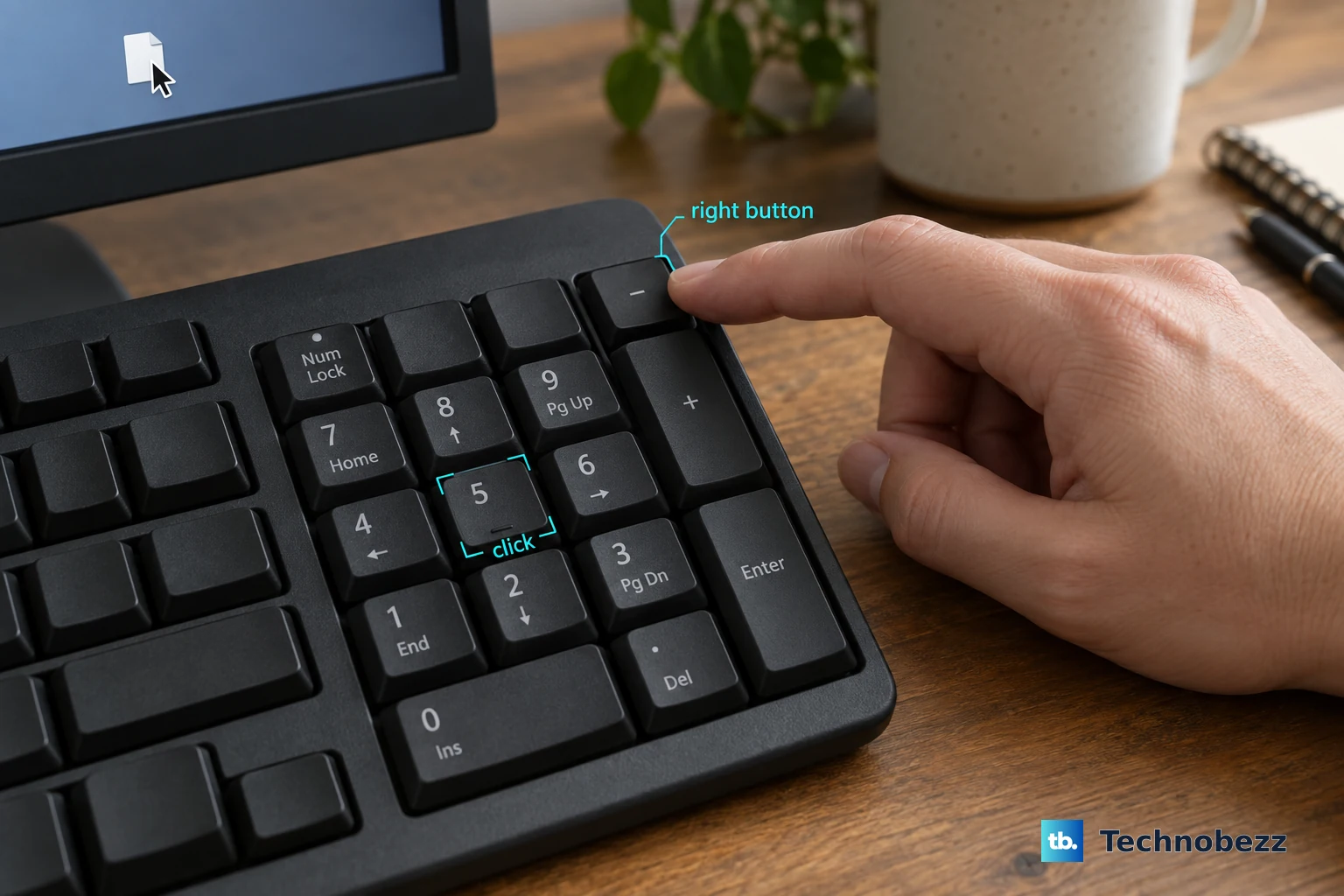
Turn on Mouse keys.
Move the pointer to your target.
Press the minus key on the numeric keypad to switch to the right button.
Press 5 to click.
For voice control, go to Settings > Accessibility > Speech and turn on Voice access.
On first use, pick a language and select Agree and continue to download the language files. This step needs an internet connection.
Finish setting up your microphone.
With Voice access running, point at an item and say "Right click."
On a Mac, open System Settings > Accessibility > Pointer Control and turn on Alternate pointer actions.
Click its Info button, then use Add to set a key, switch or facial expression as a right-click.
On a Chromebook, select the time and go to Settings > Accessibility.
Select Cursor and touchpad and turn on automatic clicking. If your Chromebook shows a Mouse and touchpad section instead, turn on Automatically click when the mouse cursor stops there.
Choose Right-click from the automatic-click menu, then stop the pointer over your target.
On Ubuntu, open Accessibility > Pointing & Clicking and turn on Simulated Secondary Click under Click Assist.
Hold the primary button over the target until the pointer finishes changing color, then let go.
Frequently Asked Questions
Can I right-click by pressing and holding on the touchpad?
No, press-and-hold isn't a standard touchpad right-click on Windows, Mac or Chromebook. Touch and hold works on touchscreens. On Ubuntu, it works once you turn on Simulated Secondary Click.
Why do I keep right-clicking by accident on my Windows laptop?
Your palm or thumb may be pressing the lower-right corner of the touchpad, which Windows treats as a right-click. Go to Settings > Bluetooth & devices > Touchpad > Taps and clear the box that makes the lower-right corner a right-click. Two-finger tapping keeps working.
Why does right-click show a different menu on some websites?
Some websites replace the browser's menu with their own or block it. In Firefox, hold Shift while you right-click to get the normal browser menu.
How do I right-click on an iPad with a trackpad?
Go to Settings > General > Trackpad and turn on Two Finger Secondary Click. Turn on Tap to Click as well if you want to use taps. You can also hold Control on the keyboard while you click.