A weak iPhone battery turns a normal day into charger hunting, sudden shutdowns, and guessing whether the phone is actually worn out. Start with Apple's battery screens before booking service, because they separate normal heavy use from a battery that needs replacement. Once the signs point to service, use the official repair path that matches your coverage, region, and comfort level.
1. Start with Battery Health
Check this screen before comparing repair shops, because Apple puts the strongest replacement signal in Settings.
- 1.Open Settings.
- 2.Tap Battery.
- 3.On iPhone 15 models and later, tap Battery Health.
- 4.On iPhone 14 models and earlier, tap Battery Health & Charging.
- 5.Review Battery Health, Maximum Capacity, Peak Performance Capability, cycle count where shown, and any battery replacement recommendation.
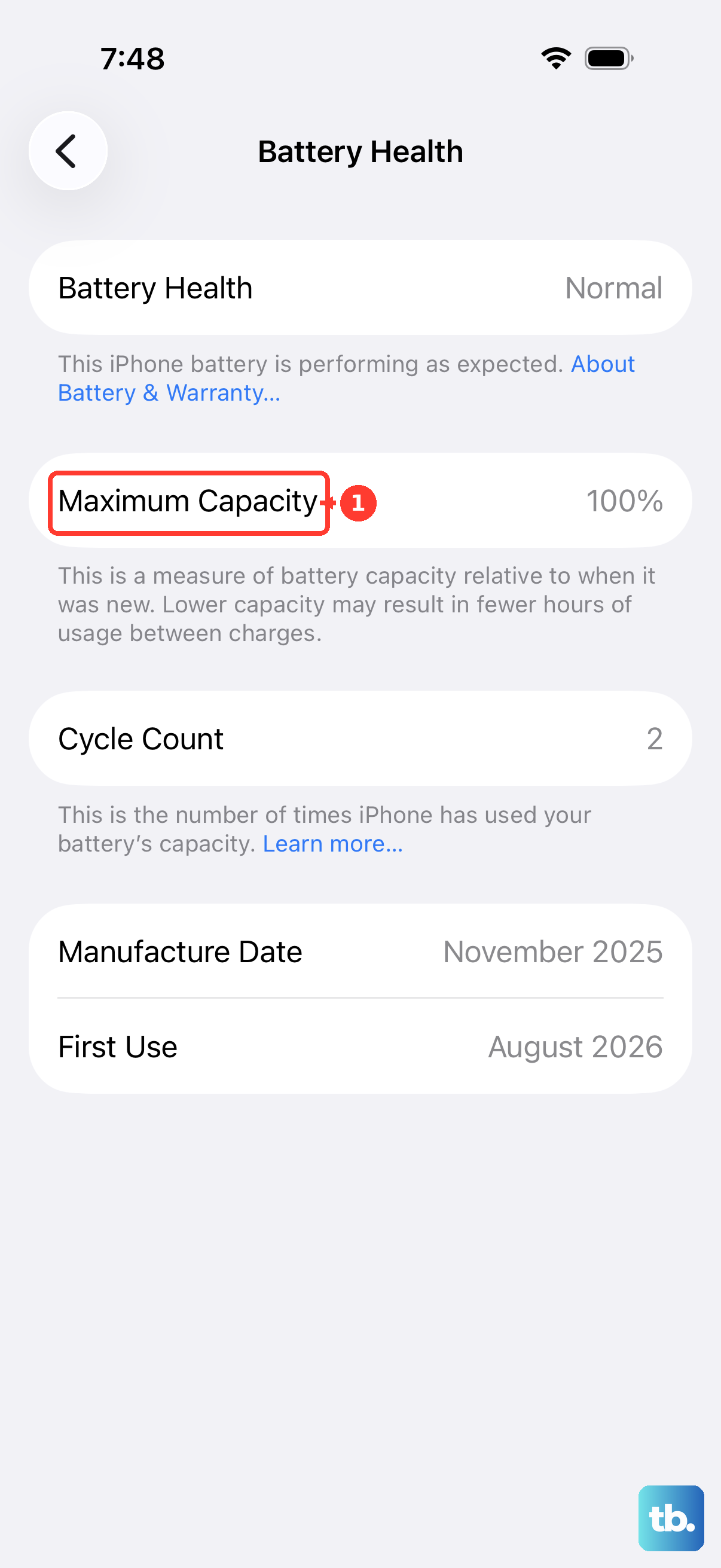
On iPhone 15 models and later with iOS 17.4 or later, Apple also shows maximum capacity, cycle count, manufacture date, first use date, and a replacement recommendation. When the screen says Your battery's health is significantly degraded, Apple says an Apple Authorized Service Provider can replace the battery.
If you see Unable to verify this iPhone has a genuine Apple battery, do not rely on the battery-health reading. Use Get Support or a verified service provider for the next step.
2. Rule out temporary battery drain
Open Settings.
Tap Battery.
Review the Daily Usage chart.
Tap View All Battery Usage.
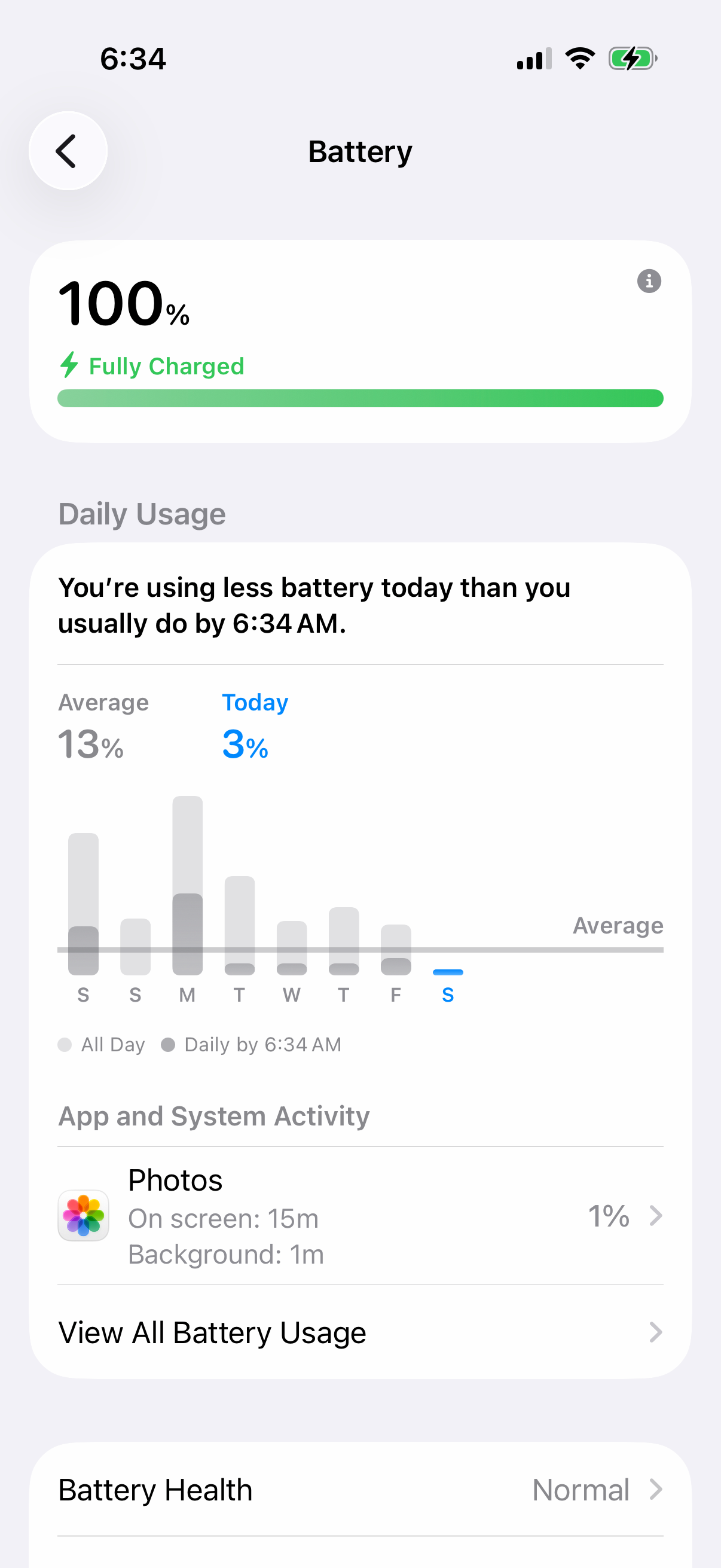
Tap a day, then review App Activity and System Activity.
Tap an app and look for labels such as Background Activity, No Mobile Coverage, Low Signal, or Notifications.
The Daily Usage chart requires iOS 26 or iPadOS 26 or later; on earlier versions, use the battery usage and app activity details your device shows instead. A battery that drains fast is not automatically a worn-out battery. These screens show what the phone has been doing.
On iOS 18 and later, Apple also shows insights such as Ongoing iOS Update and Ongoing Device Setup. Those explain temporary drain that does not call for a battery replacement.
3. Stretch the charge while you decide
Use Low Power Mode as the short-term control while you wait for service or test whether daily use is the real problem.
On iPhone 15 and later, open Settings > Battery > Power Mode, then turn Low Power Mode on or off.
On iPhone 14 and earlier, open Settings > Battery, then turn Low Power Mode on or off.
From Control Center, swipe down from the top-right corner and tap the battery icon if you added it.
With Siri, say Siri, turn on Low Power Mode or Hey Siri, turn off Low Power Mode.
For battery aging, use Apple's charging controls. On iPhone 15 models and later, open Settings > Battery > Charging and choose a charge limit from 80 percent to 100 percent. On iPhone 14 models and earlier, open Settings > Battery > Battery Health & Charging and use Optimized Battery Charging.
These settings slow wear; they do not reverse a degraded battery.
4. Book Apple battery service
Go to Apple's iPhone Battery service page.
Select Get started.
Sign in when prompted.
Select your iPhone and the battery issue.
Choose an available service option, such as Apple Store, Apple Authorized Service Provider, or Mail-in repair.
Use Apple's device or model selector on the page to estimate the battery service cost.
For most people, Apple's iPhone Battery service page is the cleanest route. You can also use the Apple Support app: open Apple Support, sign in with your Apple Account, select your iPhone, choose a battery or power issue, then use the app to chat, follow guided steps, find an Apple Store or Apple Authorized Service Provider, and book a reservation.
If eligible AppleCare coverage applies and the battery capacity is below 80 percent, Apple says battery service has no extra charge. Where AppleCare offers Express Replacement, Apple sends a replacement device before you return yours; that is device replacement service, not a home battery swap.
5. Prepare before appointment or mail-in service
Finish the handoff steps before you visit a store, an Apple Authorized Service Provider, or send the iPhone to Apple.
Schedule service through Get Support, the Apple Support app, or Apple's iPhone repair pages.
Back up your iPhone.
Make sure the iCloud features you use have finished syncing, so the status next to Saved to iCloud shows green.
Turn off Apple Cash at Settings > Wallet & Apple Pay.
Remove cards and passes in the Wallet app: select a card or pass, tap the More button, tap Card (or Pass) Details, then tap Remove Card (or Pass).
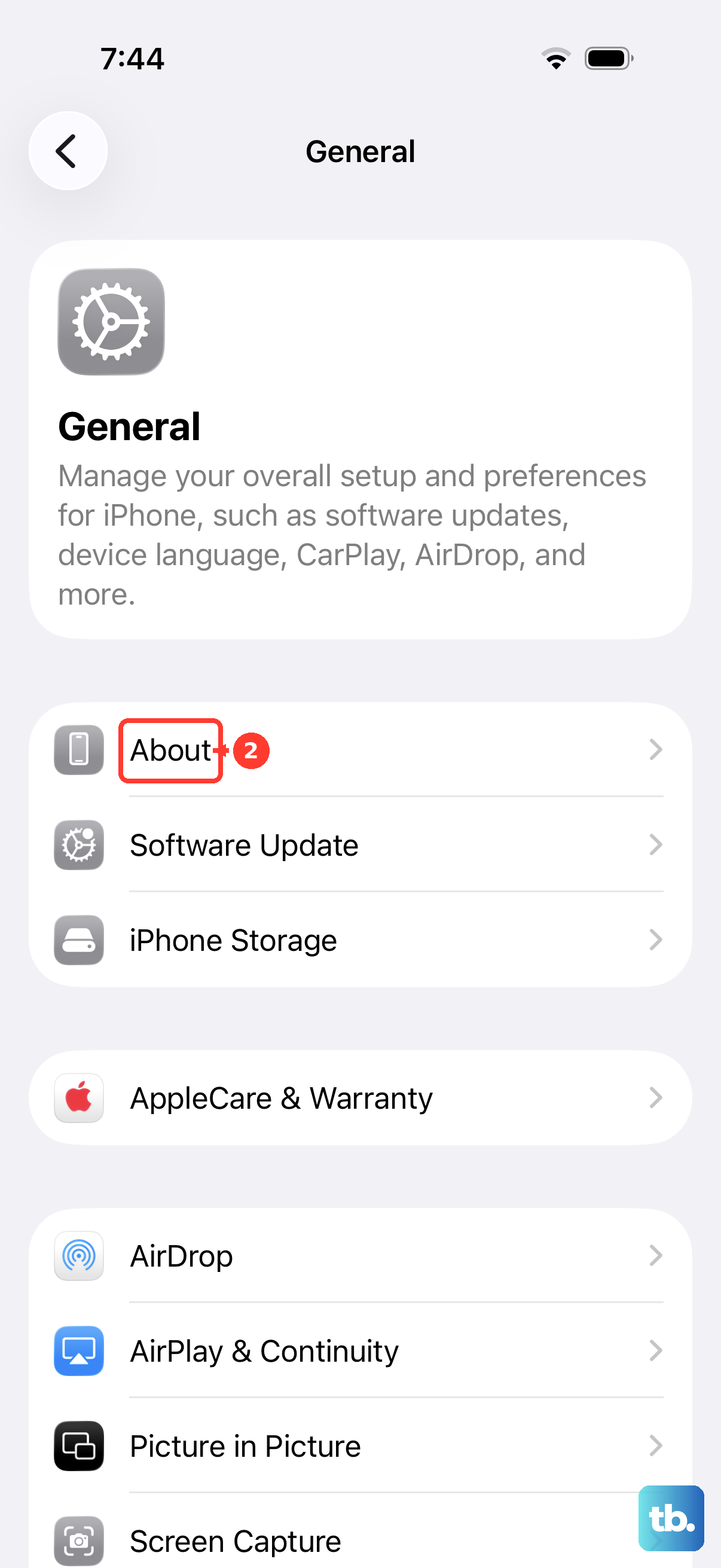
Open Settings > General > About and check Parts and Service History.
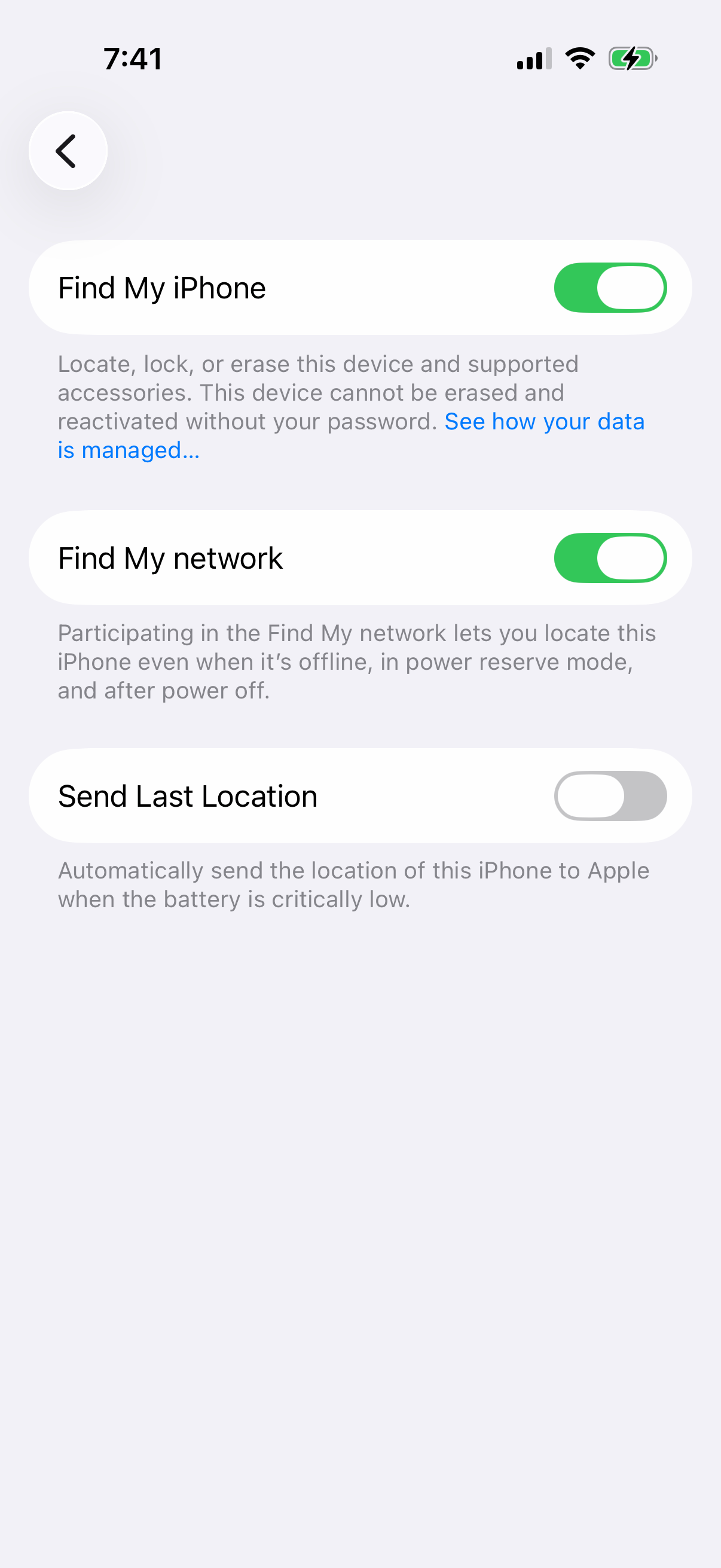
Turn off Find My at Settings > [your name] > Find My > Find My [Device] > off.
Bring the iPhone, needed accessories, proof of purchase if possible, and government ID.
For mail-in battery service, start from Apple's iPhone Battery service page or Get Support, choose the mail-in option when Apple lists it for your device and region, then use the prepaid shipping box Apple sends.
6. Verify the repair provider
Use Apple's repair provider verification page before booking with a shop. An Apple Authorized Service Provider uses Apple training, genuine parts, tools, diagnostics, and resources, and the repair is backed by Apple.
Open Apple's repair provider verification page.
Enter the Provider name, Country / Region, and City.
Select Verify provider.
Independent Repair Providers can handle out-of-warranty battery replacement and have access to genuine Apple parts, tools, training, diagnostics, and resources. Their repairs are not covered by Apple warranty or AppleCare plans. Before booking, confirm the shop is using genuine Apple parts and ask about its repair warranty.
After a non-authorized repair or nongenuine battery installation, Parts and Service History can show Unknown. Apple says that label can appear when the battery is not genuine, not working as expected, not verified and linked after repair, modified, or otherwise unable to be verified.
7. Use Self Service Repair only when qualified
Go to Apple Self Service Repair.
Open the Apple repair manual for your exact iPhone model.
Read Introduction, Battery Safety, Tools, First Steps, the Battery procedure, and post-repair software requirements.
Use the Manual ID from the manual introduction.
Order genuine Apple parts and rent or buy tools from the Self Service Repair Store, or buy parts from a Genuine Parts Distributor.
Follow the model-specific battery procedure.
Finish with Repair Assistant or System Configuration when the manual requires it.
Apple Self Service Repair is for experienced individuals doing out-of-warranty repairs. Apple lists it for specific iPhone models introduced in 2021 or later in certain countries or regions.
In the United States, Apple lists MobileSentrix as a Genuine Parts Distributor. Apple recommends new batteries for adhesive-installed battery repairs because used cells can be damaged during adhesive removal.
8. Confirm the battery after replacement
After service, check the repair record on the iPhone itself.
Open Settings.
Tap General.
Tap About.
If Parts and Service History appears, check Battery.
Look for labels such as Genuine, Used, Unknown, or Finish Repair.
The Unverified label applies to a previously replaced Logic Board, not the battery, so it will not appear under Battery.
When Repair Assistant is needed, update to the latest iOS, connect to Wi-Fi, make sure the battery is above 20 percent, then open Settings > General > About > Parts & Service History > Restart & Finish Repair and follow the onscreen instructions.
9. Skip calibration and erase tricks
Do not use the old drain-to-0-then-charge-to-100 routine as a current Apple-supported way to decide on battery replacement.
Do not erase the iPhone as a substitute for replacing a chemically aged battery.
For an employer-, school-, or institution-owned iPhone, contact the device owner or admin before arranging repair.
Apple's current recalibration documentation covers automatic battery-health recalibration for iPhone 11, iPhone 11 Pro, and iPhone 11 Pro Max on iOS 14.5 or later, shown in Settings > Battery > Battery Health, and the process happens over regular charge cycles.
Apple documents reset and erase paths for general troubleshooting, but battery replacement decisions belong in Battery Health, Battery usage, service messages, and Apple's repair flow.
Frequently Asked Questions
At what battery capacity does AppleCare battery service become free?
Apple says eligible AppleCare battery service is available for no extra charge when the iPhone battery capacity is below 80 percent.
What does Unable to verify this iPhone has a genuine Apple battery mean?
Apple says battery-health information may not be accurate. Use Apple Get Support or a verified repair provider for service.
Can I replace an iPhone battery myself?
Yes, through Apple Self Service Repair, but Apple frames it for experienced individuals doing out-of-warranty repairs on eligible models in supported regions.
Is there a current iPhone battery recall program?
Apple's Service Programs page listed no current iPhone battery replacement program as of July 2026.