

To make paper in Minecraft, open a crafting table and put three sugar cane in one row of its 3 by 3 grid, one in each slot. Take the result and you have three paper. The recipe is the same in Java Edition and Bedrock Edition, and every sugar cane you use turns into one sheet of paper.
Sugar cane grows beside water, so look along rivers, lakes and beaches for tall green stalks. Bring a few home, plant them next to water, and they keep growing back for as long as you leave the bottom block in place.
The short version
- The recipe: three sugar cane in one row of a crafting table make three paper.
- Finding cane: look for green stalks at the edge of rivers, lakes and beaches.
- Planting: put it on dirt, a grass block or sand with water right next to that block, not just at a corner.
- Harvesting: break the second block up and leave the bottom one, so the plant grows back.
- Bone meal: it makes sugar cane grow in Bedrock Edition only.
- Uses: books, maps, firework rockets, cartography tables, name tags and emerald trades.
Ways to get paper at a glance
| What you need | What to do | What you get |
|---|---|---|
| 3 sugar cane and a crafting table | Put one cane in each slot of one row | 3 paper |
| A few sugar cane and a spot beside water | Plant them, then break all but the bottom block each time they grow | A steady supply of sugar cane for more paper |
| Bone meal, in Bedrock Edition only | Use it on planted sugar cane | Faster growth |
| A shipwreck, a stronghold or a village cartographer's chest | Open the chest and check | Sometimes a little paper, with no crafting |
| A world with commands turned on | Type /give @s minecraft:paper 64 in chat | 64 paper at once |
Crafting is the only way to make paper whenever you want it, and a small farm is what keeps the crafting going. Chests are a lucky bonus rather than a plan, and the command is for worlds where cheats or commands are turned on.
How to craft paper
Place a crafting table and open it. You need its 3 by 3 grid, because the 2 by 2 grid in your inventory is only two slots wide and cannot hold three sugar cane in a row.
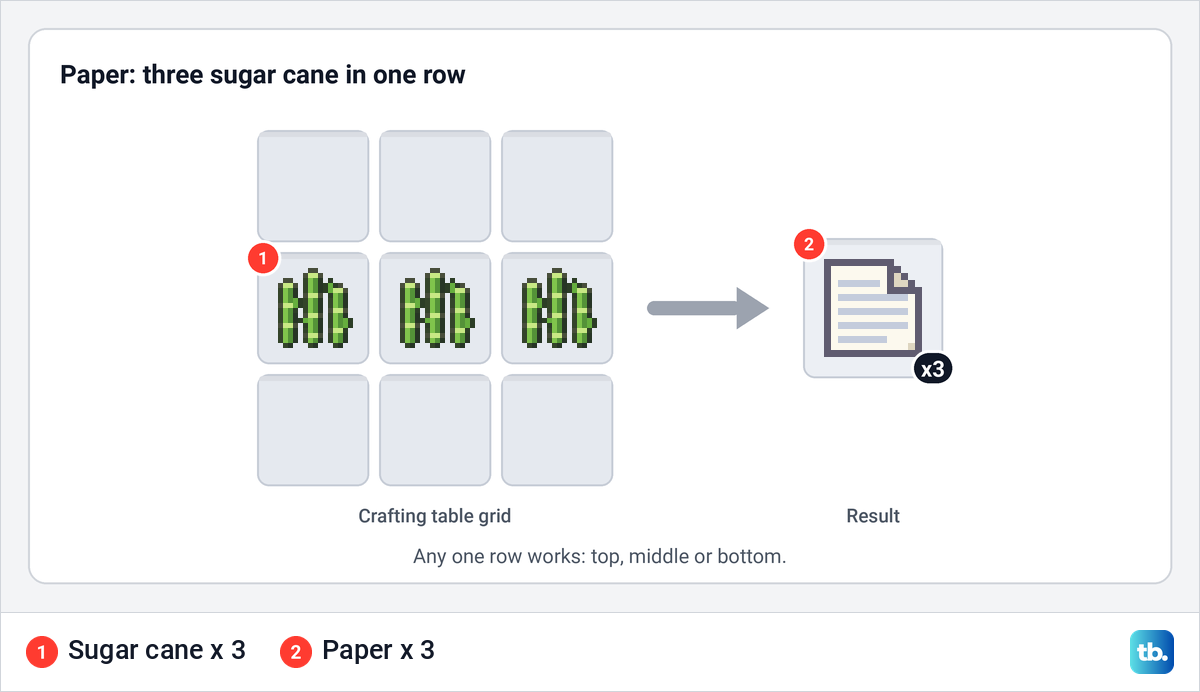
Put one sugar cane in each of the three slots of the same row. The top, middle and bottom rows all work, but the three must sit side by side, not in a column or across a diagonal. Three paper appear in the result slot, so take them and move them into your inventory.
To make more in one go, put several sugar cane in each of the three slots. Each time you take the result, one cane leaves every slot and three more paper appear, until a slot runs empty. Keep the three stacks the same size so nothing is left over.
Watch out for sugar. One sugar cane on its own makes sugar, so with only one slot filled, in either grid, the result slot shows sugar instead of paper. If you see sugar there, do not take it, and add cane until all three slots in the row are full and the result changes to paper.
Where to find sugar cane
Sugar cane grows naturally at the edge of water. It is common in river biomes, and it also turns up on stony shores, where water, sand and dirt meet. Lakes and beaches are worth checking too, because the plant only grows on a block that has water right beside it.
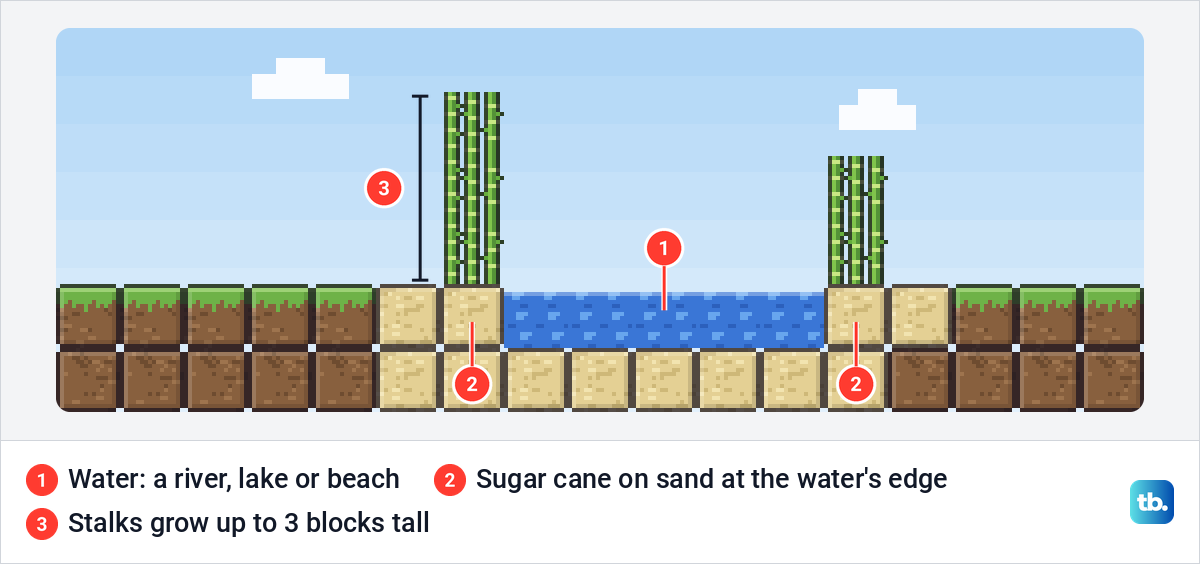
Look for pale green stalks standing right at the waterline. Break any part of a stalk to collect it, and every block of the stalk drops one sugar cane. Breaking the lowest block takes the whole plant, which is fine in the wild, but at home you want to leave the bottom block in place.
You need only three to craft your first paper, but take more if you can. Every extra stalk you plant at home is another plant that grows back, so a handful from the wild soon becomes a steady supply. If no river is close, keep following any water you find, since sugar cane does not grow away from it.
If you cannot find any, you can still get a little paper without sugar cane. Paper sometimes turns up in shipwrecks, in strongholds and in the chests of village cartographers. That is down to luck, so treat it as a bonus and keep looking for cane.
How to plant sugar cane
Hold the sugar cane and place it on top of a dirt block, a grass block or a sand block. The block you plant on must have water directly next to it on one of its four sides, at the same height. Water that only touches a corner, or sits underneath, does not count, and the game will not let you place the cane there.
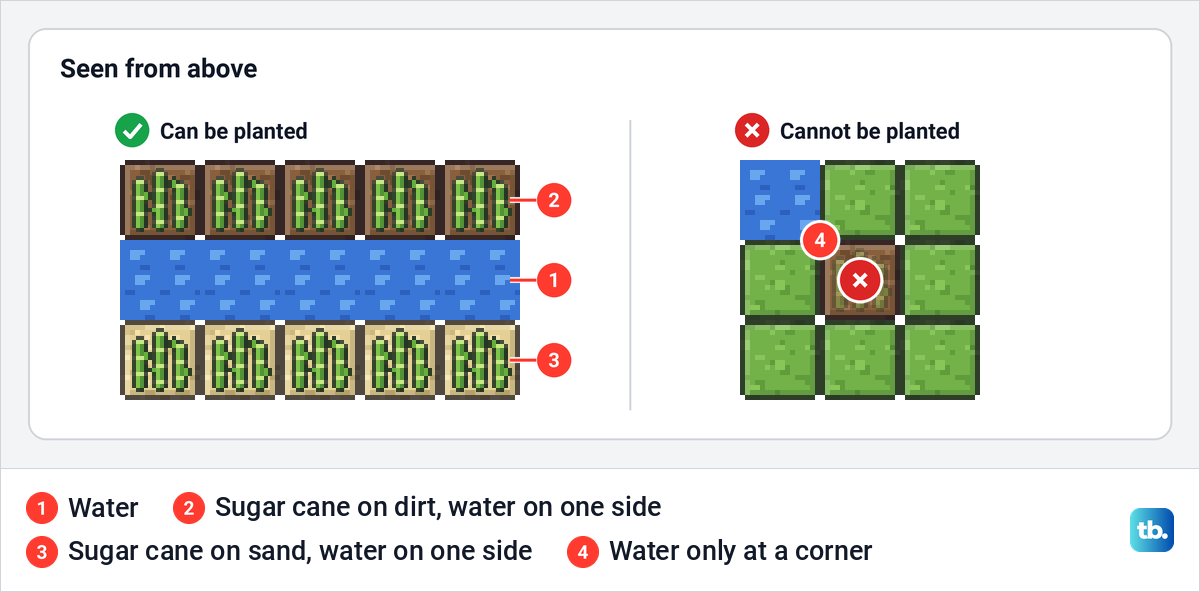
One block of water can serve up to four planting blocks, one on each side of it. A straight trench of water with dirt or sand along both edges is the easiest shape, because every block on the edge touches the water. Leave the space above each plant open so it has room to grow.
Mojang's Bedrock release notes also list the moss block as a block sugar cane can be placed on, with the same water rule. Whichever block you choose, its type does not change how fast cane grows, so use whichever is nearest.
Sugar cane grows one block at a time, up to three blocks tall, and the wait between blocks varies. It only grows in the part of the world that is loaded around a player, so stay in the area while you wait instead of wandering far away.
How to harvest sugar cane so it grows back
Wait until a plant is two or three blocks tall. Then break the second block up from the ground, not the bottom one. Anything above it breaks too, so a three-block plant gives you two sugar cane from one hit.
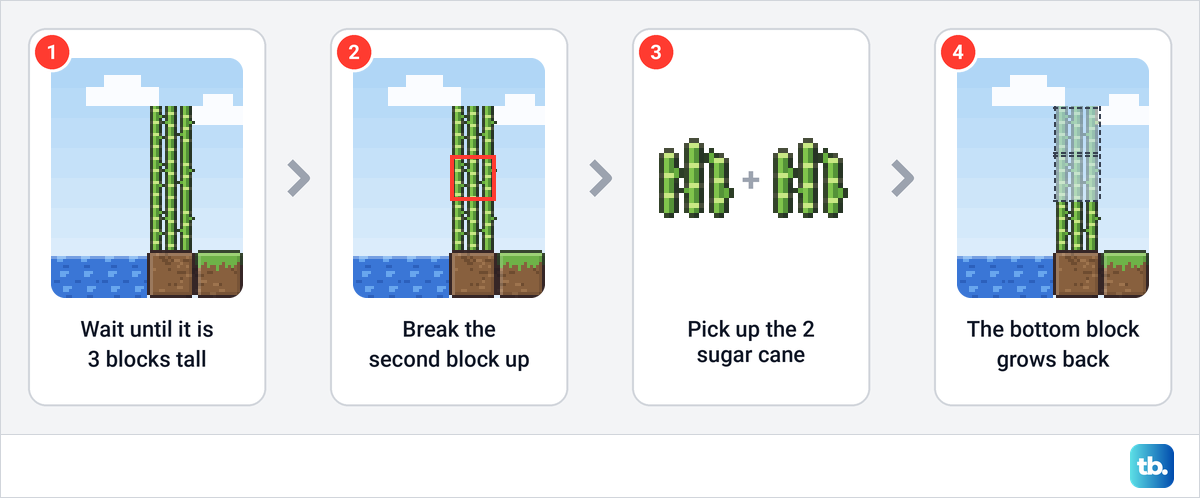
The bottom block stays planted and starts growing again on its own, so you never have to replant. Walk along the row breaking the second block of every tall plant, pick up the drops, and come back later for the next round.
If you break the bottom block by mistake, you get that cane back as an item. Plant it again in the same spot and the plant starts over from one block.
Build a sugar cane farm for lots of paper
A farm is the most reliable way to get a lot of paper in either edition. Dig a straight trench one block wide, one block deep and ten blocks long, then fill it with water. Plant one sugar cane on every dirt or sand block along both edges, which gives you twenty plants.
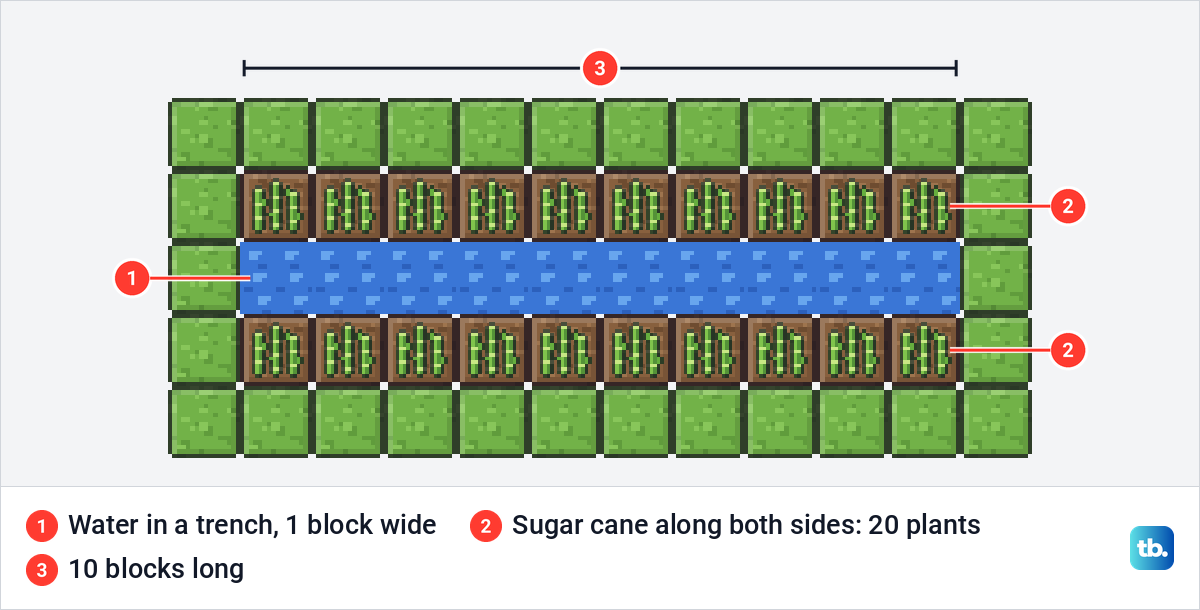
When all twenty plants reach three blocks, one walk along the trench gives you up to forty sugar cane, which is forty paper. Make the trench longer, or dig a second one nearby, when you need more. That number is how much one full harvest can hold, not a rate per hour, because each plant grows at its own pace.
Bedrock Edition players can speed things up with bone meal, because using it on planted sugar cane makes the plant grow. In Java Edition, bone meal has no effect on sugar cane. There, the way to get more paper sooner is to plant more cane.
Once a manual farm works, you can make it harvest itself. An automatic farm puts a piston level with the second block of each plant, plus an observer that fires the piston when the cane grows. The piston breaks the upper cane and leaves the bottom block planted, so aim it at the second block and never at the base.
The broken cane drops as items, and hoppers can gather those items into a chest, so make a hopper for collection once the harvest itself works. Some designs fire a whole row of pistons from one signal instead of giving each plant its own observer, and on a long row you can craft a redstone repeater to carry that pulse further along.
A Crafter can even turn the cane into paper for you. To use one, put the ingredients in its grid, set the recipe and apply a redstone pulse. For paper, switch off the six slots you do not need so only one row takes cane, and send the pulse only once all three slots in that row are filled, because a pulse with a single cane inside makes sugar.
Make books and bookshelves
A book takes three paper and one leather. Put them in a crafting grid and you get one book. Leather comes from cows, so a few cows near your sugar cane cover both parts of the recipe.
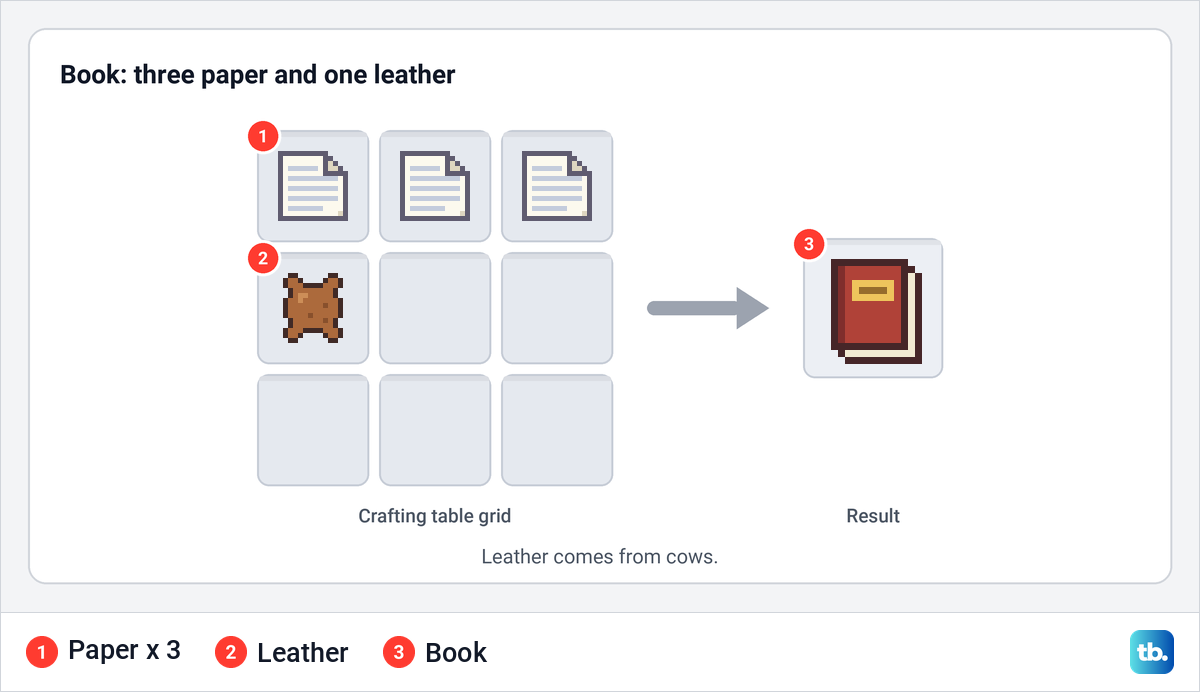
Bookshelves are where paper runs out fastest. One shelf takes six planks and three books, which means nine paper and three leather for every shelf. Fifteen shelves need 45 books, or 135 paper, so get the farm going before you start building.
If those books are for an enchanting room, our guide shows how to build and place bookshelves so that the enchanting table can use them. Bookshelves boost the power of nearby enchanting tables, so placement matters as much as the number.
Make maps in Java and Bedrock
Maps are the next big use for paper, and this is where the two editions differ. In Java Edition, surround a compass with eight paper in a crafting table. The map you make shows a pointer for where you are once you start using it, because Java maps find the player on their own.
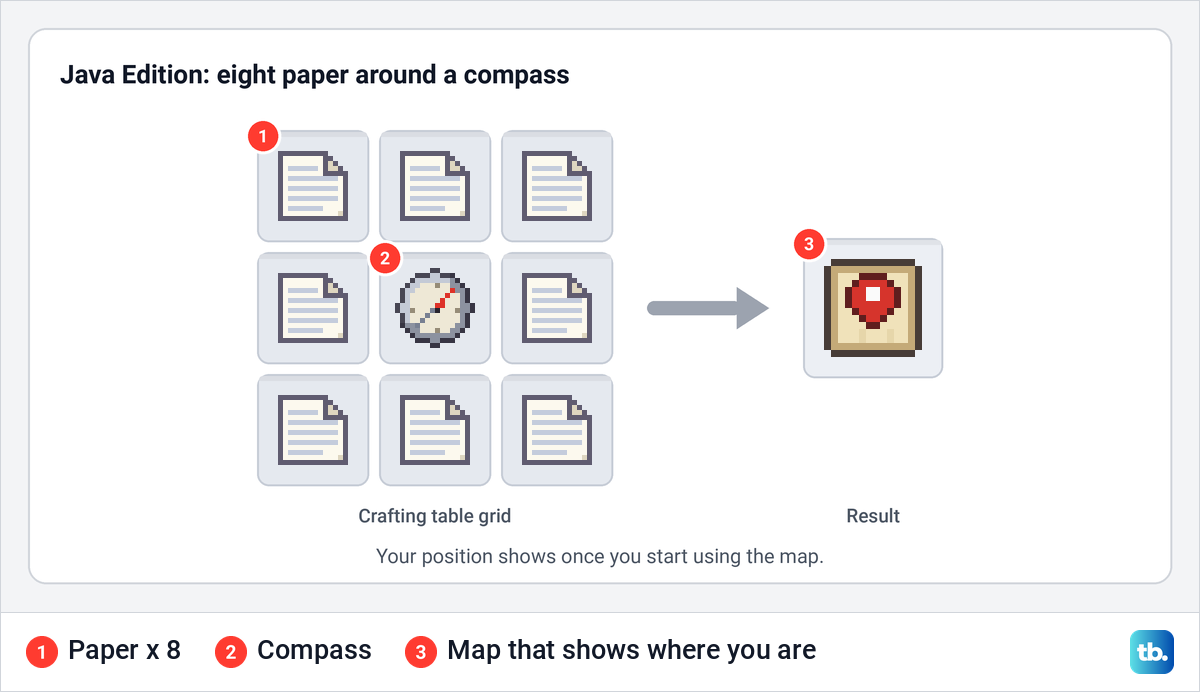
Bedrock Edition has two recipes. Nine paper fill the grid to make an empty map, which does not show where you are. Put a compass in the middle with eight paper around it and you get an empty locator map, which does.
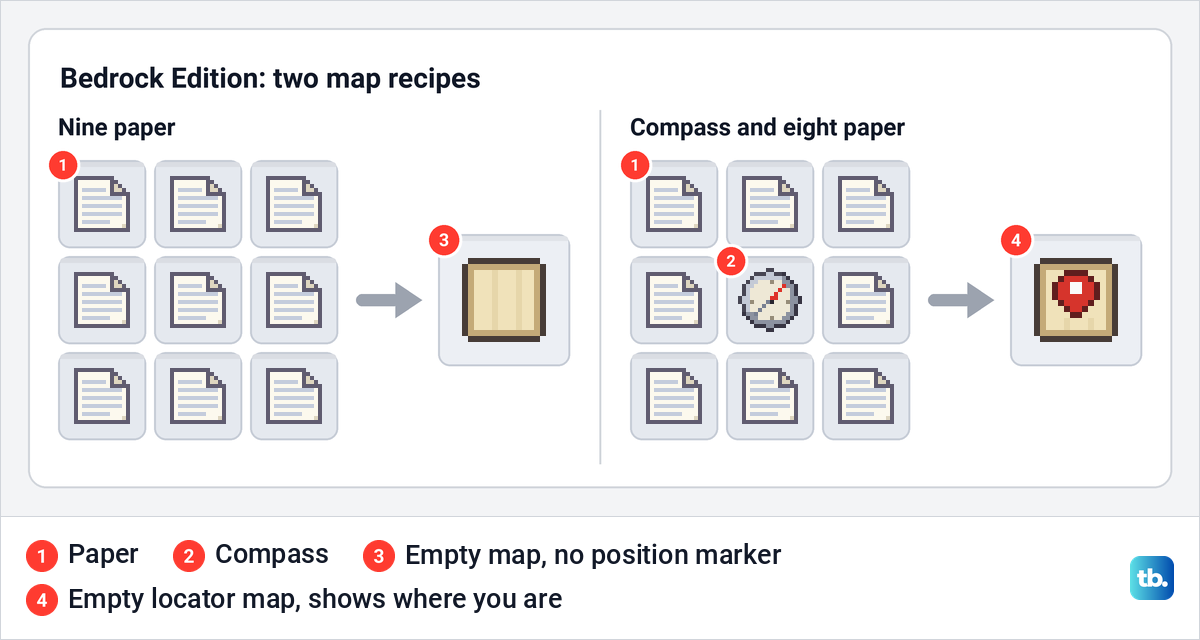
Bedrock players can also use a cartography table instead of the crafting grid. There, paper alone makes an empty map, paper and a compass make an empty locator map, and adding a compass to an existing map turns it into a locator map. For the controls to start filling the finished map, see how to make and use a map in Minecraft.
Make fireworks, cartography tables and name tags
One paper and one gunpowder in a crafting grid make three firework rockets. More gunpowder makes a rocket fly higher before it explodes, and adding a firework star gives it explosion effects. If gunpowder is the part you keep running out of, build a mob farm to collect it while your sugar cane grows.
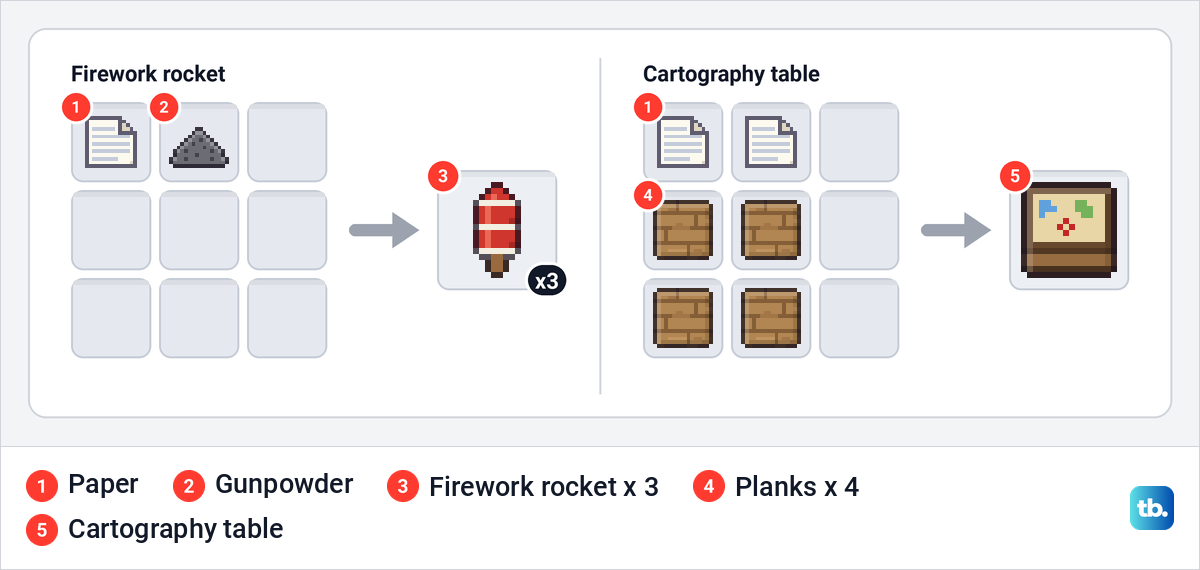
A cartography table takes two paper on top of four planks. Open it, put an explored map in the first slot and paper in the second, and you get a zoomed-out version that covers more ground. It is also the job site block for cartographer villagers, which matters for the trade below.
Name tags can be crafted now as well. The Tiny Takeover drop made them from paper and any metal nugget, so you can make your own instead of hoping to find one. If the recipe does not show up in your game, update Minecraft on your device and check again.
Trade paper for emeralds
Paper is one of the easiest ways to earn emeralds. Mojang says a librarian or a cartographer has a decent chance of offering one emerald for 24 paper. The offer sits among a villager's novice trades, the first ones it unlocks, so a brand new librarian may already have it.
Not every villager offers it, so open the trading screen and read the offers before you carry a big stack over. A lectern is the job site block for librarians, so you can make a lectern for a librarian and place it near a villager that has no job yet. A cartography table works the same way for cartographers.
Twenty-four paper is eight crafts of three. A full harvest from the twenty-plant farm above covers one trade with paper to spare, so a farm and a couple of willing villagers can keep emeralds coming.
Get paper in Creative mode or with a command
In Creative mode, open your inventory, search for paper and take as much as you like. No crafting is needed. In a Survival world, the quickest shortcut is the /give command, which works only when commands are allowed.
Open the chat, type the command below and send it, which on a keyboard means pressing Enter. It gives you 64 paper in one go, and the same command works in Java Edition and Bedrock Edition.
/give @s minecraft:paper 64

The @s part means yourself, and you can type a player's name in its place to give the paper to someone else. Change 64 to the number you need. Every command starts with a forward slash, and if you type it wrong, the game shows an error instead of running it.
Commands are off by default in Survival worlds, so turn them on before you type the command. In Bedrock Edition, turn on the Cheats toggle in the world's settings, but Mojang warns that cheats permanently stop achievements in that world, even if you switch them off later.
In a Java Edition world that is not Hardcore, turn on Allow Commands when you create the world. For a world you already have, open the pause menu, select World Options and turn on Allow Commands in the General section. Mojang's release notes say this button is not available in Hardcore worlds.
What changes between Java and Bedrock
The paper recipe itself is identical in both editions. The differences are in how you can speed up the cane, which map recipes exist and what the command setting is called, so check your edition before following advice from someone who plays the other one.
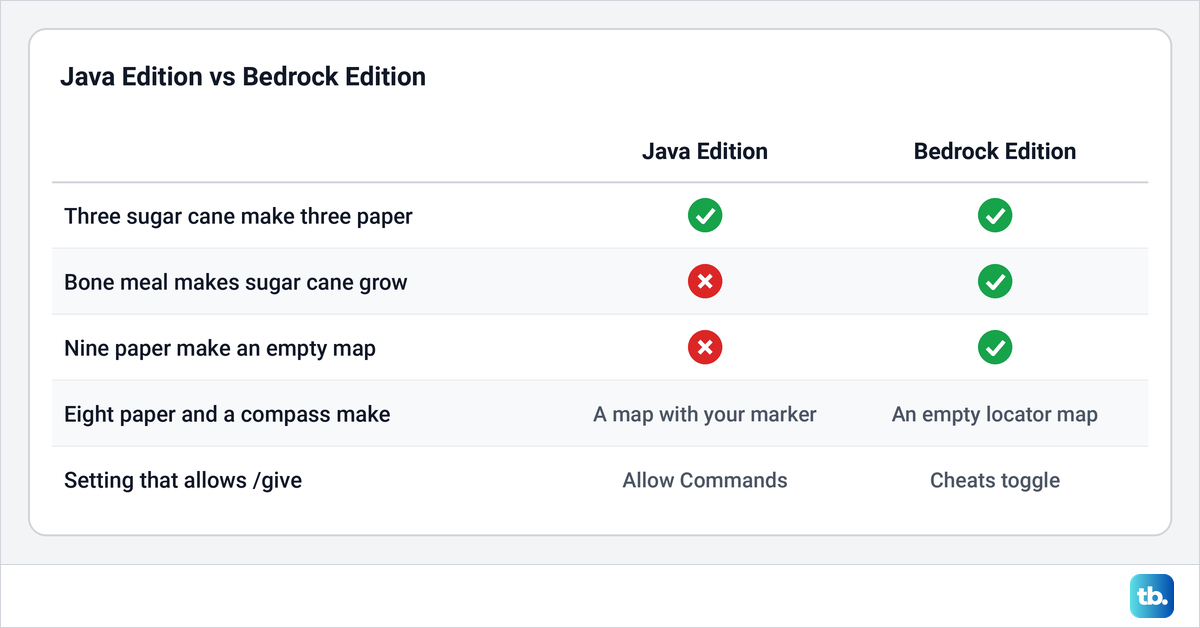
If an item name or a recipe in your game does not match this guide, the edition is the first thing to check. The second is your game version, because some recipes, such as craftable name tags, arrived in recent updates.
If paper or sugar cane will not work
If the result slot stays empty, check that all three sugar cane sit in one row of a crafting table, not in a column or in the 2 by 2 inventory grid. If it shows sugar, only one cane is in the grid so far. Bamboo looks a little like sugar cane, but the paper recipe uses only sugar cane, so bamboo will not work.
If the cane will not go down, look at the block you are planting on rather than the cane. It needs to be a block that takes sugar cane, such as dirt, a grass block or sand, with water touching one of its sides. Water at a corner or below the block is not enough.
If planted cane does not grow, make sure the block above it is empty and that you are staying nearby, so that part of the world stays loaded. Growth is random, so give it time before you change anything. In Java Edition, bone meal will not help, so plant more cane rather than waiting on one plant.
Frequently Asked Questions
How much sugar cane do you need for paper?
Three sugar cane make three paper, so each cane gives one sheet. A book needs three paper, and a bookshelf needs nine.
Can I make paper without sugar cane?
Not by crafting, because the recipe uses sugar cane only. Paper sometimes turns up in shipwrecks, strongholds and village cartographers' chests, and in Creative mode or with commands turned on you can take as much as you need.
Where can I find sugar cane?
Look along the edges of rivers, lakes, beaches and stony shores for pale green stalks standing beside the water. Take at least three, and more if you can, so you can plant some at home.
Why is my sugar cane not growing?
Check that the block under the plant has water directly beside it, that the space above is empty and that you are close enough for that area to stay loaded. Growth is random, so a plant can take a while before it adds a block.
Does bone meal work on sugar cane?
In Bedrock Edition, yes, and it makes the plant grow. In Java Edition, bone meal has no effect on sugar cane, so plant more cane instead.
Can bamboo make paper?
No. The paper recipe uses sugar cane only, and bamboo is a different plant even though it looks similar.
Why does my Crafter make sugar instead of paper?
A single sugar cane is a complete recipe for sugar, so a pulse that arrives while only one cane is inside makes sugar. Switch off the six slots you do not need, and only pulse the Crafter once all three slots in the row hold cane.